1. Introduzzjoni
This manual provides detailed instructions for the setup, operation, and maintenance of your Tenveo 4K PTZ Conference Room Camera System. This system is designed to deliver high-quality audio and video for professional conferencing environments, featuring a 4K PTZ camera with 12x optical zoom, a Bluetooth speakerphone, and two expansion microphones.
Please read this manual thoroughly before using the product to ensure proper functionality and to maximize your conferencing experience.
2. Kontenut tal-Pakkett
Verify that all items listed below are included in your package. If any items are missing or damaged, please contact Tenveo customer support.
- Tenveo VLoop 4K HDMI PTZ Camera
- Speakerphone Bluetooth
- 2 x Expansion Microphones
- Hub
- Kontroll mill-bogħod
- Ħitan Mount Bracket
- Kejbil USB 3m
- 2 x 5m DP Cables
- Adapter tal-Enerġija DC 12V/2A
- Manwal għall-Utent

Image: All components of the Tenveo 4K PTZ Conference Room Camera System, including the camera, hub, speakerphone, and two expansion microphones.

Image: Visual representation of the product details and included accessories, showing each component individually.
3. Prodott Aktarview
The Tenveo VA512Group-EX system integrates a high-definition camera, speakerphone, and hub for a comprehensive conferencing solution.
3.1 Komponenti Ewlenin
- 4K PTZ Camera: Features a 1/2.8-inch CMOS sensor, 12x optical zoom, 78° viewing angle, 350° pan, and 180° tilt. Supports 10 preset positions.
- Bluetooth Speakerphone: Equipped with a DSP audio processor, high-fidelity speaker, intelligent noise reduction, and automatic echo cancellation.
- Expansion Microphones: Two omnidirectional microphones extend the voice pickup range for larger rooms.
- Hub: Central connection point for the camera, speakerphone, and expansion microphones.

Image: A visual summary of the system's key features, including 4K UHD image, all-in-one HUB connection, 12X optical zoom, OSD menu, IR remote, Bluetooth 5.0 support, PTZ control by speaker, noise reduction, and two expansion mics.
4. Istruzzjonijiet ta' Setup
Follow these steps to set up your Tenveo conference system.
4.1 Komponenti li Jqabbdu
- Connect the 4K PTZ Camera to the Hub using one of the provided 5m DP cables. Ensure the correct port is used (refer to the port diagram).
- Connect the Bluetooth Speakerphone to the Hub using the other 5m DP cable.
- Connect the two Expansion Microphones to the Speakerphone.
- Connect the Hub to a power source using the DC 12V/2A Power Adapter.
- Connect the Hub to your computer (Windows 7/8.1/10 or Mac OS X 10.7 or higher) using the 3m USB cable.

Image: A diagram illustrating the connections between the camera, speakerphone, expansion microphones, and the central hub for an easy setup.

Image: An illustration detailing the various input and output ports on the camera (HDMI, DP, RS232, RS485) and the speakerphone (3.5mm Jack, Bluetooth, Power, DP).
4.2 Qawwa Inizjali
Once all connections are secure, power on the Hub. The system is plug-and-play, and your computer should automatically detect the devices. You may need to select the Tenveo system as your audio and video input/output device within your conferencing software (e.g., Zoom, Microsoft Teams, Webeż.
Avviż Importanti:
- The PTZ 4K Camera and microphone must be connected to the Hub for proper operation.
- The camera interface in this VLGroup system differs from the separate VL12U camera interface. Refer to product images for details.
5. Operazzjoni
The system can be controlled via the included remote control or directly from the speakerphone.
5.1 Camera Control (PTZ & Zoom)
- Pan/Mejjel: Use the directional arrows on the remote or speakerphone to adjust the camera's horizontal (pan up to 350°) and vertical (tilt up to 180°) position.
- Zoom: Use the '+' and '-' buttons on the remote or speakerphone to control the 12x optical zoom.
- Presets: The camera supports 10 preset positions. To save a preset, move the camera to the desired position and zoom level, then press and hold a number button (1-10) on the remote for 5 seconds. To recall a preset, simply press the corresponding number button. The 'C' button on the speakerphone or 'Home' button on the remote returns the camera to its default home position.

Image: An illustration showing the two control methods for the PTZ camera: using the infrared remote control and directly via the speakerphone's control panel.

Image: A visual guide demonstrating how to set and recall camera presets using the IR remote control, with examples of VISCA, PELCO-D, and PELCO-P protocol presets.
5.2 Kontroll tal-Awdjo
- Volum: Adjust the speaker volume using the '+' and '-' buttons on the speakerphone or remote.
- Siekta: Press the microphone mute button on the speakerphone to mute all microphones. Press again to unmute. The speakerphone also has a mute button for the speaker.
- Ġestjoni tas-Sejħiet: Use the call answer/end buttons on the speakerphone for managing calls when connected via Bluetooth.
5.3 Funzjonalità tal-Bluetooth
The speakerphone supports Bluetooth connectivity for use with smartphones or other compatible devices.
- Press the Bluetooth button on the speakerphone to activate pairing mode.
- On your device, search for and select the Tenveo speakerphone to pair.
- Once paired, you can use the speakerphone for audio calls from your connected device.
5.4 Kompatibilità tas-Software
The system is compatible with major conferencing platforms including Zoom, Microsoft Teams, Webex, Skype for Business, Voovmeeting, and CISCO WebEx. It supports Windows 7/8.1/10 and Mac OS X 10.7 or higher.

Image: A graphic displaying the universal compatibility of the Tenveo system with popular video conferencing software like Zoom, Teams, Webex, Skype, and operating systems such as Windows, macOS, Chrome OS, and Android.
6. Karatteristiċi
- Stunning 4K Visuals & 12x Optical Zoom: Advanced 1/2.8-inch CMOS sensor for true-to-life 4K visuals. 12x optical zoom captures details without distortion.
- Lenti Wide Angle: A 78° viewing angle ensures comprehensive room coverage.
- Awdjo Superjuri: DSP audio processor, high-fidelity speaker, intelligent noise reduction, and automatic echo cancellation provide crystal-clear voice capture. Omnidirectional pickup with two expansion microphones offers a 33ft (10m) voice pickup range, suitable for large conference rooms (40-100 sqm, 10-25 participants).
- Plug-and-Play & Universal Compatibility: Effortless setup and operation. Compatible with multiple devices via HDMI, RS485, RS232 interfaces and leading platforms like Zoom, Teams, Webex, Skype for Business, Voovmeeting, and CISCO WebEx. Supports Windows and Mac OS.
- Applikazzjoni versatili: Ideal for corporate, government, church, educational, and pharmaceutical industries.

Image: A visual comparison demonstrating the superior clarity and detail of the 4K UHD imaging system compared to 1080p FHD.
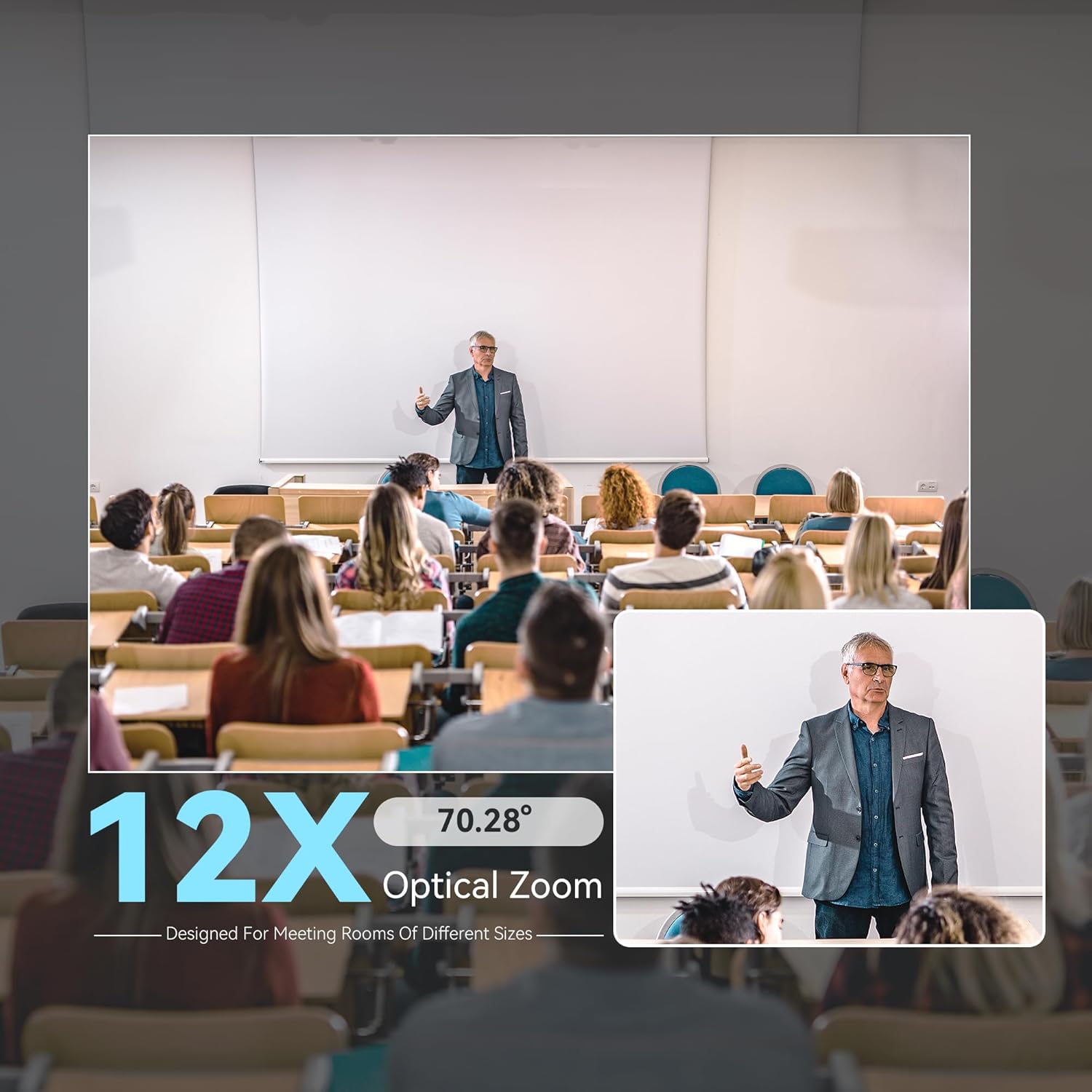
Image: A split image showing a wide view of a classroom and a zoomed-in view of a speaker, illustrating the 12X optical zoom capability and 70.28° viewangolu tal-ing.

Immaġni: Minn fuq għal isfel view of a conference table with participants, illustrating the 360° voice pickup range provided by the main speakerphone and two expansion microphones, highlighting noise reduction.
7. Manutenzjoni
To ensure the longevity and optimal performance of your Tenveo conference system, follow these maintenance guidelines:
- Tindif: Uża drapp artab u niexef biex tnaddaf il-lenti tal-kamera u l-uċuħ tal-apparat. Evita prodotti tat-tindif jew solventi li joborxu.
- Ħażna: Meta ma tkunx qed tużaha għal perjodi twal, aħżen is-sistema f'post frisk u niexef 'il bogħod mix-xemx diretta u minn temperaturi estremi.
- Ġestjoni tal-Kejbil: Ensure cables are not kinked or strained to prevent damage.
8 Issolvi l-problemi
Jekk tiltaqa' ma' problemi bis-sistema tiegħek, irreferi għall-problemi u s-soluzzjonijiet komuni li ġejjin:
- Ebda Output tal-Vidjo:
- Ensure the camera is properly connected to the Hub and the Hub is powered on.
- Verify the USB cable connection between the Hub and your computer.
- Check your conferencing software settings to ensure the Tenveo camera is selected as the video input device.
- L-ebda Input/Output tal-Awdjo:
- Confirm the speakerphone and expansion microphones are correctly connected to the Hub.
- Check volume levels on the speakerphone, computer, and conferencing software.
- Kun żgur li l-mikrofoni mhumiex siekta.
- If experiencing crackling audio, check the DP cables for damage or ensure they are fully seated.
- PTZ Control Not Responding:
- Ensure the remote control has fresh batteries and is pointed at the camera.
- Verify the speakerphone is powered on and connected to the Hub.
- Allow a few seconds between commands, especially after rapid camera movements.
- Compatibility Issues (e.g., Windows 11):
- Ensure your operating system and conferencing software are up to date.
- Contact Tenveo support for potential firmware updates or specific driver information.
For further assistance, please contact Tenveo customer support.
9. Speċifikazzjonijiet
| Karatteristika | Speċifikazzjoni |
|---|---|
| Isem tal-Mudell | TEVO-VA512Group-EX |
| Input Voltage | 12 Volts |
| Tip ta 'Immuntar | Mount Wall |
| Tip ta' Kelliem | Ġewwa |
| Użi Rakkomandati | Business, Professional, Video Conferencing |
| Apparati Kompatibbli | Smartphone |
| Komponenti Inklużi | Korp tal-Kamera |
| Metodu ta' Kontroll | Remote |
| Komunikazzjoni bla fili | Bluetooth |
| Sors tal-Enerġija | Corded Elettriku |
| Medda Bluetooth | 10 Meters |
| Użu fuq ġewwa/barra | Ġewwa |
| Piż tal-oġġett | 9.63 liri |
| Qawwa Massima tal-Ħruġ tal-Ispeaker | 5 Watts |
| Rispons ta' Frekwenza | 100 Hz |
| Teknoloġija tal-Konnettività | HDMI, USB |
| Modalità tal-Ħruġ tal-Awdjo | Stereo |
10. Garanzija u Appoġġ
Tenveo offers comprehensive support for your product:
- Garanzija ta' Flus lura: Enjoy a 30-day money-back period from the date of purchase.
- Garanzija Standard: A 3-year standard warranty covers manufacturing defects and malfunctions.
- Appoġġ Tekniku: Dedicated lifetime technical support is provided, including assistance with firmware upgrades.
For any questions or support needs, please contact Tenveo customer service at tenveo_amazon@tenveo.com. We aim to reply within 12 hours and ensure a satisfactory solution.


