1. Introduzzjoni
The RIGOL DHO1204 is a high-resolution 4-channel digital oscilloscope designed for precise signal analysis. Featuring a 12-bit analog-to-digital converter, 1 GSa/sec real-time sample rate, and 50 MPts memory, it offers enhanced signal integrity and detailed waveform visualization. This manual provides essential information for the safe and effective operation of your DHO1204 oscilloscope.
2. Informazzjoni dwar is-Sigurtà
Please read the following safety precautions carefully to avoid personal injury and prevent damage to the instrument or any products connected to it. Use the instrument only as specified. Failure to follow these safety instructions may result in serious injury or death.
- Sors tal-Enerġija: Connect the instrument only to the power source specified in this manual.
- L-ertjar: Kun żgur li l-istrument huwa ertjat sew biex tevita xokk elettriku.
- Ventilazzjoni: Timblokkax il-fetħiet tal-ventilazzjoni. Kun żgur li jkun hemm fluss tal-arja adegwat madwar l-istrument.
- Ambjent: Operate the instrument in a dry, well-ventilated area, away from direct sunlight, high temperatures, and excessive dust.
- Sondi: Use only probes and accessories supplied or recommended by RIGOL.
- Manutenzjoni: Refer all servicing to qualified service personnel. Do not attempt to service the instrument yourself.
3. Lista tal-Ippakkjar
Verify that all items listed below are present in your package. If any items are missing or damaged, please contact your supplier or RIGOL customer service.

Image: Contents of the RIGOL DHO1204 package, including the oscilloscope unit, four passive probes, a power cable, a data cable, and various certificates.
- RIGOL DHO1204 Digital Oscilloscope Host Unit (x1)
- Passive Probes (x4) - 350MHz probes included for 200MHz scope
- Power Cable (x1) - Approx. 1.5m long
- Data Cable (x1) - Approx. 1.5m long
- Certificates (x1 set)
4. Prodott Aktarview
The DHO1204 features a user-friendly interface and robust design for various measurement tasks.
4.1 Panel ta 'Quddiem

Image: Front panel of the RIGOL DHO1204 oscilloscope, highlighting the 10.1-inch touchscreen display, channel input connectors, and various control buttons and knobs for navigation and settings.
The front panel includes the 10.1-inch HD touchscreen display, four analog input channels (BNC connectors), and dedicated controls for vertical, horizontal, and trigger settings. USB ports are also available on the front for data storage and peripheral connections.
4.2 Panel ta 'wara
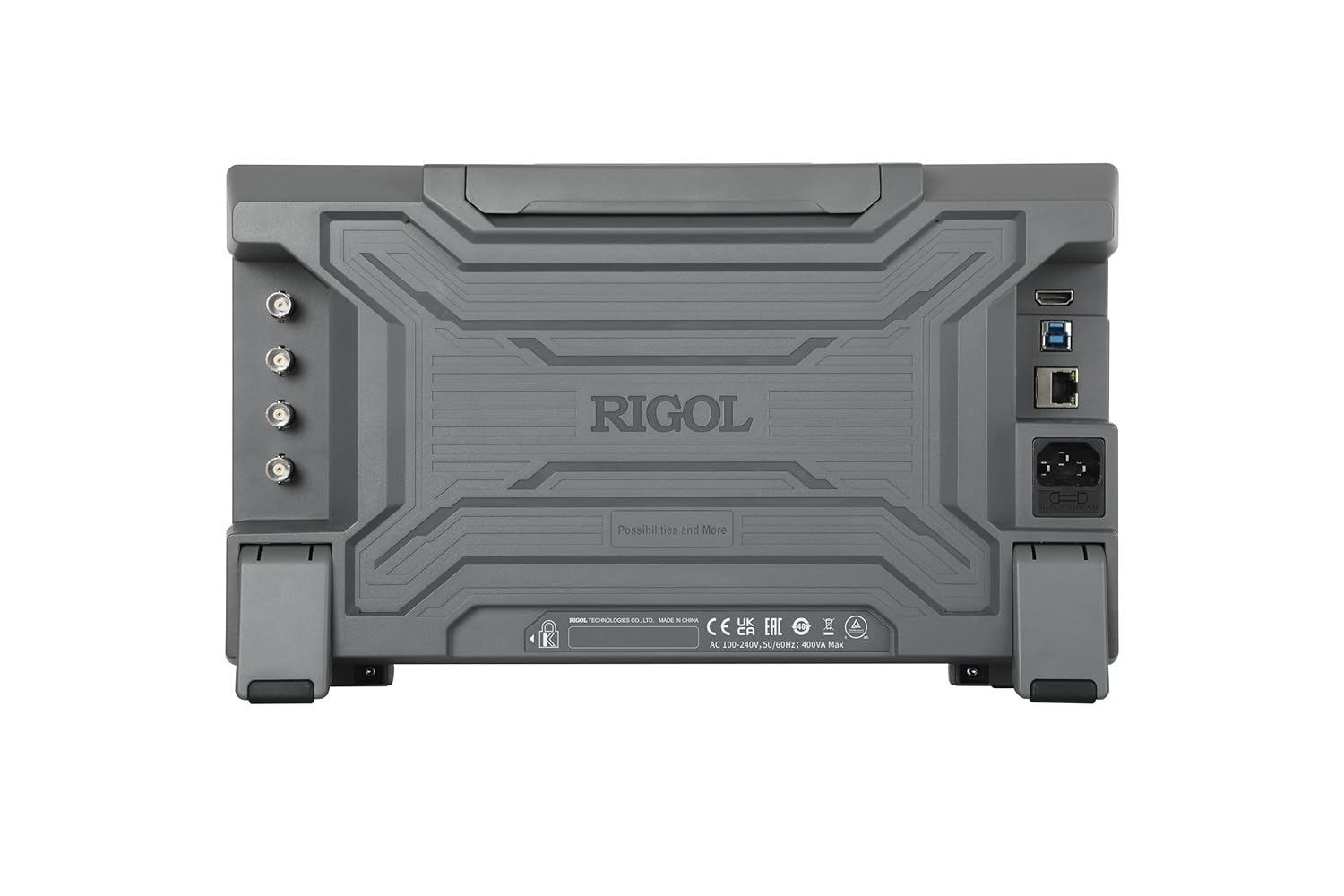
Image: Rear panel of the RIGOL DHO1204 oscilloscope, displaying the power input, LAN port for network connectivity, USB ports, and an HDMI output for external display.
The rear panel provides the AC power input, LAN port for network connectivity, additional USB ports, and an HDMI output for connecting to an external monitor, facilitating collaborative work or larger display needs.
5. Setup
- Spakkjar: Carefully remove the oscilloscope and all accessories from the packaging.
- Pjazzament: Place the oscilloscope on a stable, flat surface with adequate ventilation around the unit.
- Konnessjoni tal-Enerġija: Connect the provided power cable to the AC power input on the rear panel and then to a grounded power outlet.
- Qawwa Inizjali Mixgħula: Press the power button on the front panel to turn on the oscilloscope. The system will perform a self-test.
- Konnessjoni tas-Sonda: Connect the passive probes to the desired input channels (CH1, CH2, CH3, CH4) on the front panel. Ensure the probe compensation is adjusted for accurate measurements.
6. Istruzzjonijiet Operattivi
6.1 Operazzjoni Bażika
The DHO1204 combines traditional knob and button controls with a responsive 10.1-inch touchscreen for intuitive operation.

Image: The 10.1-inch 1280x800 HD touch display of the RIGOL DHO1204, illustrating its large viewing area for detailed waveform analysis and menu navigation.
- Kontrolli Vertikali: Use the vertical knobs to adjust the voltage scale (Volts/Div) and position for each channel.
- Kontrolli Orizzontali: Use the horizontal knob to adjust the time base (Sec/Div) and position of the waveform.
- Kontrolli tat-Trigger: Set the trigger level and mode to stabilize the waveform display.
- Interface touchscreen: Tap on screen elements to access menus, adjust settings, and perform measurements. Pinch-to-zoom and drag gestures are supported for waveform manipulation.
6.2 UltraAcquire Mode
The UltraAcquire burst capture mode allows for a high waveform capture rate, up to 1,500,000 waveforms per second, enabling the capture of elusive glitches and transient events.

Image: Display demonstrating the UltraAcquire mode, showing a high density of captured waveforms, which is beneficial for observing infrequent events or signal variations.
To activate UltraAcquire, navigate to the acquisition settings menu and select the UltraAcquire option. This mode is particularly useful for debugging digital circuits and analyzing complex signals.
6.3 Versatile Interfaces
The DHO1204 offers multiple connectivity options for enhanced usability and data management.

Image: Illustration of the DHO1204's versatile interfaces, including USB for data transfer, LAN for network control, and HDMI for external display, enabling remote operation and collaboration.
- USB: Use the front or rear USB ports to save waveforms, screenshots, or instrument settings to a USB flash drive.
- LAN: Connect the oscilloscope to a network via the LAN port for remote control and data transfer using RIGOL's PC software or web interface.
- HDMI: Output the oscilloscope display to an external monitor for larger viewing or presentation purposes.
6.4 Photoelectric Encoder Knobs
The DHO1204 utilizes standard photoelectric encoders for its operating knobs, which contributes to a longer service life and reliable performance compared to traditional mechanical encoders.

Immaġni: Maqtugħ view of a photoelectric encoder, demonstrating the technology used in the DHO1204's knobs for improved durability and precision over time.
These encoders ensure smooth and precise adjustments of parameters, maintaining accuracy throughout the instrument's lifespan.
7. Manutenzjoni
- Tindif: Naddaf il-barra tal-istrument b'ċarruta ratba u damp drapp. Tużax tindif jew solventi li joborxu.
- Ventilazzjoni: Regularly check that the ventilation openings are clear of dust and debris to ensure proper cooling.
- Ħażna: When not in use for extended periods, store the oscilloscope in a dry, dust-free environment.
- Kalibrazzjoni: Kalibrazzjoni perjodika minn persunal kwalifikat hija rakkomandata biex tinżamm l-eżattezza tal-kejl.
8 Issolvi l-problemi
| Problema | Kawża Possibbli | Soluzzjoni |
|---|---|---|
| Ebda qawwa | Power cable not connected; Power outlet faulty; Instrument fuse blown. | Check power cable connection; Test power outlet; Contact service for fuse replacement. |
| No waveform display | Probe not connected; Channel off; Vertical scale too high/low; Trigger not set correctly. | Connect probe; Enable channel; Adjust Volts/Div; Adjust trigger level/mode. |
| Forma ta' mewġa instabbli | Incorrect trigger source/mode; Noise interference. | Select correct trigger source; Adjust trigger level; Use averaging mode to reduce noise. |
| Touchscreen ma jirrispondix | Temporary software glitch; Screen lock enabled. | Restart the instrument; Check for a physical switch or software setting to enable/disable touchscreen. |
If the problem persists after attempting these solutions, please contact RIGOL customer support.
9. Speċifikazzjonijiet
Key technical specifications for the RIGOL DHO1204 Digital Oscilloscope:
- Faxxa tal-frekwenza: 200 MHz
- Kanali Analoġiċi: 4
- S fil-ħin realiampRata: 2 GSa/sek
- Riżoluzzjoni Vertikali: 12-bit
- Fond tal-memorja: 50 Mpts (standard)
- Waveform Capture Rate: Up to 1,500,000 wfms/s (UltraAcquire mode)
- Wiri: Skrin tattili HD ta' 10.1 pulzieri (1280x800)
- Interfaces: USB Host, USB Device, LAN, HDMI
- Dimensjonijiet: 14.1 x 4.75 x 8.45 pulzieri (35.8 x 12.1 x 21.5 ċm)
- Piż: 8.38 Lira (3.8 kg)
- Standard Decoding: RS232/UART, I2C, SPI, LIN, CAN busses
10. Garanzija u Appoġġ
The RIGOL DHO1204 Digital Oscilloscope comes with a garanzija ta 'sena mid-data tax-xiri. Din il-garanzija tkopri difetti fil-materjali u l-abbilità taħt użu normali.
For technical support, service, or warranty claims, please contact RIGOL customer service through their official website or the contact information provided with your product documentation. Please have your model number (DHO1204) and serial number ready when contacting support.
Software upgrades for bandwidth and memory depth may be available post-sales. Please visit the official RIGOL website for the latest information and downloads.
RIGOL Official Store: Visit the Rigol Store on Amazon


