


Login tal-Interface tal-Admin ta 'mwlogin.net
Login tal-Interface tal-Admin ta 'mwlogin.net
Biex tidħol fl-interface tal-amministratur tan-Netwerk Mercusys, immur lejn http://192.168.1.1 or http://mwlogin.net
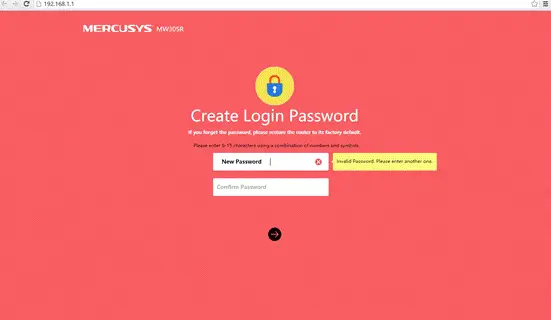
M'hemm l-ebda password ta 'login default għal MERCUSYS Wireless Router. Meta tidħol fil-paġna tal-immaniġġjar tar-router għall-ewwel darba, se titolbok biex toħloq password tal-login. Jekk insejt il-password tal-login li ħloqt, m'hemm l-ebda mod kif issibha. Għandek bżonn terġa 'tissettjaha għall-inadempjenza tal-fabbrika u kkonfigurha bħala waħda ġdida.

- Agħfas u żomm direttament il-buttuna ta' reset fuq il-pannell ta' wara b'pin għal madwar 10 sekondi meta l-apparat ikun qed jaħdem.

- Ħoll il-buttuna tar-reset u stenna li l-apparat jerġa 'jibda.
Nota
- Kun żgur li r-router huwa mixgħul qabel ma jerġa 'jibda kompletament.
- L-indirizz IP default huwa 192.168.1.1 (jew http://mwlogin.net/).
- Kun żgur li l-indirizz IP tal-kompjuter tiegħek ikun fl-istess subnet mal-apparat. Dan ifisser li l-kompjuter tiegħek għandu indirizz IP 192.168.1.X (X huwa fil-medda ta '2 ~ 253), u l-maskra tas-subnet hija 255.255.255.0.
FAQ'S
M'hemm l-ebda password ta 'login default għal MERCUSYS Wireless Router. Meta tidħol fil-paġna tal-immaniġġjar tar-router għall-ewwel darba, se titolbok biex toħloq password tal-login. Jekk insejt il-password tal-login li ħloqt, m'hemm l-ebda mod kif issibha. Għandek bżonn terġa 'tissettjaha għall-inadempjenza tal-fabbrika u kkonfigurha bħala waħda ġdida.
Agħfas u żomm direttament il-buttuna ta' reset fuq il-pannell ta' wara b'pin għal madwar 10 sekondi meta l-apparat ikun qed jaħdem. Itlaq il-buttuna reset u stenna li l-apparat jerġa 'jibda.
Kun żgur li r-router huwa mixgħul qabel ma jerġa 'jibda kompletament. L-indirizz IP default huwa 192.168.1.1 (jew http://mwlogin.net/). Kun żgur li l-indirizz IP tal-kompjuter tiegħek ikun fl-istess subnet mal-apparat. Dan ifisser li l-kompjuter tiegħek għandu indirizz IP 192.168.1.X (X huwa fil-medda ta '2 ~ 253), u l-maskra tas-subnet hija 255.255.255.0..
Jekk jogħġbok irreferi għal tagħna websit http://www.mercusys-wireless-router-support
number-1-800-903-1322/mercusys-wireless-router-tutorials/ jew ikkuntattja lit-tim ta' appoġġ tekniku tagħna fuq 1 800 903 1322
Biex taċċessa l-paġna tal-konfigurazzjoni tar-router bla fili, iftaħ a Web browser bħal Internet Explorer (IE) u daħħal (indirizz IP tar-router mingħajr fili) fil-bar tal-indirizz.
Daħħal admin fil-qasam Username u ħalli l-password vojta b'mod awtomatiku.
Iftaħ a web browser.
Imbagħad ittajpja l-indirizz IP tar-router tiegħek fil-bar tat-tiftix u agħfas il-buttuna Enter.
Sussegwentement, daħħal il-username u l-password tar-router tiegħek u kklikkja Sign In.
Imbagħad ikklikkja Wireless.
Sussegwentement, ibdel l-isem il-ġdid tal-WiFi u l-password tiegħek.
Fl-aħħarnett, ikklikkja Applika jew Issejvja.
Iftaħ a web browser, ittajpja l-indirizz IP tar-router tiegħek fil-bar tal-indirizz, imbagħad agħfas Enter. Daħħal l-isem tal-utent u l-password tar-router tiegħek. Imbagħad tkun illoggjat fil-paġna tal-amministrazzjoni tar-router. Minn hawn, tista ' view u ibdel is-settings tan-netwerk tiegħek.
Jekk ma tistax tilħaq il-paġna tal-login, jista' jkun minħabba:
Kwistjoni ta' konfigurazzjoni ta' konnessjoni bil-wajer (bħal kejbil Ethernet ħażin) Daħħal l-indirizz IP ħażin. Kwistjoni ta' indirizz IP fuq il-kompjuter.
Iftaħ a web browser bħal Internet Explorer.
Mur fil-bar tal-Indirizz u daħħal l-Indirizz IP tar-router tiegħek imbagħad agħfas Enter. Per example, 192.168. …
Tieqa ġdida titlob Isem Utent u Password. Ittajpja admin għall-Isem tal-Utent u l-Password, peress li admin hija l-password default tal-isem tal-utent, u mbagħad ikklikkja OK.
Ħafna mir-routers Mercusys jużaw 192.168. 0.1/192.168. 1.1 bħala l-indirizz IP LAN default tagħhom, li jista 'jkun f'kunflitt mal-firxa IP tal-modem/router ADSL eżistenti tiegħek.
Agħżel it-tip ta' konnessjoni tiegħek (Wired jew Wireless)
Iftaħ a web browser (jiġifieri Safari, Google Chrome jew Internet Explorer).
Agħmel password ġdida fuq il-paġna tal-login.
Ikklikkja fuq il-vleġġa biex tidħol, tista 'mbagħad tidħol fil-websajt WEB paġna ta 'ġestjoni bbażata.
Mercusys joffri routers robusti, range extenders, adapters, u swiċċijiet li huma faċli ħafna biex jiġu stabbiliti biex jipprovdu netwerk affidabbli għad-dar.
VIDEO
www://mercusys.com/
Referenzi
- Manwal għall-Utentmanual.tools
Why can’t I log in? what’s the problem I bought the product and can’t connect.
ทำไมเข้าระบบไม่ได้ เกิดปัญหาอะไรขึ้น ซื้อสินค้ามาไม่สามารถเชื่อมต่อได้
ทำไมเข้าระบบไม่ได้ เกิดปัญหาอะไรขึ้น ซื้อสินค้ามาไม่สามารถเชื่อมต่อได้
Why can't I log in to the mwlogin.net admin interface and why is it not connecting?
If you are unable to access the login page or connect to your Mercusys router, please follow these troubleshooting steps:
http://mwlogin.netor192.168.1.1directly into the address bar (not a search engine).Read the full Q&A page
Aċċess għall- website does not help improve it. Can’t buy stuff
เข้าเว็ปไซร์ไม่ได้ช่วยปรับปรุงให้ด้วย ซื้อของมาใช้ไม่ได้
เข้าเว็ปไซร์ไม่ได้ช่วยปรับปรุงให้ด้วย ซื้อของมาใช้ไม่ได้
How do I access the mwlogin.net admin interface if the website is not loading?
Jekk ma tistax taċċessa l-
http://mwlogin.netadmin interface to set up your Mercusys router, please try the following troubleshooting steps:192.168.1.1or192.168.0.1direttament fis tiegħek web il-bar tal-indirizzi tal-browser.Read the full Q&A page
how do I change my password because I don’t remember it
como faço para mudar minha senha porque não lembro dela
como faço para mudar minha senha porque não lembro dela
How do I change my admin password if I have forgotten it?
If you have forgotten the login password you created for your Mercusys router, there is no way to recover it. You must reset the router to its factory default settings and then create a new password.
To reset your router:
Once the router has restarted, navigate to
http://mwlogin.netor192.168.1.1fil tiegħek web browser. You will be prompted to create a new login password for the management page. Note that resetting the router will also erase your previous Wi-Fi settings and internet configurations.Read the full Q&A page
Hello I want to log in
Hola quiero iniciar sesión
Hola quiero iniciar sesión
How do I log in to the Mercusys admin interface?
To log in to your Mercusys router's admin interface, follow these steps:
http://mwlogin.netorhttp://192.168.1.1fil-bar tal-indirizz.Issolvi l-problemi:
Read the full Q&A page
Your interface links are not working.
No están funcionando sus ligas de la interfaz.
No están funcionando sus ligas de la interfaz.
Why are the mwlogin.net and 192.168.1.1 admin interface links not working?
If the links
http://mwlogin.netorhttp://192.168.1.1are not working, it is usually because your device is not correctly connected to the router's network or there is an IP conflict. Please try the following steps:192.168.1.2biex192.168.1.253.192.168.1.1does not work, your router's IP might have changed to192.168.0.1to avoid conflicts with your modem.Read the full Q&A page
Oħloq password
Crear contraseña
Crear contraseña
How do I create a login password for the Mercusys admin interface?
To create a password for your Mercusys router, follow these steps:
http://mwlogin.netorhttp://192.168.1.1.Nota: If you have already created a password and forgotten it, you must reset the router to factory defaults. To do this, press and hold the Irrisettja button on the rear panel with a pin for approximately 10 seconds while the device is powered on. After the reboot, you will be able to create a new password.
Read the full Q&A page
Jidher li ma nistax nilloggja
Mwlogin jew 192.168.1.1 server ma jistgħux jinstabu
Mwlogin jew 192.168.1.1 server ma jistgħux jinstabu
Why can't I access mwlogin.net or 192.168.1.1 to log into my Mercusys router?
If you are receiving a "server cannot be found" error when trying to access http://mwlogin.net or 192.168.1.1, please try the following troubleshooting steps:
Read the full Q&A page
Was there a solution to this, as I’m getting “Hmmm… can’t reach this page”
Same problem I can’t log in and find these Mwlogin or 192.168.1.1 pages. I have used different browsers and sites.
Taki sam problem nie mogę się zalogować i odszukać tych stron Mwlogin lub 192.168.1.1. Korzystałem z różnych przeglądarek i stron.
Is there any way to change the password?
Có cách nào để thay đổi mật khẩu không ạ
Có cách nào để thay đổi mật khẩu không ạ
How can I change the login password for the mwlogin.net admin interface?
There are two scenarios for changing your password on a Mercusys router:
http://mwlogin.netor192.168.1.1. Innaviga lejn il- Avvanzat or Għodod tas-Sistema section (depending on your model) to find the option to modify the login password.Biex tibdel tiegħek Password tal-Wi-Fi (rather than the admin login), log in to the interface and navigate to the Wireless settings section to update your SSID and security key.
Read the full Q&A page
Idħol
How do I login to the mwlogin.net admin interface?
To log in to the Mercusys admin interface, follow these steps:
http://mwlogin.netorhttp://192.168.1.1fil-bar tal-indirizz.Issolvi l-problemi: If you have already set a password and forgotten it, you must reset the router to factory defaults. To do this, press and hold the Irrisettja button on the rear panel with a pin for approximately 10 seconds while the device is powered on.
Read the full Q&A page
What’s up, I can’t open this site either
Co jest grane ja też nie mogę otworzyć tej witryny
Co jest grane ja też nie mogę otworzyć tej witryny
Why can't I open the mwlogin.net admin interface page?
If you are unable to open the
mwlogin.netorhttp://192.168.1.1login page, please try the following troubleshooting steps:mwlogin.net, try enteringhttp://192.168.1.1orhttp://192.168.0.1directly into your browser's address bar.Read the full Q&A page
Ma nistax nilloggja
Mwlogin or 192.168.1.1 server not found
Aqra aktar: https://hu.manuals.plus/mercusys/mwlogin-net-admin-interface-login#ixzz7YFcBYetE
Nem tudok bejelentkezni
Mwlogin vagy 192.168.1.1 szerver nem található
Aqra aktar: https://hu.manuals.plus/mercusys/mwlogin-net-admin-interface-login#ixzz7YFcBYetE
Mwlogin or 192.168.1.1 server not found
Read more: https://hu.manuals.plus/mercusys/mwlogin-net-admin-interface-login#ixzz7YFcBYetE<e/em>
Nem tudok bejelentkezni
Mwlogin vagy 192.168.1.1 szerver nem található
Read more: https://hu.manuals.plus/mercusys/mwlogin-net-admin-interface-login#ixzz7YFcBYetE
Why can't I access the mwlogin.net or 192.168.1.1 admin interface?
If you are receiving a "server not found" error when trying to access mwlogin.net or 192.168.1.1, please try the following troubleshooting steps:
192.168.1.2biex192.168.1.253b'maskra ta 'subnet ta'255.255.255.0.192.168.0.1minflok192.168.1.1. Try entering that into your browser's address bar.http://mwlogin.netmill-ġdid.Read the full Q&A page
I can’t log in to either of the websites, server can’t be found
Why can't I access mwlogin.net or the router's IP address, and how do I fix the 'server not found' error?
If you are receiving a "server not found" error when trying to access mwlogin.net or 192.168.1.1, please try the following troubleshooting steps:
http://mwlogin.netmill-ġdid.Read the full Q&A page
range extender mw300re model
How do I log in to the admin interface for the Mercusys MW300RE range extender?
To access the admin interface for your Mercusys MW300RE range extender, follow these steps:
Ensure your computer's IP address is in the same subnet as the device (e.g., 192.168.1.X) to ensure a successful connection.
Read the full Q&A page
Irrid
اريد ا
اريد ا
How do I access and log in to the mwlogin.net admin interface?
To access the admin interface for your Mercusys device, please follow these steps:
http://mwlogin.netorhttp://192.168.1.1.If you are unable to reach the login page, check your Ethernet cable connection or try a different web browser.
Read the full Q&A page
I can’t log in either
non riesco ad accedere neanche io
non riesco ad accedere neanche io
I cannot access the mwlogin.net admin interface. How can I log in?
Jekk ma tistax taċċessa l- mwlogin.net admin interface, please try the following troubleshooting steps:
http://192.168.1.1orhttp://192.168.0.1into your browser's address bar.Read the full Q&A page
mercusis connects but without internet
mercusis se conecteazadar fara internet
mercusis se conecteazadar fara internet
Why does my Mercusys router connect to devices but show no internet access?
If your Mercusys router is connected but there is no internet access, follow these troubleshooting steps to identify the issue:
If these steps do not work, you may need to reset ir-router by holding the reset button for 10 seconds while it is powered on, then re-configuring it from scratch.
Read the full Q&A page
exactly, there is no way to access mwlogin.net, it seems non-existent
esatto, non c’è modo e maniera di accedere al mwlogin.net, sembra inesistente
esatto, non c'è modo e maniera di accedere al mwlogin.net, sembra inesistente
Why can't I access mwlogin.net and how do I fix it?
Jekk ma tistax taċċessa
http://mwlogin.net, it is usually because your device is not correctly communicating with the Mercusys router. Try the following steps to resolve the issue:http://192.168.1.1directly into your browser's address bar.192.168.1.x).Read the full Q&A page
true, impossible! it doesn’t seem to exist and I can’t configure the mercusys ME30 wireless repeater
vero, impossibile! sembra non esistere e non riesco a configurare il ripetitore wireless mercusys ME30
vero, impossibile! sembra non esistere e non riesco a configurare il ripetitore wireless mercusys ME30
How do I access the admin interface to configure the Mercusys ME30 wireless repeater?
To configure your Mercusys ME30 wireless repeater, you must first ensure your device is correctly connected to the repeater's network. If
http://mwlogin.netis not loading, please try the following steps:192.168.1.1or192.168.0.1directly into your browser's address bar.mwlogin.netmill-ġdid.Note: When logging in for the first time, you will be prompted to create a new login password; there is no default password for these devices.
Read the full Q&A page