1. Introduzzjoni
Grazzi tax-xiriasing the Daakro SR-3800 5.1 Channel Home Audio Amplifier. Dan amplifier is designed to provide a high-quality audio experience for your home theater, studio, or entertainment setup. It features a dynamic DSP display, multiple input options including Bluetooth 5.4, and robust power output for passive speakers. Please read this manual thoroughly before operating the device to ensure proper use and to maximize its performance and lifespan.

Image 1.1: Daakro SR-3800 5.1 Channel Home Audio Amplifier. This image shows the front view tal- amplifier with its illuminated DSP display and control knobs.
2. Informazzjoni Importanti dwar is-Sigurtà
- Aqra l-istruzzjonijiet kollha qabel ma tħaddem l-apparat.
- Żomm dan il-manwal għal referenza futura.
- Tesponix dan l-apparat għax-xita jew l-umdità.
- Timblokkax il-fetħiet tal-ventilazzjoni. Installa skont l-istruzzjonijiet tal-manifattur.
- Tinstallax ħdejn xi sorsi tas-sħana bħal radjaturi, reġistri tas-sħana, stufi, jew apparat ieħor (inkluż amplifiers) li jipproduċu sħana.
- Ipproteġi l-korda tad-dawl milli tkun mixi jew maqrusa, partikolarment fil-plakek, fil-kontenituri tal-konvenjenza, u fil-punt fejn joħorġu mill-apparat.
- Uża biss aċċessorji/aċċessorji speċifikati mill-manifattur.
- Aqla’ dan l-apparat waqt maltempati tas-sajjetti jew meta ma jintużax għal perjodi twal ta’ żmien.
- Irreferi l-manutenzjoni kollha lil persunal tas-servizz kwalifikat. Is-servizz huwa meħtieġ meta l-apparat ikun ġie bil-ħsara b'xi mod, bħal korda tal-provvista tal-enerġija jew plagg ikun bil-ħsara, likwidu jkun inxtered jew oġġetti jkunu waqgħu fl-apparat, l-apparat ikun ġie espost għax-xita jew umdità, ma jaħdimx b'mod normali , jew twaqqgħet.
- Twissija: Biex tnaqqas ir-riskju ta’ nar jew xokk elettriku, tesponix dan l-apparat għax-xita jew l-umdità.
- Attenzjoni: Riskju ta' xokk elettriku. Tiftaħx.
3. Kontenut tal-Pakkett
Kun żgur li l-oġġetti kollha huma preżenti fil-kaxxa:
- Daakro SR-3800 5.1 Channel Home Audio Ampaktar ħaj
- Kontrollur mill-bogħod
- Manwal għall-Utent (dan id-dokument)
- Kejbil tal-Enerġija
4. Prodott Aktarview
4.1 Kontrolli ta' Front Panel

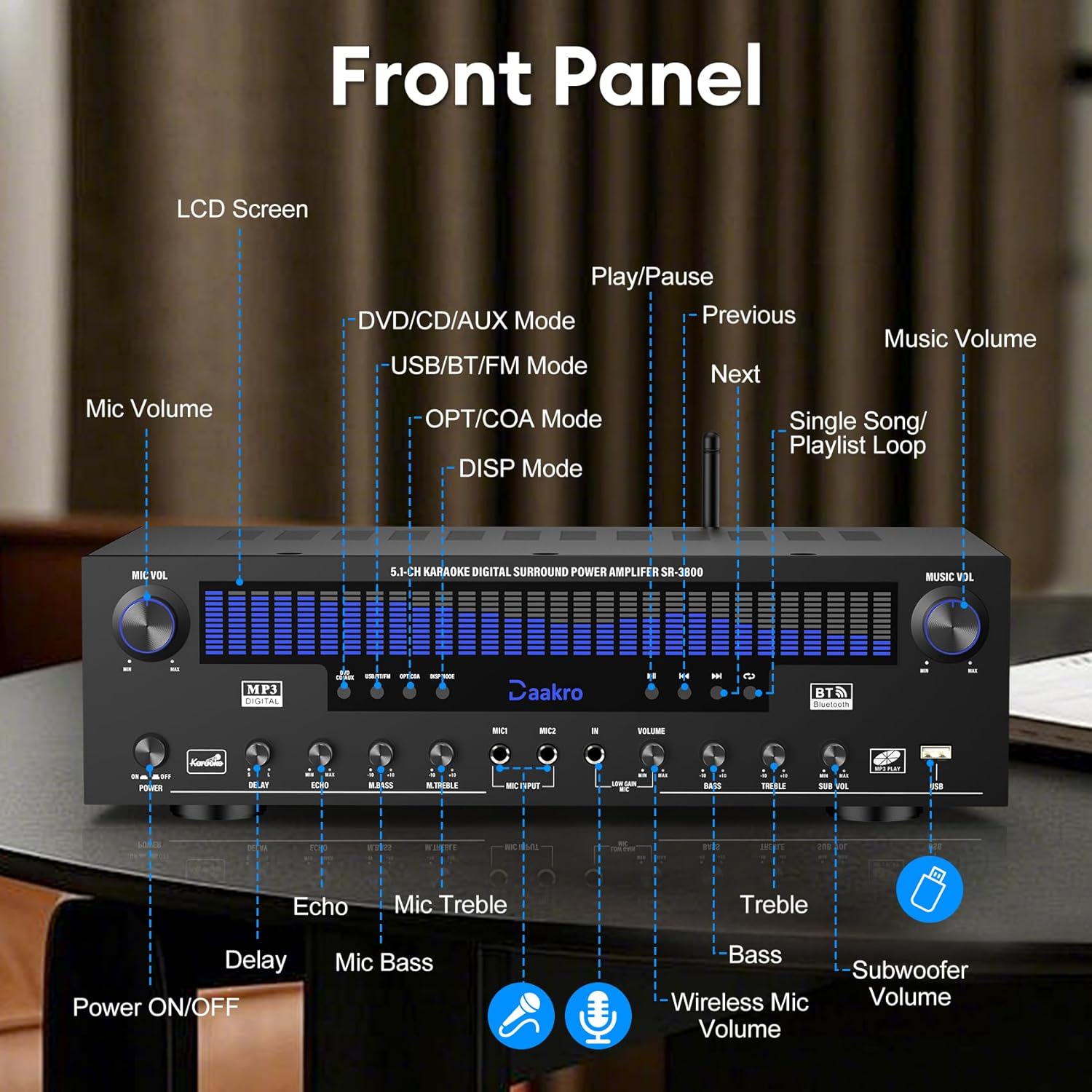
Immaġni 4.1: Dettaljata view of the Daakro SR-3800 front panel with labels for each control and display element.
- MIC VOL: Jaġġusta l-volum tal-mikrofonu.
- POWER ON / OFF: Swiċċ tal-qawwa prinċipali.
- Skrin LCD: Displays current mode, DSP spectrum, and other information.
- DEWMIEN: Adjusts microphone echo delay.
- ECHO: Adjusts microphone echo effect.
- M.BASS: Adjusts microphone bass level.
- M.TREBLE: Adjusts microphone treble level.
- DĦUL MIC: Connect wired microphones.
- VOLUM: Adjusts overall music volume.
- BASS: Adjusts music bass level.
- TREBLE: Adjusts music treble level.
- SUB VOL: Adjusts passive subwoofer volume.
- USB: USB input for media playback.
- Input Mode Buttons: Select input source (DVD/CD/AUX, USB/BT/FM, OPT/COA).
- DSP Mode: Cycles through 13 DSP spectrum display effects.
- Kontrolli tal-daqq: Play/Pause, Previous, Next, Single Song/Playlist Loop.
- MUŻIKA VOL: Main music volume control knob.
4.2 Konnessjonijiet tal-Panew ta' wara
Immaġni 4.2: Dettaljata view of the Daakro SR-3800 rear panel, showing all input and output ports with labels.
- FM ANT: FM antenna input.
- AUX IN: Input awżiljarju ta '3.5mm.
- OPT: Optical audio input.
- COAX: Coaxial audio input.
- BT ANT: Antenna Bluetooth.
- AUDIO INPUT (DVD, CD, LINE): RCA stereo audio inputs for DVD, CD, and Line sources.
- AUDIO OUT (LINE): RCA stereo audio output for connecting to active speakers or other audio devices.
- SPEAKER OUTPUT (FR, FL, SR, SL, C, SUB): Spring clip terminals for connecting passive speakers (Front Right, Front Left, Surround Right, Surround Left, Center, Subwoofer). Compatible with 4-16 ohm passive speakers.
- DĦUL TA 'QAWWA: AC power input (110V).
4.3 Karatteristiċi ewlenin
- Dynamic DSP Display: 19.8-inch LED screen with 13 spectrum effects, analyzing music rhythms in real-time (20 Hz to 20 kHz).
- True 300W Rated Power: Delivers 50W per channel across 5.1 channels, compatible with 4-16 ohm passive speakers.
- Interfejsijiet ta' Input Multipli: Bluetooth, USB, wireless microphone, two wired microphones, FM, AUX, OPT, COAX, DVD, CD, and LINE inputs.
- Streaming Bluetooth bla fili: Equipped with the latest Bluetooth 5.4 chip for stable connections up to 30 feet with smartphones, tablets, laptops, and computers.
- Intuitive Volume Equalizer Control: Independent rotary knobs for music volume, microphone volume, treble, bass, subwoofer, microphone delay, and reverb.
- Ultra-Quiet Cooling System: Built-in fans, heat sinks, and side ventilation ports improve cooling efficiency by 130% and reduce noise by 80%.
5. Setup
5.1 Konnessjoni tal-Ispeaker
The Daakro SR-3800 is compatible with 5-12 inch passive speakers and passive subwoofers. Ensure your speakers meet these requirements.
- Identify the speaker terminals on the rear panel: Front Right (FR), Front Left (FL), Surround Right (SR), Surround Left (SL), Center (C), and Subwoofer (SUB).
- Connect your passive speakers to the corresponding terminals. Ensure correct polarity (+ to + and - to -) for each speaker.
- If using a passive subwoofer, connect it to the SUB terminals.

Image 5.1: The Daakro SR-3800 amplifier positioned between two large passive speakers, illustrating a typical setup.
5.2 Konnessjoni tas-Sors tal-Awdjo
Connect your desired audio sources using the appropriate input ports on the rear panel.
- DVD/CD/LINE: Use RCA cables to connect DVD players, CD players, or other line-level audio devices.
- OPT/COAX: Use optical or coaxial cables for digital audio sources like TVs or game consoles.
- AUX IN: Use a 3.5mm audio cable for portable devices.
- FM ANT: Qabbad l-antenna tal-FM għar-riċeviment tar-radju.
5.3 Konnessjoni tal-Enerġija
- Tiżgura l- ampIs-swiċċ tal-enerġija tal-lifer huwa fil-pożizzjoni OFF.
- Connect the power cable to the POWER INPUT on the rear panel.
- Ipplaggja t-tarf l-ieħor tal-kejbil tal-enerġija f'sokit standard tal-enerġija ta' 110V AC.
6. Operazzjoni
6.1 Tixgħel/Jitfi
Press the POWER ON/OFF switch on the front panel to turn the amplifier mixgħul jew mitfi.
6.2 L-Għażla tas-Sors tal-Input
Use the input mode buttons on the front panel (DVD/CD/AUX, USB/BT/FM, OPT/COA) to select your desired audio source. The selected input will be displayed on the LCD screen.
6.3 Aġġustament tal-Volum u t-Ton
- MUŻIKA VOL: Rotate this knob to adjust the overall music volume.
- BASS/TREBLE: Use these knobs to fine-tune the bass and treble levels of the music.
- SUB VOL: Adjusts the output volume of the passive subwoofer.
6.4 Streaming tal-Bluetooth
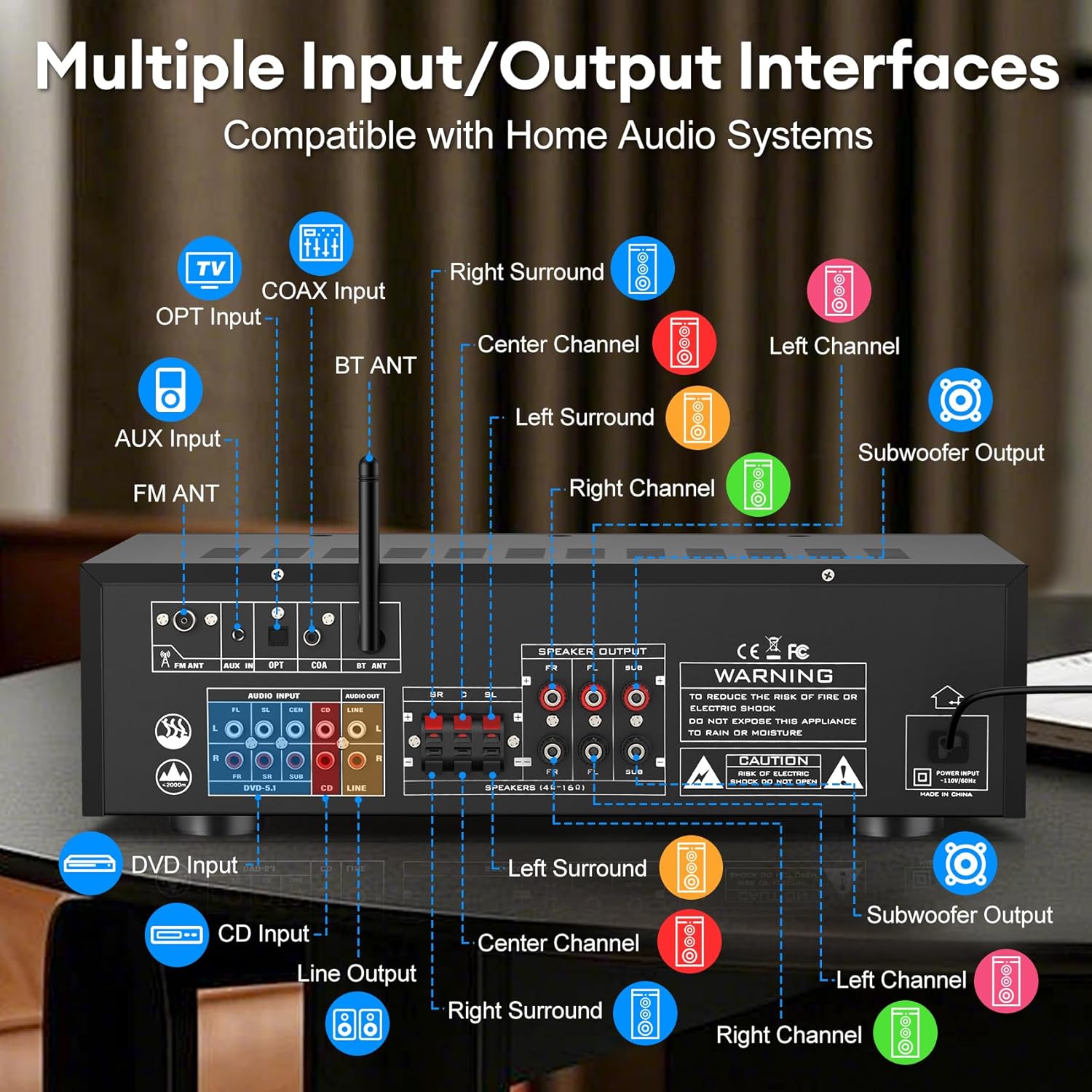
Image 6.1: The Daakro SR-3800 amplifier surrounded by various smart devices, illustrating its Bluetooth 5.4 connectivity and stable 30ft range.
- Select the 'USB/BT/FM' input mode.
- Fuq it-tagħmir tiegħek li jaħdem bil-Bluetooth (smartphone, tablet, eċċ.), fittex apparati Bluetooth disponibbli.
- Select 'Daakro SR-3800' from the list to pair.
- Ladarba tkun imqabbda, tista' tistrimja l-awdjo mingħajr fili lill- ampaktar ħaj.
6.5 Microphone and Karaoke Functions

Image 6.2: Two individuals singing into microphones, demonstrating the karaoke feature of the Daakro SR-3800 ampaktar ħaj.
- Connect wired microphones to the MIC INPUT jacks on the front panel.
- Adjust microphone volume using the MIC VOL knob.
- Use the DELAY, ECHO, M.BASS, and M.TREBLE knobs to customize microphone sound effects.
- Il- amplifier also supports wireless microphones.
6.6 DSP Display Modes
Press the 'DISP Mode' button on the front panel to cycle through 13 different DSP spectrum display effects on the LCD screen.

Image 6.3: The Daakro SR-3800 amplifier showcasing its 19.8-inch dynamic DSP display with active spectrum effects.
7. Manutenzjoni
7.1 Tindif
- Spluggja l- ampAqla’ l-lifer mill-bokk tal-elettriku qabel ma tnaddaf.
- Uża drapp artab u niexef biex timsaħ l-uċuħ ta’ barra.
- Tużax cleaners likwidi jew aerosol cleaners.
7.2 Sistema tat-tkessiħ
The SR-3800 features an ultra-quiet cooling fan. Ensure that the ventilation openings on the top and sides of the unit are not obstructed to allow for proper airflow.
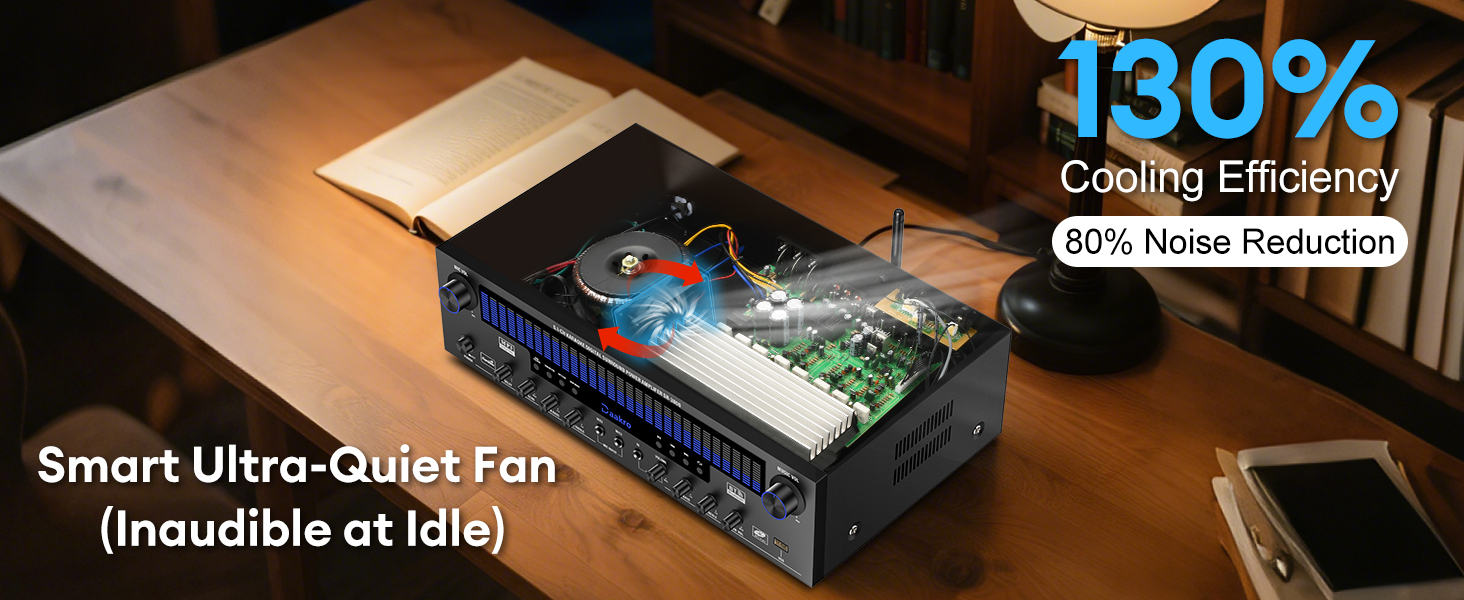
Immaġni 7.1: Intern view of the Daakro SR-3800 amplifier highlighting its smart ultra-quiet fan and heat sinks for efficient cooling.
8 Issolvi l-problemi
| Problema | Kawża Possibbli | Soluzzjoni |
|---|---|---|
| Ebda qawwa | Kejbil tal-enerġija mhux imqabbad; Swiċċ tal-enerġija mitfi; Sokit tal-enerġija difettuż. | Kun żgur li l-kejbil tal-enerġija huwa konness sew. Ixgħel is-swiċċ tal-enerġija. Ittestja s-sokit tal-enerġija b'apparat ieħor. |
| L-ebda ħoss | Incorrect input selected; Volume too low; Speakers not connected or faulty; Source device not playing. | Select the correct input source. Increase the MUSIC VOL. Check speaker connections and ensure they are passive speakers. Verify the audio source is playing. |
| Il-Bluetooth mhux qed jgħaqqad | AmpL-apparat mhux fil-modalità Bluetooth; L-apparat wisq 'il bogħod; L-apparat diġà mqabbad ma' unità oħra. | Select 'USB/BT/FM' input mode. Ensure your device is within 30 feet. Disconnect your device from other Bluetooth devices and try pairing again. |
| Microphone feedback/noise | Microphone too close to speakers; Microphone volume too high. | Move microphones away from speakers. Reduce MIC VOL. Adjust M.BASS and M.TREBLE. |
| Ħoss distort | Volume too high; Incorrect speaker impedance; Source audio quality is poor. | Reduce volume. Ensure speakers are 4-16 ohms. Check the quality of the audio source. |
9. Speċifikazzjonijiet
| Karatteristika | Speċifikazzjoni |
|---|---|
| Numru tal-Mudell | SR-3800 |
| Ħruġ ta 'Qawwa Rata | 300W (50W per channel) |
| Numru ta 'Kanali | 5.1 |
| Impedenza tal-Ispeaker | 4-16 Ohms (Passive Speakers) |
| Verżjoni Bluetooth | 5.4 |
| Medda Bluetooth | Sa 30 pied (10 metri) |
| Wiri DSP | 19.8-inch LED with 13 spectrum effects |
| Firxa ta' Rispons ta' Frekwenza | 20 Hz sa 20 kHz |
| Interfaces tal-Input | Bluetooth, USB, Wireless Mic, 2x Wired Mic, FM, AUX, OPT, COAX, DVD, CD, LINE |
| Interfaces tal-Output | 5.1 Channel Passive Speaker Output, Line Out (RCA) |
| Voltage | 110 Volts (AC) |
| Piż tal-oġġett | 13.87 liri |
| Dimensjonijiet tal-Pakkett | 19.75 x 14 x 8 pulzieri |
| Ċertifikazzjoni | FCC |
10. Vidjo tal-Prodott Aktar minnview
Video 10.1: An official product video from Daakro showcasing the features and connectivity of the SR-3800 5.1 Channel Home Audio Amplifier with DSP Display. This video provides a visual guide to the amplifier's design, input/output ports, and dynamic display in action.
11. Garanzija u Appoġġ
11.1 Informazzjoni dwar Garanzija
The Daakro SR-3800 amplifier comes with a 30-day warranty from the date of purchase. This warranty covers manufacturing defects and malfunctions under normal use. It does not cover damage caused by misuse, accidents, unauthorized modifications, or improper installation.
11.2 Appoġġ għall-Klijent
For technical assistance, troubleshooting, or warranty claims, please contact Daakro customer service. Our team is available to provide support and ensure your satisfaction.
- Servizz tal-Klijent onlajn: Available 24 hours.
- Informazzjoni ta' Kuntatt: Refer to the product packaging or the official Daakro webis-sit għad-dettalji ta' kuntatt l-aktar aġġornati.


