Introduzzjoni
The Havit H2015PRO is a versatile gaming headset designed for multi-platform compatibility and immersive audio experiences. Featuring five distinct connection modes, this headset offers flexibility for various gaming setups and entertainment needs. It delivers high-fidelity sound with 360° spatial audio and low latency, ensuring a competitive edge in gaming. This manual provides essential information for setting up, operating, maintaining, and troubleshooting your Havit H2015PRO headset.
Prodott Overview
The Havit H2015PRO headset includes the following components:
- Havit H2015PRO Gaming Headset
- Mikrofonu li jinqala'
- 2.4 GHz USB Wireless Dongle
- Cable tal-Iċċarġjar tal-USB-C
- Cable Awdjo 3.5mm
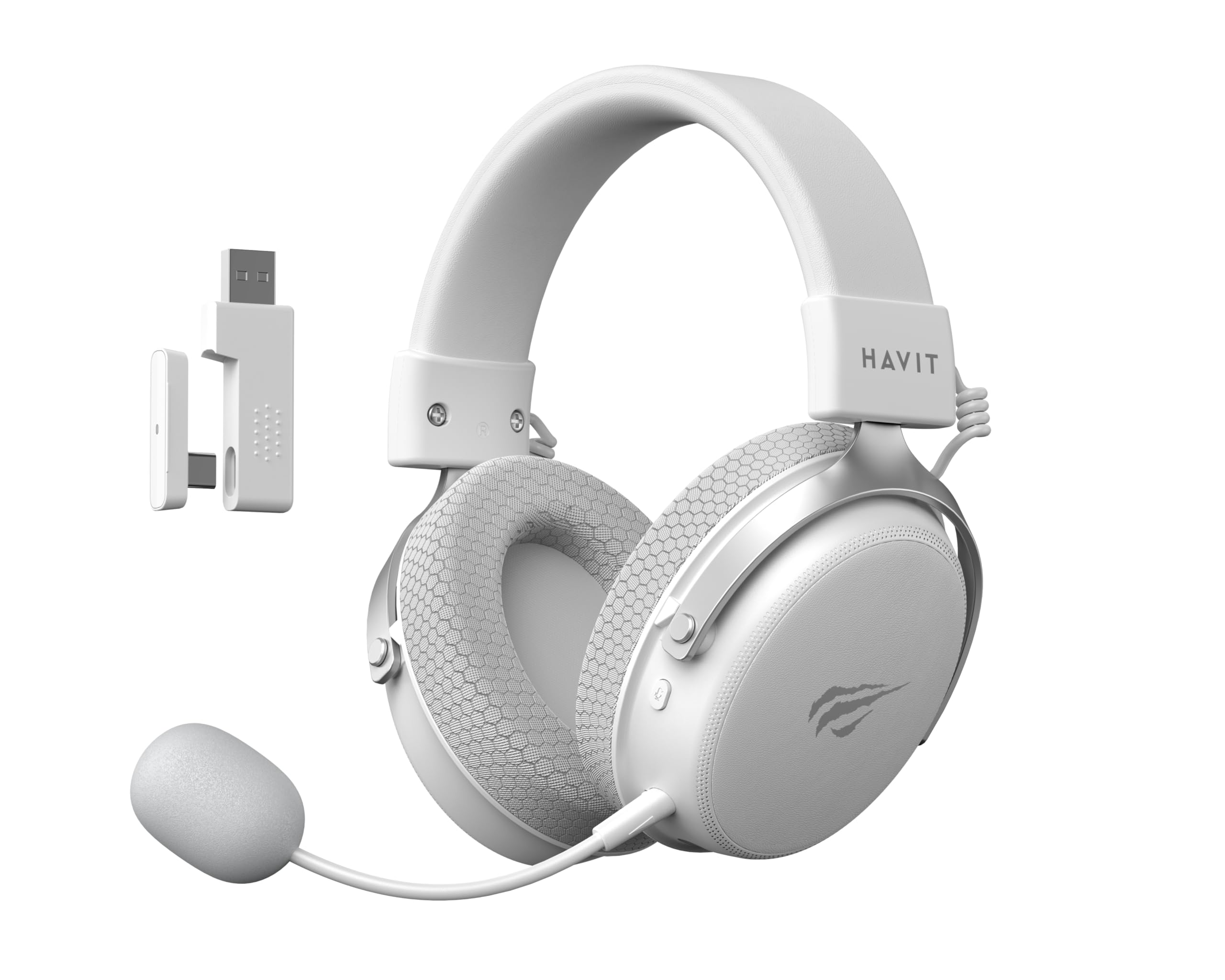
Image: The Havit H2015PRO headset in white, showcasing the main unit, detachable microphone, and the 2.4 GHz USB wireless dongle. This image provides a clear view of the primary components included with the product.
Setup
The Havit H2015PRO offers five connectivity options to suit various devices and preferences.
1. 2.4 GHz Wireless Connection (USB Dongle)
- Insert the 2.4 GHz USB wireless dongle into an available USB port on your PC, PlayStation, or Nintendo Switch (in docked mode).
- Power on the headset. The headset should automatically connect to the dongle.
- Kun żgur li l-headset huwa magħżul bħala l-apparat tal-output u tad-dħul tal-awdjo fis-settings tas-sistema tiegħek.
2. Konnessjoni Bluetooth
- Power on the headset and switch it to Bluetooth mode (refer to the headset controls for mode selection).
- On your device (smartphone, tablet, PC with Bluetooth), go to Bluetooth settings and enable Bluetooth.
- Select "Havit H2015PRO" from the list of available devices to pair.
3. Konnessjoni bil-wajer (Kejbil tal-awdjo ta' 3.5mm)
- Qabbad tarf wieħed tal-kejbil tal-awdjo ta' 3.5mm mal-port ta' 3.5mm tal-headset.
- Connect the other end to the 3.5mm audio jack on your PC, console controller, or mobile device.
- This mode does not require the headset to be powered on.
4. Wired Connection (USB-C Cable)
- Connect the USB-C cable to the headset's USB-C port.
- Connect the other end to a compatible USB-C port on your PC or device.
- This connection can be used for both audio and charging.

Immaġni: Angolata view of the Havit H2015PRO headset, highlighting the earcups, headband, and visible controls on the side. This perspective helps in identifying connection ports and buttons.
Istruzzjonijiet Operattivi
Qawwa mixgħul/mitfi
- Biex tixgħel, agħfas u żomm il-buttuna tal-Power sakemm id-dawl indikatur jixgħel.
- Biex titfi, agħfas u żomm il-buttuna tal-Qawwa sakemm id-dawl indikatur jintefa.
Kontroll tal-Volum
- Use the volume roller or buttons located on the earcup to adjust the audio level.
Użu tal-mikrofonu
- Attach the detachable microphone to the designated port on the headset.
- Adjust the microphone's flexible arm for optimal voice pickup.
- Use the microphone mute button (if available) on the headset to toggle mute on/off.
Iċċarġjar tal-Headset
- Connect the USB-C charging cable to the headset's USB-C port and the other end to a USB power source.
- The indicator light will show charging status (e.g., red for charging, off or green for fully charged).
- Ċarġ sħiħ tipikament jieħu madwar 2-3 sigħat.
Manutenzjoni
Proper care ensures the longevity and performance of your Havit H2015PRO headset.
- Tindif: Use a soft, dry cloth to wipe the headset. For earcups, a slightly damp cloth with mild soap can be used, but ensure no moisture enters the speaker grilles.
- Ħażna: Aħżen il-headset f'post frisk u niexef 'il bogħod mix-xemx diretta u minn temperaturi estremi.
- Kura tal-batterija: Biex tippreserva l-ħajja tal-batterija, evita li tiċċarġja l-headset kompletament ta' spiss. Iċċarġjah regolarment, anke jekk ma jkunx qed jintuża għal perjodi twal.
- Evita Likwidi: Do not expose the headset to water or other liquids, as it is not water-resistant.
Issolvi l-problemi
If you encounter issues with your Havit H2015PRO headset, refer to the following common solutions:
| Problema | Soluzzjoni |
|---|---|
| L-ebda ħoss mill-headset |
|
| Mikrofonu mhux qed jaħdem |
|
| Il-headset mhux qed jikkonnettja mingħajr fili |
|
| Kwistjonijiet ta' ċċarġjar |
|
Speċifikazzjonijiet
Detailed technical specifications for the Havit H2015PRO headset:
- Isem tal-Mudell: HAVIT H2015PRO
- Teknoloġija tal-Konnettività: Hybrid (2.4 GHz Wireless, Bluetooth, 3.5mm Jack, USB-C)
- Daqs tas-sewwieq: 53 mm
- Impedenza: 64 Ohms
- Rispons tal-Frekwenza: 20.2 Hz (Specific value provided, typical range is 20Hz-20kHz)
- Kapaċità tal-batterija: 1500 mAh
- Latenza Baxxa: 24 ms
- Features Awdjo: 360° Spatial Audio, Virtual 7.1 Surround Sound
- Mikrofonu: Tneħħi u Aġġustabbli
- Tip ta' Kontroll: Integrated (Touch controls)
- Materjal: Plastik
- Piż tal-Prodott: 500 Gramm
- Kompatibilità: Desktops, PC, PlayStation, Xbox, Nintendo Switch, Mobile Devices
- Livell ta' Reżistenza għall-Ilma: Mhux reżistenti għall-ilma

Immaġni: A li tħares minn quddiem view of the Havit H2015PRO headset, clearly showing the earcups, headband, and the attached microphone. This view emphasizes the ergonomic design and microphone placement.
Garanzija u Appoġġ
Informazzjoni dwar Garanzija
The Havit H2015PRO headset comes with a Garanzija tal-manifattur ta 'senaDin il-garanzija tkopri difetti fil-materjali u fix-xogħol taħt użu normali. Jekk jogħġbok żomm il-prova tax-xiri tiegħek għal talbiet ta' garanzija.
Appoġġ għall-Klijent
For technical assistance, warranty claims, or further inquiries, please contact Havit customer support through their official website or the retailer where the product was purchased. Provide your product model number (H2015PRO) and proof of purchase when seeking support.


