Introduzzjoni
This manual provides detailed instructions for the safe and effective use of your NBD 8K 64MP Digital Camera, model NBD-EU-S110-QT. Please read this manual thoroughly before operating the camera and retain it for future reference.
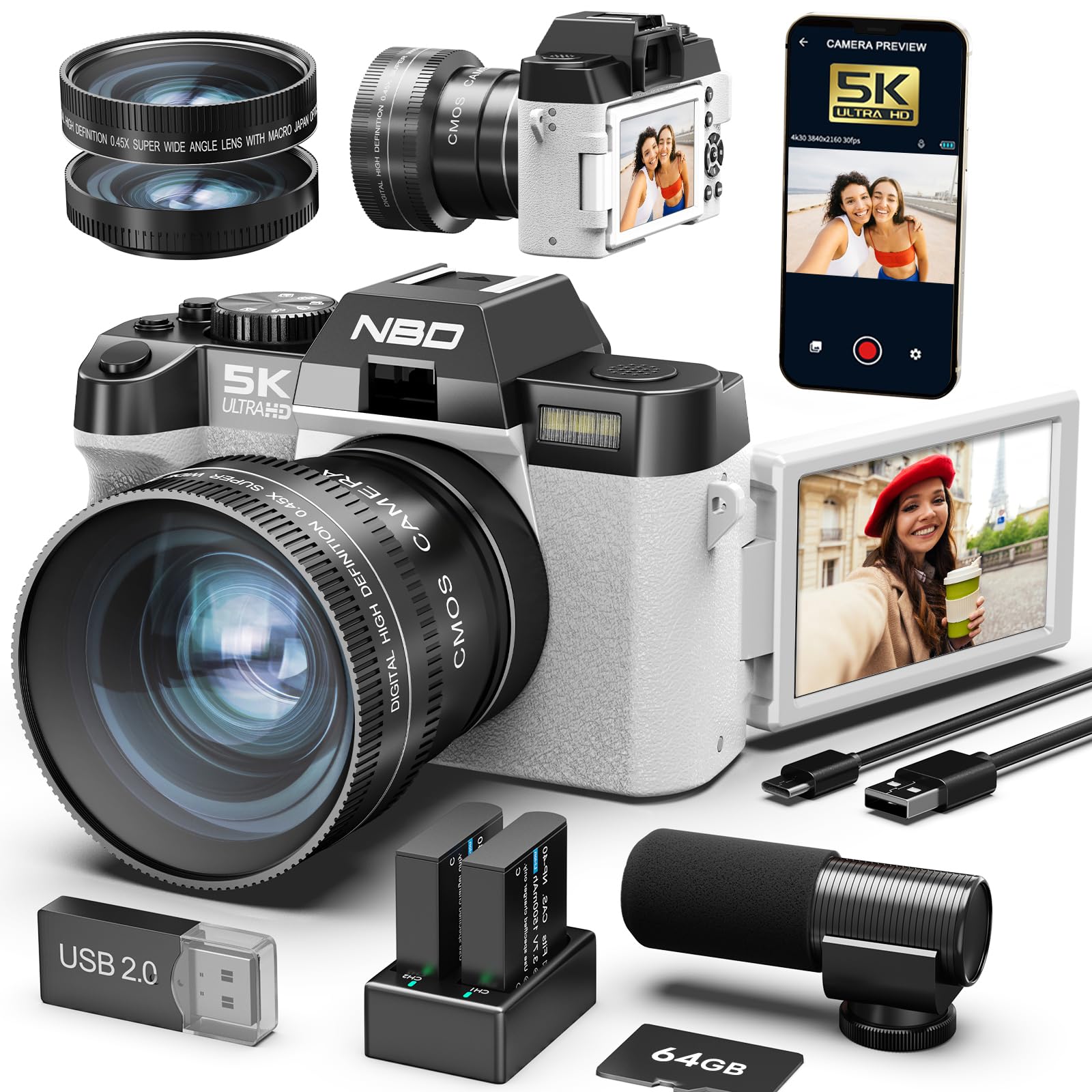
Image: The NBD 8K 64MP Digital Camera, showcasing its compact design and attached lens.
1. Setup
1.1 Tneħħija tal-kaxxa u l-kontenut tal-pakkett
Oħroġ l-oġġetti kollha mill-kaxxa bir-reqqa. Kun żgur li l-komponenti li ġejjin huma preżenti:
- NBD 8K 64MP Digital Camera Body
- Wide-angle/Macro Lens (52mm)
- Mikrofonu Estern
- 64GB Karta tal-Memorja
- 2 x Batteriji Rechargeable
- Cable tal-Iċċarġjar tal-USB
- Manwal għall-Utent (dan id-dokument)
- Ċinga tal-kamera
1.2 Installazzjoni tal-batterija
- Sib l-għatu tal-kompartiment tal-batterija fil-qiegħ tal-kamera.
- Żerżaq il-lukkett biex tiftaħ l-għatu.
- Insert a fully charged battery into the compartment, ensuring the correct orientation as indicated by the polarity markings.
- Agħlaq l-għatu tal-kompartiment tal-batterija sew sakemm tikklikkja f'postu.
- Note: Fully charge both batteries before first use.
Image description: A diagram showing the battery compartment and how to insert the battery with correct polarity.
1.3 Installazzjoni tal-Kard tal-Memorja
- Open the memory card slot cover, usually located on the side or near the battery compartment.
- Insert the 64GB memory card with the metal contacts facing the front of the camera until it clicks into place.
- Agħlaq il-qoxra tal-islott tal-karta tal-memorja.
- Important: Ensure the camera is powered off before inserting or removing the memory card.
Image description: A diagram illustrating the correct insertion of the memory card into its slot.
1.4 Twaħħil tal-Lenti
The camera comes with a 52mm wide-angle/macro lens. To attach it:
- Remove the protective cap from the camera lens mount and the rear cap from the wide-angle/macro lens.
- Align the mounting marks on the lens with those on the camera body.
- Dawwar il-lenti bil-mod lejn l-arloġġ sakemm tissakkar f'postha.
Image description: A visual guide demonstrating how to align and twist the lens onto the camera body.
1.5 External Microphone Connection
Connect the external microphone to the designated microphone input jack on the camera body for enhanced audio recording quality.
Image description: An illustration showing the microphone jack location and how to plug in the external microphone.
2. It-tħaddim tal-Kamera
2.1 Tixgħel/Jitfi
Agħfas u żomm il- Qawwa button located on the top of the camera for approximately 2 seconds to turn the camera on or off.
2.2 Kontrolli Bażiċi
- Buttuna tas-shutter: Press halfway to focus, press fully to capture a photo or start/stop video recording.
- Lieva taż-Żum: Use to adjust the 16x digital zoom. Push towards 'W' for wide-angle, 'T' for telephoto.
- Dial tal-Modalità: Rotate to select different shooting modes (e.g., Photo, Video, Playback).
- Buttuni tan-Navigazzjoni: Use the directional pad to navigate menus and settings.
- OK/SET Button: Jikkonferma l-għażliet fil-menus.
Image description: An annotated diagram highlighting the location of the power button, shutter button, zoom lever, mode dial, and navigation buttons on the camera body.
2.3 Using the 180° Rotatable IPS Screen
The 3.0-inch IPS screen can be rotated 180 degrees. This feature is particularly useful for:
- Selfies: Rotate the screen forward to easily compose self-portraits.
- Vlogging: Monitor your recording while filming yourself.
- Low/High Angle Shots: Adjust the screen for comfortable viewing when shooting from difficult angles.
Image description: A series of images demonstrating the screen rotating to different positions for various shooting scenarios.
2.4 Reġistrazzjoni ta' Ritratti u Vidjows
2.4.1 Qbid ta' Ritratti
- Turn the Mode Dial to the Ritratt ikona.
- Frame your shot using the IPS screen.
- Press the Shutter button halfway to activate autofocus. The focus frame will turn green when focus is achieved.
- Press the Shutter button fully to capture the image.
2.4.2 Reġistrar Vidjows
- Turn the Mode Dial to the Video ikona.
- Frame your scene.
- Press the Shutter button fully to start recording. A red indicator will appear on the screen.
- Press the Shutter button fully again to stop recording.
- Note: The camera supports 8K video resolution. Ensure sufficient memory card space.
2.5 Advanced Shooting Modes and Features
- Awtofokus (AF): The camera features rapid autofocus to ensure sharp images.
- Stabbilizzazzjoni tal-Immaġni: Jgħin biex inaqqas iċ-ċajpir ikkawżat mit-tħawwid tal-kamera.
- Time-lapse: Capture a series of images over time and combine them into a video. Access this mode via the menu.
- Moviment bil-mod: Record video at a higher frame rate for slow-motion playback. Access this mode via the menu.
- Digital Zoom (16x): Use the zoom lever to magnify your subject. Note that digital zoom can reduce image quality at higher magnifications.
2.6 WiFi Connectivity and App Control
The camera features built-in WiFi for seamless connectivity with your smartphone or tablet.
- Download the official NBD camera app from your device's app store.
- On the camera, navigate to the Settings tal-WiFi in the menu and enable WiFi.
- On your smartphone, connect to the camera's WiFi network (SSID and password will be displayed on the camera screen).
- Open the NBD app to remotely control the camera, view live feed, transfer photos/videos, and adjust settings.
Image description: Screenshots of the camera's WiFi settings menu and the NBD app interface on a smartphone.
3. Manutenzjoni
3.1 Tindif tal-Kamera
- Korp tal-Kamera: Uża drapp artab u niexef biex timsaħ il-korp tal-kamera. Għal ħmieġ iebes, nixxef ftit.ampLaħlaħ id-drapp bl-ilma. Evita kimiċi ħarxa.
- Lenti: Use a lens brush or a blower to remove dust. For smudges, use a specialized lens cleaning solution and a microfiber lens cloth. Never touch the lens surface with your fingers.
- Skrin: Gently wipe the IPS screen with a soft, lint-free cloth.
3.2 Kura tal-Batterija
- Always use the provided charger and cables.
- Evita li tesponi l-batteriji għal temperaturi estremi.
- If the camera will not be used for an extended period, remove the batteries and store them in a cool, dry place.
3.3 Ħażna
Store the camera in a dry, dust-free environment, away from direct sunlight and extreme temperatures. Use a camera bag for protection during transport.
4 Issolvi l-problemi
| Problema | Kawża Possibbli | Soluzzjoni |
|---|---|---|
| Il-kamera ma tixgħelx. | Il-batterija hija eżawrita jew imdaħħla ħażin. | Iċċarġja l-batterija kompletament. Erġa' daħħal il-batterija b'mod korrett. |
| L-immaġini huma mċajpra. | Fokus mhux korrett, tħawwid tal-kamera, jew lenti maħmuġa. | Ensure autofocus is engaged. Hold the camera steady or use a tripod. Clean the lens. |
| Żball fil-karta tal-memorja. | Il-karta hija mimlija, korrotta, jew imdaħħla ħażin. | Ħassar bla bżonn files or use a new card. Format the card (this will erase all data). Reinsert the card. |
| Il-konnessjoni tal-WiFi tfalli. | Incorrect password, camera WiFi disabled, or app issue. | Verify WiFi password. Ensure camera WiFi is enabled. Restart the camera and your smart device. Reinstall the app if necessary. |
| Kwalità fqira tal-awdjo. | External microphone not connected properly or faulty. | Ensure the external microphone is securely plugged in. Test with another microphone if available. |
5. Speċifikazzjonijiet
| Karatteristika | Dettall |
|---|---|
| Numru tal-Mudell | NBD-EU-S110-QT |
| Sensor tal-Immaġni | CMOS, 1/2.3 inch |
| Riżoluzzjoni tal-Immaġni | 64 Megapixels (MP) maximum |
| Riżoluzzjoni tal-vidjo | 8K |
| Zoom Diġitali | 16x |
| Display Screen | 3.0 inch IPS, 180° Rotatable |
| Konnettività | WiFi |
| Tip ta' Lenti | 52mm Wide-angle/Macro |
| Appoġġjati File Formati | MOV (Video), JPG (Photo) |
| Veloċità tax-Shutter | 1/3 sa 1/2000 sekonda |
| Kontroll tal-espożizzjoni | Awtomatiku, Manwal |
| Dimensjonijiet (L x W x H) | 12.6 x 11 x 8.2 ċm |
| Piż | 442 gramma |
6. Appoġġ għall-Klijent
For further assistance, technical support, or warranty inquiries, please contact NBD customer service through the official webis-sit jew l-informazzjoni ta' kuntatt ipprovduta mad-dokumentazzjoni tax-xiri tiegħek.
You can also visit the NBD store on Amazon for product information and updates: NBD Amazon Store


