1. Istruzzjonijiet Importanti dwar is-Sigurtà
Jekk jogħġbok aqra l-istruzzjonijiet kollha tas-sigurtà u tat-tħaddim bir-reqqa qabel ma tuża dan it-televiżjoni. Żomm dawn l-istruzzjonijiet għal referenza futura.
- Qawwa: Ensure the TV is connected to a power supply with the correct voltage. Unplug the TV during lightning storms or when unused for long periods.
- Ventilazzjoni: Timblokkax il-fetħiet tal-ventilazzjoni. Żomm biżżejjed spazju madwar it-TV għal fluss tal-arja xieraq.
- Ilma u Umdità: Tesponix it-TV għax-xita jew għall-umdità. Tpoġġix oġġetti mimlija b'likwidi, bħal vażuni, fuq it-TV.
- Sħana: Keep the TV away from heat sources like radiators, heat registers, stoves, or other heat-producing appliances.
- Tindif: Skonnettja t-TV qabel ma tnaddaf. Uża drapp artab u niexef. Tużax prodotti tat-tindif likwidi jew prodotti tat-tindif bl-ajrusol.
- Pjazzament: Place the TV on a stable, flat surface. Avoid placing it in direct sunlight or near strong magnetic fields.
- Servizzi: Tippruvax isservi dan il-prodott int stess. Irreferi l-manutenzjoni kollha lil persunal tas-servizz kwalifikat.
2. Kontenut tal-Pakkett
Iċċekkja li l-oġġetti kollha elenkati hawn taħt huma inklużi fil-pakkett tiegħek. Jekk xi oġġetti huma neqsin jew bil-ħsara, ikkuntattja lill-bejjiegħ tiegħek.
- Blaupunkt Smart TV 32" HD LED (Model 32HCT6000S)
- Kontroll mill-bogħod
- Kejbil tal-Enerġija
- Stand (2 biċċiet)
- Manwal għall-Utent (dan id-dokument)

3. Setup
3.1 It-twaħħil tal-Istand
To attach the stand to your TV, follow these steps:
- Poġġi t-TV b'attenzjoni wiċċu 'l isfel fuq wiċċ artab u nadif biex tevita li l-iskrin isir ħsara.
- Align each stand foot with the corresponding screw holes on the bottom rear of the TV.
- Secure each stand foot using the provided screws. Ensure they are tightened firmly.
- Erfa’ t-TV bir-reqqa għall-pożizzjoni wieqfa tiegħu fuq wiċċ stabbli.

3.2 Immuntar mal-Ħajt (Mhux obbligatorju)
The Blaupunkt 32HCT6000S TV is compatible with VESA wall mounts. The VESA mounting pattern for this model is not explicitly stated in the provided data, but typically for a 32-inch TV, it would be 100x100mm or 200x200mm. Consult your wall mount's instructions and ensure it is suitable for the TV's weight (4 kg).
- Twissija: Wall mounting should be performed by qualified personnel using appropriate mounting hardware.
- Remove the stand feet before wall mounting.
- Kun żgur li l-ħajt jista' jsostni l-piż tat-TV u l-muntatura.
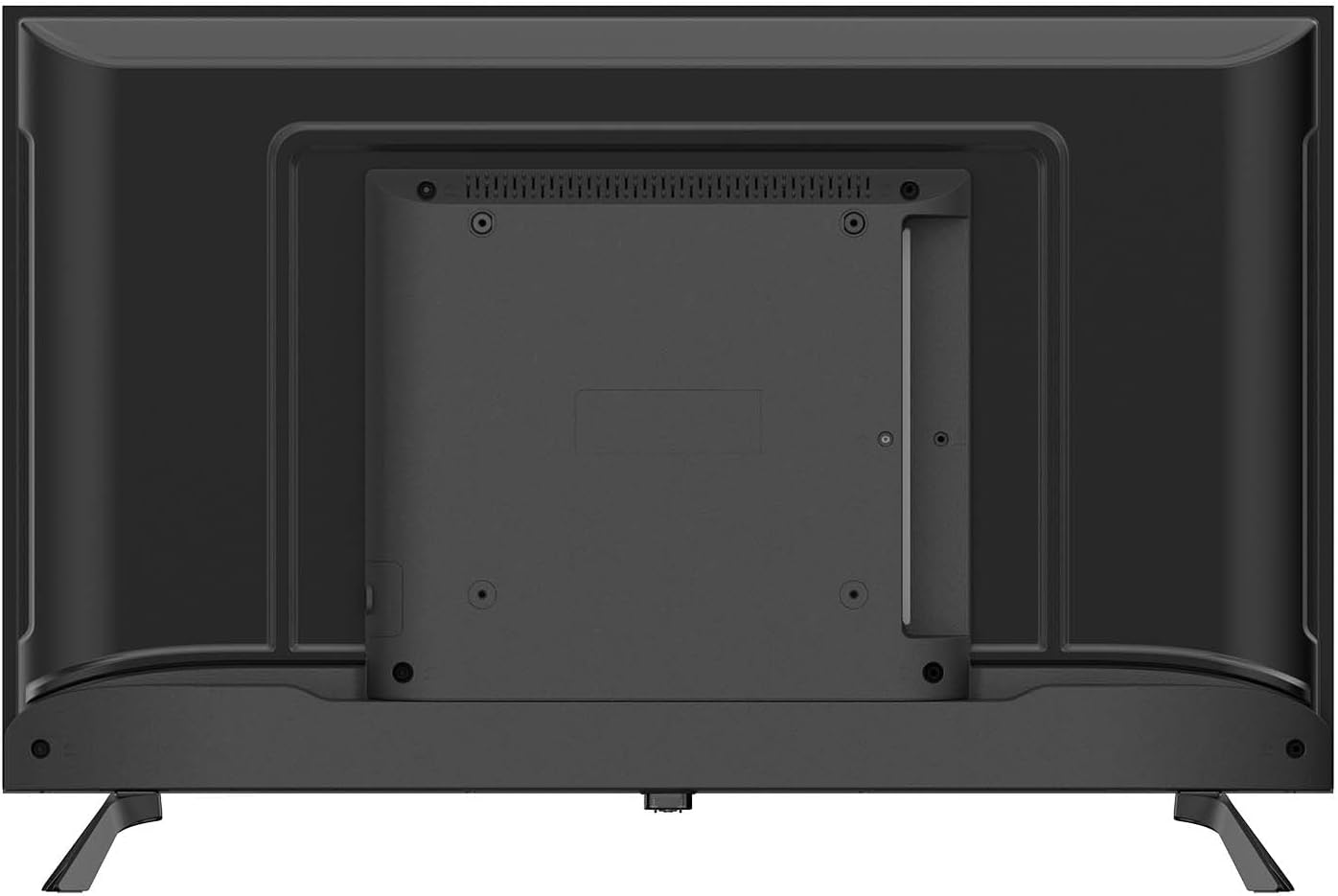
3.3 Konnessjoni tal-Periferali
Qabbad l-apparati esterni tiegħek mat-TV billi tuża l-portijiet disponibbli:
- HDMI (x2): Għall-konnessjoni ta' apparati ta' definizzjoni għolja bħal Blu-ray players, consoles tal-logħob, jew set-top boxes.
- USB 2.0 (x2): Għall-konnessjoni ta' apparati tal-ħażna USB biex tilgħab il-midja files jew għal aġġornamenti tas-softwer.
- RJ-45 (Ethernet) (x1): Għal konnessjoni tal-internet bil-fili.
- CI+ (Common Interface Plus) (x1): For inserting a CAM (Conditional Access Module) and smart card to access encrypted digital TV services.
- AV In (x1): Għall-konnessjoni ta' apparati eqdem bl-użu ta' kejbils tal-vidjo kompost u awdjo stereo.
- Optical SPDIF Output (x1): For connecting to an external audio system or soundbar for digital audio output.
- Antenna Input (DVB-C/T/T2/S2): For connecting an aerial or satellite dish for digital television reception.

3.4 Konnessjoni tal-Enerġija
After connecting all desired peripherals, plug the power cable into the TV's power input, then plug the other end into a suitable wall outlet. The TV is designed for 240 Volt power supply.
4. Initial Setup and Operating
4.1 L-Ewwel Tixgħel
When you power on the TV for the first time, a setup wizard will guide you through the initial configuration:
- Għażla tal-Lingwa: Agħżel il-lingwa preferuta tiegħek għall-menù tat-TV.
- Konnessjoni tan-Netwerk: Connect to your home network via Wi-Fi (2.4G or 5G) or Ethernet. Follow the on-screen prompts to enter your Wi-Fi password if necessary.
- Scan tal-Kanal: The TV will automatically scan for available digital channels (DVB-C/T/T2/S2). This may take several minutes.
- Żona tal-Ħin u Data: Issettja ż-żona tal-ħin u d-data korretti.
4.2 Operazzjoni Bażika
- Power On/Off: Agħfas il-buttuna tal-qawwa fuq il-kontroll remot jew fuq it-TV innifsu.
- Għażla tal-Kanal: Use the 'CH+' / 'CH-' buttons to change channels or enter channel numbers directly.
- Kontroll tal-Volum: Use the 'VOL+' / 'VOL-' buttons to adjust the volume.
- Sors tad-dħul: Press the 'SOURCE' button on the remote to select between HDMI, AV, TV, or other connected inputs.
- Navigazzjoni fil-menu: Use the arrow keys and 'OK' button on the remote to navigate through the TV's menus and settings.
4.3 Smart TV Features (Tizen OS 8.0)
Your Blaupunkt Smart TV runs on Tizen OS 8.0, providing access to a variety of smart features:
- Applikazzjonijiet: Access pre-installed apps like Netflix and YouTube. You can download additional apps from the Tizen app store.
- Mirror tal-iskrin: Share content from your compatible smartphone or tablet directly to the TV screen.
- Bluetooth 5.1: Connect Bluetooth-enabled devices such as headphones, soundbars, or game controllers wirelessly.
- AirPlay: AirPlay functionality will be available after November 2025, allowing seamless streaming from Apple devices.
- EPG (Gwida tal-Programm Elettroniku): View program schedules for digital channels.
- Lock tal-Ġenituri: Set restrictions on channels or programs based on age ratings.
- Timer ta 'l-Irqad: Configure the TV to automatically turn off after a set period.
4.4 Kontroll mill-Bogħod
The included infrared remote control allows full control over your TV's functions. Ensure there are no obstructions between the remote and the TV's IR sensor. Insert two AAA batteries (not included) into the remote control, observing the correct polarity.
5. Manutenzjoni
5.1 Tindif tat-TV
- Skrin: Imsaħ l-iskrin bil-mod b'ċarruta ratba u mingħajr suf. Għal marki persistenti, nixxef ftit.ampLaħlaħ id-drapp bl-ilma jew b'prodott speċjalizzat għat-tindif tal-iskrin (tisprejjax direttament fuq l-iskrin).
- Casing: Uża drapp artab u niexef biex timsaħ it-TV.asing. Avoid using abrasive cleaners, waxes, or solvents.
- Dejjem aqla’ t-TV mill-plagg tal-elettriku qabel ma tnaddaf.
5.2 Ħażna
Jekk teħtieġ li taħżen it-TV għal perjodu twil ta' żmien:
- Unplug the TV and disconnect all cables.
- Remove the stand if possible and pack it separately.
- Store the TV in its original packaging in a dry, dust-free environment.
- Evita temperaturi u umdità estremi.
6 Issolvi l-problemi
Jekk tiltaqa' ma' problemi bit-TV tiegħek, irreferi għall-problemi u s-soluzzjonijiet komuni li ġejjin:
| Problema | Soluzzjoni Possibbli |
|---|---|
| Ebda qawwa | Iċċekkja jekk il-kejbil tal-enerġija huwiex imdaħħal sew fit-TV u fis-sokit tal-ħajt. Ipprova sokit differenti. |
| L-ebda stampa, iżda l-ħoss huwa preżenti | Kun żgur li s-sors tad-dħul korrett huwa magħżul. Iċċekkja l-konnessjonijiet tal-kejbil ma' apparati esterni. |
| L-ebda ħoss, iżda l-istampa hija preżenti | Check the volume level and mute status. Ensure external audio systems are correctly connected and powered on. |
| Il-kontroll mill-bogħod ma jaħdimx | Iċċekkja u ibdel il-batteriji. Kun żgur li m'hemm l-ebda ostaklu bejn ir-remote u s-senser IR tat-TV. |
| Ma tistax tikkonnettja mal-Wi-Fi | Kun żgur li r-router tal-Wi-Fi tiegħek huwa mixgħul u jaħdem. Erġa' daħħal il-password tal-Wi-Fi bir-reqqa. Ipprova erġa' ibda kemm it-TV kif ukoll ir-router. |
| Kwalità fqira tal-istampa | Check antenna/cable connections. Adjust picture settings (brightness, contrast, sharpness). |
Jekk il-problema tippersisti wara li tipprova dawn is-soluzzjonijiet, jekk jogħġbok ikkuntattja l-appoġġ għall-klijenti.
7. Speċifikazzjonijiet
Detailed technical specifications for the Blaupunkt 32HCT6000S Smart TV:
| Karatteristika | Speċifikazzjoni |
|---|---|
| Mudell | 32HCT6000S |
| Daqs tal-Iskrin | 32 pulzieri |
| Teknoloġija tal-Wiri | LED HD |
| Riżoluzzjoni | 1366 x 768 pixels (720p) |
| Proporzjon ta' l-aspett | 16:9 |
| Riffriskar Rata | 60 Hz |
| ViewIng Angolu | 178° |
| Luminożità tal-Panew | 200–240 cd/m² |
| Sistema Operattiva | Tizen OS 8.0 |
| Output tal-Ħoss | 2 x 6 W |
| Teknoloġija Awdjo | Dolby Digital Plus, NICAM/Stereo |
| Bluetooth | 5.1 (and compatible older versions) |
| Wi-Fi | IEEE 802.11 ac/b/g/n, 2T2R, 2.4G + 5G |
| Portijiet HDMI | 2 |
| Portijiet USB 2.0 | 2 |
| Ethernet (RJ-45) | 1 |
| Slot CI+ | 1 |
| AV Fil | 1 |
| Ħruġ SPDIF Ottiku | Iva |
| Tuner | DVB-C / T / T2 / S2 |
| Power Consumption (in use) | 26 W |
| Klassi tal-Enerġija | E |
| Enerġija Stand-by | ≤ 0.5 W |
| Dimensions with Stand (W x D x H) | 720 x 198 x 478 mm |
| Dimensjonijiet mingħajr Stand (W x D x H) | 720 x 82 x 424 mm |
| Piż Nett | 4.0 kg |
| Kompatibilità tal-Immuntar | VESA compatible (Mounting on table) |
8. Garanzija u Appoġġ
Your Blaupunkt Smart TV is covered by a manufacturer's warranty. Please refer to the warranty card included in your package or visit the official Blaupunkt websit għal termini u kundizzjonijiet dettaljati tal-garanzija.
For technical support, troubleshooting assistance, or service inquiries, please contact Blaupunkt customer service. Contact information can typically be found on the manufacturer's webis-sit jew fid-dokumentazzjoni tal-garanzija tiegħek.


