1. Introduzzjoni
Welcome to the user manual for your new Motorola G57 Power 5G smartphone. This guide provides essential information to help you set up, operate, maintain, and troubleshoot your device. Please read this manual thoroughly to ensure optimal performance and longevity of your smartphone.
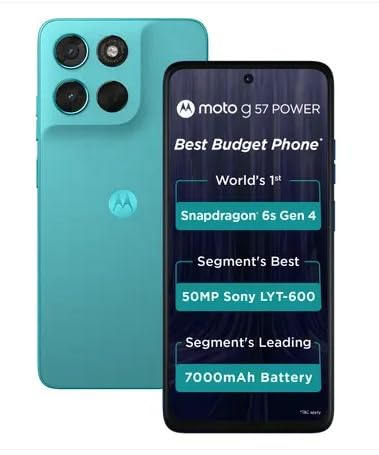
Immaġni 1.1: Minn quddiem u minn wara view of the Motorola G57 Power 5G.
2. Setup
2.1 Unboxing
Malli tiftaħ il-pakkett, kun żgur li l-komponenti kollha huma preżenti:
- Motorola G57 Power 5G Smartphone
- Ċarġer (jista' jvarja skont ir-reġjun)
- Cable USB
- Għodda tal-Ejector tat-Trej tas-SIM
- Gwida Quick Start
2.2 Installazzjoni tal-Karta SIM
- Sib it-trej tas-SIM fuq il-ġenb tat-tagħmir tiegħek.
- Daħħal l-għodda tal-ejecter tat-trej tas-SIM fit-toqba ż-żgħira ħdejn it-trej u agħfas bil-mod sakemm it-trej joħroġ 'il barra.
- Place your Nano-SIM card(s) and/or microSD card (if supported) into the tray with the gold contacts facing down. Ensure they are correctly seated.
- Erġa' daħħal it-trej fit-telefon bir-reqqa sakemm tikklikkja f'postu.
2.3 L-Ewwel Tixgħil u s-Setup
- Agħfas u żomm il-buttuna Power sakemm jidher il-logo Motorola.
- Segwi l-istruzzjonijiet fuq l-iskrin biex tagħżel il-lingwa tiegħek, tikkonnettja ma' netwerk Wi-Fi, u idħol bil-kont Google tiegħek.
- You will be guided through setting up security features like fingerprint unlock or face unlock, and data transfer from an old device.
3. Tħaddim tat-Tagħmir Tiegħek
3.1 Wiri u Navigazzjoni
The Motorola G57 Power 5G features a 6.72-inch FHD+ display with a 120Hz refresh rate for smooth visuals and up to 1050 nits peak brightness for clear outdoor visibility. Navigation is primarily through Android's intuitive gesture system or traditional on-screen buttons, configurable in settings.
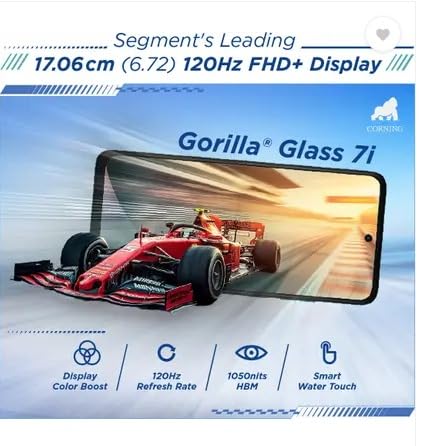
Image 3.1: The Motorola G57 Power 5G's 120Hz FHD+ display.
3.2 Użu tal-Kamera
L-apparat tiegħek huwa mgħammar b'sistema ta' kamera versatili:
- Kamera Prinċipali: 50MP LYT-600 sensor for high-resolution photos.
- Kamera Ultra Wide: 8MP biex taqbad xeni aktar wesgħin.
- Kamera ta' quddiem: 8MP għal selfies u sejħiet bil-vidjo.
Utilize the camera app to switch between modes (Photo, Portrait, Video, Pro, etc.), adjust settings, and apply filters. The integrated moto ai features enhance image processing for improved results.

Image 3.2: Rear camera module of the Motorola G57 Power 5G.
3.3 Ġestjoni tal-batterija
The Motorola G57 Power 5G features a large 7000mAh silicon carbon battery, designed for extended usage. It supports 33W TurboPower fast charging. To optimize battery life:
- Aġġusta l-luminożità tal-iskrin.
- Iddiżattiva l-karatteristiċi tal-konnettività mhux użati (Wi-Fi, Bluetooth, GPS).
- Agħlaq l-applikazzjonijiet fl-isfond.
- Utilize battery saver modes.
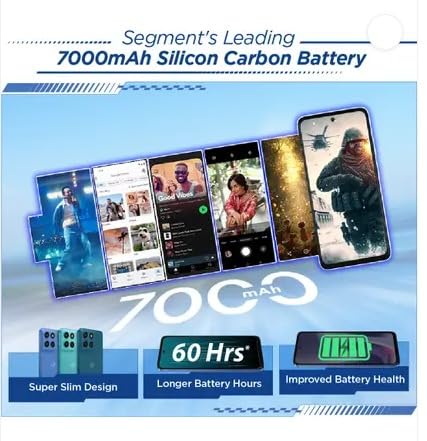
Image 3.3: Visual representation of the 7000mAh battery.
3.4 Konnettività
Your device supports 5G cellular networks for high-speed data. It also includes Bluetooth for connecting to accessories and Wi-Fi for internet access. Manage these connections through the Quick Settings panel or the Settings app.
3.5 Softwer u Aġġornamenti
The Motorola G57 Power 5G runs on Android 16, with a promised upgrade to Android 17 and three years of security updates. Regularly check for and install software updates to ensure your device has the latest features and security patches. Navigate to Settings> Sistema> Aġġornamenti tas-sistema.
4. Manutenzjoni
4.1 Tindif tal-Apparat Tiegħek
To clean your phone, use a soft, lint-free cloth. Avoid abrasive materials or harsh chemicals. For the screen, a screen cleaner specifically designed for electronics can be used. Ensure no liquids enter ports.
4.2 Manutenzjoni tas-Softwer
- Regularly update your operating system and applications.
- Clear cache and data for apps that consume excessive storage.
- Perform periodic backups of your important data.
4.3 Ġestjoni tal-Ħażna
The device comes with 128GB of internal storage. To manage storage effectively:
- Ħassar bla bżonn files u apps.
- Move photos and videos to cloud storage or an external device.
- Utilize the 'Files' app or 'Storage' section in settings to identify and manage large files.
5 Issolvi l-problemi
5.1 Kwistjonijiet Komuni u Soluzzjonijiet
- Apparat mhux mixgħul: Kun żgur li l-batterija hija ċċarġjata. Qabbad mal-ċarġer għal mill-inqas 15 minuti, imbagħad ipprova ixgħelha.
- L-apps jiġġarraf jew jiffriża: Close the app and reopen it. If the issue persists, clear the app's cache and data (Settings > Apps > [App Name] > Storage > Clear cache/Clear data).
- Konnettività tan-netwerk fqira: Check if airplane mode is off. Restart your device. Verify your SIM card is properly inserted.
- Prestazzjoni bil-mod: Close background apps, clear storage, and restart your device.
5.2 Irrisettja l-Fabbrika
A factory reset will erase all data from your phone and restore it to its original factory settings. This can resolve persistent software issues but should be used as a last resort after backing up all important data.
- Mur fuq Settings > Sistema > Għażliet ta' Reset.
- Agħżel Ħassar id-dejta kollha (reset tal-fabbrika).
- Ikkonferma d-deċiżjoni tiegħek u daħħal il-PIN/password tiegħek jekk tintalab.
6. Speċifikazzjonijiet
| Karatteristika | Speċifikazzjoni |
|---|---|
| Mudell | Motorola G57 Power 5G |
| Sistema Operattiva | Android 16 (jista' jiġi aġġornat għal Android 17) |
| Proċessur | Snapdragon 6s Ġenerazzjoni 4 |
| RAM | 8 GB LPDDR4X |
| Ħażna Interna | 128 GB UFS 2.2 |
| Wiri | 6.72-inch FHD+ LCD, 120Hz refresh rate, up to 1050 nits brightness |
| Kamera ta' wara | 50MP LYT-600 (Main) + 8MP (Ultrawide) |
| Kamera ta' Quddiem | 8MP |
| Batterija | 7000mAh Silicon Carbon, 33W TurboPower charging |
| Konnettività | 5G, Bluetooth, Wi-Fi |
| Dimensjonijiet (L x W x H) | 16.62 x 7.65 x 0.86 ċm |
| Piż | 210.6 g |
| Durabilità | IP64 dust and splash resistance, MIL-STD 810H tested |
7. Informazzjoni dwar is-Sigurtà u r-Regolamentazzjoni
Please refer to the separate safety and regulatory guide included with your device for important information regarding safe usage, disposal, and compliance with local regulations. Always use approved accessories to prevent damage or injury.
8. Garanzija u Appoġġ
Your Motorola G57 Power 5G comes with a limited warranty. For detailed warranty terms, conditions, and to register your product, please visit the official Motorola support website. For technical assistance or service, contact Motorola customer support.
Tista' ssib aktar informazzjoni u riżorsi ta' appoġġ fuq Ħanut Motorola fuq Amazon.


