Introduzzjoni
This manual provides comprehensive instructions for the setup, operation, maintenance, and troubleshooting of your Kreo Swarm 65 Wireless Mechanical Gaming Keyboard. Please read this manual carefully before using the product to ensure optimal performance and longevity.
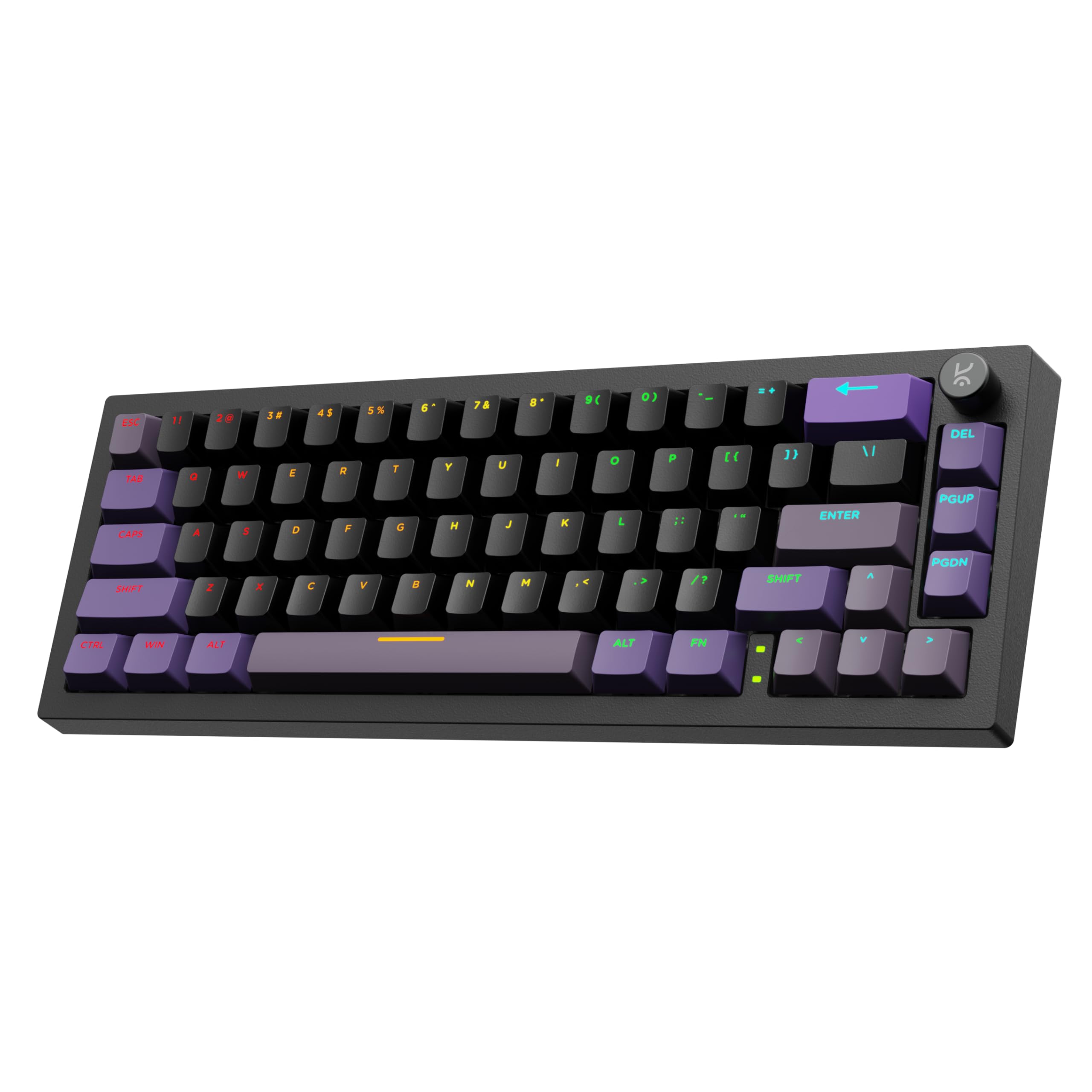
Image: The Kreo Swarm 65 Wireless Mechanical Gaming Keyboard, showcasing its compact 65% layout and RGB lighting.
Kontenut tal-Pakkett
- Kreo Swarm 65 Wireless Mechanical Gaming Keyboard
- USB-C Cable
- 2.4GHz Wireless Dongle
- Keycap Puller
- Iswiċċ Puller
- Manwal għall-Utent (dan id-dokument)
Prodott Overview
The Kreo Swarm 65 is a versatile mechanical keyboard designed for gaming and productivity, featuring multiple connectivity options and customizable components.
Karatteristiċi ewlenin:
- Konnettività Tri-Modalità: Jappoġġja konnessjonijiet Bluetooth 5.0, mingħajr fili ta' 2.4GHz, u bil-fili USB-C.
- Gasket-Mounted Design: Provides cushioned keystrokes and improved acoustics.
- 5-Layer Sound Dampening: Reduces case ping and stabilizes typing sound for a quieter experience.
- Hot-Swap PCB: Compatible with 3-pin and 5-pin mechanical switches without soldering.
- Ċwievet Doubleshot PBT: Durable keycaps with a Cherry profile for clear RGB diffusion.
- Tqassim Kompatt ta' 65%: A 67-key layout that includes arrow keys and navigation buttons.
- Customizable Metal Volume Knob: For convenient audio control.
- Per-Key RGB Lighting: North-facing LEDs with software control for personalized illumination.
- Ħajja twila tal-batterija: 4000mAh battery offering up to 200 hours of use (RGB off).
- Kompatibilità bejn il-Pjattaformi: Supports Windows, macOS, Linux, and Android.

Image: An exploded diagram illustrating the internal layers of the Kreo Swarm 65 keyboard, including Lucidus Keycaps, Upper Cover, Kreo Starling Switches, Polycarbonate Plate, Switch Plate Foam, Switch Film Sheets, PCB, PCB Foam, Silicone Pad, and Bottom Shell.

Image: A close-up showing the doubleshot PBT keycaps with a Cherry profile, highlighting their construction for durability and light transmission.

Image: A visual comparison demonstrating the difference between a doubleshot PBT shadowless keycap, which provides brighter and more even illumination, and a normal keycap, which may appear dimmer near rounded edges.
Setup
1. Iċċarġjar tat-Tastiera
Before first use, connect the keyboard to a USB power source using the provided USB-C cable. The charging indicator will show the battery status.
2. Tqabbad it-Tastiera
The Kreo Swarm 65 supports three connection modes:
- Modalità bil-fili USB-C: Connect the keyboard directly to your device using the USB-C cable. The keyboard will automatically switch to wired mode.
- Modalità bla fili 2.4GHz:
- Locate the 2.4GHz wireless dongle. It is stored in the dedicated dongle slot on the keyboard's underside.
- Daħħal il-dongle f'port USB disponibbli fuq il-kompjuter tiegħek.
- Switch the keyboard's mode selector to 2.4GHz. The keyboard should connect automatically.
- Bluetooth 5.0 Wireless Mode:
- Switch the keyboard's mode selector to Bluetooth.
- Fuq l-apparat tiegħek (PC, laptop, tablet, smartphone), attiva l-Bluetooth u fittex apparati ġodda.
- Select "Kreo Swarm 65" from the list of available devices to pair.
- The keyboard can store up to 3 paired Bluetooth devices. Use the dedicated shortcut keys (e.g., Fn + 1, Fn + 2, Fn + 3) to switch between them.

Image: The Kreo Swarm 65 keyboard connected via USB, 2.4GHz wireless, and Bluetooth to a laptop, desktop, and tablet, demonstrating its tri-mode connectivity and compatibility with Mac/Windows software.

Immaġni: Close-up view of the dedicated dongle slot on the underside of the Kreo Swarm 65 keyboard, designed for secure storage of the 2.4GHz wireless receiver.
Istruzzjonijiet Operattivi
1. Funzjonijiet Bażiċi tat-Tastiera
The Kreo Swarm 65 features a compact 65% layout. Standard keys function as labeled. For secondary functions (e.g., F-keys, media controls), use the Fn key in combination with the corresponding key.
2. Kontroll tad-Dawl RGB
The keyboard features per-key RGB lighting with multiple customizable modes. Use the following shortcuts or the dedicated software for control:
- Fn + \: Iċċikla bejn l-effetti tad-dawl RGB.
- Fn + Tasti tal-Vleġġa: Aġġusta l-luminożità u l-veloċità tal-effetti.
- Kontroll tas-Softwer: Download the Kreo software from the official website to customize lighting, macros, and key assignments.
3. Customizable Metal Volume Knob
The metal knob located on the top right of the keyboard provides convenient control:
- Dawwar: Aġġusta l-volum 'il fuq jew 'l isfel.
- Agħfas: Ixekkel jew iwaqqaf l-awdjo.
- Personalizzazzjoni tas-softwer: The knob's functions can be remapped using the Kreo software.

Image: A close-up of the customizable metal volume knob on the Kreo Swarm 65 keyboard, indicating its function can be tailored to user workflow.
4. Cross-Platform Compatibility
The keyboard supports both Windows and macOS layouts. Use the dedicated shortcut (e.g., fn + A għall-Windows, Fn + S for macOS, consult the keyboard's specific key legends if different) to switch between operating system layouts. It is also plug-and-play compatible with Linux and Android devices.
Manutenzjoni
1. Tindif tat-Tastiera
- Skonnettja t-tastiera mis-sorsi kollha tal-enerġija qabel ma tnaddafha.
- Uża drapp ratba u mingħajr ħelu ftit dampImlaħlaħ bl-ilma jew b'soluzzjoni ħafifa tat-tindif biex timsaħ il-keycaps u x-chassis.
- Għat-trab u l-fdalijiet bejn il-keycaps, uża arja kkompressata.
- To clean under the keycaps, use the provided keycap puller to carefully remove them.
2. Sostituzzjoni tal-Keycaps u s-Swiċċijiet
The Kreo Swarm 65 features a hot-swap PCB, allowing for easy replacement of switches without soldering.
- Sostituzzjoni tal-Keycap: Use the provided keycap puller to gently remove keycaps. Align new keycaps and press them firmly onto the switch stem.
- Sostituzzjoni tas-Swiċċ:
- First, remove the keycap using the keycap puller.
- Use the provided switch puller to grip the top and bottom clips of the switch.
- Gently pull the switch straight up to remove it from the PCB.
- Allinja l-pinnijiet tas-swiċċ il-ġdid bi 3 pinnijiet jew b'5 pinnijiet mat-toqob fuq il-PCB.
- Agħfas is-swiċċ il-ġdid sew f'postu sakemm jikklikkja. Kun żgur li l-labar mhumiex mgħawġa.

Image: A close-up of the Kreo Swarm 65's 5-pin hot-swap PCB, showing the sockets ready for switch installation, indicating unlimited switch compatibility.
Issolvi l-problemi
| Problema | Kawża Possibbli | Soluzzjoni |
|---|---|---|
| It-tastiera ma tirrispondix fil-modalità mingħajr fili. | Low battery, incorrect mode, dongle not connected, Bluetooth not paired. | Charge the keyboard. Ensure the mode switch is set correctly (2.4GHz or Bluetooth). Re-insert the 2.4GHz dongle. Re-pair Bluetooth. Try wired mode to confirm keyboard functionality. |
| RGB lighting not working or dim. | Brightness set too low, lighting effect turned off, software issue. | Adjust brightness using Fn + Arrow Up. Cycle through effects using Fn + \. Check Kreo software settings. |
| Iċ-ċwievet mhux qed jirreġistraw jew qed jittajpjaw darbtejn. | Faulty switch, debris under keycap/switch, software conflict. | Remove keycap and clean around the switch. If issue persists, replace the switch. Update keyboard firmware/software. |
| Cannot switch between devices (Bluetooth). | Device not properly paired, incorrect shortcut used. | Ensure all devices are paired correctly. Use Fn + 1/2/3 to switch. Re-pair if necessary. |
Speċifikazzjonijiet
| Brand | Kreo |
| Isem tal-Mudell | Swarm 65 Starling |
| Numru tal-Mudell | KM3R651BK |
| Teknoloġija tal-Konnettività | Bluetooth 5.0, Wireless 2.4GHz, USB-C bil-wajer |
| Deskrizzjoni tat-Tastiera | Mekkaniċi |
| Tip ta' Swiċċ | Starling Linear (also compatible with GTMX Tactile) |
| Materjal Keycap | PBT b'żewġ shots |
| Tqassim | 65% (67-ċavetta) |
| Kapaċità tal-batterija | 4000mAh |
| Battery Life (RGB off) | Sa 200 sigħat |
| Ir-Rata tal-Votazzjoni | 1000Hz (Wired & Wireless) |
| Apparati Kompatibbli | PC, Laptop, Tablet, Smartphone |
| Sistemi Operattivi | Windows, macOS, Linux, Android |
| Dimensjonijiet tal-Prodott | 25 x 14 x 3 ċm |
| Piż tal-oġġett | 500 g |
| Pajjiż ta' Oriġini | Iċ-Ċina |
Garanzija u Appoġġ
For warranty information and technical support, please refer to the official Kreo website or contact customer service using the details below:
- Manifattur: Kreo, Koramangala 4-B Block, Bengaluru, Karnataka 560034
- Telefon: 9611507877
- Email: help@kreo-tech.com
Jekk jogħġbok żomm il-prova tax-xiri tiegħek għal pretensjonijiet ta' garanzija.


