1. Introduzzjoni
This manual provides detailed instructions for the installation, operation, and maintenance of your DEWENWILS 300W Wi-Fi Low Voltage Transformer. This device is designed to convert 120V AC household current to 12V or 14V AC low voltage, suitable for landscape lighting systems. It features three independent control zones, Wi-Fi connectivity for app and voice control, and various timer functions.
2. Informazzjoni dwar is-Sigurtà
- Sigurtà Elettrika: Always disconnect power before installing or servicing the transformer. Installation should be performed by a qualified electrician or in accordance with local electrical codes.
- Voltage Kompatibilità: Tiżgura l-input voltage matches your power supply (120V AC).
- Kapaċità tat-Tagħbija: Do not exceed the maximum 300W output capacity of the transformer. Overloading can cause damage and pose a fire hazard.
- Protezzjoni ta' tagħbija żejda: The transformer is equipped with over-current and overload protection. If the current threshold is exceeded, the unit will automatically cut power to prevent damage.
- Espożizzjoni għall-Ilma: While the unit is designed for indoor/outdoor use and is waterproof, ensure all connections are secure and protected from direct water spray or submersion.
- L-ertjar: Ensure the transformer is properly grounded according to local electrical codes.
3. Kontenut tal-Pakkett
- DEWENWILS 300W Wi-Fi Volum Baxxtage Transformer (Model: HSLT05A)
4. Prodott Aktarview
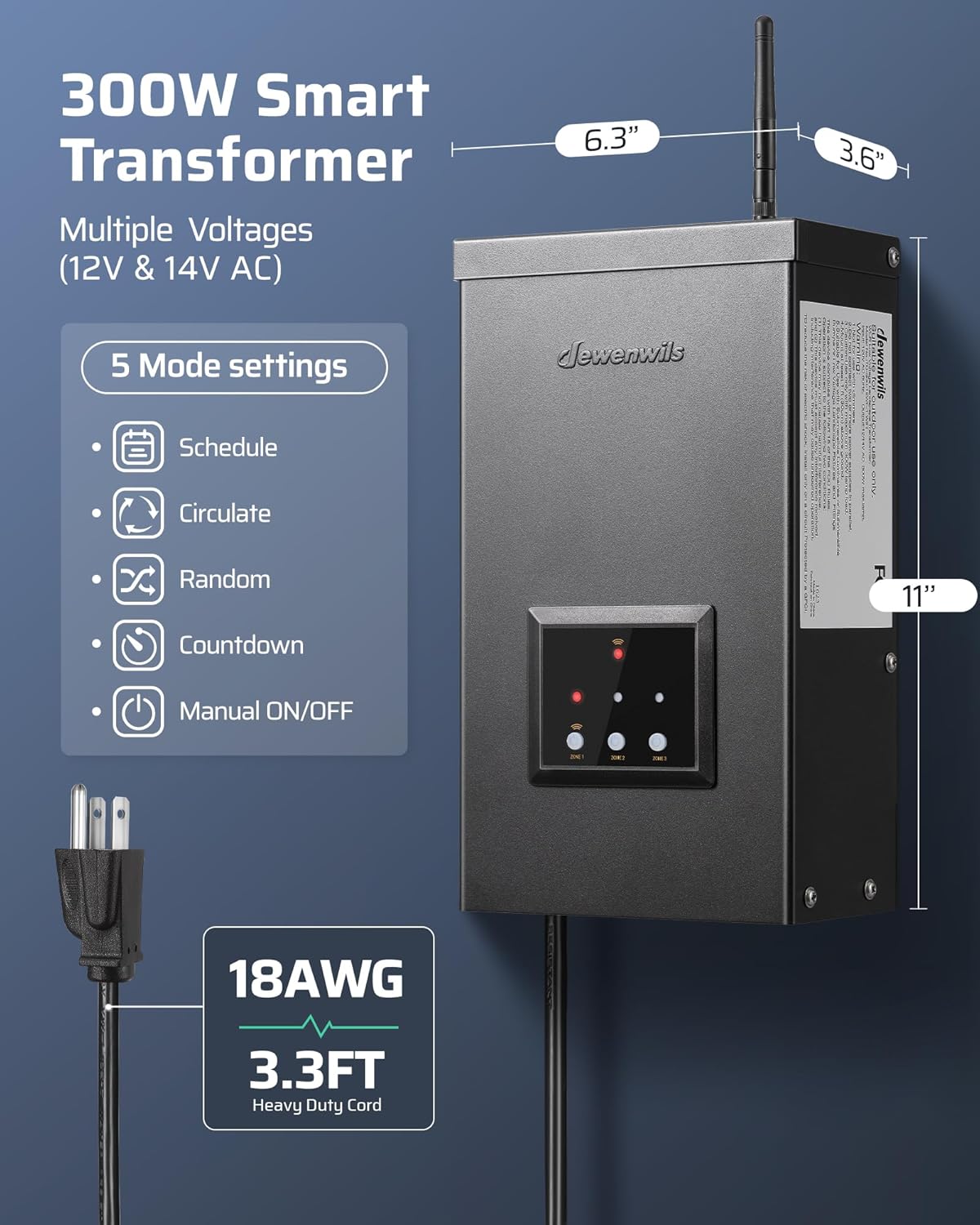
The DEWENWILS 300W Wi-Fi Low Voltage Transformer is housed in a durable, weatherproof metal casing. It features a control panel with indicator lights and buttons for manual operation and zone selection. An external antenna is provided for Wi-Fi connectivity.

5. Installazzjoni
5.1 Immuntar
- Select a suitable location for wall mounting. The transformer is designed for both indoor (e.g., garages) and outdoor (e.g., patios, gardens) installation.
- Ensure the location allows for proper ventilation and access to the power outlet and wiring terminals.
- Securely mount the transformer to a sturdy surface using appropriate hardware.
5.2 Wajers
The transformer features three independent output zones, allowing for separate control of different landscape lighting systems. Each zone can be set to either 12V AC or 14V AC output.

- Before Wiring: Ensure the transformer is unplugged from the power source.
- Connect Landscape Lights: Qabbad il-volum baxx tiegħektage landscape lighting wires to the appropriate terminals for each zone (COM, 12V, or 14V).
- Voltage Għażla: Use the 'Zone' button on the control panel or the app to select between 12V AC and 14V AC output for each zone. 12V is suitable for closer halogen installations, while 14V is recommended for LED fixtures or longer wire runs.
- Kwalità tal-Wajer: The transformer is designed for use with high-quality, waterproof wire, typically 100% pure copper for optimal conductivity and reduced heat.


5.3 Konnessjoni tal-Enerġija
Once wiring is complete, plug the transformer into a standard 120V AC grounded outlet.
6. App Setup & Wi-Fi Connection
The DEWENWILS transformer can be controlled wirelessly via the DEWENWILS App or Smart Life App.
6.1 App Download u Installazzjoni
- Download the "DEWENWILS App" or "Smart Life App" from your smartphone's app store (iOS or Android).
- Irreġistra jew idħol fil-kont tiegħek.
6.2 Tqabbil tal-Wi-Fi
- Importanti: It is recommended to pair the device to your Wi-Fi network before permanent installation and wiring. Bring the transformer close to your Wi-Fi router for initial setup.
- Kun żgur li n-netwerk Wi-Fi tiegħek huwa 2.4GHz biss. The transformer does not support 5GHz networks.
- In the app, press the "+" button to add a new device. The app should auto-pair the Wi-Fi landscape transformer. Follow the on-screen instructions to complete the connection.
- Once connected, you can configure settings and control the transformer from anywhere.
6.3 Integrazzjoni tal-Kontroll tal-Vuċi
The transformer is compatible with Alexa and Google Assistant for voice commands.
- Link your DEWENWILS or Smart Life account with your Alexa or Google Home app.
- Follow the instructions within the Alexa or Google Home app to discover and control your landscape lighting.


7. Istruzzjonijiet Operattivi
7.1 Kontroll Manwali
The control panel on the transformer allows for basic manual operation:
- Zone Buttons: Press the 'Zone' button to cycle through and select the desired output voltage (12V/14V AC) for each of the three independent zones.
- Manwal ON/OFF: Use the dedicated buttons on the control panel for immediate manual control of the lighting.
7.2 App Control and Timer Functions
The DEWENWILS App provides comprehensive control and scheduling options:
- Kontroll Indipendenti taż-Żona: Control each of the three zones separately, allowing for customized lighting schedules and settings for different areas of your landscape.
- Modalità Skeda: Set specific ON/OFF times for your lights. You can set individual schedules for each zone and repeat them weekly.
- Circulate Mode: Program your landscape lights to turn ON/OFF repeatedly during a set period.
- Modalità każwali: This mode switches outdoor landscape lights ON and OFF randomly, which can be used to simulate occupancy when you are away.
- Modalità Countdown: Set a countdown timer for the lights to turn ON or OFF after a specified duration.
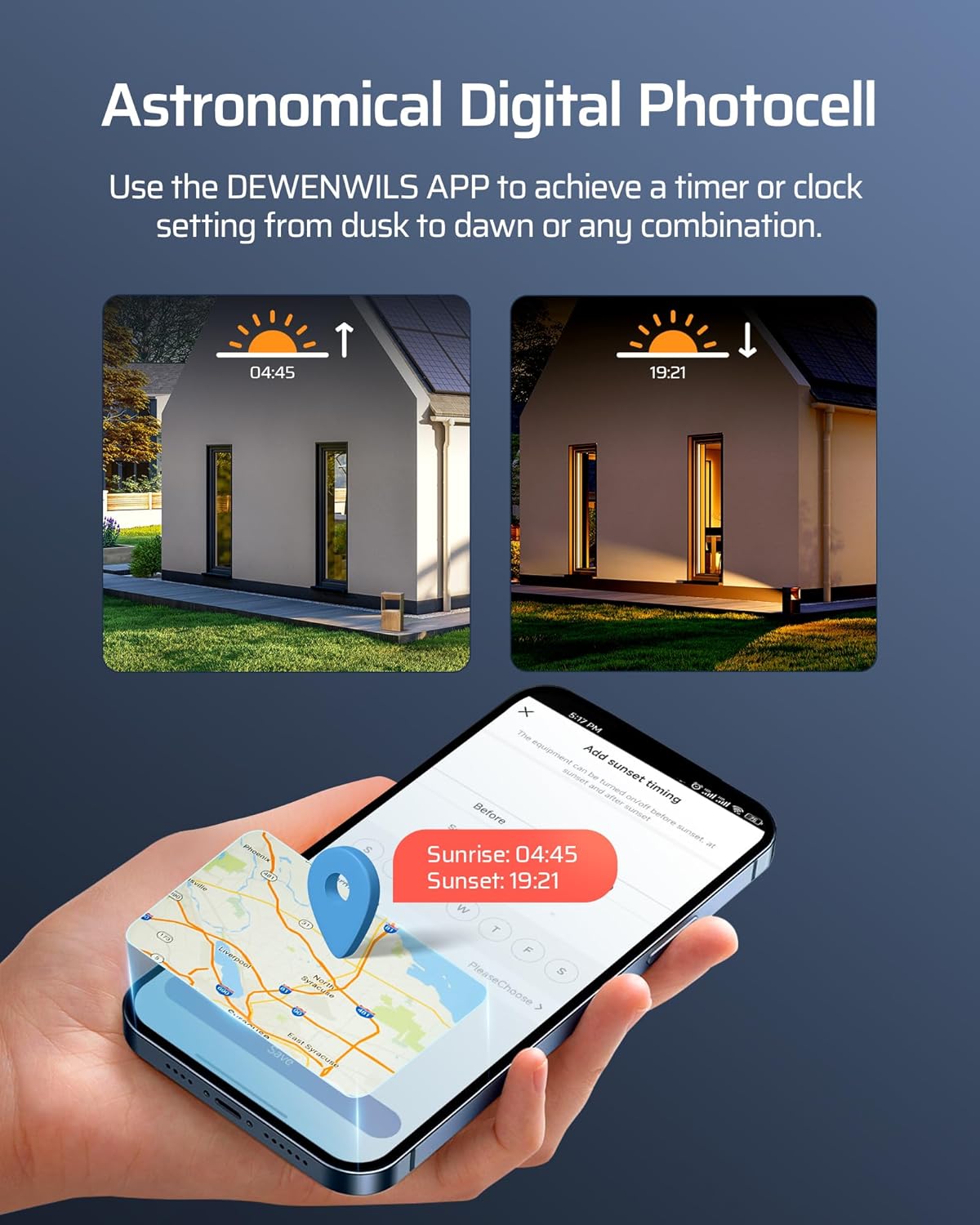
- Modalità Astronomika: Utilize the app's astronomical timing function to automatically turn lights ON at dusk and OFF at dawn based on your geographical location.


7.3 Funzjoni tal-Memorja
The transformer includes a memory function. In the event of a power or internet outage, your selected settings and modes are stored on a cloud server, ensuring no data loss and automatic restoration once power/internet is re-established.
7.4 Power Statistics
The DEWENWILS App allows you to view electricity consumption statistics for your landscape lighting system, helping you monitor energy usage.

8. Manutenzjoni
- Tindif: Periodically clean the exterior of the transformer with a soft, damp drapp. Tużax tindif jew solventi li joborxu.
- Kontroll tal-Konnessjoni: Spezzjona regolarment il-konnessjonijiet kollha tal-wajers biex tiżgura li huma sikuri u ħielsa mill-korrużjoni.
- Kura tal-antenna: The Wi-Fi antenna is removable. If removing for installation, ensure it is reattached securely. Handle with care to prevent damage.
- Protezzjoni tat-Temp: Although weatherproof, ensure the unit is not submerged in water and that its enclosure remains sealed.

9 Issolvi l-problemi
| Problema | Kawża Possibbli | Soluzzjoni |
|---|---|---|
| Transformer not powering on. | No power to the outlet; faulty power cord; internal issue. | Check the power outlet with another device. Inspect the power cord for damage. If issues persist, contact support. |
| Id-dwal mhux jixegħlu. | Loose wiring connections; incorrect voltage selection; overload protection activated; faulty lights. | Check all wiring connections. Verify correct 12V/14V output selection for the zone. Reduce load if overload protection is active. Test lights individually. |
| Wi-Fi connection fails or disconnects. | Incorrect Wi-Fi band (5GHz); weak Wi-Fi signal; incorrect password; network changes. | Ensure your router is broadcasting a 2.4GHz Wi-Fi signal. Move the transformer closer to the router during setup. Double-check Wi-Fi password. If network name changed, you may need to reset the transformer and re-pair. |
| Overload protection frequently activates. | Wat totalitage of connected lights exceeds 300W. | Ikkalkula l-wat totalitage of your landscape lights. Ensure it does not exceed 300W. Reduce the number of lights or use lower wattage bozoz. |
10. Speċifikazzjonijiet
- Numru tal-Mudell: HSLT05A
- Input Voltage: 120V AC
- Ħruġ Voltage: 12V AC / 14V AC (selectable per zone)
- Ħruġ ta 'Qawwa Massima: 300W
- Numru ta' Żoni: 3 Independent Outputs
- Frekwenza tal-Wi-Fi: 2.4GHz (mhux kompatibbli ma' 5GHz)
- Kompatibilità: DEWENWILS App, Smart Life App, Alexa, Google Assistant
- Materjal: All-metal, weatherproof housing (SPCC Steel)
- Protezzjoni: Over-current, Overload, Short Circuit Protection
- Ċertifikazzjonijiet: FCC Listed, ETL Listed
- Tip ta 'Immuntar: Mount Wall
- Sors tal-Enerġija: AC
- Klassifikazzjoni kurrenti: 3 Amps
- Dimensjonijiet tal-pakkett: 15.16 x 9.25 x 6.54 pulzieri
- Piż tal-oġġett: 12.99 Liri


11. Garanzija u Appoġġ
For warranty information and technical support, please contact DEWENWILS customer service. Details can typically be found on the product packaging or the official DEWENWILS websit.
Manifattur: DEWENWILS


