1. Gwida ta' Setup
This section provides detailed instructions for assembling your FLEXISPOT ErgoX Max Ergonomic Office Chair. Please follow the steps carefully to ensure proper setup and functionality.
1.1 Żpakkjar u Identifikazzjoni tal-Komponenti
Carefully unpack all components from the box. Verify that all parts listed in the user manual are present. Assembly tools are included.

Image: All components of the FLEXISPOT ErgoX Max Ergonomic Office Chair laid out on the floor before assembly.
1.2 Passi tal-Assemblea
- Waħħal il-Bażi: Secure the five-star aluminum base with casters. Ensure casters are firmly inserted.
- Installa l-Lift tal-Gass: Insert the gas lift cylinder into the center of the five-star base.
- Arma l-Mekkaniżmu tas-Sedil: Waħħal il-mekkaniżmu tas-sedil man-naħa ta’ taħt tal-kuxxin tas-sedil billi tuża l-viti pprovduti. Kun żgur li l-parti ta’ quddiem tal-mekkaniżmu tkun allinjata mal-parti ta’ quddiem tas-sedil.
- Qabbad is-Sedil mal-Lift tal-Gass: Poġġi s-sedil immuntat bir-reqqa fuq iċ-ċilindru tal-irfigħ tal-gass.
- Waħħal Armrests: Secure the 5D adjustable armrests to the seat base using the designated screws.
- Waħħal id-Dahar: Connect the backrest to the seat mechanism. Ensure all screws are tightened securely.
- Installa r-Rasrest: Attach the 4D adjustable headrest to the top of the backrest.
- Install Footrest (Optional): If included, attach the retractable footrest to the designated points on the chair.
Assembly required. Comes with user manual and assembly tools. Do not exceed the maximum weight capacity of 661 lbs. Always follow the assembly instructions carefully.
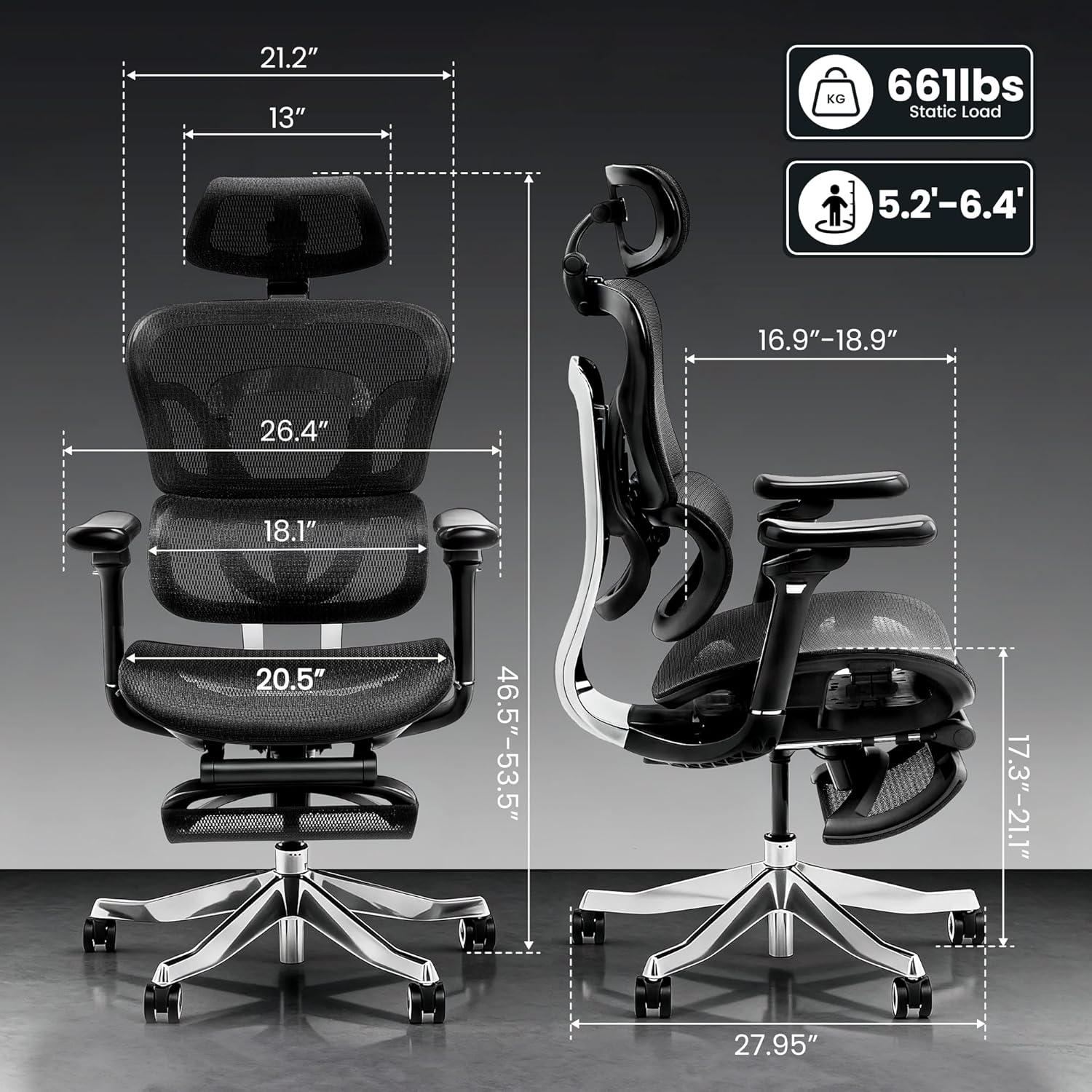
Image: Detailed dimensions of the FLEXISPOT ErgoX Max Ergonomic Office Chair, including height, width, and depth, along with its 661 lbs static load capacity.
2. Istruzzjonijiet Operattivi
Your ErgoX Max chair offers extensive adjustability to customize your seating experience for optimal comfort and ergonomic support.
2.1 Chair Height Adjustment
- Locate the lever on the right side, beneath the seat.
- To raise the chair, lift the lever while taking your weight off the seat.
- To lower the chair, lift the lever while remaining seated.
2.2 Recline System
The chair features a 3-level recline system, allowing you to transition from work mode to relax mode.
- Angolu ta' Inklinazzjoni: Adjust the recline angle between 104°, 113°, and 123.5° using the lever on the left side.
- Backrest Forward Tilt: The backrest can tilt forward 2-8° for precise back positioning.

Image: Illustration of the 3-level recline system, showing adjustable angles from 104° to 123.5°.
2.3 Aġġustament ta' Armrest
The 5D adjustable PU armrests provide multi-directional support.
- Aġġustament Għoli: Press the button on the side of the armrest to raise or lower it.
- Forward/Backward/Pivot: Armrests can slide forward/backward and pivot inward/outward for optimal positioning.

Image: Visual guide demonstrating the multi-directional adjustments of the 5D armrests, including height, forward/backward, and pivot functions.
2.4 Aġġustament tal-Appoġġ Lumbari
The 4D adaptive lumbar support automatically adjusts to your posture. You can also fine-tune it manually.
- Aġġustament tal-Fond: Use the knob on the side of the backrest to adjust the depth of the lumbar support.
- Aġġustament Għoli: The lumbar support can be moved up or down to align with your lower back curve.

Image: Illustration of the 4D adaptive lumbar support, highlighting its pull-out design for precise back positioning and lasting comfort.
2.5 Aġġustament ta 'l-serħan tar-ras
The 4D headrest allows for height, angle, and depth customization for neck comfort.
- Aġġustament Għoli: Slide the headrest up or down to your desired height.
- Aġġustament tal-Angolu: Tilt the headrest forward or backward.
- Aġġustament tal-Fond: Adjust the depth to provide optimal neck support.

Image: Visual guide demonstrating the height, angle, and depth customization options for the 4D adjustable headrest.
2.6 Retractable Footrest (Optional)
The optional retractable footrest can be pulled out for a complete reclining and relaxation experience.
- Pull the footrest out from beneath the seat when needed.
- Push it back in when not in use to save space.
3. Manutenzjoni
Proper maintenance will extend the life and appearance of your ergonomic office chair.
3.1 Istruzzjonijiet għat-Tindif
- Mesh Components: For the mesh backrest and seat, use dry methods only. A soft brush or vacuum cleaner with a brush attachment can be used to remove dust and debris.
- Qafas u Bażi: Wipe the aluminum alloy frame and base with a soft, dry cloth. Avoid abrasive cleaners.
- Pulzieri: Clean padded armrests with a dry cloth. For stubborn spots, a slightly damp Jista' jintuża drapp, segwit minn tnixxif immedjat.
- Avoid contact with liquids directly on mesh or padded surfaces.
3.2 Kura Ġenerali
- Regularly check all screws and bolts to ensure they are tight. Re-tighten if necessary.
- Avoid placing heavy objects on the armrests or backrest when not in use.
- Ensure smooth and silent mobility by keeping the electroplated chrome casters clean and free of debris.
4 Issolvi l-problemi
If you encounter any issues with your chair, refer to the common problems and solutions below.
| Problema | Kawża Possibbli | Soluzzjoni |
|---|---|---|
| Is-siġġu ma jaġġustax l-għoli | Il-lift tal-gass mhux attivat jew difettuż. | Ensure the height adjustment lever is fully engaged. If issue persists, contact customer support. |
| Is-siġġu jitħawwad jew iħossu instabbli | Viti maħlula jew assemblaġġ irregolari. | Check and tighten all assembly screws, especially those connecting the base and seat mechanism. Ensure the chair is on a flat surface. |
| Id-dahar tas-serħan ma jimteddx lura | Recline lock engaged. | Disengage the recline lock lever. If still stuck, ensure no obstruction is preventing movement. |
| Ir-roti ma jdurux bla xkiel | Debris fir-roti jew roti bil-ħsara. | Clean any hair or debris from the caster wheels. If damaged, consider replacing casters. |
If you cannot resolve the issue using these steps, please contact FLEXISPOT customer support.
5. Speċifikazzjonijiet tal-Prodott
| Karatteristika | Dettall |
|---|---|
| Brand | FLEXISPOT |
| Isem tal-Mudell | Ergonomic Executive Chair (FLEXISPOT ERGOX MAX) |
| Kulur | Obsidian Iswed |
| Materjal | Aluminum, Mesh, Nylon |
| Dimensjonijiet tal-Prodott | 27.95"D x 27.95"W x 53.5"H |
| Piż tal-oġġett | 46 liri |
| Rakkomandazzjoni tal-Piż Massimu | 661 Liri |
| Lura Stil | High-back, Mesh |
| Karatteristiċi Speċjali | Adjustable Headrest, Adjustable Height, Ergonomic, Adjustable Armrest, Dynamic Lumbar Support, Tilt, Back Support, Adjustable Recliner |
| Għadd tal-Pożizzjoni Mimduda | 3 |
| UPC | 840460490979 |
6. Garanzija u Appoġġ
FLEXISPOT is committed to providing high-quality products and customer satisfaction.
6.1 Garanzija tal-Prodott
This product may be eligible for a 3-Year Protection Plan. Please refer to your purchase documentation for specific warranty details and coverage.
6.2 Appoġġ għall-Klijent
For any questions, troubleshooting assistance, or warranty claims, please contact FLEXISPOT customer support. Contact information can typically be found on the manufacturer's webis-sit jew l-irċevuta tax-xiri tiegħek.


