1. Introduzzjoni
This manual provides instructions for the safe and effective operation, maintenance, and troubleshooting of your TOOLTOP 928D-III 110W Digital Temperature Adjustable Electric Soldering Iron. Please read this manual thoroughly before using the device to ensure proper function and safety.
The TOOLTOP 928D-III is a high-power electric soldering iron designed for various soldering applications. It features an adjustable digital temperature display, rapid heating, and intelligent functions such as sleep mode and temperature correction.
2. Istruzzjonijiet tas-Sigurtà
TWISSIJA: Jekk ma ssegwix dawn l-istruzzjonijiet ta’ sigurtà, dan jista’ jirriżulta f’xokk elettriku, nar, jew korriment serju.
- Always wear appropriate personal protective equipment, including safety glasses, when operating the soldering iron.
- Ensure the work area is well-ventilated to avoid inhaling solder fumes. Use a fume extractor if possible.
- Do not touch the soldering iron tip or heating element when the iron is powered on or cooling down, as temperatures can reach up to 480°C (896°F).
- Always place the soldering iron in its designated stand when not in use.
- Żomm il-ħadid tal-issaldjar 'il bogħod minn materjali fjammabbli.
- Do not use the soldering iron near water or in damp kundizzjonijiet.
- Aqla’ l-ħadid tal-issaldjar mill-plagg tal-elettriku meta ma tkunx qed tużah jew qabel ma tagħmel manutenzjoni.
- Do not modify the soldering iron or use it for purposes other than soldering.
- Żomm fejn ma jintlaħaqx mit-tfal.
3. Prodott Aktarview u Komponenti
Familiarize yourself with the various parts of your soldering iron.

Immaġni: Fuqview of the TOOLTOP 928D-III soldering iron, highlighting its adjustable temperature, LED digital display, sleep function, temperature correction, C/F switching, and master switch. It also shows the large power heater element and fast heating capability.

Image: Detailed breakdown of the soldering iron components, including the SGS Certified Lead-Free Soldering Iron Tip, Stainless Steel Element Cover, High-Temp. Resistant Bakelite Thread Insert, High-Temperature and Slip Resistant Silicone Grip, Temp. Adjustable Buttons / Functions Switchable Buttons, Master Switch, and Anti-Flex Cable Cover.
- Ponta tal-Ħadid tal-Issaldjar: The part that heats up and melts solder. Replaceable.
- Stainless Steel Element Cover: Protects the heating element.
- Bakelite Thread Insert: High-temperature resistant component for tip assembly.
- Qabda tas-silikonju: Provides a comfortable and heat-resistant hold.
- Wiri Diġitali LED: Shows the current temperature and settings.
- Buttuni ta' Aġġustament tat-Temperatura: Used to increase or decrease the temperature and navigate functions.
- Swiċċ ewlieni: Jixgħel jew jitfi l-unità.
- Anti-Flex Cable Cover: Protects the power cable connection.
4. Setup
- Spakkjar: Carefully remove all components from the packaging. Ensure all parts listed in the "What's in the Box" section are present.
- Installazzjoni tal-ponta: Ensure the desired soldering tip is securely screwed into the heating element. Do not overtighten.
- Pjazzament: Place the soldering iron in its stand on a stable, heat-resistant surface. Ensure the stand is firm and will not tip over.

Image: A firm and light soldering iron holder with a silicone base for strong adsorption and good stability.
- Konnessjoni tal-Enerġija: Ipplaggja l-korda tad-dawl fi żbokk elettriku adattat.
5. Istruzzjonijiet Operattivi
- Qawwa Mixgħul: Flip the Master Switch to the "ON" position. The LED digital display will illuminate.
- Aġġustament tat-temperatura:
- Uża l- Up u Down arrow buttons to adjust the desired temperature. The temperature range is typically 90°C to 480°C (194°F to 896°F).
- The iron heats rapidly, reaching 300°C in approximately 18 seconds.
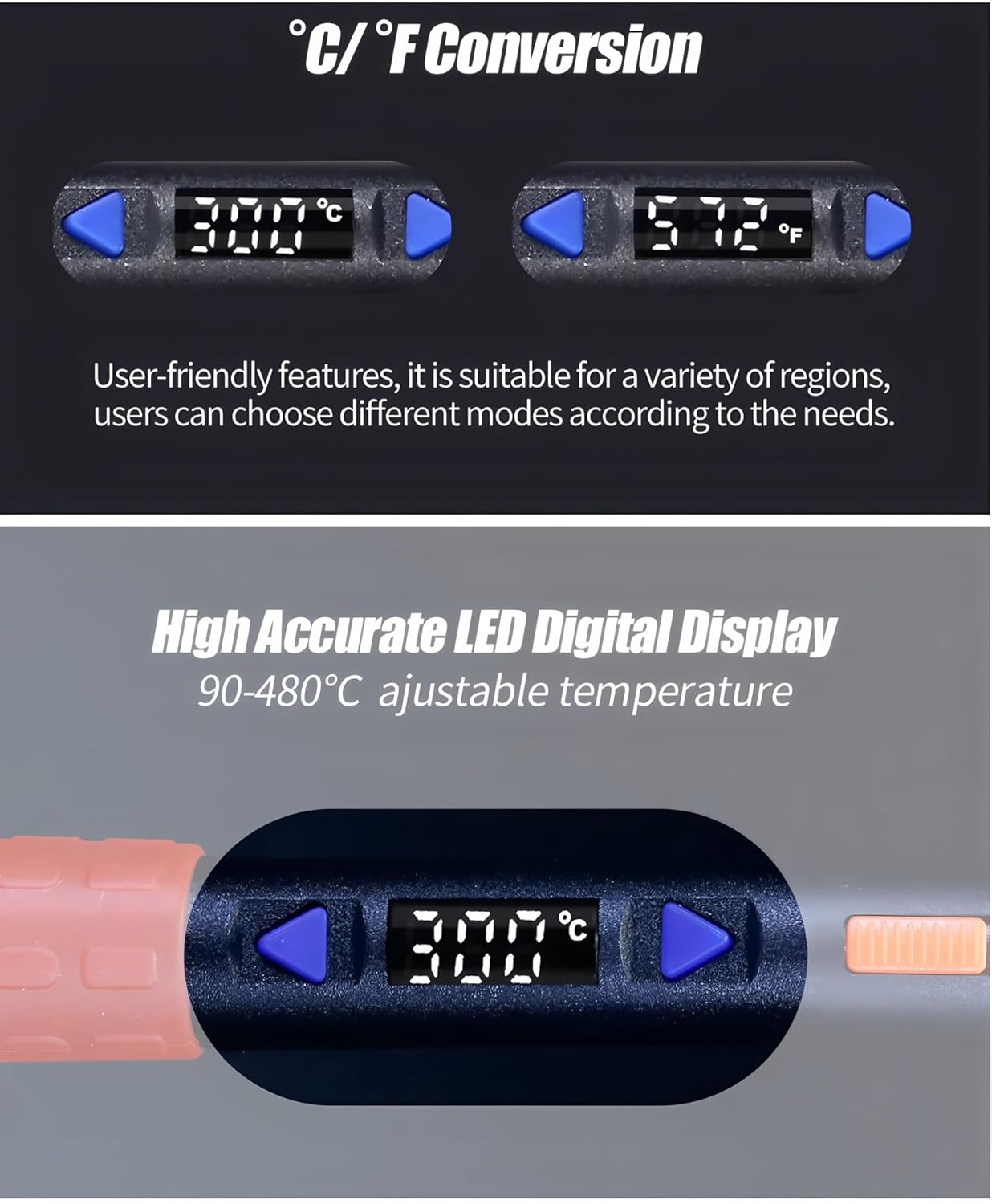
Image: Close-up of the LED digital display showing temperature in Celsius and Fahrenheit, demonstrating the C/F conversion feature and high accuracy.
- Swiċċjar Celsius/Fahrenheit:
- To switch between Celsius (°C) and Fahrenheit (°F), press and hold both the Up u Down arrow buttons simultaneously for a few seconds until the unit changes.
- Intelligent Sleep Function:
- The soldering iron features an intelligent sleep function (0-99 minutes). If the iron remains static for the set sleep time, its temperature will automatically drop to 90°C to save energy and prolong tip life.
- To wake the iron from sleep mode, gently shake it. The iron will quickly return to its previously set operating temperature.

Image: Illustration of the intelligent sleep function, showing the display indicating "SLP" and the iron resting in its stand. A hand is shown gently shaking the iron to awaken it.
- Korrezzjoni tat-Temperatura:
- If the displayed temperature deviates from the actual tip temperature, a temperature correction function is available. Refer to the full product manual or manufacturer's website for detailed calibration steps.
- Saldjar: Once the desired temperature is reached, the iron is ready for use. Apply solder to the joint, not directly to the iron tip.
- Itfi: When finished, turn off the Master Switch and unplug the iron. Allow it to cool completely in its stand before storing.
6. Manutenzjoni
- Tindif tal-ponta: Naddaf il-ponta tal-issaldjar regolarment billi tuża adamp sponge or brass wool. This helps prevent oxidation and ensures efficient heat transfer.
- Tinning tal-ponta: After cleaning and before storage, apply a small amount of solder to the tip (tinning) to protect it from oxidation.
- Sostituzzjoni tal-ponta: Replace the soldering tip when it becomes excessively worn or corroded. Ensure the iron is cool and unplugged before changing tips.
- Tindif Ġenerali: Wipe the body of the soldering iron with a soft, dry cloth. Do not use abrasive cleaners or solvents.
- Ħażna: Store the soldering iron in a dry, safe place, away from dust and moisture, and out of reach of children.
7 Issolvi l-problemi
| Problema | Kawża Possibbli | Soluzzjoni |
|---|---|---|
| Il-ħadid ma jisħonx. | Not plugged in; Master Switch off; Faulty power outlet; Damaged heating element. | Check power connection; Turn on Master Switch; Test outlet with another device; Contact support if element is damaged. |
| Temperature display is erratic or incorrect. | Loose tip; Sensor issue; Need for temperature correction. | Ensure tip is securely installed; Perform temperature correction; Contact support if issue persists. |
| Solder does not melt easily. | Temperature set too low; Oxidized tip; Incorrect solder type. | Increase temperature; Clean and re-tin tip; Use appropriate solder for the application. |
| Iron enters sleep mode too quickly/not at all. | Sleep timer setting incorrect. | Adjust the sleep timer setting (refer to full manual for specific steps). |
8. Speċifikazzjonijiet
- Mudell: TT-YIHUA 928D-III 110W
- Għażliet tal-Enerġija: 65W, 90W, 110W (depending on model variant)
- Firxa tat-Temperatura: 90°C - 480°C (194°F - 896°F)
- Wiri: Display Diġitali LED
- Element tat-tisħin: Internal Heating Type Heating Core
- Tisħin mgħaġġel: Reaches 300°C in approx. 18 seconds
- Funzjonijiet: Intelligent Sleep, Temperature Correction, °C/°F Switching, Microcomputer Temp. Control, Security Master Switch
- Ċertifikazzjonijiet: CE, RoHS
- Manifattur: GĦODDA
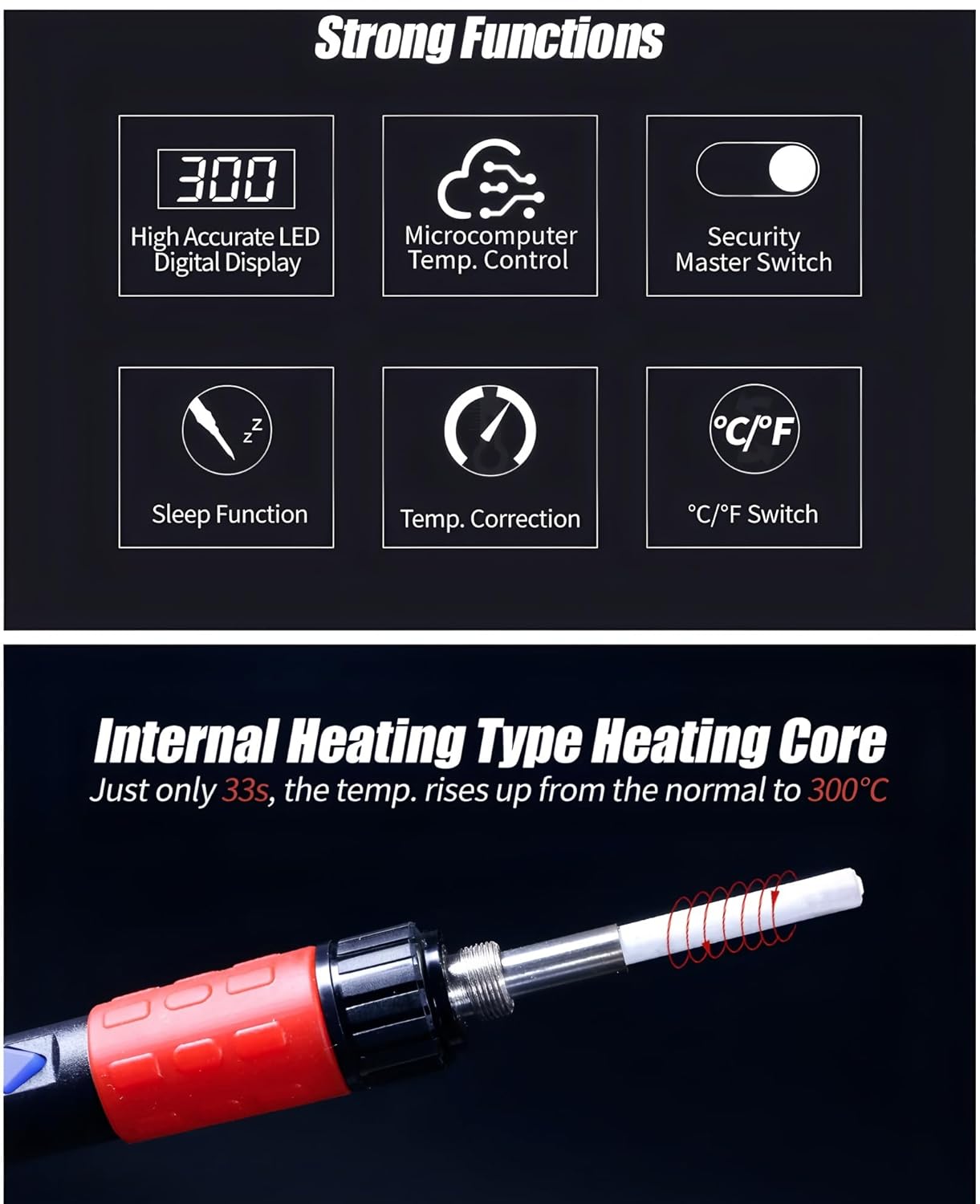
Image: Visual summary of the soldering iron's strong functions, including High Accurate LED Digital Display, Microcomputer Temp. Control, Security Master Switch, Sleep Function, Temp. Correction, and °C/°F Switch.

Image: Shows the internal heating type heating core, which heats up to 300°C in 33 seconds. Also illustrates low temperature application (90-250°C for pyrography) and high temperature application (300-480°C for desoldering).
9. Garanzija
This product comes with a 1-year EU Spare Part Availability Duration. For specific warranty terms and conditions, please refer to the documentation included with your purchase or contact TOOLTOP customer support.
10. Appoġġ
For technical assistance, troubleshooting not covered in this manual, or warranty claims, please contact TOOLTOP customer support through their official webis-sit jew l-informazzjoni ta' kuntatt ipprovduta mal-imballaġġ tal-prodott tiegħek.
You can often find additional resources, FAQs, and updated information on the manufacturer's websit: www.tooltop.com (Nota: Dan huwa detentur tal-post URL, please refer to your product's official documentation for the correct support websit.)


