1. Introduzzjoni
Thank you for choosing the Thomson 24-inch HD LED Smart TV, model 24HT2S15. This manual provides essential information to help you set up, operate, and maintain your new television. Please read it thoroughly before use and retain it for future reference.

Immaġni: Quddiem view of the Thomson 24-inch HD LED Smart TV, showcasing its frameless design and key features like HD resolution and Dolby Audio.
Karatteristiċi ewlenin:
- TiVo OS with Voice Control: Intuitive interface combining live TV and streaming apps, personalized recommendations, and voice commands.
- Wirja bla fili: Mirror your smartphone, tablet, or laptop screen to the TV.
- Dolby Audio: Enhanced sound experience with improved dialogue, detail, and surround effects.
- HDR10: Sharper contrast and realistic colors for an immersive viewing esperjenza.
- Kontroll mill-bogħod backlit: Easy navigation in low light with direct access buttons for popular streaming services.
- Adjustable Side Feet: Flexible positioning options for the TV.
- Tuner triplu: Integrated tuners for cable, satellite, and antenna reception.
2. X'hemm fil-Kaxxa
Meta tiftaħ il-pakkett, jekk jogħġbok kun żgur li l-oġġetti kollha li ġejjin huma preżenti:
- Thomson 24-inch HD LED Smart TV (Model 24HT2S15)
- Kontroll mill-bogħod
- Adapter tal-Enerġija
- Manwal għall-Utent
- Karta ta' Garanzija
- Adjustable Side Feet (2x)
If any items are missing or damaged, please contact your retailer or Thomson customer support.
3. Setup
3.1 Spakkjar u Tqegħid
Carefully remove the TV from its packaging. It is recommended to have two people for this process. Place the TV on a stable, flat surface or mount it on a wall using a compatible VESA mount (not included).
Aċċerta ruħek li jkun hemm ventilazzjoni adegwata madwar it-TV. Timblokkax il-fetħiet tal-ventilazzjoni.
3.2 It-twaħħil tal-Istand
If you are not wall-mounting the TV, attach the included side feet:
- Poġġi t-TV wiċċu 'l isfel fuq drapp artab u nadif biex tevita li tagħmel ħsara lill-iskrin.
- Allinja kull stand mat-toqob tal-viti korrispondenti fil-qiegħ tat-TV.
- Secure the stands using the provided screws. The feet are adjustable from 30 cm to 60 cm distance.

Image: The Thomson 24-inch Smart TV showing its dimensions, including a screen diagonal of 60 cm (24 inches), width of 53 cm, and height of 37 cm with the stand. The adjustable stand feet are also illustrated.
3.3 Konnessjoni tal-Periferali
Connect your external devices to the TV's ports. Refer to the diagram below for port locations.

Immaġni: Dettaljata view of the rear connection panel of the Thomson 24-inch Smart TV, illustrating various ports including 2x USB 2.0, Antenna input, Satellite input, 3x HDMI 1.4 (one with ARC), Service port, Headphone jack, AV IN, Digital Optical Audio Out, and LAN port.
- Qawwa: Connect the power adapter to the TV and then to a wall outlet.
- Antenna/Satellita: Connect your antenna or satellite cable to the respective input.
- HDMI: Use HDMI cables to connect devices like Blu-ray players, game consoles, or set-top boxes. HDMI 1.4/ARC supports Audio Return Channel.
- USB: Insert USB drives for media playback or software updates.
- LAN: Qabbad kejbil Ethernet għal konnessjoni tal-internet bil-fili.
- AV IN: Għal apparati eqdem li jużaw vidjo kompost u awdjo stereo.
- Headphone: Qabbad headphones għal smigħ privat.
- Ħruġ tal-Awdjo Ottiku Diġitali: Qabbad ma' sistema tal-ħoss esterna għal awdjo diġitali.
3.4 L-Ewwel Tixgħil u l-Ewwel Setup
- Ipplaggja t-TV f'sokit tal-elettriku.
- Agħfas il-buttuna tal-qawwa fuq il-kontroll remot jew fuq it-TV.
- Follow the on-screen instructions to select your language, country, and perform channel scanning for your triple tuner (cable/satellite/antenna).
- Connect to your Wi-Fi network by selecting it from the list and entering the password.
- Complete the TiVo OS setup, including signing in or creating an account.
4. Tħaddem it-TV tiegħek
4.1 Funzjonijiet ta' Kontroll mill-bogħod
The backlit remote control provides easy access to all TV functions, even in dim lighting. It includes dedicated buttons for popular streaming services.

Image: The Thomson Smart TV remote control, highlighting its backlit buttons, voice control microphone, and direct access buttons for Netflix, YouTube, Prime Video, Disney+, and Canal+.
- Buttuna tal-Qawwa: Ixgħel/itfi t-TV.
- Buttuni tan-Numru: Agħżel il-kanali direttament.
- Tastiera tan-Navigazzjoni ('Il fuq/'l isfel/Xellug/Lemin/OK): Innaviga l-menus u agħżel l-għażliet.
- Lura/Ħruġ: Irritorna għall-iskrin preċedenti jew toħroġ minn menu.
- Volum 'il fuq/Niżżel: Aġġusta l-livell tal-volum.
- Kanal 'l fuq/'l isfel: Ibdel il-kanali tat-TV.
- Siekta: Mute jew unmute-ħoss.
- Dar: Access the TiVo OS home screen.
- Buttuna tal-Kontroll tal-Vuċi: Activate voice commands (microphone icon).
- Buttuni ta' Aċċess Dirett: Launch Netflix, YouTube, Prime Video, Disney+, Canal+ instantly.
4.2 TiVo OS and Smart Features
The TiVo OS provides a unified platform for live TV and streaming content. Explore personalized recommendations and access your favorite apps.

Image: The Thomson Smart TV screen showing various streaming application icons like Netflix, YouTube, Disney+, Prime Video, Plex, DAZN, Canal+, and Pluto TV, indicating integrated smart TV capabilities.
- Aċċess għall-App: Navigate to the home screen to find and launch pre-installed apps or download new ones from the app store.
- Kontroll tal-Vuċi: Press the voice control button on your remote and speak commands to search for content, launch apps, or control TV functions.
- Wirja bla fili: Use the Wireless Display feature to mirror content from your compatible smartphone, tablet, or laptop directly to your TV screen.

Image: An illustration demonstrating the voice control feature of the Thomson Smart TV, showing a remote control with a microphone icon and examples of voice commands like "Open Netflix" or "Play movies with Tom Hanks."

Image: The Thomson Smart TV displaying content mirrored from a smartphone, illustrating the Wireless Display and Google Cast features for seamless content sharing.
4.3 Titjib fl-Immaġni u l-Ħoss
- HDR10: Experience improved contrast, brightness, and color accuracy with HDR10 content. This technology enhances both bright and dark scenes for a more dynamic picture.
- Dolby Audio: Enjoy rich, clear, and powerful sound. Dolby Audio optimizes dialogue, enhances detail, and provides an immersive surround sound experience.

Image: A side-by-side comparison of picture quality, demonstrating the enhanced contrast and color vibrancy of HDR10 on the right compared to standard SDR on the left, with a building and landscape scene.

Image: An illustration depicting sound waves emanating from a TV screen, with the Dolby Audio logo prominently displayed, signifying enhanced audio quality for an immersive viewing esperjenza.
5. Manutenzjoni
5.1 Tindif tat-TV tiegħek
- Skrin: Imsaħ l-iskrin bil-mod b'ċarruta ratba u mingħajr suf. Għal marki persistenti, nixxef ftit.ampLaħlaħ id-drapp bl-ilma jew b'prodott speċjalizzat għat-tindif tal-iskrin. Qatt ma tisprejja likwidu direttament fuq l-iskrin.
- Kabinett: Imsaħ il-kabinett u l-istand tat-TV b'ċarruta ratba u niexfa.
- Kontroll mill-bogħod: Naddaf il-kontroll remot b'ċarruta ratba u niexfa.
Attenzjoni:
- Dejjem aqla’ t-TV qabel ma tnaddaf.
- Tużax prodotti tat-tindif li joborxu, xama', jew solventi.
5.2 Aġġornamenti tas-Software
Your Smart TV may receive software updates to improve performance and add new features. It is recommended to enable automatic updates or check for updates periodically through the TV's settings menu to ensure optimal functionality and security.
6 Issolvi l-problemi
Jekk tiltaqa' ma' problemi bit-TV tiegħek, irreferi għall-problemi u s-soluzzjonijiet komuni li ġejjin:
| Problema | Kawża Possibbli | Soluzzjoni |
|---|---|---|
| Ebda qawwa | Kejbil tal-enerġija skonnettjat; problema fil-plakka tal-enerġija | Kun żgur li l-kejbil tal-enerġija huwa konness sew. Ittestja s-sokit b'apparat ieħor. |
| L-ebda stampa, iżda l-ħoss huwa preżenti | Sors ta' input mhux korrett; kejbil difettuż | Check the input source (e.g., HDMI 1, Antenna). Ensure cables are connected correctly. |
| L-ebda ħoss, iżda l-istampa hija preżenti | Volum immut jew baxx wisq; problema bis-sistema awdjo esterna | Unmute the TV or increase volume. Check audio settings and external audio connections. |
| Il-kontroll mill-bogħod ma jaħdimx | Batteriji mejta; ostruzzjoni; remot mhux imqabbad | Replace batteries. Remove any obstructions. Re-pair the remote if necessary (refer to TV settings). |
| Ma tistax tikkonnettja mal-Wi-Fi | Password mhux korretta; problema bir-router; it-TV 'il bogħod wisq mir-router | Verify Wi-Fi password. Restart your router. Move TV closer or use a wired LAN connection. |
| Smart features not responding | Network issue; temporary software glitch | Check internet connection. Restart the TV by unplugging it for a minute and plugging it back in. |
If the problem persists after trying these solutions, please contact Thomson customer support.
7. Speċifikazzjonijiet
Detailed technical specifications for the Thomson 24HT2S15 Smart TV:
| Karatteristika | Dettall |
|---|---|
| Brand | Thomson |
| Numru tal-Mudell | 24HT2S15 |
| Daqs tal-Iskrin | 24 pulzieri (60 ċm) |
| Teknoloġija tal-Wiri | LED |
| Riżoluzzjoni | 768p (1366 x 768 pixels) |
| Riffriskar Rata | 60 Hz |
| Proporzjon ta' l-aspett | 16:9 |
| Teknoloġija tal-Konnettività | Ethernet, HDMI, USB, Wi-Fi |
| Karatteristiċi Speċjali | Parental Controls, TiVo OS, Voice Control, HDR10, Dolby Audio |
| Dimensjonijiet tal-Prodott (bl-istand) | 8P x 53l x 37H cm (approx. 8 x 53 x 37 cm) |
| Piż | 3.33 kg |
| Komponenti Inklużi | Power Adapter, User Manual, Warranty Card, Remote Control |
| Lingwi Appoġġjati | Franċiż, Ingliż, Taljan, Spanjol, Ġermaniż |
| Klassi tal-Effiċjenza tal-Enerġija | E |
| Informazzjoni dwar il-Prodott tal-EPREL | https://eprel.ec.europa.eu/qr/1969520 |
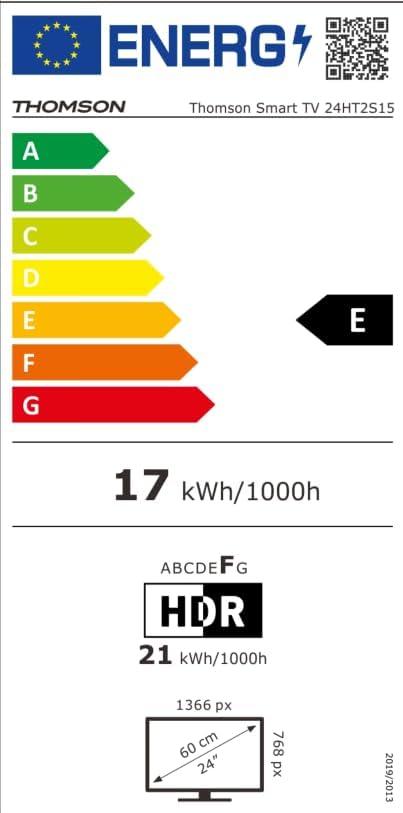
Image: The EU Energy Label for the Thomson Smart TV 24HT2S15, showing an energy efficiency class of E and energy consumption of 17 kWh/1000h for SDR and 21 kWh/1000h for HDR.
8. Garanzija u Appoġġ
8.1 Informazzjoni dwar Garanzija
Thomson products are covered by a 3-year warranty. For detailed information regarding warranty claims, returns, or defective products, please refer to the warranty card included in your package or visit the Thomson support websit.
For specific information on purchases made via Amazon, consult Amazon's help pages regarding returns and defective products.
8.2 Appoġġ għall-Klijent
If you require further assistance or have questions not covered in this manual, please contact Thomson customer support:
- Manifattur: Nixxiegħaview GmbH
- Email: kuntatt@streamview.com
- Websit: www.streamview.com
- Telefon: +4318900066
Please have your model number (24HT2S15) and purchase details ready when contacting support.


