1. Introduzzjoni
This manual provides essential information for the safe and efficient operation of your Thomson 43FT2S15 FHD LED Smart TV. Please read this manual thoroughly before using the television and retain it for future reference.
2. Informazzjoni dwar is-Sigurtà
Dejjem segwi l-prekawzjonijiet bażiċi ta' sigurtà meta tuża dan il-prodott biex tnaqqas ir-riskju ta' nar, xokk elettriku, u korriment.
- Tesponix it-TV għax-xita jew l-umdità.
- Twaqqafx il-fetħiet tal-ventilazzjoni.
- Aċċerta ruħek li l-korda tal-enerġija hija ertjata kif suppost.
- Tpoġġix it-TV fuq karrettun, stand, tripod, bracket, jew mejda mhux stabbli.
- Skonnettja t-TV waqt maltempati bis-sajjetti jew meta ma tużahx għal perjodi twal.
- Irreferi l-manutenzjoni kollha lil persunal tas-servizz kwalifikat.
3. Kontenut tal-Pakkett
Iċċekkja li l-oġġetti kollha elenkati hawn taħt huma inklużi fil-pakkett tiegħek:
- Thomson 43FT2S15 FHD LED Smart TV
- Adapter tal-Enerġija
- Kontroll mill-bogħod
- Manwal għall-Utent (dan id-dokument)
- Karta ta' Garanzija

Immaġni: Quddiem view of the Thomson 43FT2S15 Smart TV.
4. Setup
4.1 Installazzjoni Fiżika
The Thomson 43FT2S15 TV is designed for table mounting. Ensure the TV is placed on a stable, flat surface.

Image: Diagram showing the dimensions of the Thomson 43FT2S15 Smart TV. The screen size is 109 cm (43 inches) diagonally, with a width of 95 cm and height of 60 cm (including stand). The depth is 6 cm.
Dimensjonijiet (W x H x D): 95 cm x 60 cm x 6 cm (without stand, depth is 6 cm). The screen diagonal is 109 cm (43 inches).
4.2 Apparat li jgħaqqad
Connect your external devices to the appropriate ports on the TV. Refer to the diagram below for port locations.
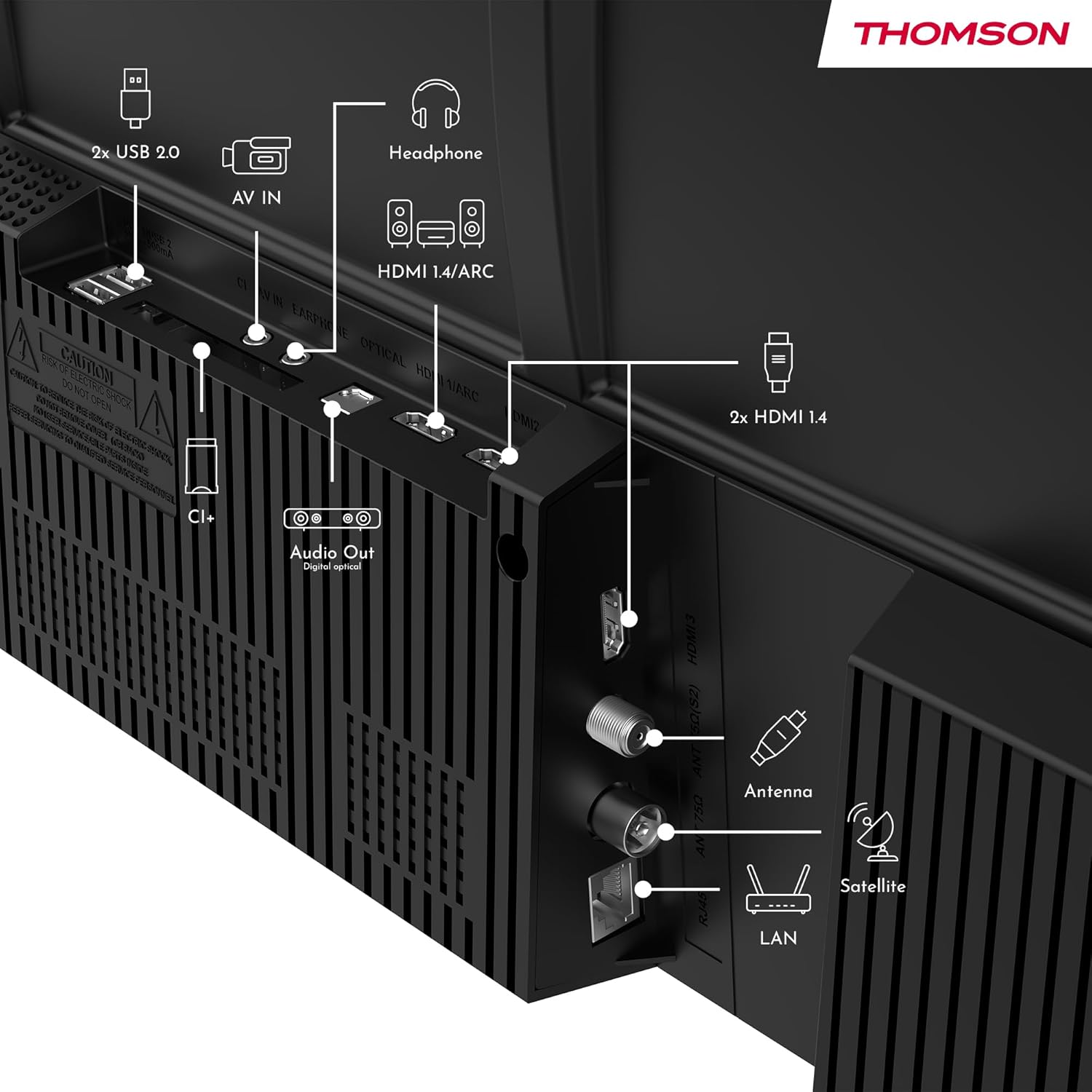
Immaġni: Wara view of the Thomson 43FT2S15 Smart TV showing various connection ports. These include 2x USB 2.0, AV IN, Headphone out, HDMI 1.4/ARC, Optical Audio Out, CI+, Antenna (DVB-T2/C), Satellite (DVB-S2), and LAN (Ethernet).
- HDMI: Connect external devices like Blu-ray players, game consoles, or set-top boxes. The TV has 2 HDMI 1.4 ports, one with ARC support.
- USB: For connecting USB storage devices. The TV has 2 USB 2.0 ports.
- Antenna/Satellita: Connect your terrestrial or satellite antenna for live TV.
- LAN (Ethernet): Għal konnessjoni tal-internet bil-fili.
- Wi-Fi: Għal konnessjoni tal-internet mingħajr fili.
- Bluetooth: For connecting compatible wireless accessories.
- Ħruġ tal-Awdjo (Ottiku): For connecting to an external sound system.
- Headphone: Għall-konnessjoni tal-headphones.
- Slott CI+: For inserting a Conditional Access Module (CAM) for encrypted channels.
5. Istruzzjonijiet Operattivi
5.1 Power On/Off
Connect the power adapter to the TV and a power outlet. Press the power button on the remote control to turn the TV on or off.
5.2 TiVo OS and Smart Features
Your Thomson Smart TV is powered by TiVo OS, which integrates live TV, streaming applications, and on-demand services into a single, intuitive interface. Personalized recommendations help you discover new content.

Image: The Thomson Smart TV displaying the TiVo OS interface with various streaming apps like Netflix, Canal+, Prime Video, YouTube, and Disney+.
5.3 Kontroll tal-Vuċi
Use the TiVo Voice Control feature to navigate channels, open applications, or search for content across different platforms using voice commands. The remote control includes a microphone for this function.

Image: The Thomson Smart TV remote control highlighting the voice control microphone, backlit buttons, and direct access buttons for streaming services.
5.4 Wireless Display
Mirror content from your smartphone, tablet, or laptop to the TV screen using the Wireless Display function. This allows for easy sharing of videos, photos, and applications.
5.5 Audio and Video Enhancements
- Dolby Audio: Experience enhanced sound quality with Dolby Audio, providing clear dialogue and immersive, multi-dimensional effects.

Image: A Thomson Smart TV displaying content with visual representations of sound waves, indicating the Dolby Audio feature.
- HDR10: Enjoy sharper contrast and lifelike colors with HDR10 technology, revealing details in both bright highlights and deep shadows.

Image: A split-screen comparison showing the difference between SDR (Standard Dynamic Range) and HDR10 (High Dynamic Range) image quality on a Thomson Smart TV, demonstrating improved contrast and color.
5.6 Kontroll mill-Bogħod
The ergonomic remote control features backlit buttons for easy navigation in low light conditions. It also includes direct access buttons for popular streaming services such as Netflix, YouTube, Prime Video, Disney+, and Canal+.
6. Manutenzjoni
Biex tiżgura l-lonġevità u l-aħjar prestazzjoni tat-TV tiegħek, segwi dawn il-linji gwida ta' manutenzjoni:
- Tindif tal-Iskrin: Imsaħ l-iskrin bil-mod b'ċarruta ratba u mingħajr suf. Għal marki iebsa, uża prodott għat-tindif tal-iskrin iddisinjat speċifikament għat-televiżjonijiet, applikat fuq iċ-ċarruta, mhux direttament fuq l-iskrin.
- Tindif tal-Kabinett: Uża drapp artab u niexef biex timsaħ il-kabinett tat-TV. Tużax prodotti tat-tindif jew solventi li joborxu.
- Ventilazzjoni: Kun żgur li l-fetħiet tal-ventilazzjoni fuq wara tat-TV mhumiex imblukkati biex tevita li jisħon iżżejjed.
- Korda tal-Enerġija: Regularly check the power cord for any damage. If damaged, contact qualified service personnel for replacement.
7 Issolvi l-problemi
Jekk tiltaqa' ma' problemi bit-TV tiegħek, irreferi għall-passi komuni li ġejjin għas-soluzzjoni tal-problemi:
- Ebda Qawwa:
- Iċċekkja jekk il-korda tal-enerġija hijiex imqabbda sew mat-TV u mas-sokit tal-enerġija.
- Kun żgur li s-sokit tal-enerġija qed jaħdem billi tqabbad apparat ieħor.
- Ipprova agħfas il-buttuna tal-qawwa fuq it-TV innifsu, mhux biss fuq ir-remote.
- Ebda Stampa/Ħoss:
- Ivverifika li s-sors tad-dħul korrett huwa magħżul (eż., HDMI 1, Antenna).
- Iċċekkja l-konnessjonijiet kollha tal-kejbil bejn it-TV u apparati esterni.
- Aġġusta l-volum u kun żgur li t-TV mhux siekta.
- Il-Kontroll mill-bogħod Mhux Jaħdem:
- Ibdel il-batteriji fil-kontroll remot.
- Kun żgur li m'hemm l-ebda ostaklu bejn ir-remote u s-senser IR tat-TV.
- Smart TV Features Not Working (Wi-Fi/Apps):
- Iċċekkja l-konnessjoni tal-internet tiegħek. Erġa' ibda r-router tiegħek jekk meħtieġ.
- Go to the TV's network settings to ensure it's connected to Wi-Fi or Ethernet.
- Ipprova ibda mill-ġdid it-TV.
For more complex issues, please contact customer support or refer to the manufacturer's websit.
8. Speċifikazzjonijiet
Key technical specifications for the Thomson 43FT2S15 FHD LED Smart TV:
| Karatteristika | Speċifikazzjoni |
|---|---|
| Brand | Thomson |
| Mudell | 43FT2S15 |
| Daqs tal-Iskrin | 43 Pulzier (109 ċm) |
| Teknoloġija tal-Wiri | LED |
| Riżoluzzjoni | 1920 x 1080 (FHD) |
| Riffriskar Rata | 60 Hz |
| Proporzjon ta' l-aspett | 16:9 |
| Sistema Operattiva | TiVo OS |
| Teknoloġija Awdjo | Dolby Audio (Dolby Atmos encoding) |
| Appoġġ HDR | HDR10 |
| Konnettività | Wi-Fi, Ethernet, Bluetooth, 2x HDMI 1.4 (1x ARC), 2x USB 2.0, Optical Audio Out, AV In, Headphone, CI+ |
| Tuners | DVB-T2/C/S2 (Triple Tuner) |
| Servizzi tal-Internet Appoġġjati | Netflix, YouTube, Prime Video, Disney+, Canal+, Browser |
| Dimensjonijiet (Prodott) | 6 x 95 x 60 ċm; 6.5 kg |
| Klassi tal-Effiċjenza tal-Enerġija | E |

Image: Energy efficiency label for the Thomson 43FT2S15 Smart TV, showing an energy class of E and energy consumption of 42 kWh/1000h (SDR) and 46 kWh/1000h (HDR).
Għal informazzjoni dettaljata dwar il-prodott, irreferi għad-database tal-EPREL: https://eprel.ec.europa.eu/qr/1969521
9. Garanzija u Appoġġ
Your Thomson 43FT2S15 TV comes with a warranty. Please refer to the included Warranty Card for specific terms and conditions.
For technical support or service inquiries, please contact the manufacturer:
- Manifattur: Nixxiegħaview GmbH
- Websit: www.streamview.com
- Email: kuntatt@streamview.com
- Telefon: +4318900066
Please have your model number (43FT2S15) and purchase information ready when contacting support.


