1. Introduzzjoni
The Bushnell Golf Wingman HD GPS Speaker combines advanced GPS technology with high-quality audio to enhance your golf experience. This device provides precise golf course distances, integrates with your smartphone for music playback, and features a magnetic mount for convenient use on a golf cart. This manual provides detailed instructions for setup, operation, and maintenance of your Wingman HD.

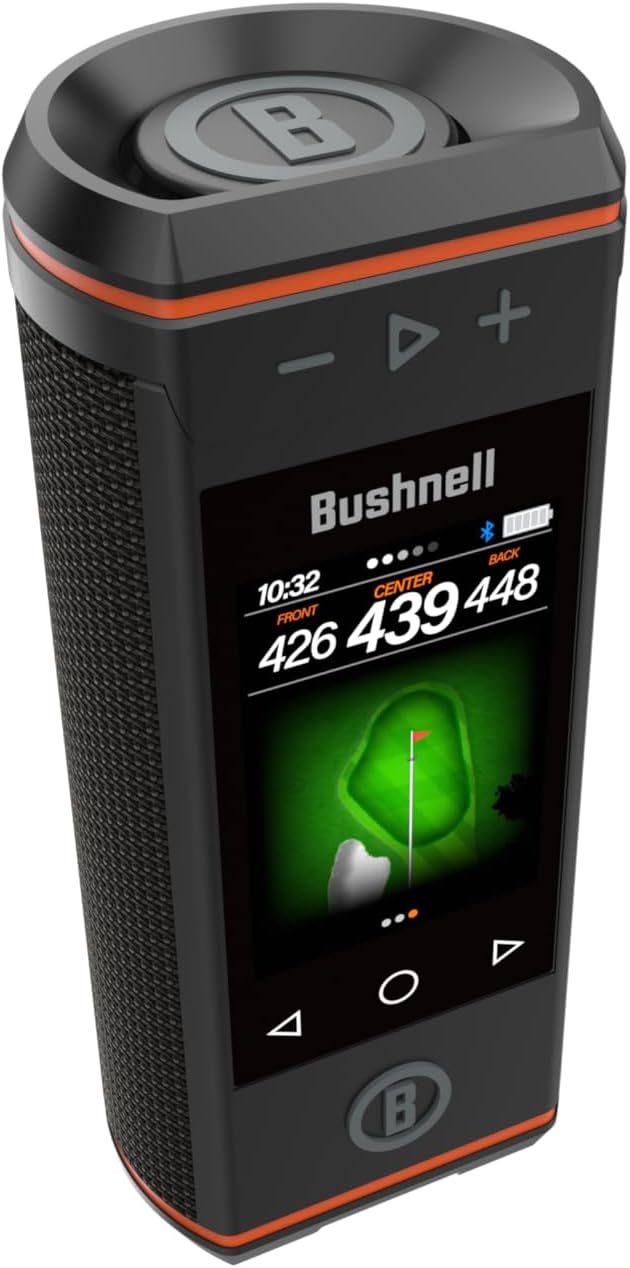
Stampa 1.1: Quddiem view of the Bushnell Golf Wingman HD GPS Speaker, showcasing its touchscreen display and speaker grille.
2. Karatteristiċi tal-prodott
- 3.5” HD Touchscreen: Provides critical distance data in a clear, color display.
- Premium 360° Audio: Equipped with 2 x 15-WATT speakers and 2 passive radiators for rich sound.
- Hole and Green View Stampi: Visual representation of hole layouts and green shapes.
- Hazards and Layups with Icons: Displays on-screen hazard locations and layup points.
- BITE Magnetic Cart Mount: Securely attaches the Wingman HD to a golf cart bar.
- Dedicated Music Screen: Shows song, artist, and album art during music playback.
- Audible and Visual GPS: Provides spoken and displayed front, center, and back distances.
3. Setup
3.1. Iċċarġjar tal-Apparat
Before initial use, fully charge your Wingman HD. Connect the provided charging cable to the charging port on the device and to a standard USB power adapter. The battery indicator on the screen will show charging status. A full charge ensures optimal performance during your round.
3.2. Tixgħil / Mitfi
- To power on, press and hold the power button located on the device until the screen illuminates.
- To power off, press and hold the power button until the shutdown prompt appears, then confirm.
3.3. Tqabbil tal-Bluetooth
To use the Wingman HD as a speaker, pair it with your smartphone or other Bluetooth-enabled device:
- Ensure the Wingman HD is powered on.
- Access the Bluetooth settings on your smartphone.
- Select "Wingman HD" from the list of available devices.
- A confirmation tone will sound when pairing is successful.
3.4. Immuntar tal-Apparat
The Wingman HD features an integrated BITE magnetic mount. Simply attach the device to any metallic surface on your golf cart for secure placement. Ensure the surface is clean and dry for optimal magnetic adhesion.
Immaġni 3.1: Ġenb view of the Wingman HD, highlighting the BITE magnetic mount for golf cart attachment.
4. Istruzzjonijiet Operattivi
4.1. Golf GPS Functionality
Upon powering on, the Wingman HD will automatically search for golf courses. Select your desired course from the list. The device will then display key distances and course information.
- Front, Center, Back Distances: The main screen displays distances to the front, center, and back of the green. These distances are also available audibly by pressing the dedicated button.
- Aħdar View: Touch the screen to access a visual representation of the green, allowing you to see its shape and adjust for pin placement.
- Toqba View: Jipprovdi overview of the entire hole layout, aiding in strategic shot planning.
- Perikli u Layups: Icons on the screen indicate the location and distance to various hazards (e.g., bunkers, water) and recommended layup points.

Image 4.1: The Wingman HD screen showing front, center, and back distances to the green, along with a visual green layout.
4.2. Daqq tal-mużika
Once paired via Bluetooth, you can stream music from your smartphone to the Wingman HD. Use the dedicated music screen on the device to control playback, view song information, artist, and album art.
- Kontroll tal-Volum: Use the physical buttons on the device or your paired smartphone to adjust volume.
- Kontroll tal-binarji: Use the touchscreen controls on the Wingman HD to skip tracks forward or backward.
- Concert Links Pairing: For an enhanced audio experience, two Wingman HD speakers can be paired together to play music simultaneously. Refer to the device's on-screen menu for instructions on initiating Concert Links pairing.

Image 4.2: The Wingman HD screen displaying music playback information, including song title and artist.
4.3. Vidjo Uffiċjali tal-Prodott
Watch this official product video for a visual guide on the features and operation of the Bushnell Golf Wingman HD.
Video 4.1: An official product video from Bushnell Inc. demonstrating the features and usage of the Wingman HD GPS Speaker, including its touchscreen, GPS capabilities, and magnetic mount.
5. Manutenzjoni
- Tindif: Uża artab, damp drapp biex tnaddaf l-apparat. Evita prodotti tat-tindif jew solventi li joborxu.
- Ħażna: Store the Wingman HD in a cool, dry place when not in use. Avoid extreme temperatures.
- Kura tal-batterija: To prolong battery life, avoid fully discharging the device frequently. Charge regularly, especially if storing for extended periods.
- Aġġornamenti tas-Software: Periodically check the Bushnell Golf website or app for available software updates to ensure optimal performance and access to new features.
6 Issolvi l-problemi
- L-Apparat Mhux Jixgħel: Ensure the device is fully charged. If the issue persists, try a different charging cable or power adapter.
- GPS Not Connecting/Inaccurate Distances: Kun żgur li tinsab f'żona miftuħa b'dawl ċar view of the sky. Allow a few minutes for the device to acquire satellite signals. Verify that the correct course is selected.
- Kwistjonijiet ta' Tqabbil tal-Bluetooth: Ensure Bluetooth is enabled on your smartphone and the Wingman HD is in pairing mode. Forget the device from your phone's Bluetooth settings and attempt to re-pair.
- Ebda Awdjo/Kwalità tal-Ħoss Fqira: Check the volume levels on both the Wingman HD and your paired smartphone. Ensure the device is not obstructed.
- L-iskrin tat-touchscreen ma jirrispondix: Restart the device. If the issue continues, ensure the screen is clean and dry.
7. Speċifikazzjonijiet
| Karatteristika | Dettall |
|---|---|
| Isem tal-Mudell | Wingman HD |
| Numru tal-Parti | 362350 |
| Daqs tal-Iskrin | 3.5 Pulzier |
| Output Speaker | 2 x 15-WATT with 2 Passive Radiators |
| Konnettività | Bluetooth |
| Tip ta 'Immuntar | Golf Cart Mount (BITE Magnetic) |
| Materjal | Aluminju, plastik |
| Dimensjonijiet tal-oġġett (LxWxH) | 7.3 x 3.2 x 2.7 pulzieri |
| Piż tal-oġġett | 2.5 Liri |
| Komponenti Inklużi | Kelliem tal-Golf tal-GPS |
8. Garanzija u Appoġġ
The Bushnell Golf Wingman HD GPS Speaker comes with a 1 Sena Garanzija tal-Manifattur. For warranty claims, technical support, or service inquiries, please contact Bushnell Golf customer service. Refer to the official Bushnell Golf webis-sit għall-aktar informazzjoni ta' kuntatt u riżorsi ta' appoġġ aġġornati.
It is recommended to register your product on the Bushnell Golf website to facilitate warranty service and receive important product updates.


