Introduzzjoni
This manual provides detailed instructions for the installation, operation, and maintenance of your Pawfly AL-4380 Pro 8-Inch Aquarium Light. This full-spectrum LED light is designed to enhance the aquatic environment for plants and fish through customizable lighting options and smart control features. Please read this manual thoroughly before use to ensure proper function and longevity of your product.
Karatteristiċi tal-Prodott
- Bright & Natural Aquarium Lighting: Features a full spectrum (6500 K white, 660 nm red, 525 nm green, 455 nm blue) with an ultra-high CRI (98) for optimal coral and plant growth, and accurate color reproduction.
- Kontroll Intelliġenti tal-Bluetooth: Manage the light via a stable Bluetooth connection and the intuitive Pawfly app (compatible with iOS and Android). Customize brightness, colors, and effects.
- 100,000+ Color Choices: Access a wide range of colors through the app to create diverse lighting environments. Suitable for freshwater, saltwater, planted, and coral reef tanks.
- 3 Automatic Day-Night Timers: Includes Dutch, Jungle, and Japanese timer modes to simulate a 24/7 natural day-night cycle, promoting aquatic life activity.
- Tailor Light & Color: Set custom start times and adjust full-spectrum brightness for healthier fish and plants. Easily switch between vibrant color effects.
- Enhanced Plastic Shell: Designed for durability and efficient heat dissipation.
- IP68 li ma jgħaddix ilma minnha: Fully dustproof and waterproof for reliable everyday use in aquatic environments.
Kontenut tal-Pakkett
Jekk jogħġbok ivverifika li l-komponenti kollha huma preżenti fil-pakkett:
- Pawfly AL-4380 Pro 8-Inch Aquarium Light Unit
- Integrated Controller with Power Cord
- Suction Cups for Mounting (2x)
- Hook-and-Loop Fasteners for Mounting (2x)
- Manwal għall-Utent (dan id-dokument)

Image: The Pawfly AL-4380 Pro 8-inch aquarium light unit, showing the LED strip and the attached inline controller with its power cord.
Setup Istruzzjonijiet
- Agħżel il-Metodu ta' Immuntar: The light can be installed using either the provided suction cups or hook-and-loop fasteners.
- Immuntar tat-tazza tal-ġbid: Attach the suction cups to the ends of the light unit. Press the suction cups firmly onto a clean, dry surface inside or outside your aquarium. Ensure a tight, reliable hold.
- Hook-and-Loop Mounting: Apply the adhesive side of the hook-and-loop fasteners to the desired location on your tank or canopy, and the other side to the light unit. Press firmly to secure. This method allows for flexible placement.
- Pożizzjonament: Place the light unit in your desired location, ensuring it is stable and provides adequate coverage for your tank. The light is submersible, but ensure the controller and power adapter remain dry.
- Konnessjoni tal-Enerġija: Connect the power cord from the light's controller to a suitable power outlet.
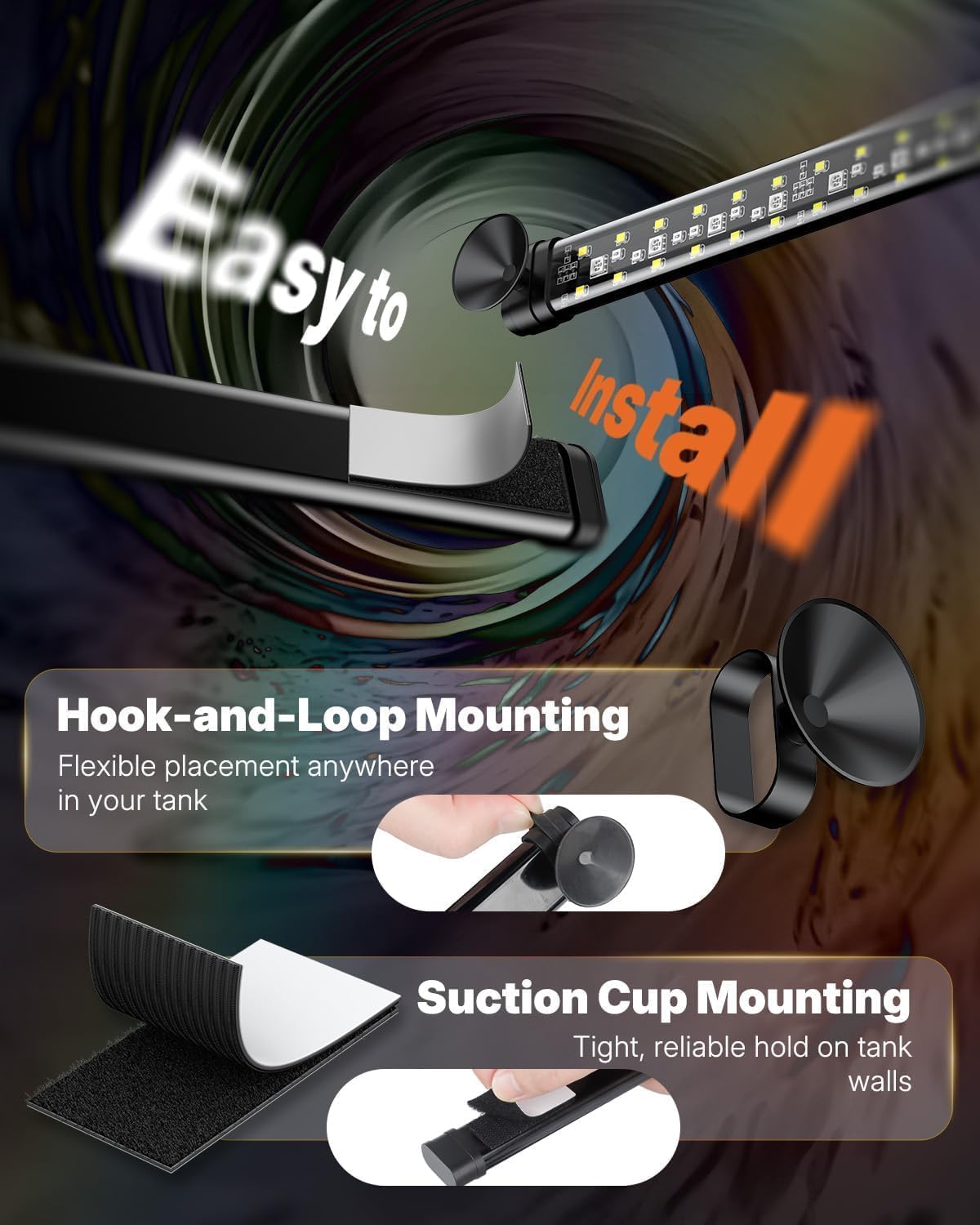
Image: Illustration of the two installation methods: hook-and-loop fasteners for flexible placement and suction cups for a secure hold on tank walls.
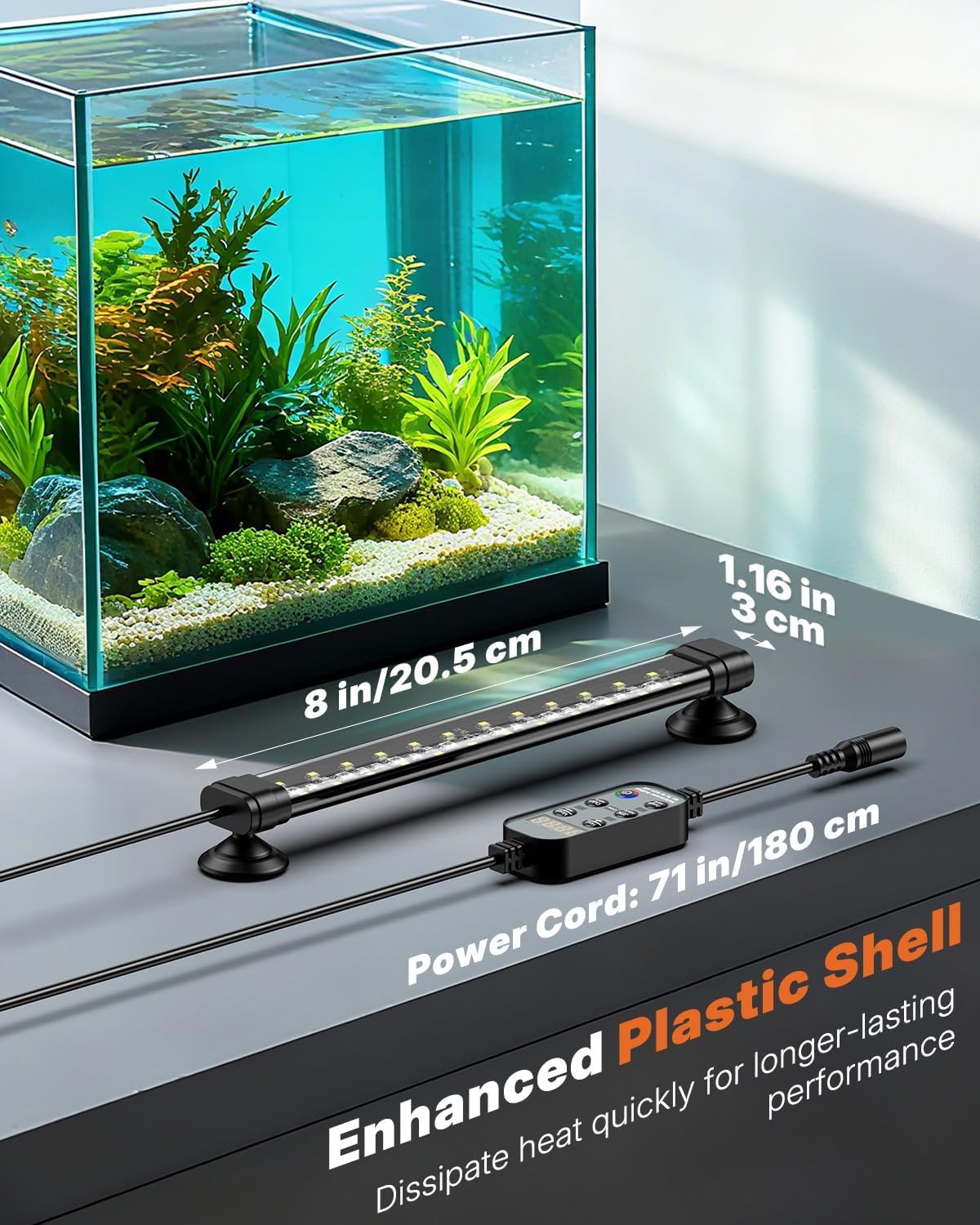
Image: The 8-inch aquarium light installed on a tank, highlighting its compact size and the length of the power cord (71 inches / 180 cm).
Istruzzjonijiet Operattivi
1. Using the Inline Controller
The light unit features an inline controller for basic operations and timer settings.

Image: The light controller with buttons labeled for Hour, Minute, Japanese Style, Dutch Style, Jungle Style, and Dynamic Color Mode/On/Off.
- Hour Button (1): Increases brightness and sets the start hour for timer modes.
- Minute Button (2): Decreases brightness and sets the start minute for timer modes.
- JPN Style Button (3): Activates the Japanese Style Timer Mode.
- Dutch Style Button (4): Activates the Dutch Style Timer Mode.
- Jungle Style Button (5): Activates the Jungle Style Timer Mode.
- Dynamic Color Mode & On/Off Button (6): Toggles dynamic color modes and powers the light on/off. Hold to turn off.
To set the 24/7 mode using the controller, hold down the power button until the display flashes, then use the Hour and Minute buttons to set the current time. The timer modes will then operate relative to this set time.
2. Using the Pawfly Bluetooth App
For advanced control and customization, download the Pawfly app from your device's app store.

Image: The Pawfly app interface on a smartphone, demonstrating Bluetooth control for brightness and color customization. App download links for iOS and Android are visible, along with a default PIN: 12345678.
- Niżżel l-App: Fittex għal "Pawfly" or "P-light controller" in the Apple App Store (iOS) or Google Play Store (Android). Ensure your app is updated to the latest version.
- Tqabbil: Enable Bluetooth on your mobile device. Open the Pawfly app and follow the on-screen instructions to connect to your light. The default PIN is 12345678.
- Aġġustament tal-luminożità: Use the app's slider to adjust the light intensity from 1% to 100%.
- Personalizzazzjoni tal-Kulur: Select from over 100,000 colors using the color wheel or by adjusting individual WRGB (White, Red, Green, Blue) channels.
- Modi tat-Tajmer:
- Access the 24/7 mode selection to choose between Dutch, Jungle, and Japanese styles.
- You can also set custom DIY timer modes to personalize lighting schedules. Note: DIY timers must be set before first use.
- Effetti dinamiċi: Explore various preset effects such as warm white, bright white, day, and RGB cycle to create different moods in your aquarium.

Image: A visual representation of the 24/7 natural day-night light cycle, showing how light intensity and color change from sunrise to moonlight, simulating a natural rhythm for the aquarium.

Image: The Pawfly app displaying the three customizable 24/7 day-night cycles (Dutch, Jungle, Japanese) and options for setting up to three DIY personalized lighting schedules.

Image: The Pawfly app demonstrating different dynamic light effects, including Warm White, Bright White, Day mode, and an RGB Cycle, allowing users to tailor the aquarium's ambiance.

Image: The Pawfly app interface showing a brightness slider for overall light intensity adjustment and individual sliders for Red, Green, Blue, and White channels, enabling precise color tuning.
Manutenzjoni
- Tindif: Regularly wipe the light unit with a soft, damp cloth to remove algae or mineral buildup. Ensure the power is disconnected before cleaning.
- Klassifikazzjoni li ma jgħaddix ilma minnha: The light unit is IP68 waterproof, meaning it is fully dustproof and can be submerged. However, the inline controller and power adapter are not waterproof and must be kept dry.
- Spezzjoni tal-Cable: Periodically check the power cord and connections for any signs of damage. Do not use if the cord is frayed or damaged.

Image: The Pawfly aquarium light highlighting its IP68 waterproof rating, indicating it is fully dustproof and waterproof for daily use in an aquarium.
Issolvi l-problemi
| Problema | Kawża Possibbli | Soluzzjoni |
|---|---|---|
| Id-dawl ma jixgħelx. | Bla enerġija, konnessjoni maħlula, adapter difettuż. | Iċċekkja s-sokit tal-elettriku, kun żgur li l-konnessjonijiet kollha huma siguri. Ipprova sokit ieħor. |
| Bluetooth app cannot connect to the light. | Bluetooth off, app not updated, light too far, incorrect PIN. | Ensure Bluetooth is enabled on your device. Update the Pawfly app. Move closer to the light. Verify the default PIN (12345678). Restart the app and light. |
| Timer settings are confusing or not working as expected. | Incorrect time setting on controller, misunderstanding of timer logic. | When setting the 24/7 mode via the controller, ensure you accurately set the current time. The timer modes (Dutch, Jungle, Japanese) operate based on this initial time setting. For example, if you want lights on from 1 PM to 9 PM, and the timer starts at 9 AM, you may need to adjust the controller's "current time" to be 4 hours behind the actual time (e.g., set controller to 9 AM when it's actually 1 PM). Refer to the app for more intuitive timer setup. |
| Suction cups do not hold. | Surface not clean, suction cups worn out, improper application. | Clean the tank surface thoroughly before applying. Ensure suction cups are free of debris. If worn, consider replacing them or using the hook-and-loop fasteners. |
Speċifikazzjonijiet
| Karatteristika | Dettall |
|---|---|
| Numru tal-Mudell | AL-4380 |
| Sors tal-Enerġija | Corded Elettriku |
| Tip ta' Sors tad-Dawl | LED |
| Wattage | 5 Watts |
| Temperatura tal-Kulur | 6500 K (Abjad) |
| Spettru tal-Kulur | 660 nm (Red), 525 nm (Green), 455 nm (Blue) |
| CRI (Indiċi tar-Rendiment tal-Kulur) | 98 |
| Dimensjonijiet tal-Prodott | 8"T x 1.18"W x 0.6"Għ (20.5 ċm T x 3 ċm W x 1.5 ċm Għ) |
| Piż tal-oġġett | 7.4 uqija |
| Materjal | Plastik |
| Tip ta 'Immuntar | Submersible (with suction cups or hook-and-loop) |
| Klassifikazzjoni li ma jgħaddix ilma minnha | IP68 (light unit only) |
| Metodu ta' Kontroll | Bluetooth App, Inline Controller |
| Kompatibilità | Apparat iOS u Android |
Garanzija u Appoġġ
Pawfly products are manufactured with quality and performance in mind. For warranty information, technical support, or customer service inquiries, please contact Pawfly directly through their official website or the retailer where the product was purchased. Keep your purchase receipt as proof of purchase for any warranty claims.


