1. Gwida ta' Setup
This section provides instructions for the initial setup of your OPPO A6 Pro 5G CPH2781 smartphone.
1.1 Tneħħija tal-kaxxa u Spezzjoni Inizjali
Neħħi bir-reqqa l-komponenti kollha mill-imballaġġ. Ivverifika li l-oġġetti li ġejjin huma preżenti:
- OPPO A6 Pro 5G CPH2781 device
- 80W SUPERVOOC Flash Charge adapter
- Kejbil USB Type-C
- Għodda ejector SIM
- Gwida ta' Bidu Mgħaġġel u Informazzjoni dwar is-Sigurtà
Spezzjona l-apparat għal kwalunkwe ħsara viżibbli qabel tipproċedi.
1.2 Installazzjoni tas-SIM Card u l-Ħażna
The OPPO A6 Pro 5G supports Dual SIM functionality. Follow these steps to install your SIM cards:
- Sib it-trej tal-kard SIM fuq il-ġenb tal-apparat.
- Daħħal l-għodda tal-ejecter tas-SIM fit-toqba ż-żgħira ħdejn it-trej u agħfas bil-mod sakemm it-trej joħroġ 'il barra.
- Place your Nano-SIM cards into the designated slots on the tray. Ensure the gold contacts face downwards.
- Erġa' daħħal it-trej tas-SIM card fl-apparat bir-reqqa sakemm tikklikkja f'postu.
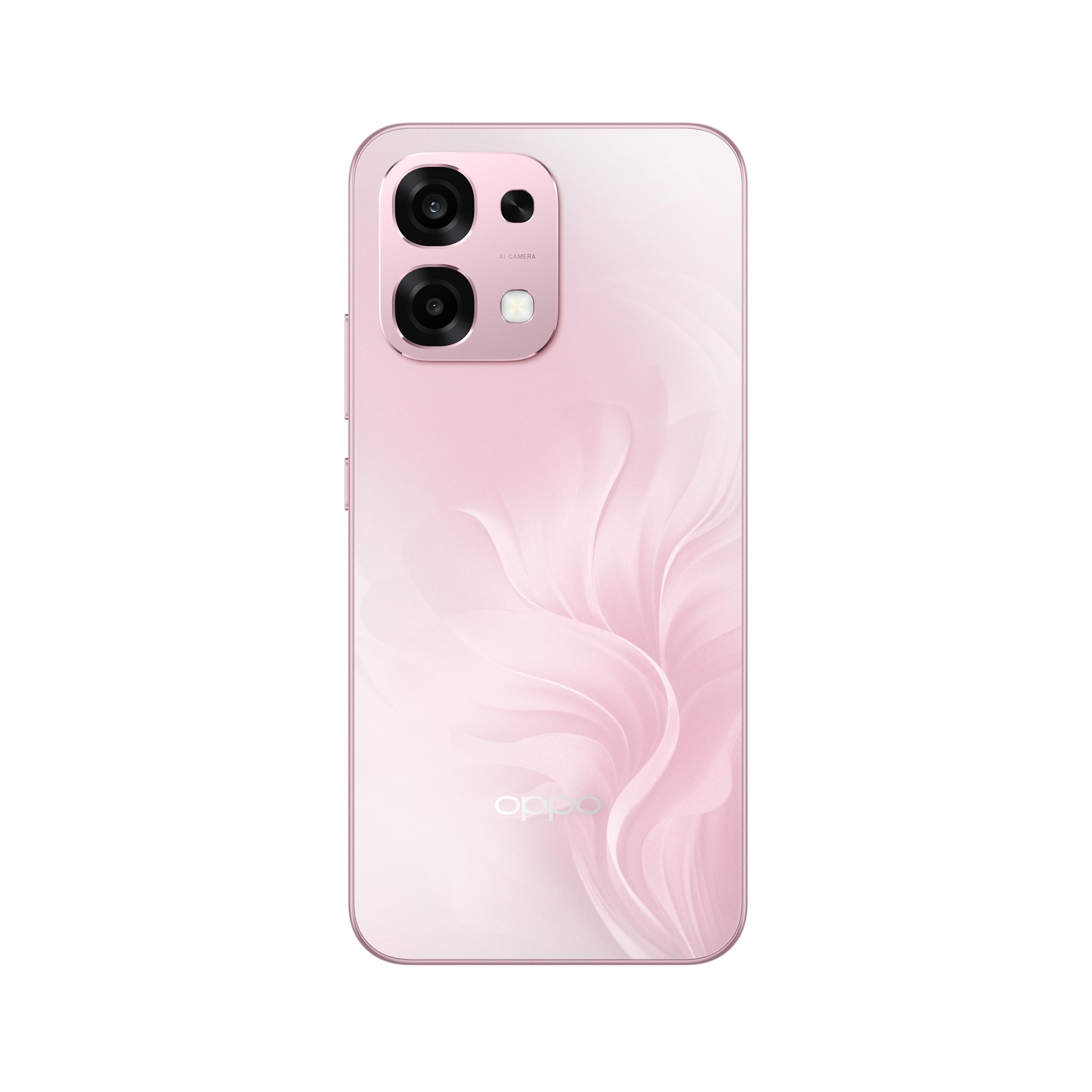
Figura 1: Wara view of the OPPO A6 Pro 5G CPH2781, highlighting the camera array and device color.
1.3 Ixgħel u Konfigurazzjoni Inizjali
Biex tixgħel l-apparat tiegħek għall-ewwel darba:
- Press and hold the Power button (located on the right side) until the OPPO logo appears on the screen.
- Segwi l-istruzzjonijiet fuq l-iskrin biex tagħżel il-lingwa u r-reġjun tiegħek, u tikkonnettja ma' netwerk Wi-Fi.
- Idħol bil-kont tal-Google tiegħek jew oħloq wieħed ġdid biex taċċessa s-servizzi tal-Google u l-Play Store.
- Complete the setup wizard, including setting up screen lock methods (PIN, pattern, password, or Face Recognition).
1.4 Iċċarġjar tal-Apparat
Your OPPO A6 Pro 5G is equipped with 80W SUPERVOOC Flash Charge technology for rapid charging. Use the provided 80W SUPERVOOC adapter and USB Type-C cable for optimal charging performance.
- Qabbad il-kejbil USB tat-Tip C mal-port tal-iċċarġjar fil-qiegħ tat-telefon.
- Connect the other end of the cable to the 80W SUPERVOOC adapter.
- Ipplaggja l-adapter fi żbokk tad-dawl.
- L-indikatur tal-iċċarġjar se jidher fuq l-iskrin.
2. Istruzzjonijiet Operattivi
This section covers the basic operation and key features of your OPPO A6 Pro 5G CPH2781.
2.1 Navigating ColorOS
Your device runs on ColorOS, OPPO's customized Android operating system. Common navigation gestures include:
- Swipe 'l fuq: Access the app drawer (if enabled) or return to the home screen.
- Swipe' l isfel: Open the notification panel and quick settings.
- Swipe Xellug/Lemin: Navigate between home screen pages.
- Tektek: Agħżel oġġett jew iftaħ app.
- Stampa Twila: Aċċessa l-menus kuntestwali jew iċċaqlaq l-ikoni tal-app.
2.2 Karatteristiċi tal-Wiri
The OPPO A6 Pro 5G features a 6.57-inch 120Hz AMOLED Ultra Bright Display, providing vivid colors and smooth scrolling. You can adjust display settings such as brightness, color mode, and refresh rate in the Settings menu under "Display & Brightness".
2.3 Użu tal-Kamera
The device is equipped with an advanced camera system. To open the camera, tap the Camera app icon on your home screen or lock screen. Key features include:
- Modi tar-Ritratti: Standard, Ritratt, Bil-Lejl, Professjonali, Panorama.
- Reġistrazzjoni tal-vidjo: Supports various resolutions and frame rates.
- Kamera AI: Utilizes artificial intelligence for scene recognition and optimal photo settings.

Figure 2: Detail of the OPPO A6 Pro 5G CPH2781 camera module.
2.4 Karatteristiċi tal-AI
The OPPO A6 Pro 5G integrates several AI-powered features to enhance user experience:
- AI Eraser 2.0: For intelligent object removal in photos.
- AI Assistance for Documents: Helps in scanning and managing documents.
- AI Assistant for Notes: Enhances note-taking capabilities.
2.5 Konnettività
Your device supports 5G cellular technology, Bluetooth, and LTE. AI LinkBoost 3.0 automatically optimizes network performance for stable connections.
- Wi-Fi: Qabbad ma' netwerks mingħajr fili permezz ta' Settings > Wi-Fi.
- Bluetooth: Pair with other Bluetooth devices via Settings > Bluetooth.
- Netwerk mobbli: Manage 5G/LTE settings via Settings > Mobile Network.
3. Manutenzjoni u Kura
Proper maintenance ensures the longevity and optimal performance of your OPPO A6 Pro 5G CPH2781.
3.1 Kura tal-Batterija
The device is equipped with a 6500mAh battery. To maximize battery life:
- Evita temperaturi estremi.
- Use the provided 80W SUPERVOOC Flash Charge adapter and cable.
- Evita li tiċċarġja l-batterija kompletament ta' spiss.
- Ippermetti l-modi ta' ffrankar tal-enerġija meta jkun meħtieġ.
3.2 Reżistenza għall-Ilma u t-Trab
The OPPO A6 Pro 5G CPH2781 has an IP69 rating, indicating resistance to dust and high-pressure water jets. While resistant, it is not waterproof under all conditions. To maintain resistance:
- Ensure the SIM tray is fully closed and sealed.
- Evita li tgħaddas l-apparat fl-ilma.
- Do not expose the device to saltwater, chlorinated water, or other liquids.
- If the device gets wet, wipe it dry with a clean, soft cloth before charging.
3.3 Protezzjoni Fiżika
The device is certified to military standards for durability. It also comes with a built-in screen protector. For additional protection:
- Consider using a protective case.
- Avoid dropping the device or exposing it to severe impacts.
- Naddaf l-iskrin u l-korp b'ċarruta ratba u mingħajr suf.
4 Issolvi l-problemi
This section addresses common issues you might encounter with your OPPO A6 Pro 5G CPH2781.
4.1 L-Apparat Mhux Qed Jixgħel
- Kun żgur li l-batterija hija ċċarġjata. Qabbad l-apparat mal-ċarġer għal mill-inqas 10-il minuta.
- Perform a forced restart by pressing and holding the Power button and Volume Up button simultaneously for about 10-15 seconds.
4.2 Konnettività tan-Netwerk Dgħajfa
- Iċċekkja jekk is-SIM card tiegħek hijiex imdaħħla sew.
- Verify that mobile data is enabled in Settings.
- Ipprova terġa 'tibda l-apparat.
- Reset network settings (Settings > System settings > Back up and reset > Reset phone > Reset network settings).
- Kun żgur li tinsab fil-kopertura tan-netwerk.
4.3 L-Applikazzjonijiet Jikkraxxjaw jew Jiffriżaw
- Agħlaq u terġa' tiftaħ l-app.
- Clear the app's cache and data (Settings > Apps > App management > [App Name] > Storage usage > Clear cache/Clear data).
- Aġġorna l-app għall-aħħar verżjoni mill-Google Play Store.
- Ensure your ColorOS is up to date (Settings > About device > Up to date).
4.4 Il-Batterija Tixxotta Malajr
- Iċċekkja l-użu tal-batterija f'Settings > Battery biex tidentifika apps li jikkunsmaw ħafna enerġija.
- Naqqas il-luminożità tal-iskrin u l-ħin tal-iskadenza tal-iskrin.
- Iddiżattiva karatteristiċi mhux meħtieġa bħall-GPS, il-Bluetooth, jew il-Wi-Fi meta ma tkunx qed tużahom.
- Enable power-saving mode.
5. Speċifikazzjonijiet
Below are the key technical specifications for the OPPO A6 Pro 5G CPH2781.
| Karatteristika | Speċifikazzjoni |
|---|---|
| Brand | OPPO |
| Isem tal-Mudell | A6 Pro (CPH2781) |
| Sistema Operattiva | ColorOS |
| Memorja RAM | 8 GB (espandibbli għal 16 GB) |
| Kapaċità tal-Ħżin | 256 GB |
| Mudell tas-CPU | MediaTek Helio G100 |
| Daqs tal-Iskrin | 6.57 Pulzier |
| Tip ta 'Wiri | AMOLED |
| Riffriskar Rata | 120 Hz |
| Kapaċità tal-batterija | 6500 mAh |
| Teknoloġija tal-Iċċarġjar | 80W SUPERVOOC Flash Charge |
| Teknoloġija Ċellulari | 5G |
| Għadd ta' Slottijiet tal-Karta SIM | SIM doppju |
| Livell ta 'Reżistenza għall-Ilma | IP69 (Li ma jgħaddix ilma) |
| Sigurtà Biometrika | Rikonoxximent tal-wiċċ |
| Tip ta' Konnettur | USB Tip Ċ |
| Midja Inkorporata | Protettur tal-iskrin |
6. Informazzjoni dwar Garanzija
Your OPPO A6 Pro 5G CPH2781 comes with a Garanzija ta' 2 snin mill-manifattur. Din il-garanzija tkopri difetti fil-materjali u l-abbilità taħt użu normali.
Please retain your proof of purchase for warranty claims. The warranty does not cover damage caused by misuse, accidents, unauthorized modifications, or normal wear and tear. For detailed terms and conditions, please refer to the warranty card included in your product packaging or visit the official OPPO websit.
7. Appoġġ għall-Klijent
For further assistance, technical support, or service inquiries regarding your OPPO A6 Pro 5G CPH2781, please contact OPPO customer service through the following channels:
- Official OPPO Websit: Żur Appoġġ tal-OPPO għal FAQs, gwidi għas-soluzzjoni tal-problemi, u informazzjoni ta' kuntatt.
- OPPO Store: Tista 'wkoll iżżur l-uffiċjal OPPO Store on Amazon għal informazzjoni dwar il-prodott u aċċessorji relatati.
- Ċentri tas-Servizzi: Locate authorized OPPO service centers in your region for in-person support.
When contacting support, please have your device model (CPH2781) and serial number ready.