1. Introduzzjoni
This manual provides detailed instructions for the installation, operation, and maintenance of your VSTARCAM CS995 Pan/Tilt Smart Security Camera. This indoor camera is designed to provide comprehensive surveillance with features such as 2K QHD resolution, full-color night vision, motion detection, and two-way audio. Please read this manual thoroughly before using the product to ensure proper setup and functionality.
2. Kontenut tal-Pakkett
Iċċekkja li l-oġġetti kollha elenkati hawn taħt huma inklużi fil-pakkett tiegħek. Jekk xi oġġetti huma neqsin jew bil-ħsara, jekk jogħġbok ikkuntattja l-appoġġ għall-klijenti.
- VSTARCAM CS995 Pan/Tilt Smart Security Camera
- Adapter tal-Enerġija
- Iċċarġjar Cable
- Kit tal-Viti tal-Immuntar
- Stand
- Manwal ta 'Istruzzjoni (dan id-dokument)
3. Prodott Aktarview
The VSTARCAM CS995 camera offers advanced features for indoor monitoring.
3.1 Karatteristiċi ewlenin
- 360° PTZ Coverage: Pan 310° horizontally and tilt 115° vertically for complete room coverage.
- Riżoluzzjoni QHD ta' 2K: Captures clear, detailed video footage.
- Viżjoni bil-Lejl bil-Kulur Sħiħ: Provides clear, colored images up to 15ft in low-light conditions using dual light sources.
- Motion & Human Detection: AI-powered detection sends real-time alerts to your mobile phone upon detecting motion or human figures.
- Awdjo f'żewġ direzzjonijiet: Built-in microphone and speaker allow for clear communication with family or pets.
- Ħażna Flessibbli: Supports local storage via Micro SD card (up to 256GB, not included) and cloud storage (7-day trial available).
- Konnettività Wi-Fi 2.4GHz: Connects to your home network for remote access and control.
3.2 Komponenti tal-Kamera
Iffamiljarizza ruħek mal-komponenti fiżiċi tal-kamera tiegħek.

Image: VSTARCAM CS995 camera illustrating its 310° pan and 115° tilt capabilities. The image shows the camera in a living room setting, monitoring a child playing.
- Lenti: Main camera lens for video capture.
- LEDs/Spotlajts infra-aħmar: Għall-viżjoni u d-dawl bil-lejl.
- Mikrofonu: Għal input awdjo waqt komunikazzjoni f'żewġ direzzjonijiet.
- Kelliem: For audio output during two-way communication and alerts.
- Slott tal-Karta Mikro SD: Għall-ħażna lokali tal-vidjow.
- Port tal-Enerġija: Għall-konnessjoni tal-adapter tal-enerġija.
- Buttuna Irrisettja: Used for factory reset (usually a small pinhole).
4. Gwida ta' Setup
4.1 Kif Tixgħel il-Kamera
- Connect the charging cable to the camera's power port.
- Ipplaggja l-adapter tal-enerġija fi żbokk elettriku standard.
- The camera will power on and initiate its self-test, indicated by a rotating motion and status light.
4.2 Installing the O-KAM Pro App
- Download the "O-KAM Pro" app from your smartphone's app store (App Store for iOS, Google Play Store for Android).
- Irreġistra għal kont ġdid jew idħol jekk diġà għandek wieħed.
4.3 Connecting the Camera to Wi-Fi
Kun żgur li l-ismartphone tiegħek huwa konness ma' netwerk Wi-Fi ta' 2.4GHz. Il-kamera ma tappoġġjax Wi-Fi ta' 5GHz.
- Open the O-KAM Pro app and tap the "+" icon to add a new device.
- Follow the on-screen instructions to select your camera model and begin the pairing process.
- You may be prompted to scan a QR code displayed on your phone with the camera, or to enter your Wi-Fi credentials.
- Wait for the camera to connect to your Wi-Fi network. A voice prompt or status light change will indicate a successful connection.
4.4 Installazzjoni ta' Karta Mikro SD (Mhux obbligatorja)
For local storage, insert a Micro SD card (up to 256GB, not included) into the designated slot on the camera. Ensure the camera is powered off before inserting or removing the card.
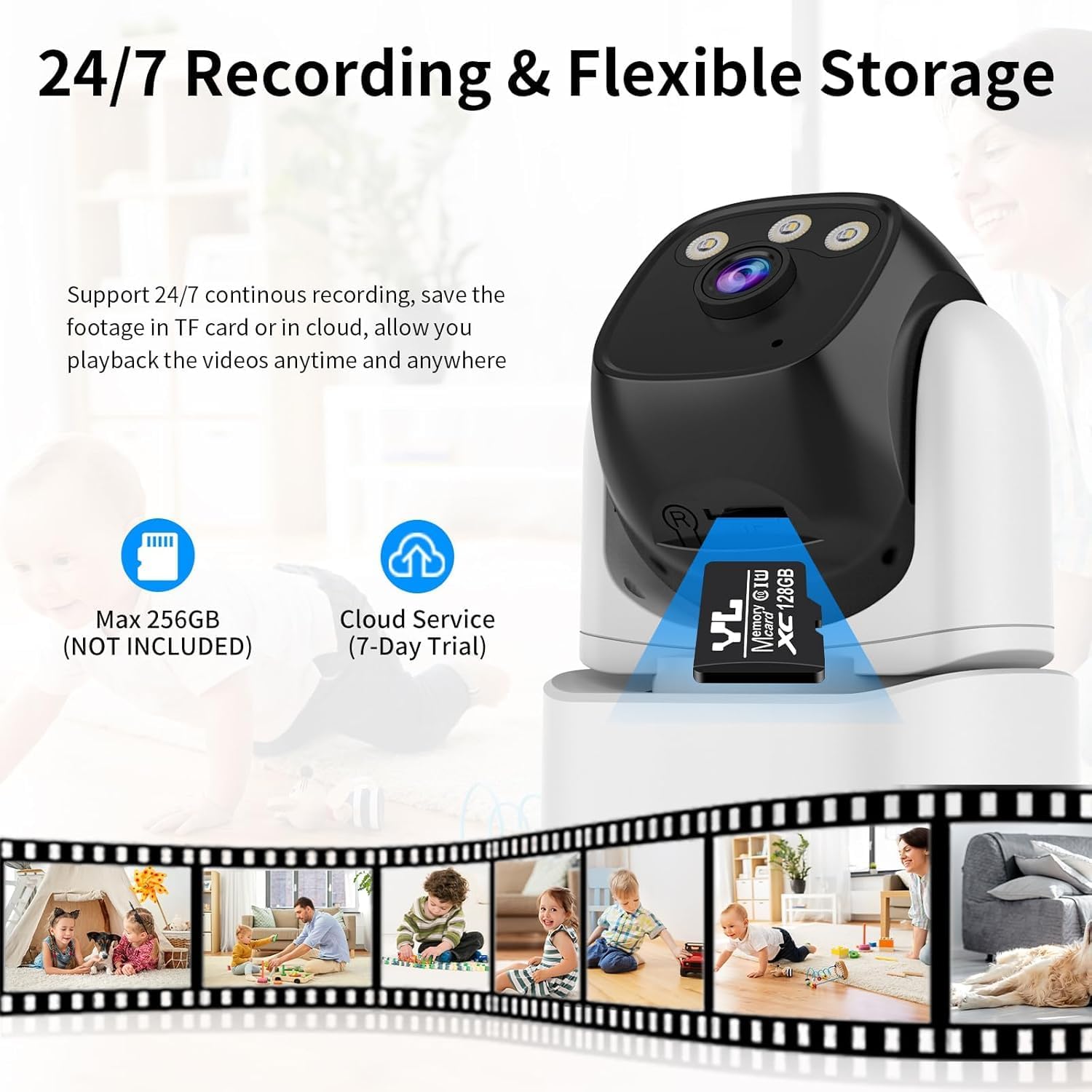
Image: VSTARCAM CS995 camera highlighting the Micro SD card slot and indicating support for both local (SD card) and cloud storage options.
5. Istruzzjonijiet Operattivi
5.1 Ħaj View u Kontroll PTZ
Once connected, open the O-KAM Pro app to view il-feed dirett mill-kamera tiegħek.
- Pan/Mejjel: Mexxi subgħajk fuq il-live view screen to remotely adjust the camera's horizontal (pan) and vertical (tilt) angles.
- Zoom: Uża ġesti ta' pinch-to-zoom fuq il-live view to digitally zoom in or out.
Image: VSTARCAM CS995 camera illustrating its 310° pan and 115° tilt capabilities. The image shows the camera in a living room setting, monitoring a child playing.
5.2 Awdjo b'żewġ direzzjonijiet
The camera supports two-way communication.
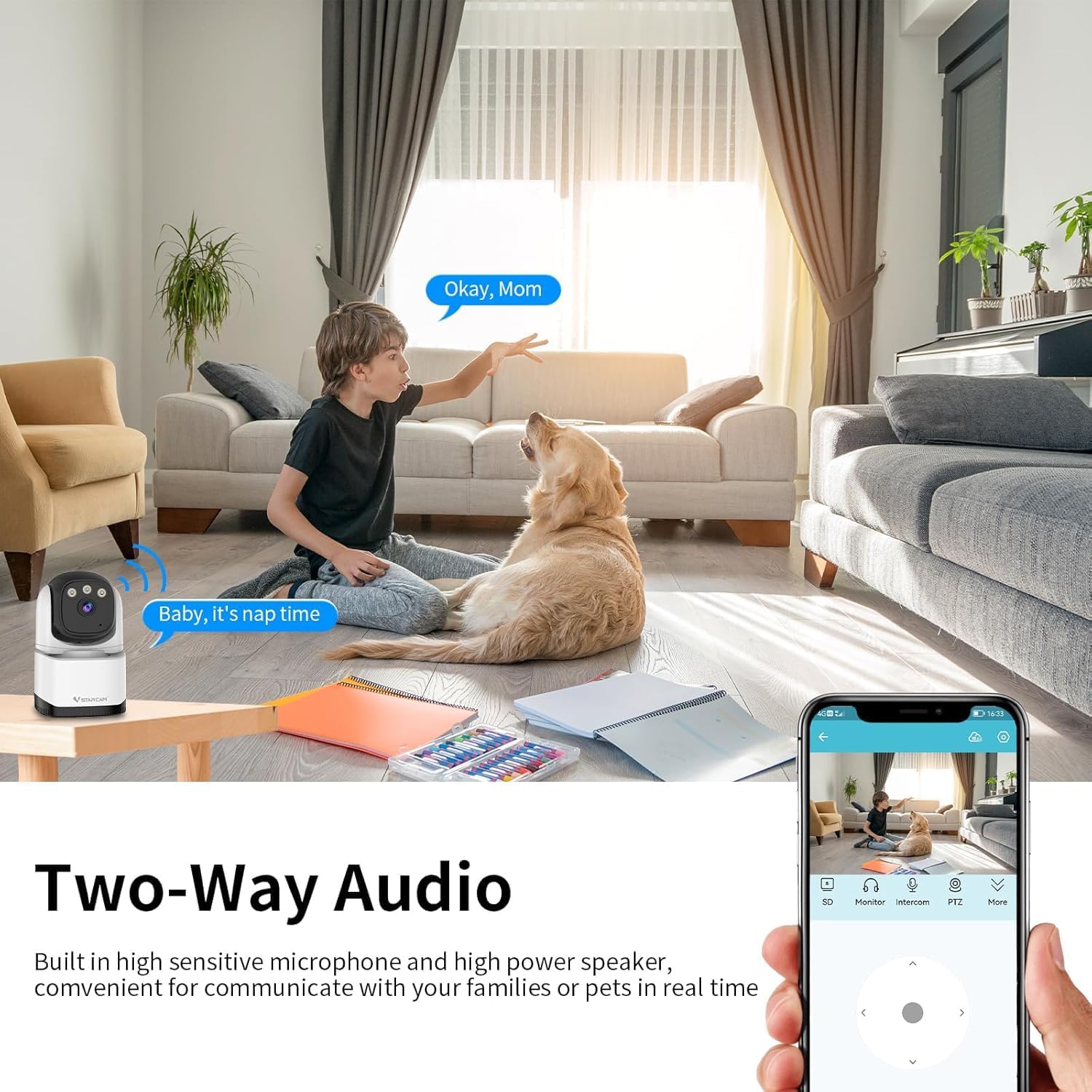
Image: VSTARCAM CS995 camera demonstrating its two-way audio function, showing a child communicating with an adult via the camera.
- Tektek l-ikona tal-mikrofonu fil-live tal-app view biex titkellem permezz tal-ispiker tal-kamera.
- Tektek l-ikona tal-ispiker biex tisma' l-awdjo mill-ambjent tal-kamera.
5.3 Motion and Human Detection
The camera can detect motion and human figures, sending alerts to your phone.

Image: VSTARCAM CS995 camera demonstrating AI-powered motion and human detection, showing the camera tracking a person in a living room.
- Ippermetti Twissijiet: In the app settings, navigate to "Detection Settings" to enable motion and human detection.
- Customize Zones: Iddefinixxi żoni speċifiċi fil-kamera view għall-iskoperta tal-moviment.
- Sensittività: Aġġusta s-sensittività tad-detezzjoni biex timminimizza l-allarmi foloz.

Image: VSTARCAM CS995 camera illustrating real-time alert notifications, including spotlight activation, alarm alerts, and push notifications to a smartphone when motion is detected.
5.4 Modi ta' Viżjoni bil-Lejl
Il-kamera toffri diversi għażliet ta' viżjoni bil-lejl:

Image: VSTARCAM CS995 camera demonstrating its three night vision modes: Infrared (black and white), Full Color (using ambient light or spotlights), and Smart Light (activates spotlights upon detection for color vision).
- Modalità infra-aħmar: Standard black and white night vision.
- Modalità Kulur Sħiħ: Utilizes built-in spotlights to provide color images in the dark.
- Smart Light Mode: The camera remains in infrared mode and switches to full color with spotlights upon detecting motion.
You can switch between these modes in the O-KAM Pro app settings.
5.5 Reġistrazzjoni u Daqq
The camera supports 24/7 continuous recording to a Micro SD card or cloud storage.
- Reġistrazzjoni tal-Kard SD: Ensure a Micro SD card is inserted and formatted via the app. Recordings will be saved locally.
- Ħażna Cloud: Activate the cloud storage service (7-day trial available) through the app for remote backup.
- Daqq: Aċċess irreġistrat footage through the "Playback" section in the O-KAM Pro app.
5.6 Qsim ta' Multi-Utent
You can share live views of your camera with other users through the O-KAM Pro app.
- In the app, go to the camera settings and find the "Share Device" option.
- Invite other users by entering their O-KAM Pro account details.
- Shared users will receive an invitation and can view the live feed and access certain features based on permissions granted.
6. Manutenzjoni
- Tindif: Uża drapp artab u niexef biex tnaddaf il-lenti u l-qafas tal-kamera. Evita prodotti tat-tindif jew solventi li joborxu.
- Aġġornamenti tal-Firmware: Regularly check the O-KAM Pro app for available firmware updates to ensure optimal performance and security.
- Pjazzament: Ensure the camera is placed in a stable, dry indoor environment, away from direct sunlight or extreme temperatures.
7 Issolvi l-problemi
7.1 Il-Kamera Mhux Qed Tikkonnettja mal-Wi-Fi
- Kun żgur li n-netwerk Wi-Fi tiegħek huwa 2.4GHz. Il-kamera ma tappoġġjax netwerks ta' 5GHz.
- Ivverifika li l-password tal-Wi-Fi li daħħalt fl-app hija korretta.
- Poġġi l-kamera eqreb lejn ir-router Wi-Fi tiegħek waqt is-setup.
- Erġa' ibda r-router u l-kamera tiegħek, imbagħad erġa' pprova l-proċess tal-konnessjoni.
- Perform a factory reset on the camera by pressing and holding the reset button for several seconds until a voice prompt confirms.
7.2 L-ebda Twissijiet ta' Sejbien ta' Mozzjoni
- Check if motion detection is enabled in the O-KAM Pro app settings.
- Adjust the detection sensitivity. Higher sensitivity may be needed for subtle movements.
- Ensure notification permissions are enabled for the O-KAM Pro app on your smartphone.
- Ivverifika li l-kamera għandha konnessjoni stabbli tal-internet.
7.3 Issues with Two-Way Audio
- Ensure your phone's microphone and speaker are not muted or blocked.
- Check the volume settings within the O-KAM Pro app.
- Verify the camera's internet connection stability.
7.4 Unable to Share Camera with Family Members
- Ensure the family member has downloaded the O-KAM Pro app and created their own account.
- Double-check the account details (email/username) entered when sending the share invitation.
- The invited user must accept the sharing invitation within the app.
- Verify that both your device and the invited user's device have a stable internet connection.
8. Speċifikazzjonijiet
| Karatteristika | Dettall |
|---|---|
| Isem tal-Mudell | CS995 |
| Użu fuq ġewwa/barra | Ġewwa |
| Riżoluzzjoni tal-Qbid tal-Vidjo | 1440p (2K QHD) |
| Teknoloġija tal-Konnettività | Bil-fili (Enerġija), Wi-Fi (Data) |
| Teknoloġija tal-Komunikazzjoni mingħajr Fili | Wi-Fi (2.4GHz biss) |
| Sors tal-Enerġija | Corded Elettriku |
| Medda tal-Viżjoni Lejl | 15 Metri (madwar 49 pied) |
| Frame Rata | 20 frejm kull sekonda |
| Għażliet ta' Ħażna | Karta Mikro SD (massimu 256GB), Ħażna fis-Sħab |
| Metodu ta' Kontroll | App (O-KAM Pro) |
| Medda Pan/Tilt | Pan 310°, Mejjel 115° |
| Dimensjonijiet tal-oġġett (L x W x H) | 5 x 3 x 3 pulzieri |
| Piż tal-oġġett | 11.2 uqija |
| Materjal | Plastik |
9. Garanzija u Appoġġ
VSTARCAM provides professional customer service. If you encounter any issues or have questions regarding your CS995 camera, please contact our support team.
- Informazzjoni ta' Kuntatt: Refer to the contact details provided on the product packaging or the official VSTARCAM websit.
- Garanzija: Information regarding product warranty can be found on the official VSTARCAM websit jew billi tikkuntattja lis-servizz tal-konsumatur.


