1. Introduzzjoni
This manual provides comprehensive instructions for the setup, operation, maintenance, and troubleshooting of your Mars Hydro iHub-Pro Smart 10AC Power Strip Kit. Please read this manual thoroughly before using the device to ensure proper functionality and safety.

Stampa 1.1: Fuqview of the Mars Hydro iHub-Pro system, including the 10-outlet power strip, various smart sensors (PPFD, CO2, Soil), and a smartphone demonstrating the control application interface. This image illustrates the complete kit components.
2. Kontenut tal-Pakkett
Ivverifika li l-oġġetti kollha huma preżenti fil-pakkett tiegħek:
- Mars Hydro iHub-Pro Smart 10AC Power Strip
- Korda tal-Enerġija
- Manwal għall-Utent (dan id-dokument)
- (Optional, if purchased separately) Mars Hydro Smart Sensors (PPFD, CO2, Soil)
3. Informazzjoni dwar is-Sigurtà
- Tesponix l-apparat għall-ilma jew għal umdità eċċessiva.
- Kun żgur li l-provvista tal-enerġija taqbel mar-rekwiżiti tal-apparat.
- Żarmax jew timmodifikax l-apparat.
- Żomm fejn ma jintlaħaqx mit-tfal.
- Aqla 'l-apparat qabel it-tindif jew il-manutenzjoni.
4. Gwida ta' Setup
4.1 Konnessjoni Inizjali
- Ippakkja: Neħħi bir-reqqa l-komponenti kollha mill-imballaġġ.
- Pjazzament: Position the iHub-Pro power strip in a stable, dry location within your grow room, away from direct water spray.
- Konnessjoni tal-Enerġija: Connect the provided power cord to the iHub-Pro and then plug it into a standard AC outlet. The power indicator light should illuminate.
- Konnessjoni tal-Apparat: Plug your grow room equipment (lights, fans, humidifiers, etc.) into the appropriately labeled outlets on the iHub-Pro. Refer to the diagram below for outlet functions.

Stampa 4.1: Detailed layout of the iHub-Pro's 10 smart outlets, showing their designated functions such as LIGHT 1, LIGHT 2, HUMIDIFIER, DE-HUMIDIFIER, WATERING, FAN, INLINE FAN, HEATING, DEVICE 1, and DEVICE 2. Also indicates sensor ports and extension ports.
4.2 Installazzjoni u Tqabbil tal-App
- Niżżel l-App: Fittex għal "Mars Hydro" or "MarsPro" in your smartphone's app store (iOS or Android) and download the official application.
- Oħloq Kont: Iftaħ l-app u segwi l-istruzzjonijiet biex toħloq kont ta' utent ġdid jew idħol jekk diġà għandek wieħed.
- Żid Apparat: In the app, select "Add Device" or the '+' icon. Follow the on-screen instructions to pair your iHub-Pro. This typically involves putting the iHub-Pro into pairing mode (refer to the device's small button or indicator light instructions) and connecting to its temporary Wi-Fi network before linking it to your home Wi-Fi.
4.3 Sensor Connection (Optional)
If you have purchased optional Mars Hydro smart sensors (PPFD, CO2, Soil), connect them to the designated sensor ports on the iHub-Pro. The app will automatically detect connected sensors.
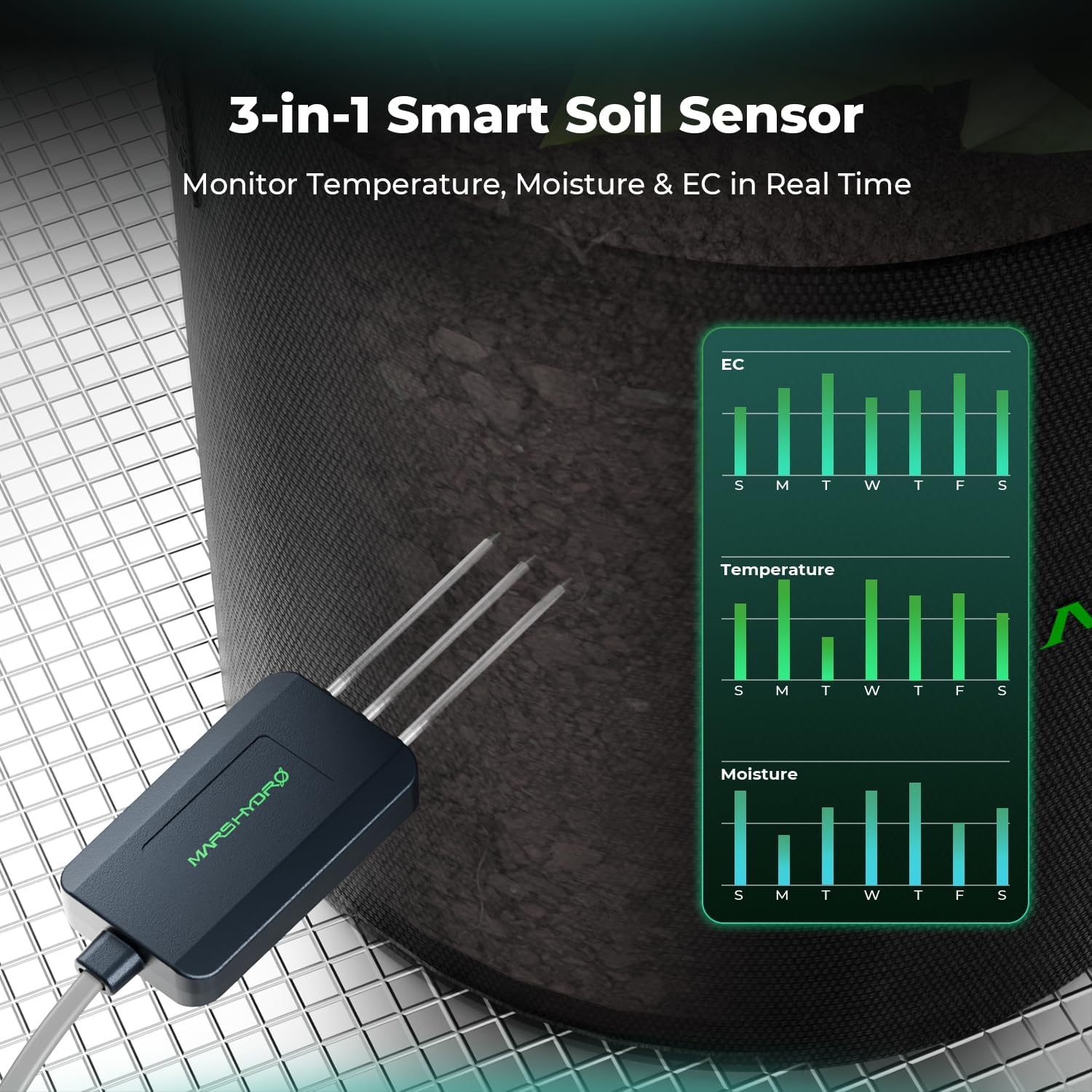
Stampa 4.2: A close-up of the Mars Hydro 3-in-1 Smart Soil Sensor, demonstrating its probes inserted into a plant's growing medium. Adjacent to it, a smartphone screen displays historical data charts for Electrical Conductivity (EC), Temperature, and Moisture, indicating real-time monitoring capabilities.

Stampa 4.3: The Mars Hydro CO2 sensor positioned within a grow environment, designed for real-time CO2 monitoring. A smartphone interface is shown, displaying current CO2 levels and controls for an inline fan, suggesting automated adjustments based on CO2 readings.

Stampa 4.4: The Mars Hydro PPFD (Photosynthetic Photon Flux Density) sensor, designed for precise measurement of light intensity. A smartphone screen displays light control settings, including dimming range and runtime settings, indicating the ability to automate grow light adjustments based on PPFD readings.
5. Istruzzjonijiet Operattivi
The Mars Hydro iHub-Pro offers comprehensive control over your grow environment through the MarsPro app.
5.1 Fuqview of App Interface

Stampa 5.1: A visual representation of the Mars Hydro iHub-Pro's intelligent grow management system, depicted through its smartphone application interface. The screen displays real-time environmental data such as temperature, humidity, VPD, CO2, PPFD, and substrate conditions. Below this, control sections for LIGHTING, ENVIRONMENT (ventilation, humidifier, dehumidifier), SENSOR (PPFD, VPD, CO2, TEMP, HUMID), and WATERING (drip irrigation, DWC, self-drainage) are visible, illustrating the centralized control capabilities.
5.2 Modi ta' Kontroll
The iHub-Pro supports six primary smart control modes for each customizable socket:
- Kontroll tat-temperatura: Automate devices (e.g., heaters, fans) based on ambient temperature readings.
- Kontroll tal-umdità: Manage humidifiers or dehumidifiers to maintain desired humidity levels.
- PPFD Control: Adjust grow light intensity based on Photosynthetic Photon Flux Density measurements.
- CO2 Control: Regulate CO2 generators or ventilation based on CO2 concentration.
- Kontroll tat-Tajmer: Skeda l-apparati biex jixegħlu/jitfu f'ħinijiet speċifiċi.
- Cycle Control: Set devices to operate in repeating on/off cycles.
Each outlet can be configured independently within the app to respond to these triggers.
5.3 Scenario-Based Automation
Define specific environmental strategies for different plant growth stages (e.g., Seedling, Vegetative, Flowering). The iHub-Pro can automatically synchronize and adjust all connected devices to match the selected stage.

Stampa 5.2: An illustration from the Mars Hydro app demonstrating the "Define Your Growing Scenario" feature. It shows a timeline with three distinct growth stages: Seedling, Veg, and Flower, along with their current status and duration. This feature allows users to pre-set environmental parameters for each stage, enabling automated transitions and management of the grow cycle.
5.4 Smart Lighting Control
Utilize the app to control your grow lights, including dimming based on PPFD readings and setting sunrise/sunset simulations.

Stampa 5.3: The Mars Hydro Smart Lighting Control System in action, featuring an FC-E1500 grow light connected to the iHub-Pro. A smartphone displays the app interface, allowing users to control light brightness, set PPFD-based dimming ranges, and configure runtime schedules for various growth stages, simulating natural sunrise and sunset.
5.5 Remote Management and Alerts
Monitor your grow room environment, log data, and receive smart alerts directly on your smartphone, providing instant notifications for environmental anomalies.

Stampa 5.4: A collage of four different indoor grow tent setups, each being remotely managed and monitored through a smartphone application. This image emphasizes the convenience and flexibility of controlling your grow environment from anywhere, highlighting the "Your Garden in Your Hand" capability of the iHub-Pro system.
6. Manutenzjoni
- Tindif: Disconnect the iHub-Pro from power before cleaning. Use a dry, soft cloth to wipe the exterior. Do not use liquid cleaners or sprays.
- Aġġornamenti tal-Firmware: Regularly check the MarsPro app for available firmware updates for your iHub-Pro and connected sensors. Updates often include performance improvements and new features.
- Kalibrazzjoni tas-Sensor: Refer to the individual sensor manuals for specific calibration procedures, if applicable.
7 Issolvi l-problemi
| Problema | Kawża Possibbli | Soluzzjoni |
|---|---|---|
| iHub-Pro not powering on. | No power from outlet; loose power cord. | Check the wall outlet with another device. Ensure the power cord is securely plugged into both the iHub-Pro and the wall outlet. |
| Ma nistax nikkonnettja mal-Wi-Fi/App. | Password tal-Wi-Fi mhux korretta; router wisq 'il bogħod; netwerk Wi-Fi ta' 5GHz. | Ensure correct 2.4GHz Wi-Fi password. Move iHub-Pro closer to the router. The iHub-Pro only supports 2.4GHz Wi-Fi networks. |
| Connected device not responding. | Outlet not enabled; incorrect app settings; device malfunction. | Check the app to ensure the specific outlet is enabled and configured correctly. Test the connected device by plugging it directly into a wall outlet. |
| Sensor not detected or reading incorrectly. | Loose connection; sensor malfunction; calibration needed. | Ensure the sensor is securely plugged into the iHub-Pro. Refer to the sensor's manual for troubleshooting or calibration. |
8. Speċifikazzjonijiet
- Mudell: iHub-Pro
- Numru ta' Sokits tal-AC: 10
- Input Voltage: 100-240V AC, 50/60Hz
- Kurrent Max: 10A (per outlet), 15A (total)
- Konnettività Wireless: Wi-Fi 2.4GHz (IEEE 802.11b/g/n)
- Portijiet tas-Sensor: Multiple dedicated ports for Mars Hydro Smart Sensors
- Temperatura operattiva: 0°C sa 40°C (32°F sa 104°F)
- Umdità Operattiva: 10% sa 90% RH, mingħajr kondensazzjoni
- Dimensjonijiet: (Irreferi għall-imballaġġ tal-prodott għad-dimensjonijiet eżatti)
- ASIN: B0FRRK8PGL
- L-Ewwel Disponibbli: 1 ta’ Lulju, 2025
9. Informazzjoni dwar Garanzija
Mars Hydro products typically come with a limited warranty. For detailed warranty terms, conditions, and registration, please visit the official Mars Hydro webis-sit jew ikkuntattja l-appoġġ għall-klijenti. Żomm il-prova tax-xiri tiegħek għal talbiet ta' garanzija.
10. Appoġġ għall-Klijent
If you encounter any issues or have questions not covered in this manual, please contact Mars Hydro customer support:
- Websit: www.marshydro.com
- Email: (Irreferi għal website for current support email)
- Telefon: (Irreferi għal website for current support phone number)
Please have your product model (iHub-Pro) and purchase information ready when contacting support.


