1. Informazzjoni Importanti dwar is-Sigurtà
- Tesponix l-ispiker għal temperaturi estremi jew dawl tax-xemx dirett għal perjodi twal.
- Żomm l-ispiker 'il bogħod minn sorsi ta' sħana, oġġetti li jaqtgħu, u materjali korrużivi.
- Do not disassemble, repair, or modify the speaker yourself. Contact qualified service personnel if needed.
- Ensure the charging port cover is securely closed when using the speaker near water to maintain its IPX7 waterproof rating.
- Uża biss il-kejbil tal-iċċarġjar provdut jew kejbil USB-C iċċertifikat għall-iċċarġjar.
2. Kontenut tal-Pakkett
- 1 x OHAYO X10 Max Bluetooth Speaker (White)
- 1 x USB-C Charging Cable (charging plug not contained)
- 1 x 3.5mm AUX Cable
- 1 x Manwal għall-Utent
- 1 x Lanyard
3. Prodott Aktarview
The OHAYO X10 Max is a versatile portable Bluetooth speaker designed for high-quality audio and durability. It features a powerful 25W sound output with active bass, IPX7 waterproofing, and a long-lasting 24-hour battery. Enjoy dynamic sound with colorful RGB lighting effects, dual pairing for stereo sound, and multiple input modes.
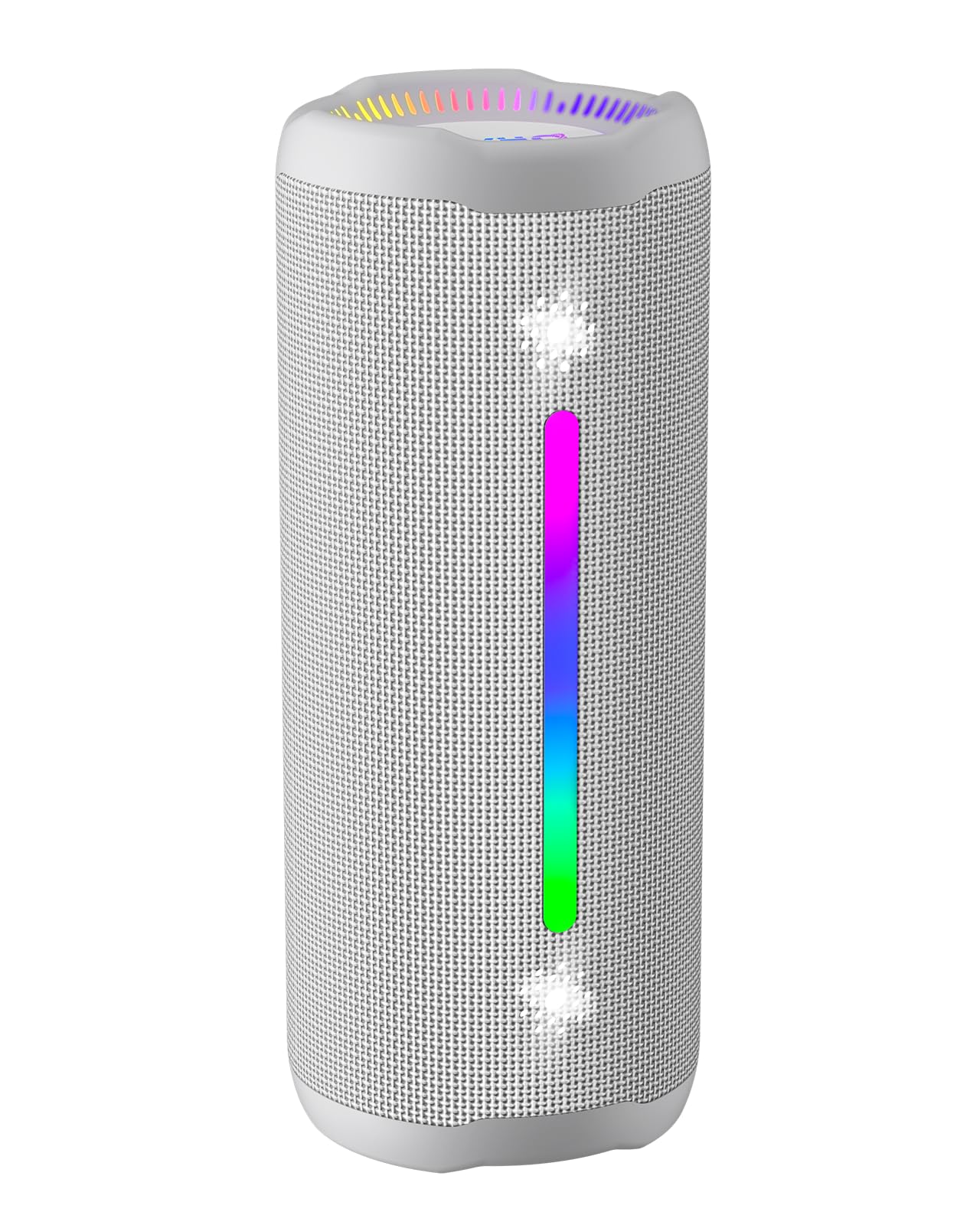
Figure 3.1: OHAYO X10 Max Bluetooth Speaker (White)

Figure 3.2: OHAYO X10 Max Bluetooth Speaker - Fully upgraded from appearance to performance.

Figure 3.3: 25W Deep Bass Sound - Independent channel design for accurate audio performance.

Figure 3.4: 6 Dazzling RGB Light Effects - Syncs with music for an immersive experience.

Figure 3.5: IPX7 Waterproof - Highly sealed design for use in various environments.

Figure 3.6: 24H Ultra-Long Battery Life - 6600mAh battery for extended playback.
4. Kontrolli u Indikaturi
The OHAYO X10 Max features intuitive controls for easy operation.

Figure 4.1: Control Panel and Ports
- Buttuna tal-Qawwa: Press and hold to power on/off. Short press to switch between input modes (Bluetooth, AUX, TF Card, USB-Audio).
- Volume Up (>): Agħfas qasir biex iżżid il-volum. Agħfas fit-tul għat-trakka li jmiss.
- Volume Down (<): Agħfas qasir biex tnaqqas il-volum. Agħfas fit-tul għat-trakka ta' qabel.
- Buttuna tal-Bass: Press to activate/deactivate Bass Boost mode.
- Buttuna tal-Logħob/Pawża/Sejħa: Short press to play/pause music. Short press to answer/end calls. Long press to reject calls. Double press to activate voice assistant.
- Dwal Indikaturi tal-Batterija: Four LED lights indicate battery level.
- Strixxa tad-Dawl RGB: Displays various colorful lighting effects.
- Port tal-Iċċarġjar (USB-C): Għall-iċċarġjar tal-ispiker.
- Port tal-AUX-in: Għal konnessjoni awdjo bil-fili.
- Slott tal-Karta TF: For playing music directly from a MicroSD card.
5. Setup
5.1 Iċċarġjar tal-Ispeaker
Before first use, fully charge the speaker. Connect the provided USB-C charging cable to the speaker's charging port and the other end to a 5V/2A USB power adapter (not included). The battery indicator lights will blink during charging and remain steady when fully charged.
5.2 Tixgħel/Jitfi
Press and hold the Power button for approximately 3 seconds to turn the speaker on or off. A voice prompt will confirm the action.
5.3 Tqabbil tal-Bluetooth
- Turn on the speaker. It will automatically enter Bluetooth pairing mode, indicated by a blinking blue LED.
- Ippermetti l-Bluetooth fuq l-apparat tiegħek (smartphone, tablet, eċċ.).
- Fittex għal "X10 Max" in your device's Bluetooth list and select it to connect.
- Ladarba jkun konness, se tinstema' twissija bil-vuċi biex tikkonferma li l-akkoppjar sar b'suċċess.
5.4 Tqabbil ta' Stereo Veru Wireless (TWS)
To achieve a true wireless stereo experience, you can pair two OHAYO X10 Max speakers together.

Figure 5.1: True Wireless Stereo Pairing
- Ensure both X10 Max speakers are powered on and not connected to any other Bluetooth device.
- Fuq kelliem wieħed (dan se jkun il-kelliem primarju), agħfas darbtejn il-buttuna tal-Power. Dan jidħol fil-modalità ta' tqabbil tat-TWS.
- Iż-żewġ kelliema jikkonnettjaw ma' xulxin awtomatikament. Se jinstema' messaġġ bil-vuċi biex jikkonferma li t-tqabbil tat-TWS kien b'suċċess.
- Issa, qabbad it-tagħmir tiegħek mal-ispiker primarju permezz tal-Bluetooth kif deskritt fit-taqsima 5.3.
5.5 Connecting via AUX
Use the provided 3.5mm AUX cable to connect the speaker to devices without Bluetooth capability.
Figure 5.2: 4 Input Modes - Including AUX, TF, and USB-Audio.
- Connect one end of the AUX cable to the speaker's AUX-in port.
- Qabbad it-tarf l-ieħor mal-output tal-awdjo tat-tagħmir tiegħek.
- The speaker will automatically switch to AUX mode. If not, short press the Power button to cycle through modes until AUX mode is activated.
5.6 Using TF Card
Insert a MicroSD (TF) card with MP3/WAV/FLAC/WMA audio files into the TF card slot. The speaker will automatically switch to TF card mode and begin playback. Short press the Power button to cycle through modes if needed.
5.7 Using USB-Audio
Connect the speaker to a computer using the USB-C cable. The speaker can function as an external audio output device for your computer. Short press the Power button to cycle through modes if needed.
6. Istruzzjonijiet Operattivi
6.1 Daqq tal-Mużika
- Play/Pawsa: Short press the Play/Pause/Call button.
- Kontroll tal-Volum: Short press the Volume Up (>) or Volume Down (<) buttons.
- Track li jmiss: Long press the Volume Up (>) button.
- Track preċedenti: Long press the Volume Down (<) button.
6.2 Funzjoni ta' Spinta tal-Bass
Press the 'BASS' button to activate or deactivate the enhanced bass mode. This feature provides deeper and richer low frequencies for a more impactful audio experience.
6.3 Modi tad-Dawl RGB
The speaker features dynamic RGB lighting. The lights will automatically sync with the music beat. To turn the lights on/off, refer to the specific control instructions in your quick start guide or experiment with the mode button if available.
6.4 Sejħiet mingħajr idejn
When connected via Bluetooth to your smartphone, the speaker can be used for hands-free calls.

Figure 6.1: Hands-Free Calling Feature
- Tweġiba/Tmiem Sejħa: Short press the Play/Pause/Call button.
- Irrifjuta Sejħa: Long press the Play/Pause/Call button.
- Attiva l-Assistent tal-Vuċi: Double press the Play/Pause/Call button.
7. Manutenzjoni
- Tindif: Imsaħ il-kelliem b 'soft, damp drapp. Tużax kimiċi ħarxa jew tindif li joborxu.
- Ħażna: Aħżen l-ispiker f'post frisk u niexef 'il bogħod mix-xemx diretta u minn temperaturi estremi meta ma jkunx qed jintuża għal perjodi twal.
- Kura tal-batterija: Biex ittawwal il-ħajja tal-batterija, iċċarġja l-ispiker mill-inqas darba kull tliet xhur jekk ma tużahx regolarment.
8 Issolvi l-problemi
| Problema | Kawża Possibbli | Soluzzjoni |
|---|---|---|
| L-ispiker ma jixgħelx. | Batterija baxxa. | Iċċarġja l-ispiker kompletament. |
| Ma tistax tqabbad permezz tal-Bluetooth. | L-ispiker mhux fil-modalità ta' tqabbil; il-Bluetooth tal-apparat mitfi; 'il bogħod wisq mill-apparat. | Ensure speaker is in pairing mode (blinking blue LED). Turn on device Bluetooth. Move device closer to speaker (within 10 meters). |
| L-ebda ħoss jew volum baxx. | Volum baxx wisq fuq l-ispiker jew l-apparat; modalità ta' input mhux korretta. | Increase volume on both speaker and device. Check if the correct input mode (Bluetooth, AUX, TF) is selected. |
| It-tqabbil tat-TWS falla. | Speakers too far apart; one speaker already connected to another device. | Ensure speakers are close to each other. Disconnect any existing Bluetooth connections before TWS pairing. |
| Distorsjoni tal-ħoss. | Volum għoli wisq; batterija baxxa. | Naqqas il-volum. Iċċarġja l-ispiker. |
9. Speċifikazzjonijiet
| Karatteristika | Speċifikazzjoni |
|---|---|
| Isem tal-Mudell | x10max |
| Verżjoni Bluetooth | 5.3 |
| Teknoloġija tal-Komunikazzjoni mingħajr Fili | Bluetooth |
| Qawwa tal-Ħruġ Massimu tal-Ispeaker | 35 Watts (25W effettivi) |
| Kapaċità tal-batterija | 6600 mAh |
| Ħin tal-logħob | Up to 24 hours (varies with volume and light use) |
| Livell ta 'Reżistenza għall-Ilma | IPX7 (Li ma jgħaddix ilma minnha) |
| Input Voltage | 5 Volts (DC) |
| Rispons ta' Frekwenza | 20 KHz |
| Sinjal-mal-ħoss Ratio | 80 dB |
| Tip ta' Sewwieq Awdjo | Sewwieq Dinamika |
| Dijametru tal-Woofer | 75 Millimetru |
| Dijametru tat-Tweeter | 26 Millimetru |
| Dimensjonijiet tal-Prodott | 2.95"D x 2.95"W x 7.28"H |
| Piż tal-oġġett | 450 Gram (15.9 uqija) |
| Materjal | Akrilonitril Butadiene Styrene (ABS), Aluminju |
| Metodu ta' Kontroll | Imbotta Buttuna |
| Karatteristiċi Speċjali | Bass Boost, AUX, Hi-Res Audio, 24-Hour Playtime, IPX7 Waterproof, TF Card Port, Dual Passive Radiators, Hands-free, True Wireless Stereo Pairing, Shockproof |
10. Garanzija u Appoġġ
The OHAYO X10 Max Bluetooth Speaker comes with an extended warranty. For specific warranty details and to register your product, please refer to the information provided in your quick start guide or contact OHAYO customer support.
For technical support or customer service inquiries, please contact OHAYO Direct. Contact information may be found in your product packaging or on the official OHAYO websit.
11. Vidjo Uffiċjali tal-Prodott
Video 11.1: Official OHAYO Portable Bluetooth Speaker overview by OHAYO Direct. This video highlights key features and design elements of the speaker.


