1. Prodott Aktarview
The Caydo T3 AI Drawing Projector is an innovative educational tool designed to foster creativity and develop essential skills in children aged 5 and above. This device combines a native 720P HD projector with advanced AI capabilities, offering a versatile platform for drawing, tracing, and interactive learning.
Karatteristiċi ewlenin:
- Step-by-Step Drawing Guidance: Access over 700 pre-loaded patterns across five educational themes, including Simple Sketches, Color Painting, Stroke Practice, and Letter & Number Tracing. Interactive guidance simplifies the drawing process.
- AI Magic Integration: Transform text descriptions into unique images for projection. Utilize fun filters (Pixel, Sketch, Cartoon, Cyberpunk) on personal photos or cut out images for custom designs.
- Photo-to-Sketch Conversion: Convert any photo into three distinct art styles (Detailed, Bold-Line, Cartoon) with an easy-to-follow step-by-step guide for tracing.
- Native 720P HD Projector: Enjoy clear projections with 60 ANSI lumens. Functions as a movie projector for cartoons, a Bluetooth speaker for audio, and a wireless screen for family videos.
- Disinn faċli għall-utent: No assembly required. Features auto keystone correction and smooth manual focus for distortion-free images. Operates offline for portability.
- Eye-Safe Projection: Certified for low blue light (SGS RG0) with auto-brightness adjustment and an adjustable break reminder (0/0.5/1/2H) to promote healthy viewdrawwiet.
2. X'hemm fil-Kaxxa
- 1x T3 Drawing Projector
- 1x Adapter tal-Enerġija
- 1x Remote (requires 2 AAA batteries, not included)
- 1x Manwal tal-Utent (dan id-dokument)
3. Gwida ta' Setup
- Unfold the Projector: Gently unfold the projector from its compact form.
- Qabbad l-Enerġija: Plug the provided power adaptor into the projector and a suitable power outlet.
- Qawwa Mixgħul: Agħfas il-buttuna tal-qawwa fuq il-proġettazzjoni jew uża l-kontroll remot biex tixgħel l-apparat.
- Aġġusta l-Istand: Position the versatile stand to achieve the desired projection angle for either table or wall use.
- Focus Image: Use the manual focus adjustment to ensure a clear and sharp projected image. The device also features auto keystone correction for distortion-free display.
- Daħħal Batteriji fil-Remote: Open the battery compartment of the remote control and insert 2 AAA batteries (not included), observing polarity.

Figure 3.1: Caydo T3 Projector unfolded and projecting an image.
Video 3.1: Demonstrates how to set up and use the T3 projector.
4. Istruzzjonijiet Operattivi
4.1 Basic Drawing & Tracing
- Select a Pattern: Use the on-device controls or the remote to browse through the pre-loaded patterns. Alternatively, connect to the Caydo app for a wider selection.
- Place Paper: Place a sheet of paper directly under the projected image.
- Traċċa: Follow the projected lines to trace the image onto your paper. For step-by-step patterns, advance through the stages as you complete each part of the drawing.
- Kulur: Once tracing is complete, use your preferred coloring tools to bring your artwork to life.

Figure 4.1: Step-by-step tracing of a projected image.
Video 4.1: Demonstrates the step-by-step tracing and drawing process.
4.2 Using the Caydo App (AI Magic & Photo-to-Sketch)
- Niżżel l-App: Download the official Caydo app from your device's app store.
- Connect Projector: Open the app and follow the on-screen instructions to connect your T3 projector via Bluetooth.
- AI Drawing:
- Select the AI Drawing feature within the app.
- Type in a description of the image you wish to create. The AI will generate a unique picture for projection.
- Photo-to-Sketch:
- Capture a photo using your device's camera or select one from your gallery.
- The app will transform the photo into various art styles (Detailed, Bold-Line, Cartoon) and provide a step-by-step guide for tracing.
- Image Filters & Cutout: Experiment with filters like Pixel, Sketch, Cartoon, or Cyberpunk. Use the AI-powered image cutout feature to isolate objects and remove backgrounds for creative compositions.

Figura 4.2: Eżample of artwork created using the AI Magic feature.
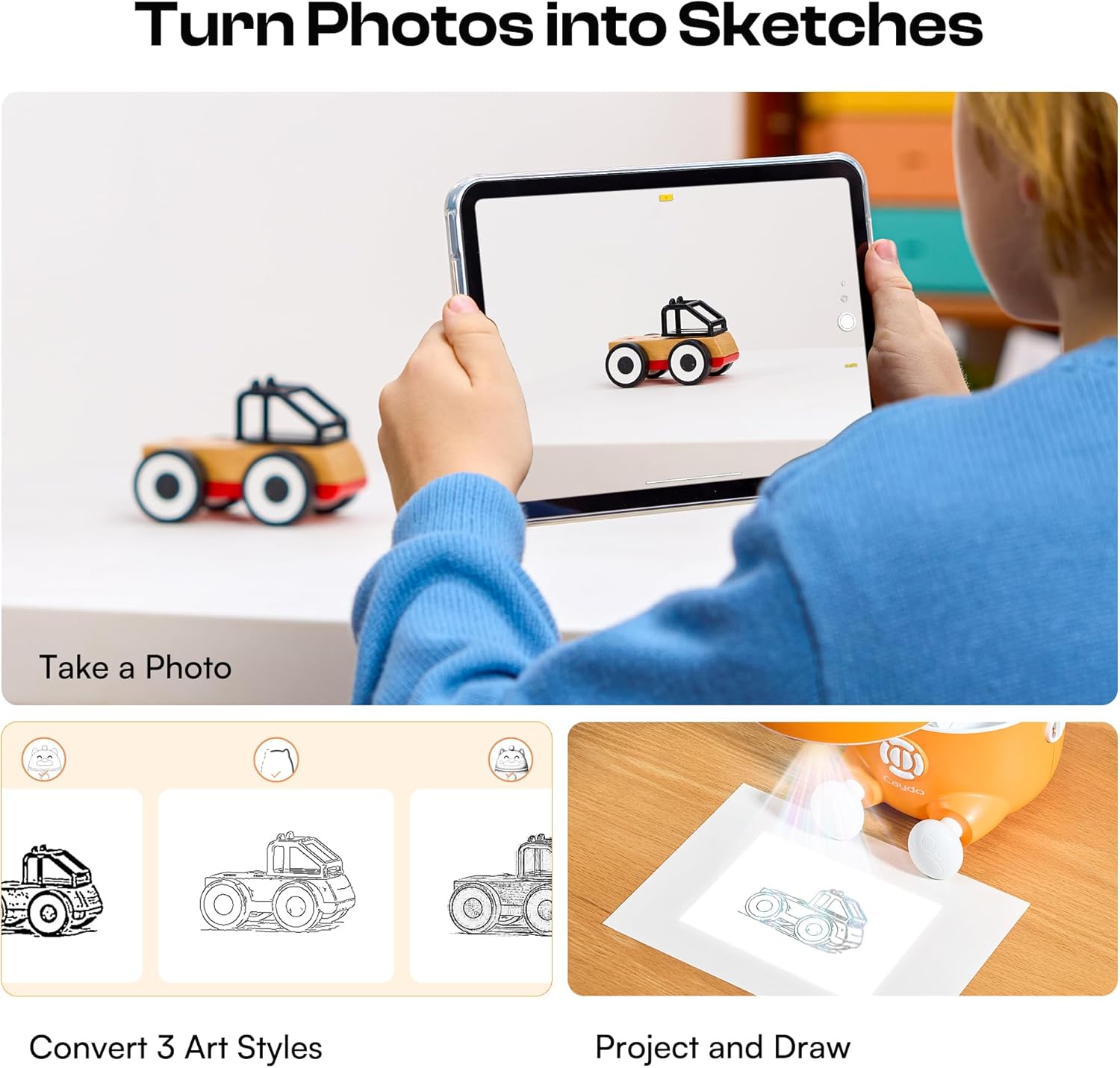
Figure 4.3: Demonstrates converting a photo into a traceable sketch.
4.3 Multimedia Projection
The T3 projector can also be used for entertainment beyond drawing:
- Movie Projector: Project cartoons or videos onto any flat surface for a large-screen viewing esperjenza.
- Speaker Bluetooth: Connect your device via Bluetooth to use the T3 as an audio speaker for music or storytelling.
- Wireless Screen: Mirror content from compatible devices for family videos or presentations.

Figure 4.4: The T3 projector used for multimedia entertainment.
5. Eye Safety and Care
The Caydo T3 projector is designed with eye safety in mind:
- Dawl Blu Baxx: The projector is SGS RG0 certified for low blue light emission.
- Awto-Luminożità: The device automatically adjusts brightness for comfortable viewing.
- Break Reminder: Utilize the adjustable break reminder feature (0/0.5/1/2H) to encourage regular breaks during use, protecting developing eyes.
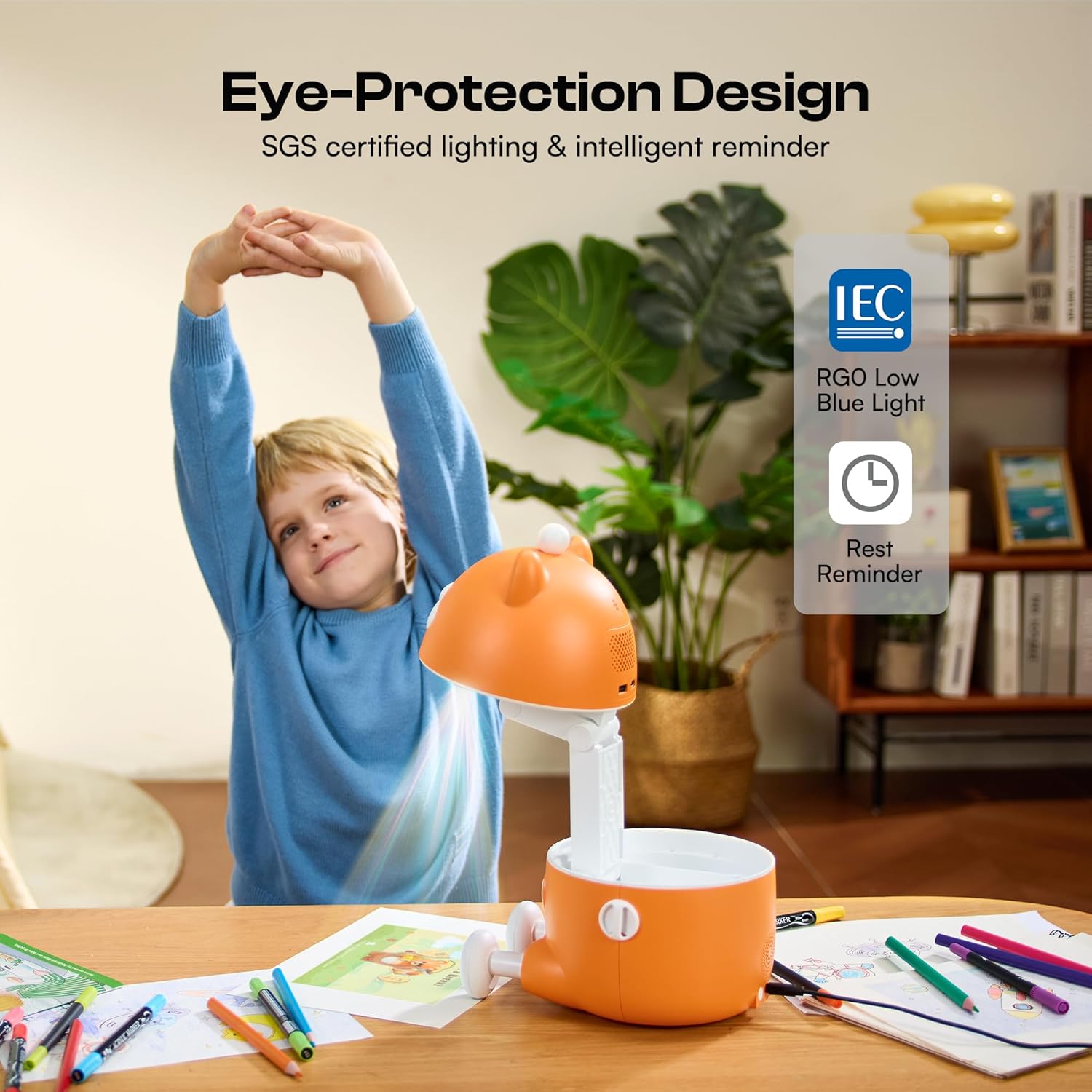
Figure 5.1: Eye-protection features promoting healthy screen-free fun.
6. Manutenzjoni u Kura
- Tindif: Use a soft, dry cloth to clean the exterior of the projector. Do not use liquid cleaners or abrasive materials.
- Kura tal-Lenti: Gently wipe the projector lens with a microfiber cloth designed for optics. Avoid touching the lens with bare fingers.
- Ħażna: When not in use, fold the projector into its compact form and store it in a cool, dry place away from direct sunlight and extreme temperatures.
- Sostituzzjoni tal-batterija: Replace AAA batteries in the remote control as needed.
7 Issolvi l-problemi
- Ebda Qawwa: Ensure the power adaptor is securely connected to both the projector and a working power outlet. Check if the power button is pressed.
- Immaġni mċajpra: Adjust the manual focus ring on the projector lens until the image is clear. Ensure the projection surface is flat and the projector is stable.
- No Projection: Verify the projector is powered on. If using the app, ensure the projector is correctly connected via Bluetooth.
- Kwistjonijiet ta' Konnettività tal-App: Ensure Bluetooth is enabled on your device and the projector. Restart both the app and the projector if connection fails.
- Remote Mhux Jirrispondi: Check if the remote control batteries are correctly inserted and not depleted. Replace batteries if necessary.
8. Speċifikazzjonijiet tal-Prodott
| Karatteristika | Dettall |
|---|---|
| Dimensjonijiet tal-Prodott | 9.37 x 7.32 x 7.87 pulzieri |
| Piż tal-oġġett | 3.2 liri |
| Numru tal-Mudell | T3 |
| Manifattur | Caydo |
| Riżoluzzjoni | Native 720P HD |
| Luminożità | 60 lumi ANSI |
| Konnettività | Bluetooth, Wi-Fi (għall-karatteristiċi tal-app) |
| Eye Safety Certification | SGS RG0 Low Blue Light |

Figure 8.1: Physical dimensions of the Caydo T3 Projector.
9. Garanzija u Appoġġ
For warranty information, technical support, or customer service inquiries, please refer to the contact details provided on the product packaging or visit the official Caydo websit. Żomm l-irċevuta tax-xiri tiegħek għal pretensjonijiet ta' garanzija.


