1. Introduzzjoni
Thank you for choosing the MCHOSE ACE 68 Mechanical Gaming Keyboard. This 60% compact keyboard is engineered for high-performance gaming, featuring Hall Effect magnetic switches, Rapid Trigger technology, adjustable actuation, and an 8000Hz polling rate for ultra-low latency. This manual will guide you through the setup, operation, and maintenance of your new keyboard to ensure optimal performance.
2. X'hemm fil-Kaxxa
- MCHOSE ACE 68 Mechanical Gaming Keyboard
- Kejbil USB (Tip-Ċ)
- Keycap & Switch Puller
- 2 x Swiċċijiet ta' Sostituzzjoni
- Qoxra tat-Trab
- Manwal għall-Utent (dan id-dokument)
3. Setup
3.1 Konnessjoni tal-Ħardwer
- Connect the provided USB Type-C cable to the port on the MCHOSE ACE 68 keyboard.
- Plug the other end of the USB cable into an available USB port on your computer (PC, Laptop, Gaming Console, PS5, XBOX).
- It-tastiera tiġi rikonoxxuta awtomatikament mis-sistema operattiva tiegħek.
3.2 Software Installation (M HUB Web Sewwieq)
For advanced customization and optimal performance, it is recommended to use the MCHOSE M HUB web sewwieq.
- Iftaħ tiegħek web browser and navigate to the MCHOSE official websit: https://www.mchose.com.cn.
- Select your preferred language from the options provided on the websit.
- Click on the 'Enter M HUB WEB' button.
- On the M HUB page, click on the image corresponding to the 'Ace 68' keyboard to enter its configuration interface.

Image: Step 1 - Webpage input for MCHOSE HUB web sewwieq.

Image: Step 2 - Language selection and entering M HUB WEB.
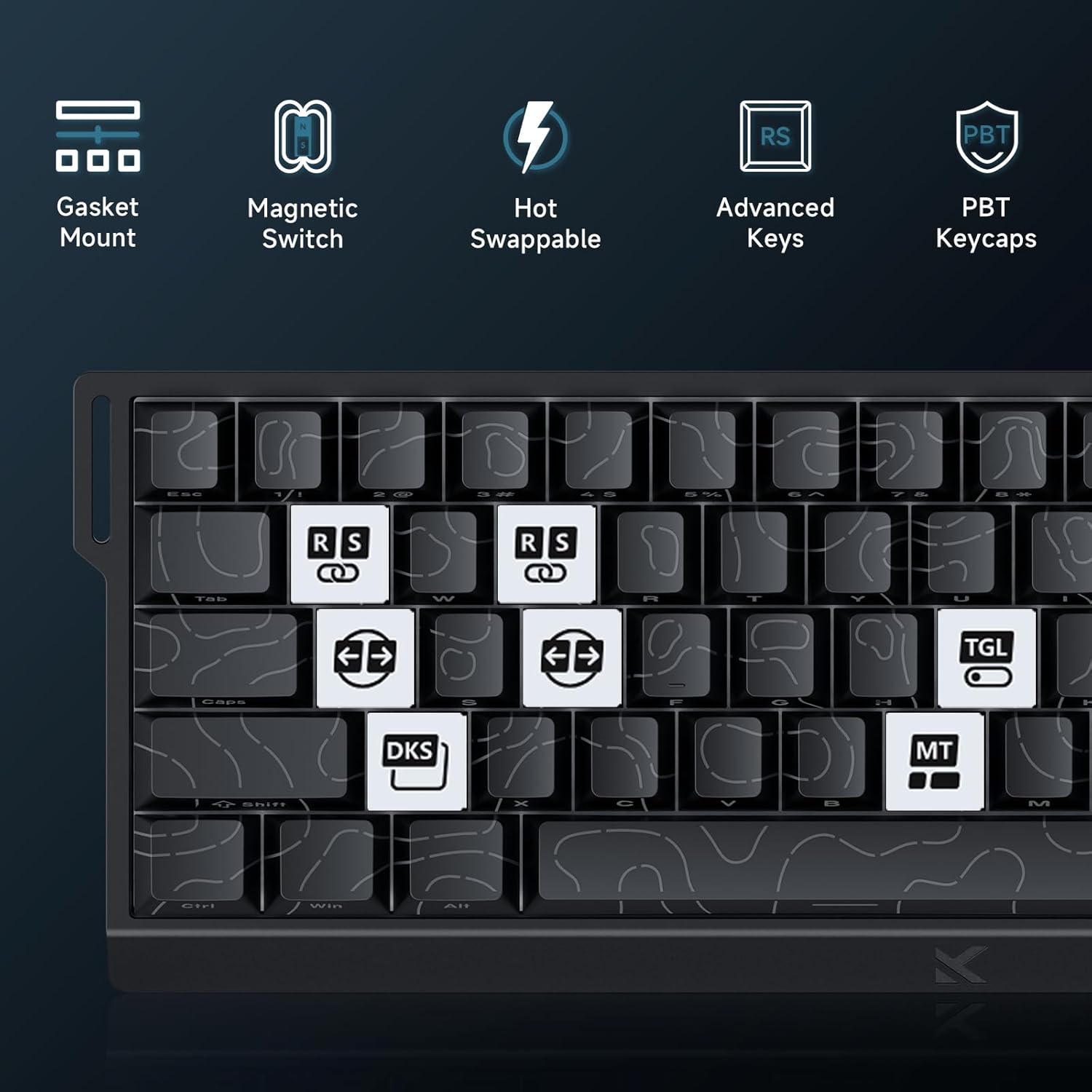
Image: Step 3 - Selecting the Ace 68 device within the M HUB web interface.
4. Istruzzjonijiet Operattivi
4.1 Rata ta' Polling u Latency
The MCHOSE ACE 68 features an 8000Hz polling rate and a 128K scan rate, resulting in an ultra-low 0.1ms latency. This ensures rapid and precise input registration.

Image: Visual representation of 8000Hz Polling Rate and 0.1ms Report Rate, highlighting fast actuation and response time.
4.2 Trigger Rapidu u Attwazzjoni Aġġustabbli
The keyboard's magnetic switches allow for dynamic actuation and deactivation points, eliminating traditional input latency.
- Trigger Rapidu: Keys activate when pressed and deactivate when released, without a fixed reset point. This allows for faster repeated inputs.
- Attwazzjoni Aġġustabbli: Customize the actuation point of each key from 0.1mm to 4.0mm using the M HUB software. This provides precise control over key sensitivity.

Image: Comparison of Rapid Trigger (dynamic reset) versus traditional fixed actuation/reset points.
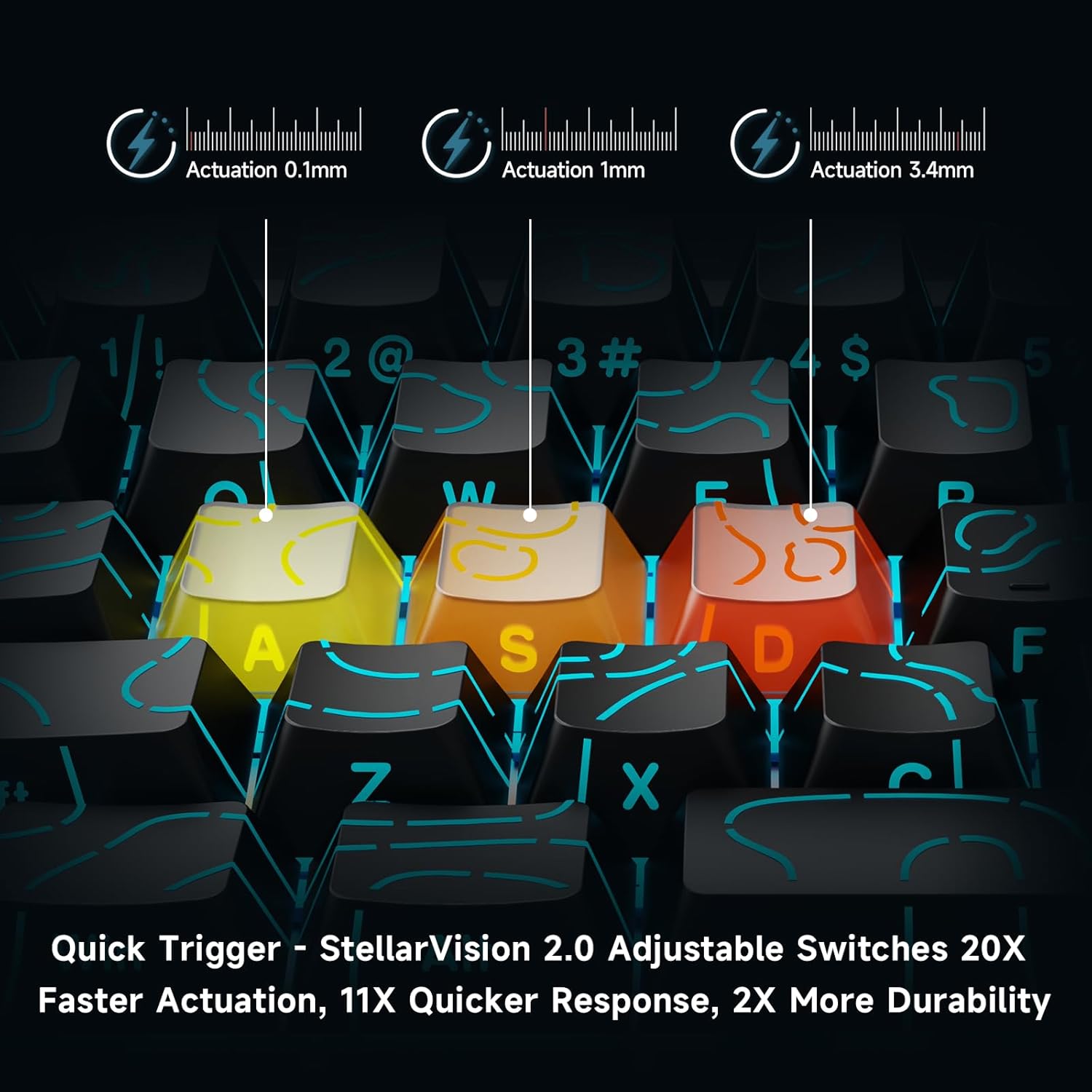
Image: Visual demonstration of adjustable actuation points (0.1mm, 1mm, 3.4mm) for StellarVision 2.0 switches.
4.3 Advanced Key Functionality (M HUB Software)
The M HUB software allows for advanced customization of key behavior:
- RS (Rappy Snappy): Monitors at least two selected keys and activates the key pressed the furthest. When both are at the same depth, it uses your selected SOCD resolution. This enhances movement in games.
- SOCD (Simultaneous Opposing Cardinal Directions): When opposing direction keys (e.g., Left + Right) are pressed together, you can set it to neutralize, prioritize the last-pressed, or hold the first-pressed direction.
- DKS (Dynamic Key Press): Map up to four separate actions along a single key's travel at actuation, bottom-out, first release, and full release for complex macros or multi-stage jikkmanda.
- MT (Mod-Tap): Assign a key to send one keycode on a quick tap and a different (usually modifier) code when held, blending typing and modifier layers seamlessly.
- TGL (Toggle): Turn any key into an on/off switch-press once to latch the output; press again to cancel. A hold still provides momentary behavior.

Immaġni: Fuqview of key features including Advanced Keys (RS, DKS, TGL, MT).

Image: Diagram explaining the concept of 4-in-1 Action Keys, allowing multiple actions per key based on press depth.
4.4 Personalizzazzjoni tad-Dawl RGB
The MCHOSE ACE 68 features customizable RGB backlighting with 16.8 million colors and 22+ dynamic lighting effects.
- Kombinazzjonijiet taċ-Ċwievet FN: Use the Function (FN) key in combination with other keys to adjust lighting effects directly on the keyboard.
- M HUB Software: For full customization, including per-key lighting and advanced effects, use the M HUB web sewwieq.

Image: FN key combinations for adjusting RGB lighting effects, brightness, and speed.

Image: The MCHOSE ACE 68 keyboard displaying various preset RGB lighting effects.
5. Manutenzjoni
5.1 Tindif
- Skonnettja t-tastiera mill-kompjuter tiegħek qabel ma tnaddafha.
- Use a soft, dry cloth to wipe down the keycaps and keyboard body.
- Għal tindif aktar fil-fond, uża bott ta' arja kkompressata biex tneħħi t-trab u l-fdalijiet minn bejn il-keycaps.
- Evita li tuża kimiċi ħarxa jew materjali li joborxu, għax dawn jistgħu jagħmlu ħsara lill-finitura tat-tastiera jew lill-leġġendi tal-keycap.
5.2 Sostituzzjoni tal-Għatu taċ-Ċwievet u s-Swiċċ
The MCHOSE ACE 68 features hot-swappable magnetic switches, allowing for easy replacement without soldering.
- Uża l-puller tal-keycap provdut biex tneħħi bil-mod il-keycap mixtieq.
- Use the provided switch puller to carefully extract the magnetic switch from its socket.
- Allinja l-pinnijiet tas-swiċċ il-ġdid mat-toqob fuq il-PCB u agħfas sew sakemm tikklikkja f'postha.
- Poġġi l-għatu taċ-ċwievet lura fuq is-swiċċ il-ġdid.

Image: Diagram showing the hot-swappable PCB, pre-lubed magnetic switch, plate-mounted stabilizers, hot-swap socket, and north-facing per-key LEDs.
6 Issolvi l-problemi
- It-Tastiera Mhux Tirrispondi:
- Kun żgur li l-kejbil USB huwa konness sew kemm mat-tastiera kif ukoll mal-kompjuter.
- Ipprova qabbad it-tastiera ma' port USB differenti fuq il-kompjuter tiegħek.
- Ittestja t-tastiera fuq kompjuter ieħor biex teskludi problemi speċifiċi tas-sistema.
- Input Lag or Dropped Inputs:
- Ensure the M HUB web driver is installed and updated to the latest version.
- Check the polling rate setting in the M HUB software; ensure it is set correctly for your needs.
- If 'Berserk Mode' is enabled in the M HUB software, be aware that while it offers maximum accuracy, it may impact stability with mixed switch configurations. Try disabling it if issues persist.
- Ensure no other software or background processes are interfering with keyboard input.
- Dawl RGB Mhux Jaħdem/Mhux Korrett:
- Check FN key combinations for lighting control (refer to section 4.4).
- Verify lighting settings within the M HUB software.
- Kun żgur li l-firmware tat-tastiera huwa aġġornat.
- Keys Not Actuating Correctly:
- Check the adjustable actuation settings for the specific key in the M HUB software.
- If a switch feels faulty, consider replacing it using the provided spare switches and switch puller (refer to section 5.2).
7. Speċifikazzjonijiet
| Karatteristika | Dettall |
|---|---|
| Numru tal-Mudell | MCHOSE ACE 68 |
| Layout tat-Tastiera | 60% Kompatt (61 Ċwievet) |
| Tip ta' Swiċċ | TTC Dragon Lord Magnetic Switches (Hall Effect) |
| Firxa ta' Attwazzjoni | 0.1mm - 4.0mm (Aġġustabbli) |
| Ir-Rata tal-Votazzjoni | 8000Hz |
| Rapport tar-Rata | 0.1ms |
| Tappijiet ewlenin | PBT Keycaps, Cherry Profile, Shine-through legends |
| Backlighting | RGB (16.8 Million Colors, 22+ Effects) |
| Konnettività | Bil-wajer (USB-C) |
| Apparati Kompatibbli | PC, Laptop, Gaming Console, PS5, XBOX |
| Dimensjonijiet tal-Prodott | 12.6"T x 4.56"W x 1.54"Għ (32cm x 11.7cm x 3.9cm) |
| Piż tal-oġġett | 2.55 liri (1.16 kg) |
| Karatteristiċi Speċjali | Rapid Trigger, Adjustable Actuation, Hot-Swappable Switches, Programmable Keys, Gasket Mount |
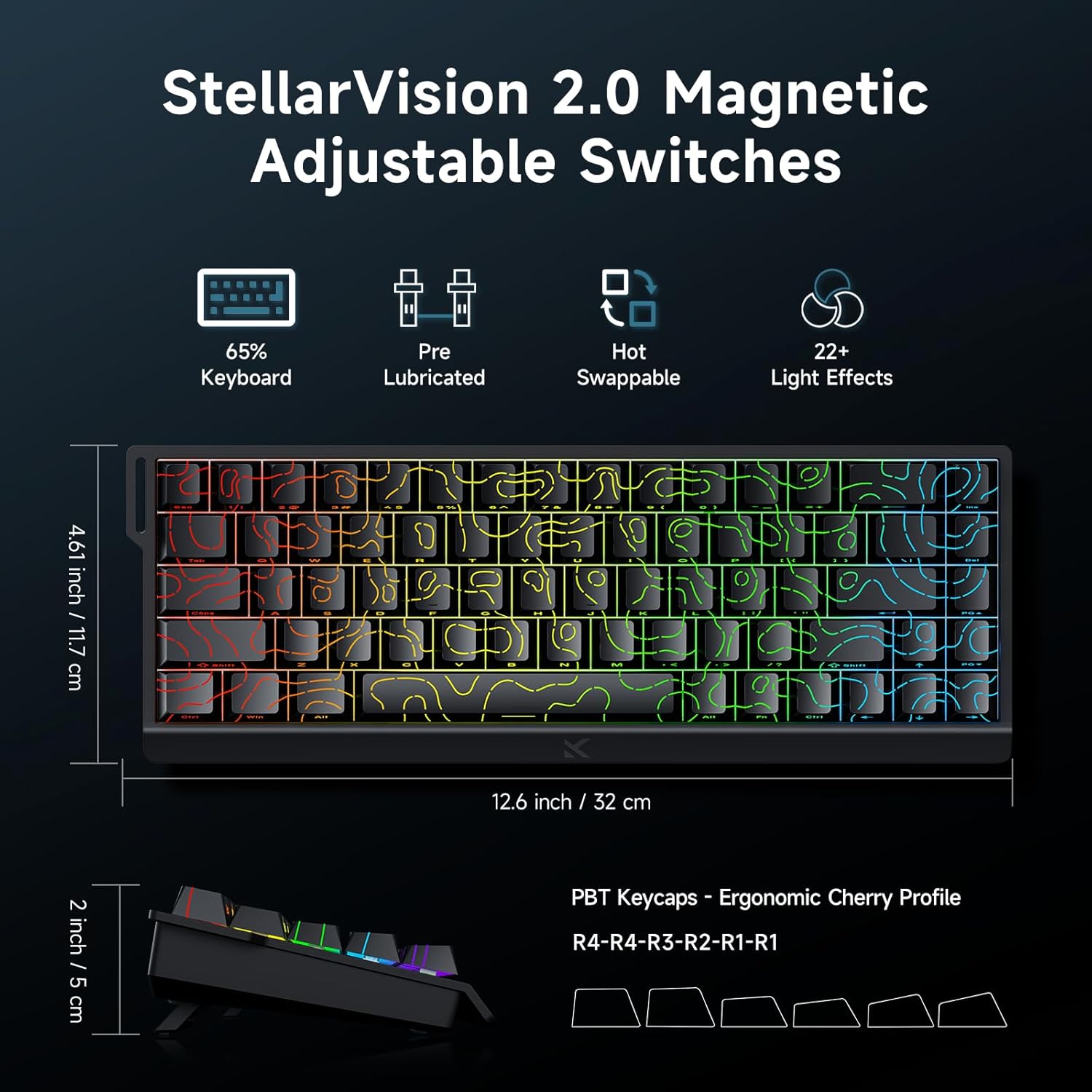
Image: MCHOSE ACE 68 keyboard with dimensions (12.6 inches / 32 cm length, 4.61 inches / 11.7 cm width, 2 inches / 5 cm height) and key features like StellarVision 2.0 Magnetic Adjustable Switches, pre-lubricated, hot-swappable, and 22+ light effects.

Image: Detailed specifications of the Uranus Magnetic Switch eSports, including switch type, actuation range (0.1-3.4mm), lifespan (100 Million Clicks), sensitivity (0.005mm), total travel (3.4mm), and trigger pressure (32 +/- 5 gf).
8. Garanzija u Appoġġ
MCHOSE products are designed for durability and performance. For warranty information, technical support, or further assistance, please visit the official MCHOSE webis-sit jew ikkuntattja lis-servizz tal-konsumatur tagħhom direttament. Żomm l-irċevuta tax-xiri tiegħek għal talbiet ta' garanzija.
Uffiċjali Websit: https://www.mchose.com.cn


