1. Prodott Aktarview
The MAYBESTA Wireless Mini Microphone is designed for high-quality audio and video recording across various platforms. Its compact and wireless design offers convenience and portability for content creators, interviewers, and anyone requiring clear audio capture.

Figure 1: MAYBESTA Wireless Mini Microphone Kit, showing two microphones, a receiver, and windscreens.
2. Kontenut tal-Pakkett
Meta tiftaħ il-kaxxa, jekk jogħġbok kun żgur li l-oġġetti kollha li ġejjin huma preżenti:
- 2x Lavalier Microphones
- 1x Receiver (for Phone Connectivity)
- 1x USB Iċċarġjar Cable
- 3x Klipps
- 2x High Density Sponge tips

Figure 2: All components included in the MAYBESTA Wireless Mini Microphone package.
3. Gwida ta' Setup
3.1 Kompatibilità
The MAYBESTA Wireless Mini Microphone is designed for wide compatibility:
- Sistema Android: Compatible with various Android smartphones and tablets.
- iPhone & iPad Series: Supports all iPhone and iPad models, including iPhone 14 and below (Lightning port) and the latest iPhone 15/16 series (USB-C port).
- Laptops u Tablets: Can also be used with compatible laptops and tablets.
Nota: For Android devices, ensure the OTG function is enabled before use.
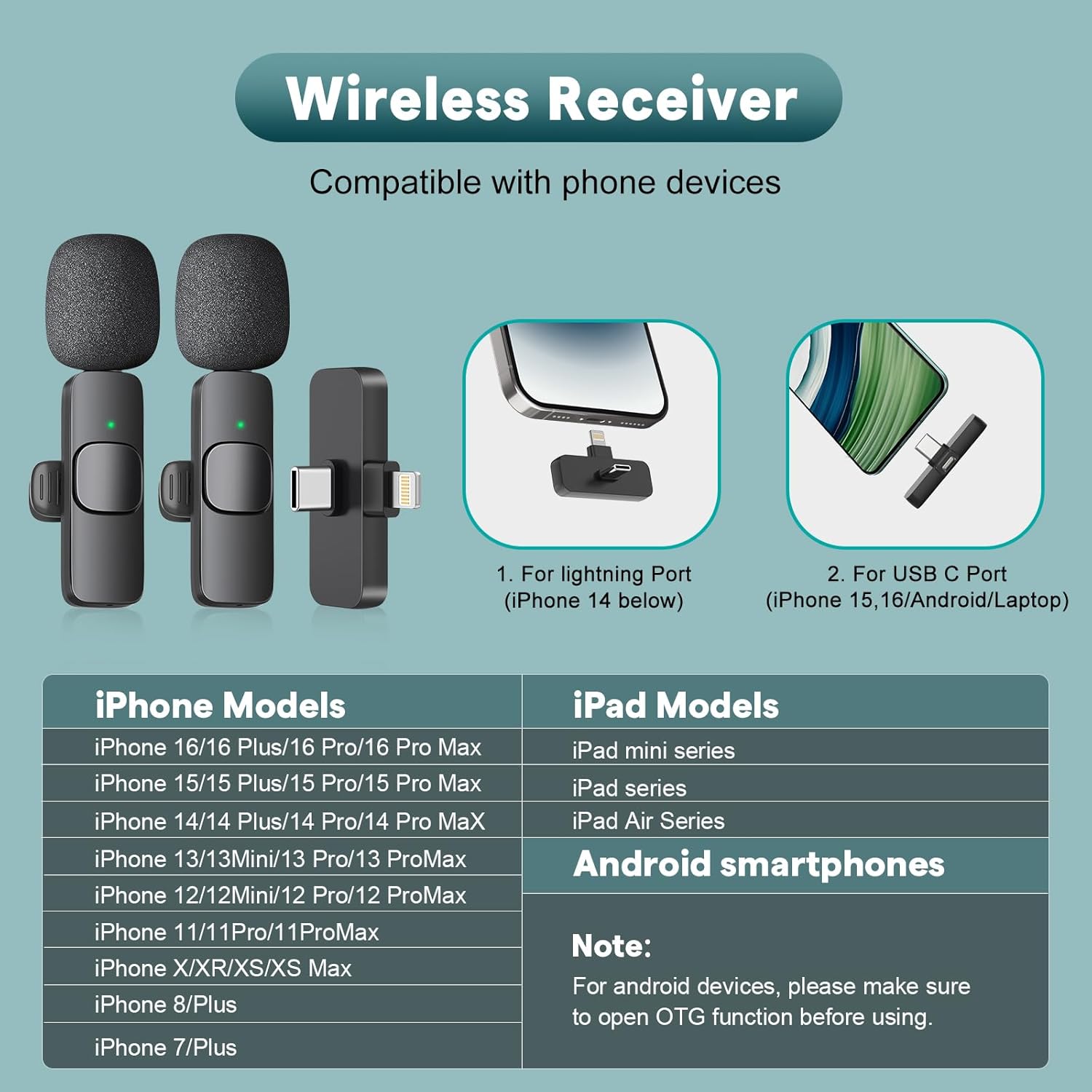
Figure 3: Visual representation of device compatibility for the wireless receiver.
3.2 Konnessjoni tar-Riċevitur
The receiver features an upgraded longer interface for better compatibility with most phone cases, eliminating the need to remove your phone case during use.

Figure 4: The newly upgraded longer receiver design for enhanced phone case compatibility.
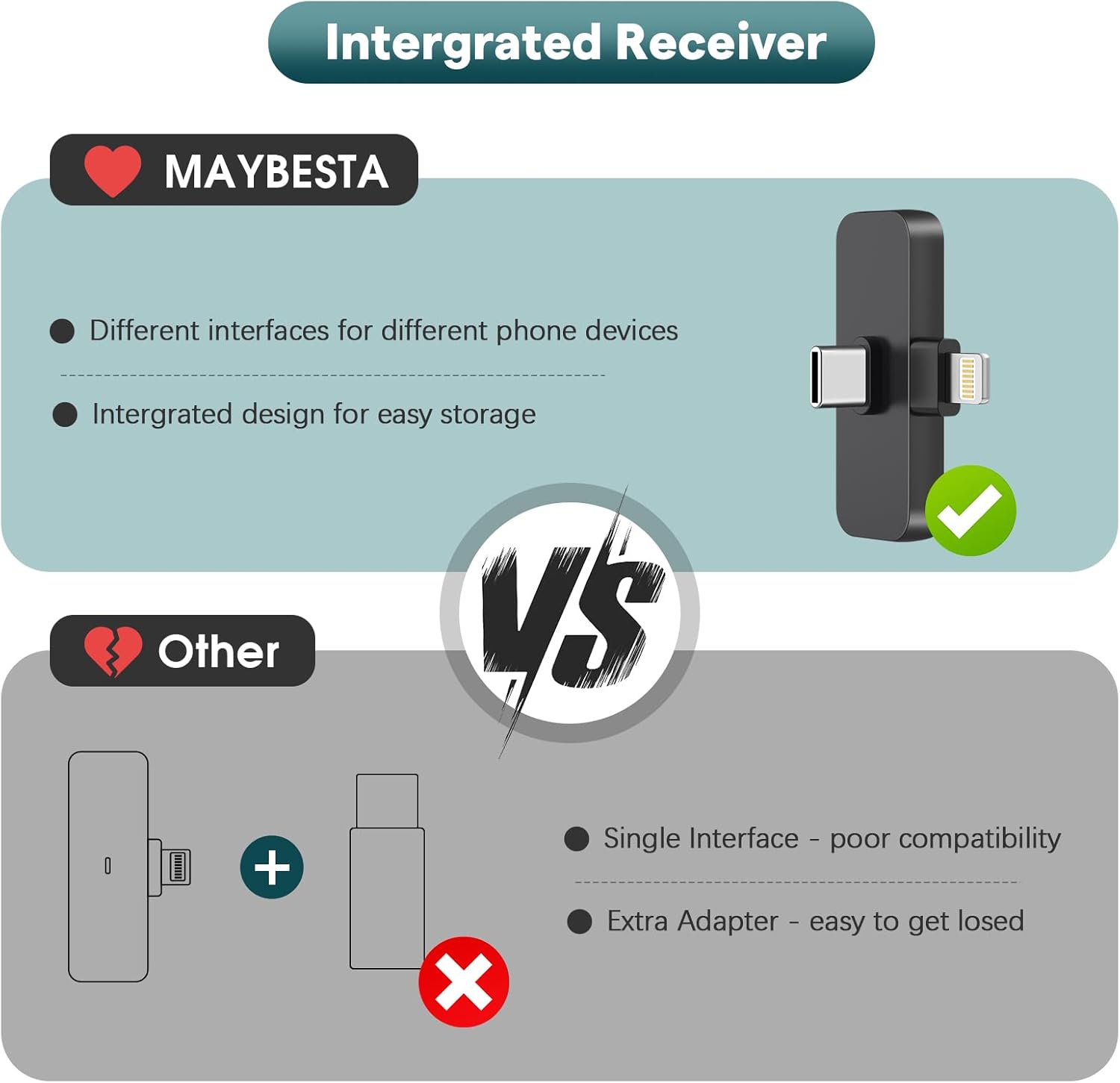
Figure 5: The integrated receiver with both Lightning and USB-C connectors for versatile device connection.
3.3 Easy Automatic Connection
The microphone system offers a simple plug-and-play setup:
- Ipplaggja: Select the appropriate adapter (Lightning or USB-C) and plug the receiver into your device's charging port.
- Agħfas: Turn on the lavalier microphone by pressing its power button.
- Konnessi: A solid green light on both the receiver and the microphone indicates a successful connection. You can now begin audio/video recording.
Nota Importanti: Please ensure your cellphone's Bluetooth is OFF before starting any audio or video recordings to prevent interference.

Figure 6: Step-by-step guide for connecting the microphone and receiver.
4. Istruzzjonijiet Operattivi
4.1 Trażmissjoni Awdjo Wireless
The lavalier microphone utilizes Bluetooth technology for wireless audio transmission, allowing for a range of up to 65 feet (20 meters). This enables freedom of movement during recording sessions.

Figure 7: The microphone supports stable audio transmission up to 65 feet.
4.2 Omnidirectional Pickup & Noise Reduction
Equipped with an omnidirectional pickup pattern, the microphone captures sound from all directions. It features a built-in noise reduction chip and comes with a microphone windscreen to minimize ambient noise, ensuring clear and high-quality audio.
4.3 Monitoraġġ f'Ħin Reali
To monitor your recording in real-time:
- Ensure the microphone and receiver are paired.
- Open your device's voice memo or recording application.
- Insert wired USB-C earphones (without button functions) into the microphone's interface.

Figure 8: Steps to enable real-time audio monitoring during recording.
4.4 Ħajja tal-Batterija u Iċċarġjar
Each microphone has a built-in rechargeable battery providing approximately 6 hours of continuous working time after a full charge (about 1 hour). The receiver does not require charging.

Figure 9: Details on microphone battery life and charging time.
4.5 Iċċarġjar Waqt ir-Reġistrazzjoni
You can charge your phone using a USB-C charging cable through the receiver's port while the microphone system is in use.
4.6 Using Different Windscreens
The kit includes different windscreens for various recording environments:
- High Density Sponge Tips: Ideal for indoor audio reception.
- Furry Windscreens (Deadcat): Recommended for outdoor recording activities to reduce wind noise.
5. Manutenzjoni
To ensure the longevity and optimal performance of your MAYBESTA Wireless Mini Microphone, follow these maintenance guidelines:
- Keep the microphone and receiver clean and dry. Avoid exposure to moisture or extreme temperatures.
- Store the components in a protective case when not in use to prevent physical damage.
- Regularly clean the microphone's foam cover and furry windscreens. Replace them if they become worn or damaged to maintain sound quality.
- Uża biss il-kejbil tal-iċċarġjar USB provdut jew wieħed ekwivalenti ċċertifikat għall-iċċarġjar.
6 Issolvi l-problemi
If you encounter issues with your MAYBESTA Wireless Mini Microphone, refer to the following common solutions:
- Ebda Konnessjoni: Ensure the receiver is fully plugged into your device and the microphone is powered on. Check for a solid green light on both units.
- Kwalità tal-Ħoss Fqira:
- Ensure there are no obstacles between the microphone and the receiver.
- Try to face the microphone directly.
- Verify that your cellphone's Bluetooth is OFF.
- Use the appropriate windscreen for your environment (foam for indoors, furry for outdoors).
- No Audio Recording: Confirm that the microphone is properly paired and your recording application is correctly configured to use the external microphone.
- Kwistjonijiet ta' Volum: The microphone does not have a built-in volume control. Adjust the audio volume directly through your cellphone or recording application.
- Batterija Baxxa: Charge the microphone using the provided USB charging cable. The receiver does not require charging.
7. Speċifikazzjonijiet
| Karatteristika | Speċifikazzjoni |
|---|---|
| Numru tal-Mudell | WM356-1 |
| Brand | MAYBESTA |
| Fattur tal-Forma tal-Mikrofonu | Mini |
| Teknoloġija tal-Konnettività | Wireless |
| Tip ta' Konnettur | Lightning, USB Type-C |
| Apparati Kompatibbli | Android, Laptop, Smartphone, Tablet, iPad |
| Mudell Polari | Omnidirezzjonali |
| Rispons ta' Frekwenza | 2.4 GHz |
| Sinjal-mal-ħoss Ratio | 80 dB |
| Sensittività Audio | 15 Deċibel |
| Ħin tax-Xogħol | Up to 6 hours (per mic) |
| Medda ta 'Trażmissjoni bla Fili | Sa 65 pied |
| Sors tal-Enerġija | Imħaddem bil-batterija (batterija 1 C inkluża) |
| Materjal | Acrylonitrile Butadiene Styrene |
| Piż tal-oġġett | 1.76 uqija (50 Grammi) |
| Dimensjonijiet tal-Prodott (L x W x H) | 0.59 x 0.3 x 2.56 pulzieri |
8. Garanzija u Appoġġ
For any product inquiries, technical support, or warranty information, please contact MAYBESTA customer service:
- Email: support@maybesta.com
- Websit: https://maybesta.com/vip-register/
Jekk jogħġbok żomm l-irċevuta tax-xiri tiegħek għal talbiet ta' garanzija.


