1. Introduzzjoni
This manual provides detailed instructions for the installation, operation, and maintenance of your EDUP USB WiFi 7 Adapter BE6500M (Model: EP-BE1703). This device is designed to provide high-speed wireless connectivity for desktop PCs and laptops, leveraging the latest WiFi 7 (IEEE 802.11be) technology across tri-band frequencies (6GHz, 5GHz, and 2.4GHz). Please read this manual thoroughly before using the product to ensure optimal performance and proper usage.

Figura 1: EDUP USB WiFi 7 Adapter BE6500M. This image displays the compact design of the USB WiFi adapter with its dual external antennas and USB 3.0 connector.
2. Kontenut tal-Pakkett
Ivverifika li l-oġġetti kollha elenkati hawn taħt huma preżenti fil-pakkett tal-prodott tiegħek. Jekk xi oġġetti huma neqsin jew bil-ħsara, jekk jogħġbok ikkuntattja l-appoġġ għall-klijenti.
- 1x EDUP USB WiFi 7 Adapter BE6500Mbps
- 1x U Disk Driver
3. Setup u Installazzjoni
Follow these steps to install and configure your EDUP USB WiFi 7 Adapter.
3.1 Installazzjoni tas-sewwieq
The EDUP USB WiFi 7 Adapter requires a driver for proper functionality.
- Insert the provided U Disk Driver into an available USB port on your computer.
- Locate the driver program (e.g., "Setup.exe") on the U Disk.
- Double-click the driver program to initiate the installation process. Follow the on-screen prompts to complete the installation.
- Alternatively, if you do not have a U Disk drive or encounter issues, you can download the latest driver from the official EDUP websit: szedup.com/usb-adapters/EPBE1703.html. Ensure you have decompression software installed to extract the driver files jekk meħtieġ.

Figura 2: Easy Setup Steps. This image illustrates the three main steps for setup: inserting the adapter, installing the driver from the U disk, and connecting to a Wi-Fi network.
3.2 Konnessjoni tal-Ħardwer
- After driver installation, insert the EDUP USB WiFi 7 Adapter into an available USB 3.0 port on your desktop PC or laptop. For optimal performance, use a USB 3.0 port (typically blue inside).
- Ensure the adapter is securely seated in the USB port.
- Adjust the dual antennas to an upright position or as needed for optimal signal reception. The antennas are 90° rotatable.

Figura 3: Plug and Play Functionality. This image shows the adapter plugged into a laptop's USB port, highlighting its driver-free (after initial installation), no download, and easy installation aspects.
3.3 Konnessjoni ma' Netwerk Wireless
- Once the adapter is installed and recognized by your operating system (Windows 10/11), open your computer's network settings.
- Skennja għal netwerks mingħajr fili disponibbli.
- Select your desired Wi-Fi network from the list and enter the network password (if required).
- The adapter will connect to the network, providing internet access.
4. Tħaddim u Karatteristiċi
4.1 WiFi 7 Tri-Band Connectivity
The EDUP BE6500M adapter utilizes the latest WiFi 7 (IEEE 802.11be) standard, offering high-speed wireless connectivity across three frequency bands:
- Faxxa 6GHz: Provides interference-free bandwidth with increased throughput, ideal for demanding applications.
- Faxxa 5GHz: Offers high speeds for streaming and gaming.
- Faxxa 2.4GHz: Provides wider coverage and compatibility with older devices.
This tri-band capability allows for simultaneous connections for multiple devices, ensuring a stable and lag-free wireless experience. The maximum combined transmission rate is up to 6500Mbps.

Figura 4: Tri-Band Speed Capabilities. This image illustrates the theoretical maximum speeds for each band: 2882 Mbps on 6GHz, 2882 Mbps on 5GHz, and 688 Mbps on 2.4GHz, totaling 6452 Mbps.
4.2 Kopertura Mtejba tas-Sinjal
The adapter features dual external antennas designed to enhance signal strength and extend wireless range. These antennas are rotatable, allowing for flexible adjustment to optimize signal reception and minimize dead zones.
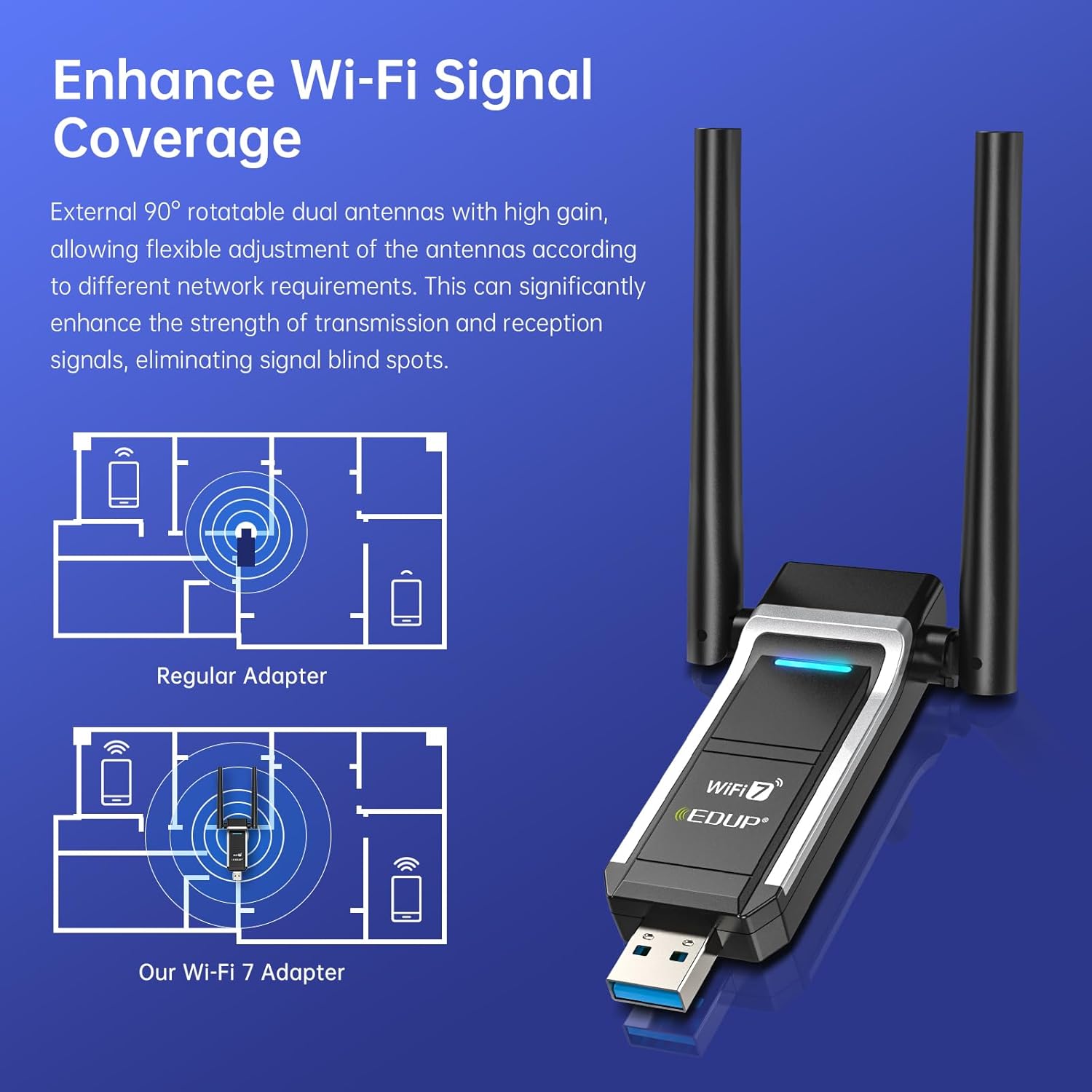
Figura 5: Signal Coverage Enhancement. This diagram compares the signal coverage of a regular adapter versus the EDUP Wi-Fi 7 adapter, showing improved range and reduced signal blind spots with the dual antennas.
4.3 Interface USB 3.0
Equipped with a USB 3.0 interface, the adapter provides data transfer speeds up to 10 times faster than USB 2.0. This ensures quicker response times for data transfers, smooth video streaming, and responsive online gaming.
4.4 Advanced WiFi 7 Technologies (OFDMA & MU-MIMO)
The adapter incorporates advanced WiFi 7 features to optimize network performance:
- OFDMA (Aċċess Multiplu b'Diviżjoni tal-Frekwenza Ortogonali): When paired with a compatible router, OFDMA allows your PC to receive data simultaneously with other devices on the same stream. This significantly reduces latency and improves efficiency, especially in busy network environments, leading to minimal lag for videos and games.
- MU-MIMO (Utent Multiplu, Input Multiplu, Output Multiplu): MU-MIMO enables the network to efficiently manage bandwidth for multiple devices concurrently. This results in seamless streaming, gaming, and uploads, enhancing overall network efficiency and reducing congestion.
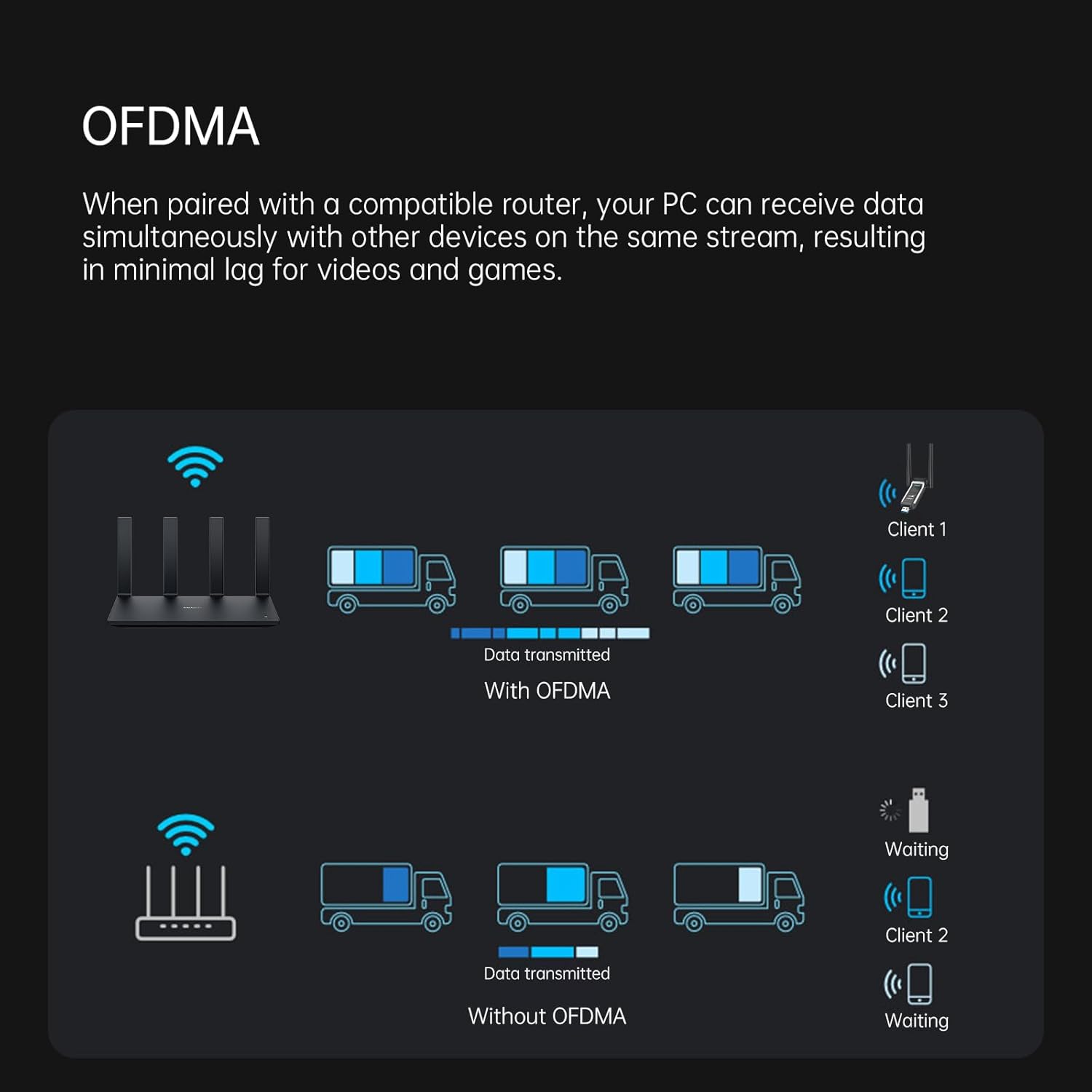
Figura 6: OFDMA for Low Latency. This diagram illustrates how OFDMA allows a router to transmit data to multiple clients simultaneously, reducing waiting times compared to traditional methods.
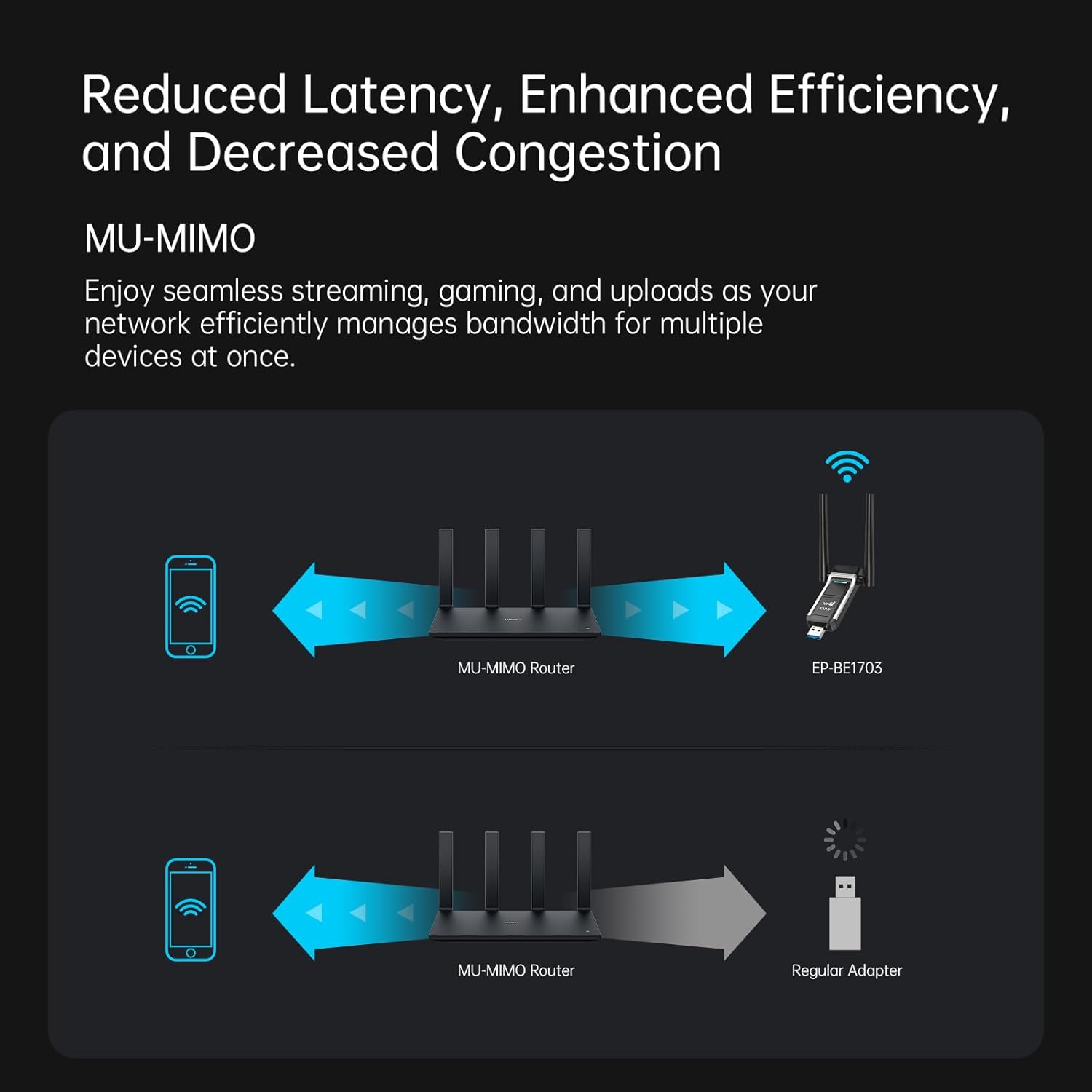
Figura 7: MU-MIMO for Enhanced Efficiency. This diagram shows how MU-MIMO enables a router to communicate with multiple devices (like the EP-BE1703 adapter) simultaneously, improving overall network performance compared to a regular adapter.
5. Manutenzjoni
To ensure the longevity and optimal performance of your EDUP USB WiFi 7 Adapter, consider the following maintenance tips:
- Żomm Nadif: Periodically clean the adapter's exterior with a soft, dry cloth. Avoid using liquid cleaners or solvents.
- Ħażna xierqa: Meta ma tkunx qed tuża, aħżen l-adapter f'post frisk u niexef 'il bogħod mid-dawl tax-xemx dirett u temperaturi estremi.
- Konnessjoni Soda: Ensure the adapter is always securely plugged into the USB port to prevent intermittent connections or damage.
- Aġġornamenti tas-sewwieq: Regularly check the EDUP websit (szedup.com/usb-adapters/EPBE1703.html) for the latest driver updates to ensure compatibility and performance improvements.
6 Issolvi l-problemi
If you encounter issues with your EDUP USB WiFi 7 Adapter, refer to the following common troubleshooting steps:
- Ebda Konnessjoni Wi-Fi:
- Kun żgur li l-adapter huwa mdaħħal sew f'port USB 3.0.
- Ivverifika li d-drajvers huma installati b'mod korrett. Erġa' installahom jekk meħtieġ.
- Check if your Wi-Fi network is broadcasting and visible.
- Erġa' ibda l-kompjuter tiegħek u r-router mingħajr fili tiegħek.
- Veloċità ta' Konnessjoni Bil-Mod:
- Ensure you are connected to the 5GHz or 6GHz band if available, as these offer higher speeds.
- Adjust the adapter's antennas for optimal signal reception.
- Naqqas l-interferenza billi tmexxi l-adapter 'il bogħod minn apparati elettroniċi oħra.
- Update your router's firmware and the adapter's drivers to the latest versions.
- Ensure your router supports WiFi 7 (802.11be) for maximum performance.
- Adapter Mhux Rikonoxxut:
- Ipprova daħħal l-adapter f'port USB ieħor.
- Check Device Manager (Windows) to see if the adapter is listed without errors.
- Reinstall the drivers from the U Disk or the official websit.
- Konnessjoni intermittenti:
- Kun żgur li l-adapter huwa mwaħħal sew fil-port tal-USB.
- Check for physical obstructions or sources of interference between the adapter and the router.
- Update drivers and router firmware.
If these steps do not resolve your issue, please contact EDUP customer support.
7. Speċifikazzjonijiet
| Karatteristika | Dettall |
|---|---|
| Numru tal-Mudell | EP-BE1703 |
| Interface tal-Ħardwer | USB 3.0 |
| Standard Wireless | IEEE 802.11be (WiFi 7), 802.11ax/ac/a/b/g/n |
| Meded ta' Frekwenza | 6GHz, 5GHz, 2.4GHz (Tri-Band) |
| Rata ta' Trasferiment tad-Data | Up to 6500 Mbps (Combined) |
| Sistemi Operattivi Kompatibbli | Windows 10 (64-bit), Windows 11 (64-bit) |
| Apparati Kompatibbli | Laptop, PC tad-Desktop |
| Antenni | Dual External, 90° Rotatable |
| Kulur | Iswed |
| Piż tal-oġġett | 20 Gram (0.705 uqija) |
| Dimensjonijiet tal-Pakkett | 4.49 x 3.74 x 0.87 pulzieri |
8. Garanzija u Appoġġ
EDUP provides the following warranty and support for this product:
- Garanzija tal-Manifattur: 3 years replacement warranty.
- Politika ta' Ritorn: 90 days no-questions-asked return policy.
- Appoġġ għall-Klijent: For any assistance or inquiries, please contact us via Amazon message.


