Introduzzjoni
The Reebok Icon Smartwatch is designed for active lifestyles, offering comprehensive health tracking, smart notifications, and a durable, waterproof design. This manual provides instructions for setting up, operating, and maintaining your device to ensure optimal performance and longevity.

Image: The Reebok Icon Smartwatch, showcasing its display with activity metrics.
X'hemm fil-Kaxxa
Upon unboxing your Reebok Icon Smartwatch, verify that all the following items are included:
- Reebok Icon Smartwatch
- Banda Sportiva
- Kejbil tal-Iċċarġjar Manjetiku
- Gwida Quick Start
- Protettur tal-iskrin

Image: A visual representation of the items included in the Reebok Icon Smartwatch packaging.
Setup
Follow these steps to set up your Reebok Icon Smartwatch for first use:
- Iċċarġja l-Ismartwatch: Connect the magnetic charging cable to the charging points on the back of the watch and to a USB power source. Ensure the watch is fully charged before initial use. A full charge typically takes approximately 2 hours.
- Download the Reebok Connect App:
- Scan the QR code provided in the Quick Start Guide or search for "Reebok Connect" on the Apple App Store (for iPhone) or Google Play Store (for Android).
- Installa l-app fuq l-ismartphone tiegħek.
- Imqabbad mal-Ismartphone Tiegħek:
- Open the Reebok Connect App and follow the on-screen instructions to create an account or log in.
- Ippermetti Bluetooth fuq l-ismartphone tiegħek.
- In the app, select "Add Device" or a similar option and choose "Reebok Icon" from the list of available devices.
- Ikkonferma t-talba ta' tqabbil kemm fuq l-arloġġ kif ukoll fuq l-ismartphone tiegħek.
- Complete Initial Setup: Follow the app's prompts to set up your personal profile, preferences, and grant necessary permissions for full functionality, such as notification access and health data synchronization.

Image: The Reebok Connect app interface, demonstrating its user-friendly design and data synchronization capabilities.
It-Tħaddim tal-Ismartwatch Tiegħek
Basic Navigation and Display
- Touchscreen: The Reebok Icon Smartwatch features a 2.04-inch AMOLED touchscreen for intuitive navigation. Swipe across the screen to access different functions and tap to select options.
- Side Button/Dial: Refer to your Quick Start Guide for specific functions of the physical button or rotating dial, which may include waking the screen, returning to the home screen, or navigating menus.
- Jippersonalizzaw l-uċuħ tal-arloġġi: Choose from preloaded watch faces directly on the device or explore additional options within the Reebok Connect App to personalize your display.

Image: The smartwatch displaying its HD AMOLED screen with multiple watch face designs.
Traċċar tas-Saħħa u l-Fitness
- Traċċar tal-Attività: The watch continuously tracks daily steps, calories burned, and distance covered. View your progress directly on the watch or in the Reebok Connect App.
- Monitoraġġ tar-Rata tal-Qalb: The built-in sensor monitors your heart rate throughout the day. Access real-time heart rate data on the watch and detailed historical data in the app.
- Traċċar tal-SpO2: Monitor your blood oxygen saturation levels. This feature provides insights into your overall wellness.
- Analiżi tal-Irqad: Wear your watch to bed to track sleep patterns, including REM, deep, and light sleep stages, and awake times.
- Modi ta' Taħriġ: Select from over 80 sports modes to accurately track specific activities. The watch records metrics relevant to your chosen workout, such as duration, distance, and calories.

Image: The smartwatch's health tracking features, including heart rate, SpO2, and sleep analysis.
Karatteristiċi Smart
- Notifiki Intelliġenti: Receive alerts for incoming calls, text messages, and app notifications directly on your wrist. Manage notification preferences through the Reebok Connect App.
- Sejħa Bluetooth: Utilize the watch for Bluetooth calling, allowing you to answer or make calls directly from your wrist when connected to your smartphone.
- Ħajja tal-batterija: The Reebok Icon Smartwatch offers up to 10 days of battery life on a single charge, depending on usage.
Manutenzjoni
Proper care and maintenance will extend the life of your Reebok Icon Smartwatch:
- Tindif: Naddaf l-ismartwatch u ċ-ċinga tiegħek regolarment b'ċarruta ratba uamp cloth. Avoid harsh chemicals, abrasive materials, or strong detergents. Ensure the charging contacts are clean and dry before charging.
- Reżistenza għall-Ilma: The Reebok Icon Smartwatch is IP68 water and dust resistant. This rating indicates protection against immersion in water up to 1.5 meters for up to 30 minutes. It is suitable for activities like swimming in shallow water but is not recommended for diving, snorkeling, or high-pressure water activities (e.g., showering with hot water, saunas, steam rooms). Always dry the watch thoroughly after exposure to water.
- Kura taċ-ċinga: The silicone rubber strap is designed for comfort and durability. Clean it regularly to prevent skin irritation and maintain hygiene. If you experience skin irritation, discontinue use and consult a physician.
- Iċċarġjar: Use only the provided magnetic charging cable. Avoid exposing the charging contacts to moisture or foreign objects. Do not attempt to charge a wet watch.
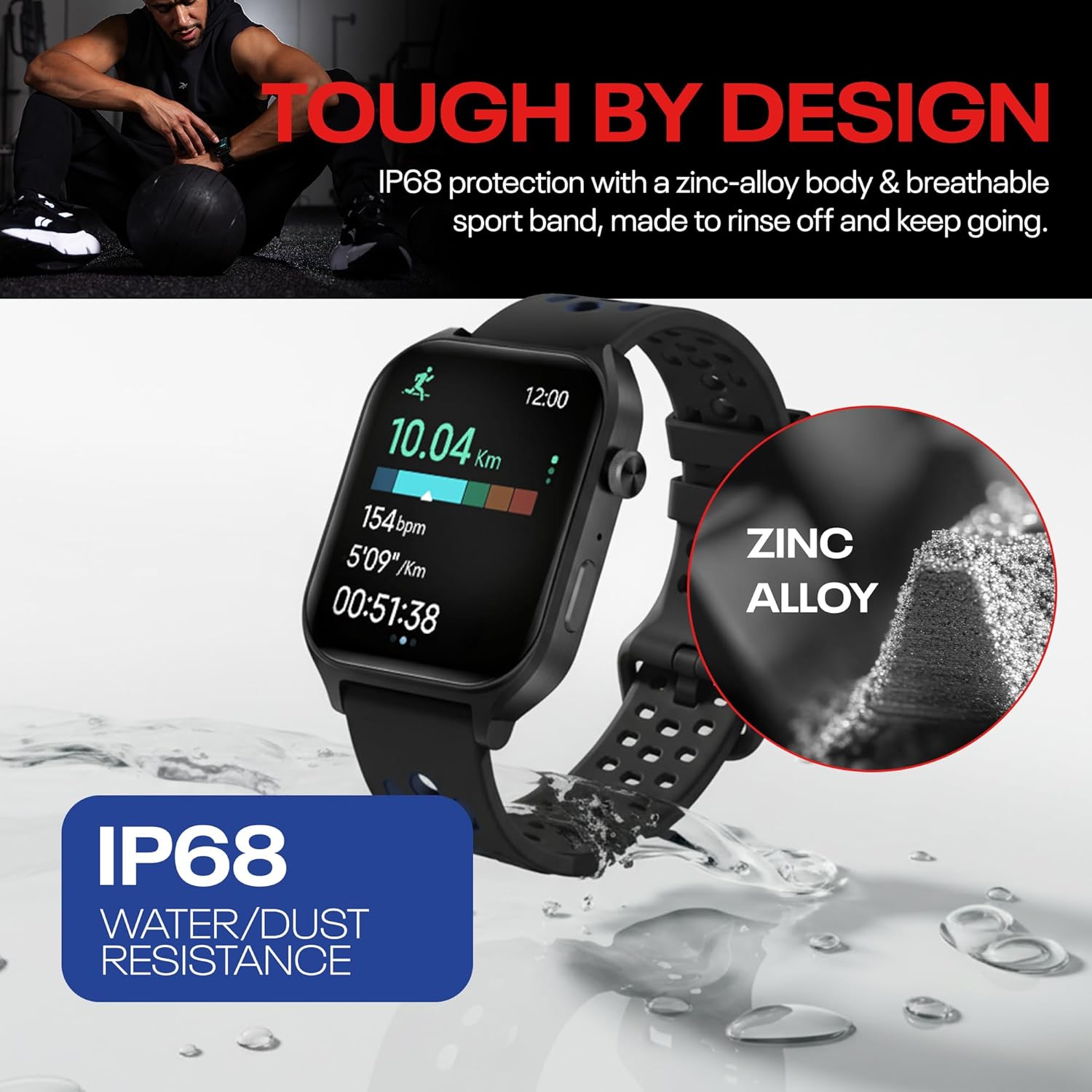
Image: The smartwatch highlighting its IP68 water and dust resistance.
Issolvi l-problemi
If you encounter issues with your Reebok Icon Smartwatch, refer to the following common solutions:
- L-Apparat Mhux Jixgħel: Ensure the watch is fully charged. If it still doesn't turn on, try connecting it to a different USB power source.
- Kwistjonijiet ta' Tqabbil:
- Ensure Bluetooth is enabled on your smartphone and the watch is within close range.
- Erġa' ibda kemm l-ismartphone tiegħek kif ukoll l-ismartwatch.
- Try unpairing the device from your phone's Bluetooth settings and then re-pairing through the Reebok Connect App.
- Traċċar Mhux Preċiż:
- Kun żgur li l-arloġġ jintlibes sew fuq il-polz tiegħek, madwar wisa' ta' saba' 'l fuq mill-għadma tal-polz.
- Keep the sensors on the back of the watch clean and free from debris.
- Ensure your personal information (height, weight, age) is accurately entered in the Reebok Connect App.
- Notifiki li Ma Jidhrux:
- Check notification settings in the Reebok Connect App and your smartphone's system settings to ensure all necessary permissions are granted.
- Ensure the watch is actively connected to your smartphone via Bluetooth.
- Ħajja Qasira tal-Batterija:
- Reduce screen brightness or set a shorter screen timeout.
- Limit continuous heart rate monitoring or turn off features you don't use frequently.
- Kun żgur li l-arloġġ ikun iċċarġjat kompletament bl-użu tal-kejbil provdut.
Speċifikazzjonijiet
| Karatteristika | Speċifikazzjoni |
|---|---|
| Brand | Reebok |
| Mudell | RICS1-BK-US |
| Manifattur | CE Brands International Inc |
| Sistema Operattiva | RTOS |
| Tip ta 'Wiri | AMOLED |
| Daqs tal-Iskrin | 2.04 Pulzier |
| Kapaċità tal-Ħżin tal-Memorja | 128 MB |
| Karatteristiċi Speċjali | Accelerometer, Activity Tracker, Always On Display, Touchscreen |
| Ħajja Medja tal-Batterija | 10-il jum |
| Kapaċità tal-batterija | 300 Milliamp Sigħat |
| Kompożizzjoni taċ-Ċellola tal-Batterija | Jonju tal-litju |
| Teknoloġija tal-Konnettività | Bluetooth |
| Komunikazzjoni mingħajr fili Standard | Bluetooth |
| Input tal-Interface tal-Bniedem | Touchscreen |
| Material Type (Case) | Liga taż-żingu |
| Material Type (Backplate) | PC+ABS |
| Material Type (Strap) | Gomma tas-silikonju |
| GPS | Phone Assisted |
| Forma | Rettangolari |
| Reżistenza għall-Ilma | IP68 |
Garanzija u Appoġġ
For detailed warranty information, product registration, and technical support, please refer to the Quick Start Guide included with your Reebok Icon Smartwatch. You may also visit the official Reebok support webis-sit għall-aktar informazzjoni u assistenza aġġornata.


