Introduzzjoni
This manual provides comprehensive instructions for the TOZO OpenWear T13051 Open Ear Headphones. Designed for comfort and situational awareness, these headphones feature an open-ear design, adjustable ear hooks, and advanced audio technology. Please read this manual thoroughly to ensure proper use and optimal performance of your device.
X'hemm fil-Kaxxa
Iċċekkja li l-oġġetti kollha elenkati hawn taħt huma inklużi fil-pakkett tiegħek:
- OpenWear Earbuds (Left and Right)
- Kawża tal-Iċċarġjar
- Manwal għall-Utent
- Kejbil USB-C® (A għal C) (20")
- Gwida Quick
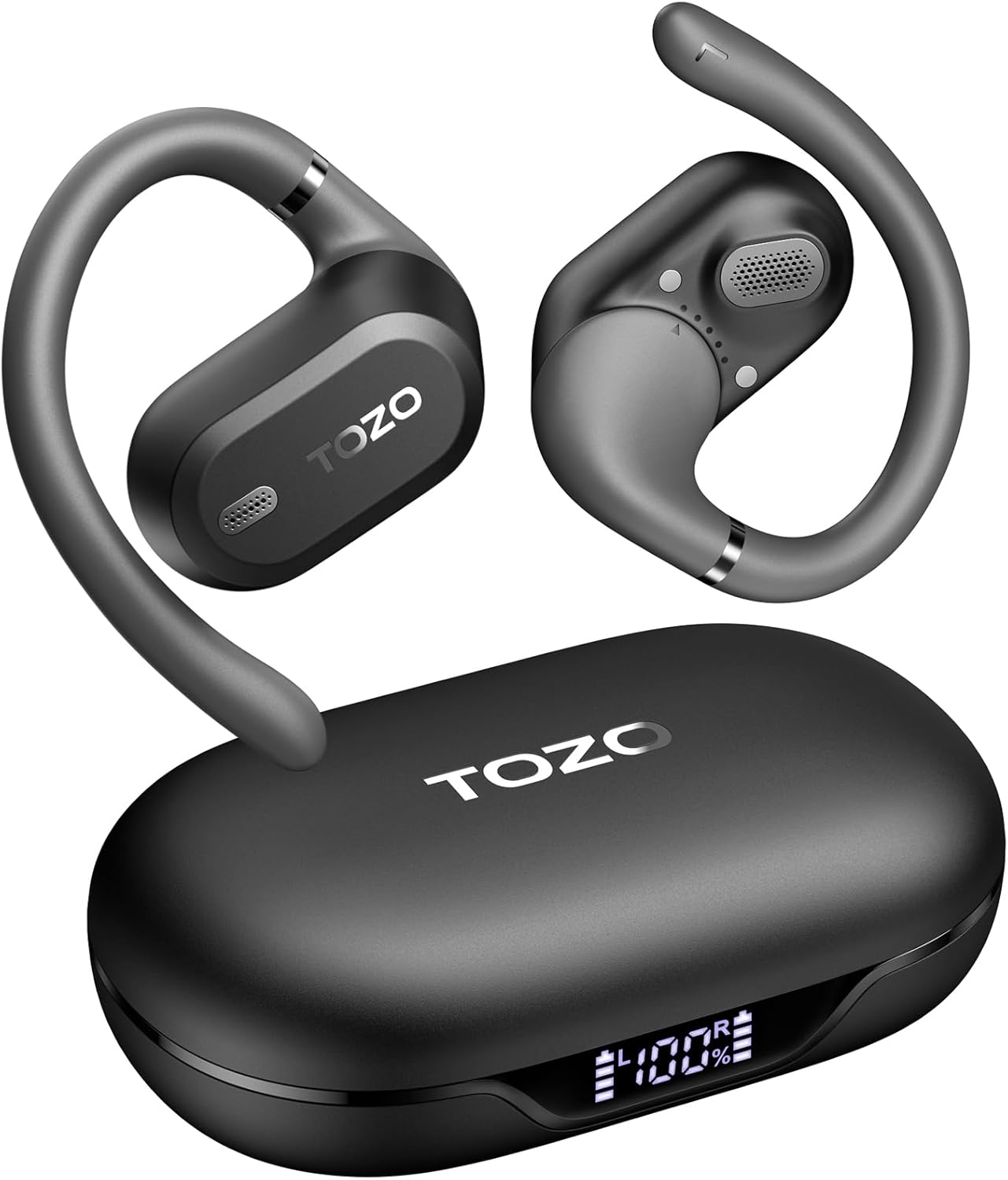
Image: TOZO OpenWear T13051 Open Ear Headphones and Charging Case. The image displays the two black open-ear earbuds with their flexible ear hooks, alongside their matching black charging case. The charging case features a digital display on the front.
Prodott Overview
Komponenti
The TOZO OpenWear headphones are designed with user comfort and sound quality in mind. Each earbud features a main body housing the audio components and a flexible ear hook for secure placement.

Immaġni: Close-up view of a TOZO OpenWear earbud, highlighting the internal 14.2mm dynamic driver and speaker grille. The image emphasizes the audio technology for clear sound and bass.
Kontrolli
Each earbud is equipped with touch-sensitive controls for managing audio playback, calls, and other functions. Specific control gestures can be customized via the TOZO App.
Vidjo: Overview of the TOZO OpenWear Open Ear Headphones. The video demonstrates the physical design, including the flexible ear hooks and the charging case, providing a general introduction to the product's appearance and features.
Setup
Iċċarġjar tal-headphones
Qabel l-ewwel użu, iċċarġja l-headphones u l-kaxxa tal-iċċarġjar kompletament.
- Place the earbuds into the charging case. Ensure they are correctly seated; magnets will guide them into position.
- Qabbad il-kejbil USB-C mal-port tal-iċċarġjar fuq il-kaxxa u ma' sors tal-enerġija.
- Id-displej diġitali fuq il-kaxxa tal-iċċarġjar se juri l-perċentwal tal-batterijatage għall-kaxxa u l-earbuds individwali (X/R).
- A 10-minute charge provides approximately 2 hours of playtime. A full charge offers up to 38 hours of total playtime with the charging case.

Image: The TOZO OpenWear charging case open, showing the earbuds inside and a digital display indicating "38 hrs" of extended battery life, "630 songs", and "38 meetings". This highlights the long battery performance.
Image: A close-up of the TOZO OpenWear charging case's digital display, showing the battery levels for the left earbud (L), the charging case (center percentage), and the right earbud (R).
Tqabbil mat-Tagħmir Tiegħek
- Iftaħ il-kaxxa tal-iċċarġjar. Il-earbuds jidħlu awtomatikament fil-modalità ta' tqabbil.
- Fuq l-apparat tiegħek (smartphone, tablet, laptop), attiva l-Bluetooth.
- Fittex għal "TOZO OpenWear" in the list of available Bluetooth devices and select it to connect.
- Ladarba jkun konness, se tinstema' twissija bil-vuċi biex tikkonferma li l-akkoppjar sar b'suċċess.
Image: A TOZO OpenWear earbud shown next to a smartphone displaying its Bluetooth settings, with "TOZO OpenWear" listed as a connected device. The charging case is also visible in the background.
Istruzzjonijiet għall-ilbies
The TOZO OpenWear headphones feature a dual-axis adjustable design for a personalized and secure fit. Proper placement is crucial for both comfort and sound quality.
- Gently place the earbud over your ear, positioning the main body in front of your ear canal.
- Adjust the flexible ear hook to rest comfortably and securely behind your ear.
- Utilize the dual-axis rotation to adapt the earbud's angle both horizontally and vertically until it sits comfortably and the sound is clear.
- Ensure the speaker grille is positioned to direct sound towards your ear canal without blocking it.

Image: A diagram illustrating the dual-axis adjustment feature of the TOZO OpenWear ear hooks. It shows how the ear hook can rotate 40 degrees horizontally and 75 degrees vertically to adapt to different ear shapes for enhanced comfort and stability.

Image: A woman wearing a TOZO OpenWear earbud, demonstrating the comfortable and breathable fit of the open-ear design for all-day wear. The earbud sits gently on the ear without entering the ear canal.
Istruzzjonijiet Operattivi
Kontrolli Bażiċi
The earbuds feature touch controls for various functions. Refer to the Quick Guide for detailed touch gestures. Common functions include:
- Play/Pawsa: Tektek wieħed fuq kull earbud.
- Track li jmiss: Tektek darbtejn fuq il-earbud tal-lemin.
- Track preċedenti: Tektek darbtejn fuq il-earbud tax-xellug.
- Volum 'il fuq: Tektek tliet darbiet fuq il-earbud tal-lemin.
- Volum 'l isfel: Tektek tliet darbiet fuq il-earbud tax-xellug.
- Tweġiba/Tmiem Sejħa: Tektek wieħed fuq kull earbud.
- Irrifjuta Sejħa: Agħfas u żomm kwalunkwe earbud għal 2 sekondi.
Modalità ta' Latenza Baxxa
Activate low-latency mode for an enhanced audio-visual synchronization, ideal for gaming and video playback. This mode reduces audio delay to 60ms.
- Refer to the TOZO App or Quick Guide for specific instructions on activating/deactivating low-latency mode.
TOZO App Features
Download the official TOZO App for a personalized audio experience. The app allows you to:
- Access 16 custom EQ settings to fine-tune your sound.
- Receive and install firmware updates for improved performance.
- Control various features and settings of your OpenWear headphones.

Image: Screenshots of the TOZO App interface, demonstrating features such as 5 types of EQ sound modes, firmware updates, and detailed EQ adjustment options for a personalized listening experience.
Manutenzjoni
Tindif
Tindif regolari jgħin biex iżomm prestazzjoni u iġjene ottimali.
- Imsaħ il-earbuds u l-kaxxa tal-iċċarġjar b'ċarruta ratba, niexfa u mingħajr suf.
- Evita li tuża materjali li joborxu, solventi, jew sprejs tal-ajrusol.
- Do not submerge the charging case in water.
Ħażna
Always store the headphones in their charging case when not in use to protect them and ensure they remain charged.
Reżistenza għall-Ilma (IPX6)
The TOZO OpenWear headphones are rated IPX6 water-resistant, meaning they can withstand high-pressure water jets from any direction. This makes them suitable for workouts and outdoor activities where sweat and splashes may occur.
- The IPX6 rating applies to the earbuds only, not the charging case.
- Tgħaddasx il-earbuds fl-ilma apposta għal perjodi twal.
- Kun żgur li l-earbuds ikunu niexfa qabel ma tpoġġihom lura fil-kaxxa tal-iċċarġjar biex tevita li ssirilhom ħsara.
Issolvi l-problemi
If you encounter any issues, try the following solutions:
- Ebda Ħsejjes: Kun żgur li l-earbuds huma ċċarġjati, imqabbdin sew, u l-volum huwa aġġustat.
- Kwistjonijiet ta' Tqabbil: Turn off Bluetooth on your device, place earbuds in case, close and reopen, then try pairing again. Forget "TOZO OpenWear" from your device's Bluetooth list and re-pair.
- Tajjeb skomdu: Adjust the dual-axis ear hooks as described in the "Wearing Instructions" section.
- Problemi tal-iċċarġjar: Check the USB-C cable and power source. Ensure earbuds are correctly seated in the case.
If issues persist, please refer to the official TOZO website for detailed FAQs or contact customer support.
Speċifikazzjonijiet
| Karatteristika | Speċifikazzjoni |
|---|---|
| Isem tal-Mudell | OpenWear T13051 |
| Brand | TOZO |
| Teknoloġija tal-Konnettività | Mingħajr fili (Bluetooth 5.4) |
| Tqegħid tal-widnejn | Widna Miftuħa |
| Daqs tas-Sewwieq tal-Awdjo | Sewwieq Dinamiku ta '14.2 mm |
| Ħajja tal-Batterija (Earbuds) | Sa 8.5 sigħat (ċarġ wieħed) |
| Ħajja Totali tal-Batterija (bil-Kaxxa) | Sa 38 sigħat |
| Ħin tal-Iċċarġjar (Iċċarġjar Mgħaġġel) | 10 minuta għal sagħtejn ħin ta' logħob |
| Reżistenza għall-Ilma | IPX6 (Earbuds biss) |
| Modalità ta' Latenza Baxxa | 60ms |
| Tip ta' Kontroll | Mess, Kontroll tal-App |
| Apparati Kompatibbli | IOS/Android mobile phones, tablets, laptops |
| Piż tal-oġġett | 1.38 uqija (total) |
Garanzija u Appoġġ
TOZO products come with a standard manufacturer's warranty. For specific warranty details, registration, or to access customer support, please visit the official TOZO websit:
You can also find additional support resources, FAQs, and contact information on their official websit.


