Introduzzjoni
This manual provides comprehensive instructions for the installation, operation, and maintenance of your Imou Cell 3C AIO 5MP Solar Surveillance Camera. Please read this manual thoroughly before use and retain it for future reference.
The Imou Cell 3C AIO is a wireless, rechargeable surveillance camera featuring an integrated 2.2W solar panel for continuous power. It offers 5MP (3K) resolution, IP66 weather resistance, smart color night vision, and advanced human detection with smart tracking. Key features include a built-in siren and spotlight for deterrence, flexible storage options via microSD card or Imou Cloud, and a privacy mode for enhanced security.
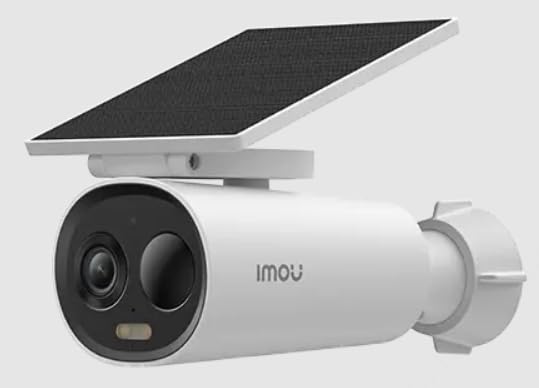
Image of the Imou Cell 3C AIO 5MP Solar Surveillance Camera, showcasing id-disinn kompatt tiegħu u l-pannell solari integrat.
Setup
Follow these steps for initial setup of your Imou Cell 3C AIO camera:
- Ħoll u Spezzjona: Carefully remove all components from the packaging and ensure everything is present and undamaged.
- Ħlas Inizjali: Although solar-powered, it is recommended to fully charge the camera using a 5V USB adapter (not included) before the first use to ensure optimal performance.
- Niżżel l-App Imou Life: Niżżel u installa l-app "Imou Life" mill-app store tal-ismartphone tiegħek (disponibbli fuq iOS u Android).
- Ħolqien tal-Kont: Iftaħ l-app Imou Life u oħloq kont ġdid jew idħol f'wieħed eżistenti.
- Żid Apparat: Segwi l-istruzzjonijiet fl-app biex iżżid il-kamera tiegħek. Dan tipikament jinvolvi l-iskennjar ta' kodiċi QR fuq il-kamera jew fuq l-imballaġġ tagħha.
- Post tal-Immuntar: Select a suitable outdoor location for mounting. Ensure the solar panel receives direct sunlight for several hours daily to maintain battery charge. The camera is IP66 weather-resistant, suitable for various outdoor conditions.
- Immuntar Sikur: Use the provided mounting hardware to securely attach the camera to the chosen surface. Adjust the camera angle for optimal surveillance coverage.
Istruzzjonijiet Operattivi
Utilize the Imou Life app to access and control your camera's features:
- Live View: Iftaħ l-app Imou Life u agħżel il-kamera tiegħek mil-lista tal-apparati biex view the real-time video feed.
- Sejbien u Traċċar tal-Moviment: The camera features advanced human detection and smart tracking. Configure detection sensitivity, activity zones, and alert preferences within the app settings.
- Viżjoni bil-lejl: The camera supports smart color night vision, which automatically activates in low-light conditions to provide clear, full-color images.
- Sirena u Spotlight: The integrated spotlight and siren can be configured to activate automatically upon detection of an intruder, or they can be manually triggered through the Imou Life app to deter potential threats.
- Ħażna tal-Vidjo:
- Karta MicroSD: Daħħal kard microSD (sa 256GB, mhux inkluża) fl-islott apposta għall-ħażna lokali tal-vidjow.
- Imou Cloud: Subscribe to Imou Cloud for secure cloud storage of your video recordings. Refer to the app for subscription details and free trial availability.
- Modalità ta' Privatezza: Activate the privacy mode within the Imou Life app. This feature physically covers the camera lens, ensuring your privacy when desired.
Manutenzjoni
Manutenzjoni xierqa tiżgura l-lonġevità u l-prestazzjoni ottimali tal-kamera tiegħek:
- Tindif: Regularly clean the camera lens and the surface of the solar panel with a soft, damp cloth. Avoid using abrasive cleaners or harsh chemicals, as these can damage the components.
- Aġġornamenti tal-Firmware: Periodically check for and install firmware updates through the Imou Life app. Updates often include performance improvements, new features, and security enhancements.
- Kura Ambjentali: While IP66 rated, extreme environmental conditions (e.g., prolonged exposure to direct salt spray, very high humidity, or temperatures outside the specified operating range) should be minimized to prevent potential damage.
- Saħħa tal-batterija: Ensure the solar panel receives adequate sunlight daily to maintain the internal battery's charge. If the camera is in a shaded area, occasional manual charging via USB may be required.
Issolvi l-problemi
Irreferi għal din it-taqsima għal soluzzjonijiet għal kwistjonijiet komuni:
- Il-Kamera Ma Tixgħel:
- Check if the solar panel is obstructed or receiving insufficient sunlight.
- Ensure the internal battery has sufficient charge. If necessary, manually charge the camera via USB.
- Ma tistax tikkonnettja mal-Wi-Fi:
- Verify that the camera is within range of your Wi-Fi router.
- Double-check the Wi-Fi password entered in the Imou Life app.
- Erġa' ibda kemm il-kamera kif ukoll ir-router tal-Wi-Fi tiegħek.
- Kwalità Fqira tal-Immaġni:
- Naddaf il-lenti tal-kamera biex tneħħi kwalunkwe ħmieġ jew tbajja’.
- Ensure there is adequate lighting in the surveillance area, especially for optimal color night vision.
- Check your network connection stability, as a weak signal can affect video streaming quality.
- Is-Sejbien tal-Moviment Mhux Taħdim:
- Verify that motion detection is enabled and configured correctly in the Imou Life app settings.
- Adjust the detection sensitivity and ensure activity zones are properly defined.
- Kun żgur li m'hemm l-ebda ostaklu fiżiku li jimblokka l-kamera view fiż-żona ta' skoperta.
Speċifikazzjonijiet
| Karatteristika | Dettall |
|---|---|
| Numru tal-Mudell | IPC-K9DC-5M0WEH-V2 |
| Brand | Imou |
| Riżoluzzjoni | 5 Megapixels (3K) |
| Panel Solari Integrat | 2.2 Watts |
| Reżistenza għat-temp | Ċertifikat IP66 |
| Dimensjonijiet (L x W x H) | 16.8 x 7.2 x 6 ċm |
| Piż | 650 gramma |
| Konsum tal-Enerġija | 3.5 Watts |
| Voltage | 5 Volts |
| Għażliet ta' Ħażna | MicroSD card (up to 256GB), Imou Cloud |
| Karatteristiċi | Human Detection, Smart Tracking, Smart Color Night Vision, Siren, Spotlight, Privacy Mode |
Garanzija u Appoġġ
For detailed warranty information, technical assistance, or customer support, please visit the official Imou website or contact their authorized service centers. Retain your proof of purchase for any warranty claims.


