1. Introduzzjoni
The Trevi RDA 70 BR is a compact and versatile portable radio designed to provide a comprehensive listening experience. It combines traditional radio functionality with modern digital features, making it suitable for listening to music or news anywhere. This manual provides instructions for the proper setup, operation, and maintenance of your device.
2. Informazzjoni dwar is-Sigurtà
- Aqra l-istruzzjonijiet kollha bir-reqqa qabel tuża l-apparat.
- Do not expose the radio to rain, moisture, or extreme temperatures.
- Evita li tpoġġi l-apparat ħdejn sorsi tas-sħana jew fid-dawl tax-xemx dirett.
- Tiżżarmax jew tippruvax issewwi l-unità int stess. Irreferi għal kull manutenzjoni f'idejn persunal kwalifikat.
- Żomm l-apparat 'il bogħod minn kampi manjetiċi qawwija.
- Use only the specified charging cable (USB Type-C) for recharging the battery.
3. Kontenut tal-Pakkett
Kun żgur li l-oġġetti kollha huma preżenti fil-pakkett:
- Trevi RDA 70 BR Portable Radio
- Cable tal-Iċċarġjar tal-USB tat-Tip-Ċ
- Manwal għall-Utent (dan id-dokument)
4. Prodott Aktarview
Familiarize yourself with the various parts and controls of your Trevi RDA 70 BR radio.

Figura 1: Quddiem angolat view of the Trevi RDA 70 BR Portable Radio, showing the speaker grille, display, and main controls.
Kontrolli tal-Panew ta' Quddiem
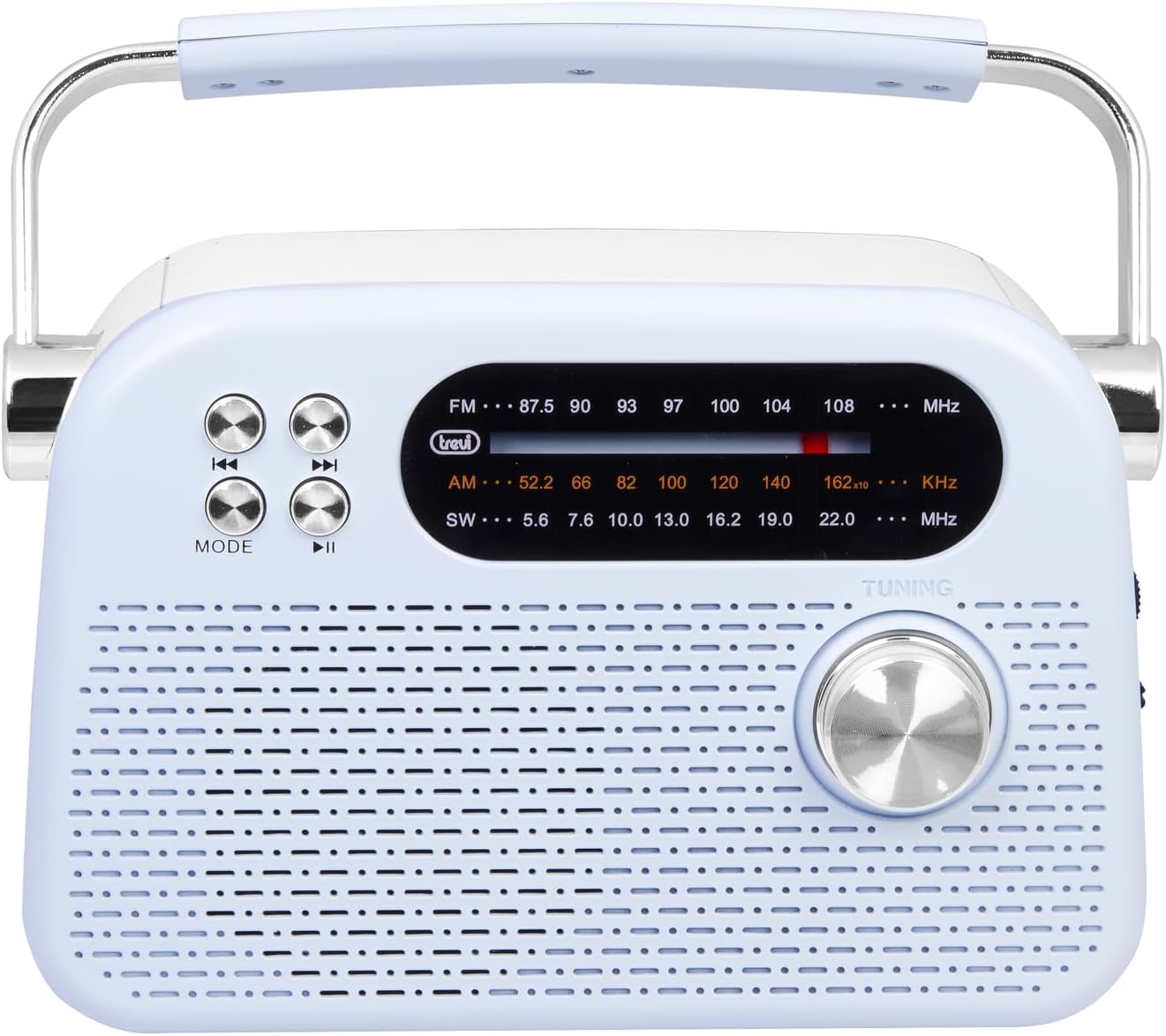
Figura 2: Quddiem dettaljat view highlighting the display, mode button, playback controls, and tuning knob.
- Wiri: Shows frequency, mode, and other information.
- Buttuna MODE: Switches between radio bands (FM/AM/SW) and media playback modes (USB/Micro SD/Wireless).
- Playback Controls (◀◀ / ▶▶ / ▶▶): Used for skipping tracks in media mode or fine-tuning in radio mode.
- Pum tal-irfinar: For manual station tuning.
Side Panel Controls and Ports

Figura 3: Ġenb view showing the power switch, volume control, USB port, Micro SD slot, and USB Type-C charging port.
- OFF/ON/Volume Knob: Turns the radio on/off and adjusts the volume level.
- DC 5V IN (USB Type-C): Port tal-iċċarġjar għall-batterija interna.
- Port USB: Għall-konnessjoni ta' flash drives USB għad-daqq ta' MP3.
- Micro SD Slot (TF): For inserting Micro SD cards for MP3 playback.
- Swiċċ tas-Selettur tal-Banda: Selects between FM, AM, and SW radio bands, and MEDIA mode for USB/Micro SD/Wireless.
Panel ta' wara

Figura 4: Wara view showing the telescopic antenna and battery compartment.
- Antenna teleskopika: Extend for improved radio reception, especially for FM and SW bands.
- Kompartiment tal-batterija: Houses the rechargeable lithium battery.
5. Setup
5.1 Iċċarġjar tal-batterija
- Locate the USB Type-C charging port on the side of the radio.
- Qabbad il-kejbil USB Type-C provdut mal-port tal-iċċarġjar tar-radju.
- Qabbad it-tarf l-ieħor tal-kejbil USB ma' adapter tal-enerġija USB standard (mhux inkluż) jew mal-port USB tal-kompjuter.
- The charging indicator light will illuminate (if present) to show charging status.
- Once fully charged, disconnect the cable. A full charge ensures maximum portability and uninterrupted use.
5.2 Aġġustament tal-Antenna
For optimal radio reception, extend the telescopic antenna fully. Adjust its direction and angle to achieve the clearest signal, especially for FM and Shortwave (SW) broadcasts.
6. Istruzzjonijiet Operattivi
6.1 Mixgħul/Mitfi u Kontroll tal-Volum
- Biex tixgħel ir-radju ON, rotate the OFF/ON/Volume knob clockwise.
- Continue rotating the knob clockwise to żid il-volum.
- Rotate the knob counter-clockwise to tnaqqas il-volum.
- Biex tixgħel ir-radju OFF, rotate the knob counter-clockwise until it clicks into the OFF position.
6.2 Għażla tal-Modalità
Uża l- Swiċċ Selettur tal-Banda on the side panel to choose your desired mode:
- FM: For Frequency Modulation radio stations.
- AM: Għal Amplitude Modulation radio stations.
- SW: For Shortwave radio stations.
- NOFS: For playing audio from USB, Micro SD, or Wireless (Bluetooth) sources.
6.3 Irfinar tar-Radju
- Select the desired radio band (FM, AM, or SW) using the Band Selector Switch.
- Estendi l-antenna teleskopika għal riċeviment aħjar.
- Dawwar bil-mod il- Buttuna tal-Irfinar on the front panel to scan for stations.
- The frequency will be displayed on the screen. Stop tuning when you find a clear station.
6.4 USB/Micro SD Playback (MP3)
- Insert a USB flash drive or a Micro SD card (with MP3 files) into the corresponding port/slot on the side panel.
- Switch the Band Selector Switch to MEDIA mode. The radio should automatically detect and begin playing MP3 files.
- Uża l- Kontrolli tal-daqq (◀◀ / ▶▶) to skip to the previous or next track.
- Uża l- Play/Pause (▶▶) buttuna biex tieqaf jew terġa’ tibda d-daqq.
6.5 Konnessjoni bla fili (Bluetooth)
The radio supports wireless audio streaming from compatible devices.
- Switch the Band Selector Switch to MEDIA mode. The radio will enter Bluetooth pairing mode (indicated by an audible prompt or flashing indicator).
- Fuq l-ismartphone, it-tablet, jew apparat ieħor li jaħdem bil-Bluetooth tiegħek, attiva l-Bluetooth u fittex apparati disponibbli.
- Agħżel "Trevi RDA 70 BR" (or similar name) from the list of devices to pair.
- Ladarba jkun imqabbad, tista' tixxandar l-awdjo mit-tagħmir tiegħek għar-radju.
- Use the playback controls on your connected device or the radio's playback controls to manage audio.
7. Manutenzjoni
- Tindif: Uża drapp artab u niexef biex tnaddaf il-barra tar-radju. Tużax prodotti tat-tindif jew solventi li joborxu.
- Ħażna: Meta ma tkunx qed tuża r-radju għal perjodi twal, aħżen ir-radju f'post frisk u niexef, 'il bogħod mix-xemx diretta u minn temperaturi estremi.
- Kura tal-batterija: Biex ittawwal il-ħajja tal-batterija, evita li tiċċarġja kompletament il-batterija ta' spiss. Erġa' ċċarġjaha regolarment, anke jekk ma tkunx qed tużaha kontinwament.
8 Issolvi l-problemi
| Problema | Kawża Possibbli | Soluzzjoni |
|---|---|---|
| Ebda qawwa | Battery is discharged; Power knob is OFF. | Charge the battery; Rotate the power knob to ON. |
| Riċeviment ħażin tar-radju | Antenna mhux estiża; Sinjal dgħajjef; Interferenza. | Extend and adjust the telescopic antenna; Move the radio to a different location; Tune carefully. |
| USB/Micro SD not playing | Incorrect mode; Unsupported file format; Korrott files. | Ensure Band Selector Switch is on MEDIA; Check if files are MP3 format; Try a different USB/Micro SD card. |
| Cannot connect via Wireless (Bluetooth) | Radio not in pairing mode; Bluetooth off on device; Device already connected to another unit. | Ensure radio is in MEDIA mode; Enable Bluetooth on your device; Disconnect from other devices and try again. |
9. Speċifikazzjonijiet
| Karatteristika | Dettall |
|---|---|
| Brand | Trevi |
| Mudell | RDA 70 BR |
| Dimensjonijiet (L x W x H) | 18.5 x 7 x 12.5 ċm |
| Piż | 600 gramma |
| Sors tal-Enerġija | Batterija tal-litju rikarikabbli |
| Port tal-Iċċarġjar | USB tat-Tip Ċ (DC 5V) |
| Frekwenzi tar-Radju Appoġġjati | FM, AM, SW |
| Daqq tal-Midja | USB, Micro SD (MP3 format) |
| Konnettività bla fili | Yes (Bluetooth compatible) |
| Karatteristiċi Speċjali | Portabbli, Rikarikabbli |
10. Garanzija u Appoġġ
For warranty information and customer support, please refer to the documentation provided at the time of purchase or visit the official Trevi website. Standard return policies apply for products purchased through retailers. For specific details regarding returns or defective products, consult your purchase platform's help pages.


