1. Introduzzjoni
Thank you for choosing the ANRAN Q04 5MP Solar 4G LTE Cellular Security Camera. This manual provides detailed instructions for the proper installation, operation, and maintenance of your security camera. Please read this manual thoroughly before use to ensure optimal performance and longevity of the product. This camera operates exclusively on 4G LTE cellular networks and does not support Wi-Fi connectivity.
2. Kontenut tal-Pakkett
Jekk jogħġbok ivverifika li l-oġġetti kollha elenkati hawn taħt huma inklużi fil-pakkett tiegħek. Jekk xi oġġetti huma neqsin jew bil-ħsara, jekk jogħġbok ikkuntattja l-appoġġ għall-klijenti.
- ANRAN Q04 5MP Solar 4G LTE Cellular Security Camera
- Panel Solari Integrat
- Bracket tal-Immuntar u Viti
- Karta MicroSD ta' 32GB (installata minn qabel jew separata)
- 4G SIM Card (pre-installed or separate)
- Cable tal-Iċċarġjar tal-USB
- Manwal għall-Utent

Immaġni: Fuqview of the ANRAN Q04 camera system, including the camera, solar panel, SIM card, and microSD card.
3. Setup
3.1 SIM Card & MicroSD Card Installation
- Locate the SIM card slot and MicroSD card slot on the camera. These are typically protected by a rubber cover.
- Iftaħ l-għatu bir-reqqa.
- Insert the provided 4G SIM card into the SIM card slot with the gold contacts facing down and the notched corner oriented correctly. Push until it clicks into place.
- Insert the provided MicroSD card into the MicroSD card slot with the gold contacts facing down. Push until it clicks into place.
- Ensure the rubber cover is securely closed to maintain the camera's weather resistance.
3.2 Immuntar tal-Kamera
Agħżel post li jirċievi ample sunlight for the solar panel and has good 4G LTE signal strength. Ensure the camera has a clear view taż-żona li tixtieq tissorvelja.
- Position the mounting bracket against the desired surface (wall, pole, etc.) and mark the drill holes.
- Ħaffra toqob pilota fil-postijiet immarkati.
- Waħħal il-bracket tal-immuntar billi tuża l-viti pprovduti.
- Attach the camera to the mounting bracket and adjust its angle for optimal coverage and solar panel exposure.

Image: A person installing the ANRAN Q04 camera, demonstrating simple installation on a wall.
3.3 L-Ewwel Xgħel u l-Konnessjoni tal-App
- Ensure the camera's battery is sufficiently charged. You may pre-charge it using the USB cable if needed.
- Download the official ANRAN app from your smartphone's app store (iOS or Android).
- Iftaħ l-app u oħloq kont jew idħol.
- Follow the in-app instructions to add your new camera. This typically involves scanning a QR code on the camera or manually entering its device ID.
- Once connected, the camera will establish a connection via the 4G LTE network.
4. It-tħaddim tal-Kamera
4.1 Camera Controls & Features
- Pan & Mejjel: The ANRAN Q04 offers a 355° horizontal pan and 90° vertical tilt, allowing you to remotely adjust the camera's viewing angle via the app.

Image: Illustration of the camera's 355-degree pan and 90-degree tilt capabilities, controlled remotely via a smartphone app.
- Sejbien tal-Mozzjoni u Notifiki: The camera is equipped with human motion detection. When motion is detected, the camera will record footage and send real-time notifications to your smartphone. Note: This camera does not support auto-tracking.

Image: Depiction of the camera's motion detection feature at night, showing a person triggering an alert and the camera's lights illuminating the area.
- Modi ta' Viżjoni bil-lejl: The camera offers three distinct night vision modes for various low-light conditions:
- Modalità Smart: Automatically switches between infrared and color night vision based on detected activity.
- Modalità tal-Kulur: Utilizes built-in spotlights to provide full-color video even in complete darkness.
- Modalità infra-aħmar: Uses infrared LEDs for clear black-and-white video in low light, conserving power.
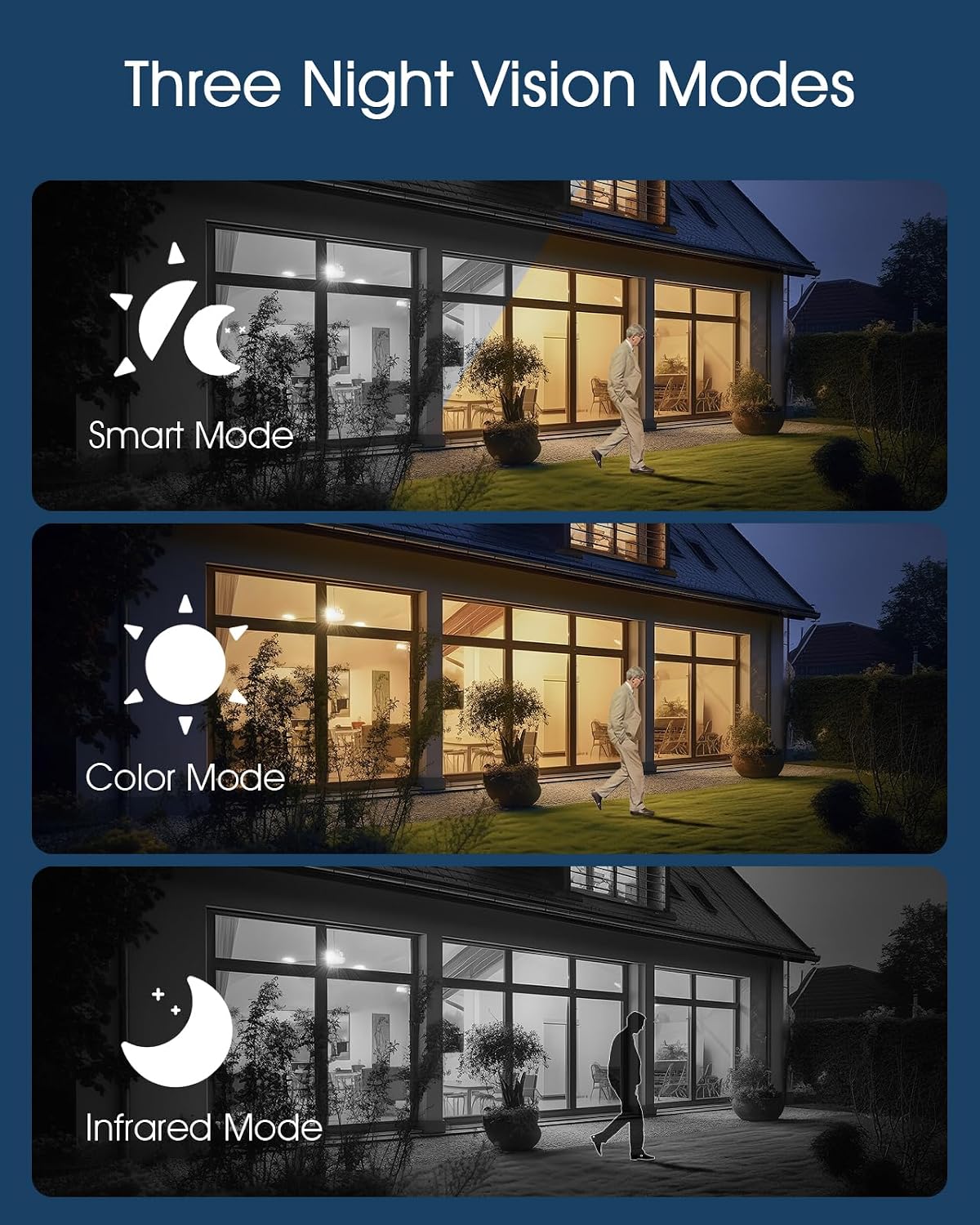
Image: A visual comparison of the three night vision modes: Smart Mode (auto-switching), Color Mode (full-color with spotlights), and Infrared Mode (black and white).
4.2 Konnettività 4G LTE
The ANRAN Q04 camera is designed for areas without Wi-Fi access. It relies solely on a 4G LTE cellular connection for data transmission. Ensure your SIM card has an active data plan for continuous operation.

Image: A graphic emphasizing the camera's 4G LTE connectivity, explicit lack of Wi-Fi support, integrated solar panel for charging, and included SIM card.
4.3 Ġestjoni tal-Enerġija Solari
The camera features an integrated solar panel and a 9600mAh rechargeable battery, providing continuous power. Position the solar panel to receive maximum direct sunlight daily to ensure optimal charging and uninterrupted operation.

Image: The camera mounted with its solar panel, illustrating its self-sustaining power system with a 9600mAh battery and IP66 weather resistance for year-round outdoor use.
5. Manutenzjoni
- Tindif: Naddaf il-lenti tal-kamera u l-pannell solari perjodikament b'drapp artab u dryer.amp drapp biex tneħħi t-trab u l-fdalijiet. Tużax kimiċi ħarxa.
- Kura tal-batterija: While the solar panel charges the battery, avoid prolonged periods of complete discharge. If storing the camera, ensure the battery is partially charged.
- Aġġornamenti tal-Firmware: Check the ANRAN app regularly for firmware updates. Keeping your camera's firmware up-to-date ensures optimal performance and security.
- Ġestjoni tal-Kard MicroSD: The camera will overwrite older footage when the MicroSD card is full. For critical recordings, download them to your device or cloud storage.
6 Issolvi l-problemi
- Il-Kamera Ma Tixgħel: Ensure the battery is charged. Connect the camera to a USB power source for initial charging.
- No 4G LTE Signal: Check the SIM card installation and ensure it has an active data plan. Relocate the camera to an area with better cellular reception.
- Kwistjonijiet ta' Konnessjoni tal-App: Ensure your smartphone has a stable internet connection. Restart the app and the camera. Re-add the camera if necessary.
- Viżjoni fqira bil-lejl: Clean the camera lens. Ensure there are no obstructions blocking the infrared LEDs or spotlights.
- Il-Pannell Solari Mhux Qed Jiċċarġja: Ensure the solar panel is clean and positioned to receive direct sunlight for several hours daily. Check for any physical damage to the panel or cable.
- Is-Sejbien tal-Moviment Mhux Taħdim: Verify motion detection settings in the app. Ensure the camera's view ikun ċar u mhux ostakolat.
7. Speċifikazzjonijiet
| Karatteristika | Speċifikazzjoni |
|---|---|
| Mudell | ANRAN Q04 |
| Riżoluzzjoni | 5 Megapixels |
| Konnettività | 4G LTE Cellular (No Wi-Fi Support) |
| Sors tal-Enerġija | Integrated Solar Panel, 9600mAh Rechargeable Battery |
| Medda Pan/Tilt | Pan Orizzontali ta' 355°, Inklinazzjoni Vertikali ta' 90° |
| Viżjoni bil-lejl | Smart Mode, Color Mode, Infrared Mode |
| Ħażna | MicroSD Card (up to 128GB, 32GB included) |
| Reżistenza għat-temp | IP66 Rated |
8. Garanzija u Appoġġ
ANRAN products come with a limited warranty. For detailed warranty information, please refer to the warranty card included in your package or visit the official ANRAN website. If you encounter any issues or have questions regarding your ANRAN Q04 camera, please contact ANRAN customer support through the app or the official websit għall-għajnuna.


