Introduzzjoni
This manual provides detailed instructions for the installation, operation, and maintenance of your ANRAN Q04 Solar 4G LTE Security Camera. Please read this manual thoroughly before using the product to ensure proper functionality and safety. Keep this manual for future reference.

Image: Two ANRAN Q04 white solar security cameras, showcasing the solar panel and antenna design.
Kontenut tal-Pakkett
Verify that all components are present in your package. If any items are missing or damaged, please contact customer support.
- ANRAN Q04 Solar 4G LTE Security Camera(s)
- Solar Panel (integrated or separate, depending on model variant)
- Bracket tal-Immuntar u Viti
- Cable tal-Iċċarġjar tal-USB
- Manwal għall-Utent (dan id-dokument)
- SIM Card (pre-installed or included, depending on region/package)
- MicroSD Card (optional, may be included in some packages)
Prodott Overview
The ANRAN Q04 camera is a wireless outdoor security solution featuring 4G LTE connectivity and solar power. It is designed for continuous surveillance in locations without Wi-Fi access or consistent power supply.

Image: ANRAN Q04 black solar security camera, highlighting the inclusion of a SIM card and a 32GB microSD card.
Karatteristiċi ewlenin:
- Konnettività 4G LTE: Operates independently without Wi-Fi.
- Li jaħdmu bix-xemx: Integrated solar panel for continuous charging of the built-in 9600mAh battery.
- 100% Wire-Free: Flexible placement without power cables.
- Tliet Modi ta' Viżjoni bil-Lejl: Smart, Color, and Infrared for clear visibility in low light.
- IP66 Reżistenti għat-Temp: Designed for outdoor use, resistant to dust and water.
- Ħażna Lokali u fuq il-Cloud: Supports up to 128GB MicroSD card (not included) and offers cloud storage options.
Setup
1. Iċċarġjar Inizjali
Before first use, fully charge the camera's internal battery using the provided USB cable and a 5V/2A power adapter (not included). A full charge ensures optimal performance, especially during initial setup or periods of low sunlight.
2. SIM Card & MicroSD Card Installation
- Locate the SIM card slot and MicroSD card slot on the camera (usually under a rubber seal).
- Insert the 4G LTE SIM card (ensure it is activated and has a data plan) into the SIM slot with the gold contacts facing down.
- Insert a MicroSD card (up to 128GB, Class 10 or higher recommended) into the MicroSD slot if local storage is desired.
- Securely close the rubber seal to maintain waterproofing.

Image: ANRAN Q04 white solar security camera with an arrow pointing to the MicroSD card slot, indicating local storage capability up to 128GB.
3. App Download & Account Creation
- Download the "ANRAN" app from your smartphone's app store (iOS App Store or Google Play Store).
- Iftaħ l-app u oħloq kont ġdid jew idħol jekk diġà għandek wieħed.
4. Camera Pairing/Connection
- Power on the camera. Wait for the indicator light to show it's ready for pairing (refer to the camera's LED indicator guide in the app or a separate quick start guide).
- Fl-app ANRAN, agħfas l-ikona "+" biex iżżid apparat ġdid.
- Select "4G Camera" or the appropriate camera type.
- Follow the on-screen instructions to scan the QR code on the camera or manually enter its device ID.
- Ladarba tkun konness, tista' tagħti isem lill-kamera tiegħek u tikkonfigura s-settings inizjali.
5. Istruzzjonijiet għall-Immuntar
Agħżel post li jirċievi ample direct sunlight for the solar panel and provides the desired viewangolu tal-ing.
- Mark the drilling points on the wall or mounting surface using the mounting bracket as a template.
- Ħaffer toqob pilota u daħħal ankri tal-ħajt jekk meħtieġ.
- Waħħal il-bracket tal-immuntar mal-wiċċ billi tuża l-viti pprovduti.
- Waħħal il-kamera mal-bracket tal-immuntar.
- Adjust the camera angle and solar panel orientation for optimal sunlight exposure and coverage.

Image: A woman installing an ANRAN Q04 white solar security camera on an outdoor wall, demonstrating simple installation.

Image: An ANRAN Q04 black solar security camera mounted on a tree, illustrating its 100% wire-free and 4G capabilities, powered by an integrated solar panel.
It-tħaddim tal-Kamera
1. Ħaj View
Open the ANRAN app and select your camera from the device list. The live view will display the real-time feed from your camera. You can use on-screen controls for pan/tilt (if supported by your model), zoom, and two-way audio.
2. Reġistrazzjoni u Daqq
The camera records video based on motion detection or continuous recording settings (if configured).
- Ħażna Lokali: Recordings are saved to the installed MicroSD card. Access them via the app's playback section.
- Ħażna Cloud: If subscribed, recordings are uploaded to the cloud. Access them through the app's cloud history.
3. Modi ta' Viżjoni bil-Lejl
The ANRAN Q04 supports three night vision modes, which can be configured in the app settings:
- Modalità Smart: Automatically switches between infrared and color night vision based on detected motion or ambient light.
- Modalità tal-Kulur: Juża spotlajts integrati biex jipprovdi vidjow bil-kulur sħiħ f'kundizzjonijiet ta' dawl baxx.
- Modalità infra-aħmar: Juża LEDs infra-aħmar għal vidjow iswed u abjad fid-dlam totali.
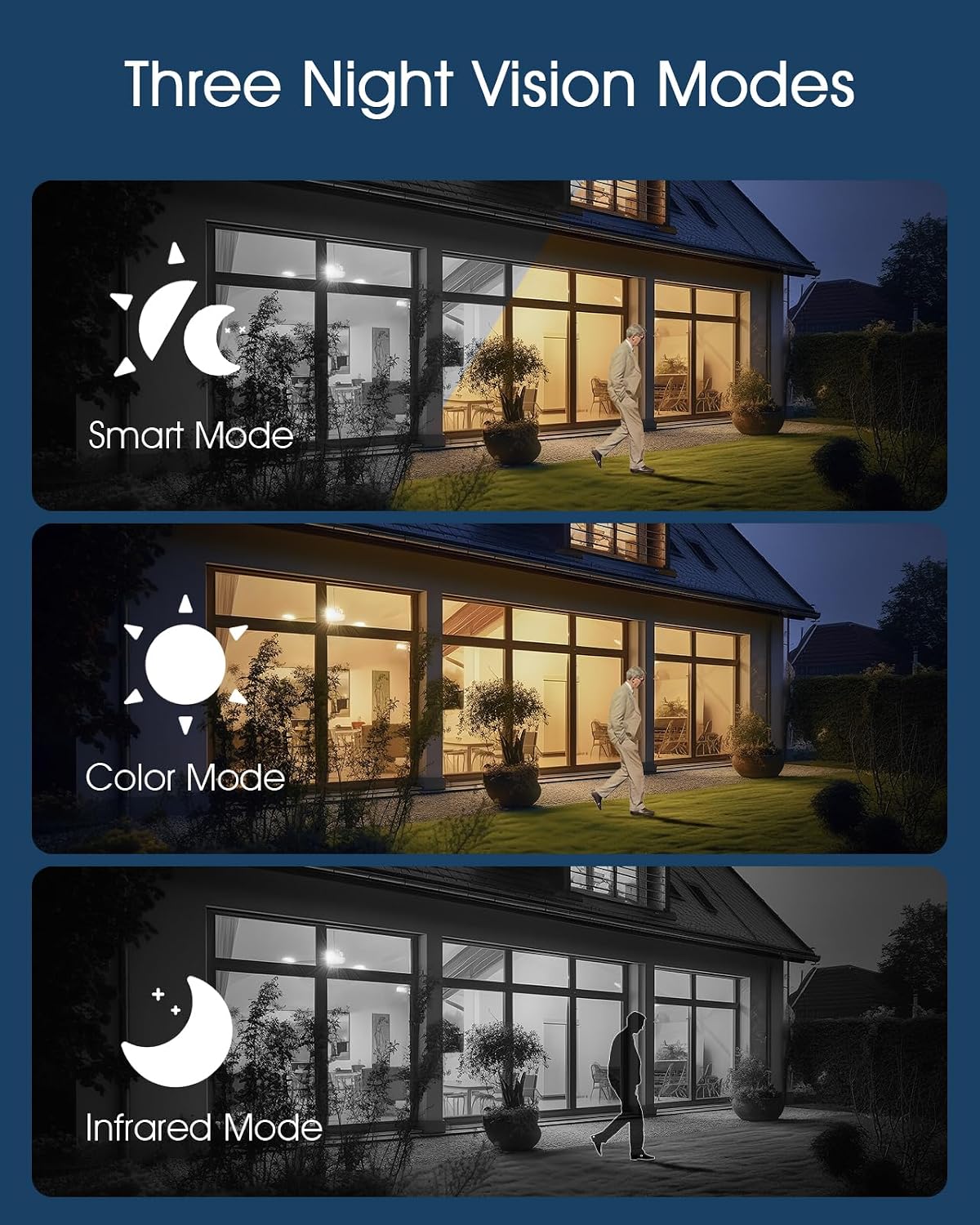
Image: Visual representation of the three night vision modes (Smart, Color, Infrared) available on the ANRAN Q04 camera, showing their distinct appearances.
4. Issettjar tad-Detezzjoni tal-Mozzjoni
Configure motion detection sensitivity, detection zones, and notification preferences within the ANRAN app. This allows you to receive alerts only for relevant events.
Manutenzjoni
1. Tindif
- Imsaħ il-lenti tal-kamera u l-pannell solari regolarment b'ċarruta ratba u damp drapp biex tneħħi trab, ħmieġ, jew debris.
- Ensure the solar panel is clean for efficient charging.
- Tużax kimiċi ħarxa jew tindif li joborxu.
2. Kura tal-batterija
- The camera is designed for continuous solar charging. Ensure the solar panel receives adequate direct sunlight daily.
- If the camera is installed in a shaded area or during prolonged periods of low sunlight, occasional manual charging via USB may be required.
- Avoid extreme temperatures that can degrade battery performance.

Image: ANRAN Q04 black solar security camera with its solar panel, illustrating its capability for 365 days of non-stop solar power due to the 9600mAh battery and IP66 waterproof rating.
Issolvi l-problemi
| Problema | Soluzzjoni Possibbli |
|---|---|
| Il-kamera mhux qed tixgħel. | Ensure the battery is charged. Connect to a USB power source for initial charging. Check the power button. |
| No 4G signal. | Verify the SIM card is correctly inserted and activated with a data plan. Check network coverage in the installation area. Try restarting the camera. |
| Ma nistax nikkonnettja mal-app. | Ensure the camera is powered on and the SIM card has an active data connection. Restart the app and the camera. Follow the pairing steps again. |
| Kwalità tal-vidjo fqira bil-lejl. | Check night vision settings in the app (Smart, Color, Infrared). Ensure the camera lens is clean and not obstructed. |
| Battery not charging via solar. | Ensure the solar panel is clean and receives at least 4-6 hours of direct sunlight daily. Reposition the camera or panel if necessary. |
Speċifikazzjonijiet
- Mudell: Q04
- Konnettività: 4G LTE (SIM card required)
- Qawwa: Solar Panel with 9600mAh Rechargeable Battery
- Ħażna: MicroSD Card (up to 128GB, not included), Cloud Storage (subscription optional)
- Reżistenza għat-temp: IP66 Waterproof u Dustproof
- Temperatura operattiva: -40°F sa 140°F (-40°C sa 60°C)
- Viżjoni bil-lejl: Smart, Color, Infrared Modes
- Awdjo: Awdjo bidirezzjonali

Image: ANRAN Q04 white solar security camera operating outdoors in the rain, demonstrating its IP66 waterproof and dustproof rating and ability to withstand temperatures from -40°F to 140°F.
Garanzija u Appoġġ
ANRAN products typically come with a limited warranty. Please refer to the warranty card included in your package or visit the official ANRAN websit għal termini u kundizzjonijiet dettaljati tal-garanzija.
For technical support, troubleshooting assistance, or warranty claims, please contact ANRAN customer service through their official webis-sit jew l-informazzjoni ta' kuntatt ipprovduta fl-imballaġġ tal-prodott tiegħek.
Websit: www.anran-cctv.com (Please verify official websit)


