Introduzzjoni
Thank you for choosing the Pamray 32 Inch Computer Desk. This manual provides detailed instructions for the assembly, operation, and maintenance of your new desk. Please read this manual thoroughly before assembly and retain it for future reference.

Image: The Pamray 32 Inch Computer Desk, fully assembled, featuring a black desktop and four integrated fabric drawers on the left side.
Informazzjoni dwar is-Sigurtà
Jekk jogħġbok osserva l-prekawzjonijiet ta' sigurtà li ġejjin biex tevita korriment jew ħsara lill-prodott:
- Kun żgur li l-partijiet kollha huma preżenti u mhux imħassra qabel tibda l-assemblaġġ.
- Arma l-iskrivanija fuq wiċċ artab u nadif biex tevita l-grif.
- Tissikkax iżżejjed il-viti waqt l-assemblaġġ, għax dan jista' jagħmel ħsara lill-materjal.
- Żomm partijiet żgħar 'il bogħod mit-tfal biex tevita perikli ta' fgar.
- Toqgħodx bilwieqfa jew bilqiegħda fuq l-iskrivanija.
- Distribute weight evenly across the desktop and within drawers. The maximum weight recommendation for the desktop is 150 pounds. Each drawer supports up to 10 pounds.
- Iċċekkja regolarment il-qafliet kollha biex tiżgura li jibqgħu ssikkati.
Kontenut tal-Pakkett
Before starting assembly, verify that all components listed below are included in your package. Refer to the included accessory bag for specific hardware.
- Panel tad-Desktop
- Left Support Frame (with drawer housing)
- Qafas ta 'Appoġġ Dritt
- Cross Braces (X-shape)
- Pads tar-riġlejn aġġustabbli
- Fabric Drawers (x4)
- Ħardwer tal-Assemblaġġ (viti, Allen wrench, eċċ.)
- Manwal ta' Istruzzjoni
Istruzzjonijiet ta' Armar
Assembly is required for this product. Clear instructions and all necessary tools are provided in the accessory bag. For a visual guide, scan the QR code on the packaging to access comprehensive installation videos.
Pass 1: Ipprepara Komponenti
Unpack all components and lay them out on a clean, soft surface to prevent damage. Identify each part using the provided labels and the parts list.
Step 2: Attach Support Frames
Secure the left and right support frames to the desktop panel using the designated screws. Ensure the drawer housing on the left frame is correctly oriented.

Image: An assembled Pamray desk in a home office setting, illustrating the overall structure and placement of the drawer unit.
Step 3: Install Cross Braces
Attach the "X" shaped back braces between the support frames. These braces enhance the desk's stability. Do not overtighten.

Immaġni: Dettaljata view of the X-shaped metal cross brace, providing structural support to the desk frame.
Step 4: Attach Adjustable Leg Pads
Screw the adjustable leg pads into the bottom of each leg. These pads protect your floor and allow for minor leveling adjustments on uneven surfaces.
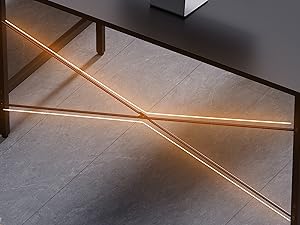
Image: A close-up of the desk's legs, showing the adjustable leg pads designed to protect flooring and stabilize the desk.
Step 5: Insert Fabric Drawers
Unfold the four fabric drawers and insert them into the designated slots within the left support frame. Ensure they slide smoothly.

Immaġni: Close-up view of the four fabric drawers, partially pulled out to show their storage capacity.

Image: The fabric drawers shown with various items stored inside, demonstrating their practical use for organization.
Linji Gwida għall-Użu
This desk is designed for use as a computer desk, office desk, study table, or vanity. Its compact size makes it suitable for small spaces.
- Użu tad-Desktop: Place your computer, monitor, and other work essentials on the desktop. The surface is designed to be waterproof.
- Ħażna tal-kexxun: Utilize the four fabric drawers for organizing office supplies, documents, or personal items. Each drawer can hold up to 10 lbs.
- Invellar: If the desk wobbles, adjust the leg pads at the bottom of each leg until the desk is stable.

Image: Water droplets on the desk surface, illustrating its waterproof property for easy cleaning and spill resistance.
Manutenzjoni
To ensure the longevity and appearance of your Pamray desk, follow these maintenance guidelines:
- Tindif: Imsaħ id-desktop u l-qafas tal-metall b'ċarruta ratba u damp cloth. Avoid harsh chemicals or abrasive cleaners. For the fabric drawers, spot clean with a mild detergent if necessary.
- Protezzjoni: Avoid placing hot items directly on the desktop. Use coasters for drinks.
- Qafliet: Iċċekkja l-viti u l-boltijiet kollha perjodikament biex tiżgura li huma ssikkati. Erġa' ssikkahom jekk meħtieġ.
- Ambjent: Keep the desk in a dry environment and avoid prolonged exposure to direct sunlight or extreme temperatures.
Issolvi l-problemi
| Problema | Kawża Possibbli | Soluzzjoni |
|---|---|---|
| L-iskrivanija qed titħarrek. | Art irregolari jew qfieli maħlula. | Adjust the leg pads until the desk is stable. Check and tighten all assembly screws. |
| Il-kxaxen ma jiżżerżqux bla xkiel. | Installazzjoni mhux xierqa jew ostruzzjoni. | Ensure drawers are fully unfolded and correctly inserted. Check for any items obstructing the drawer path. |
| Partijiet nieqsa. | Żball fl-ippakkjar. | Contact Pamray customer service immediately with your purchase details. |
Speċifikazzjonijiet
- Ditta: Pamray
- Mudell: S12
- Dimensjonijiet tal-Prodott (W x D x H): 31.5" x 15.7" x 29.2" (80 ċm x 40 ċm x 74.2 ċm)
- Kulur: Iswed
- Materjal Bażi: Metall
- Tip ta 'Materjal ta' Fuq: Injam Ċertifikat mill-FSC
- Piż tal-oġġett: 16.4 Lira (7.44 kg)
- Numru ta' kxaxen: 4 (Drapp)
- Maximum Desktop Weight Recommendation: 150 Lira (68 kg)
- Maximum Drawer Weight Recommendation: 10 Pounds (4.5 kg) per drawer
- Assemblaġġ Meħtieġa: Iva
- Karatteristiċi Speċjali: Compact design, X-shape back brace for stability, adjustable leg pads, waterproof desktop.

Image: A diagram illustrating the precise dimensions of the Pamray 32 Inch Computer Desk and its drawers.
Servizz tal-Klijent u Appoġġ
Your satisfaction is our priority. If you encounter any issues regarding the desk's quality or during use, please do not hesitate to contact us. We are committed to providing prompt and effective solutions.
For assistance, please visit the Pamray store on Amazon or use the messaging assistant feature. You can typically find contact options on the product's Amazon page under the seller information.
Kif Tikkuntattja s-Servizz tal-Klijent:
- Mur fil-paġna tal-prodott fuq Amazon.
- Click on the seller's name (e.g., "Xstone" or "Pamray Store").
- Look for a "Ask a question" or "Contact Seller" option.

Image: A visual guide demonstrating the process of contacting Pamray customer service through the Amazon platform.


