1. Introduzzjoni
This manual provides detailed instructions for the proper use and maintenance of your LIGE Smart Watch FV6-B2. Please read this manual thoroughly before using the device to ensure optimal performance and longevity.
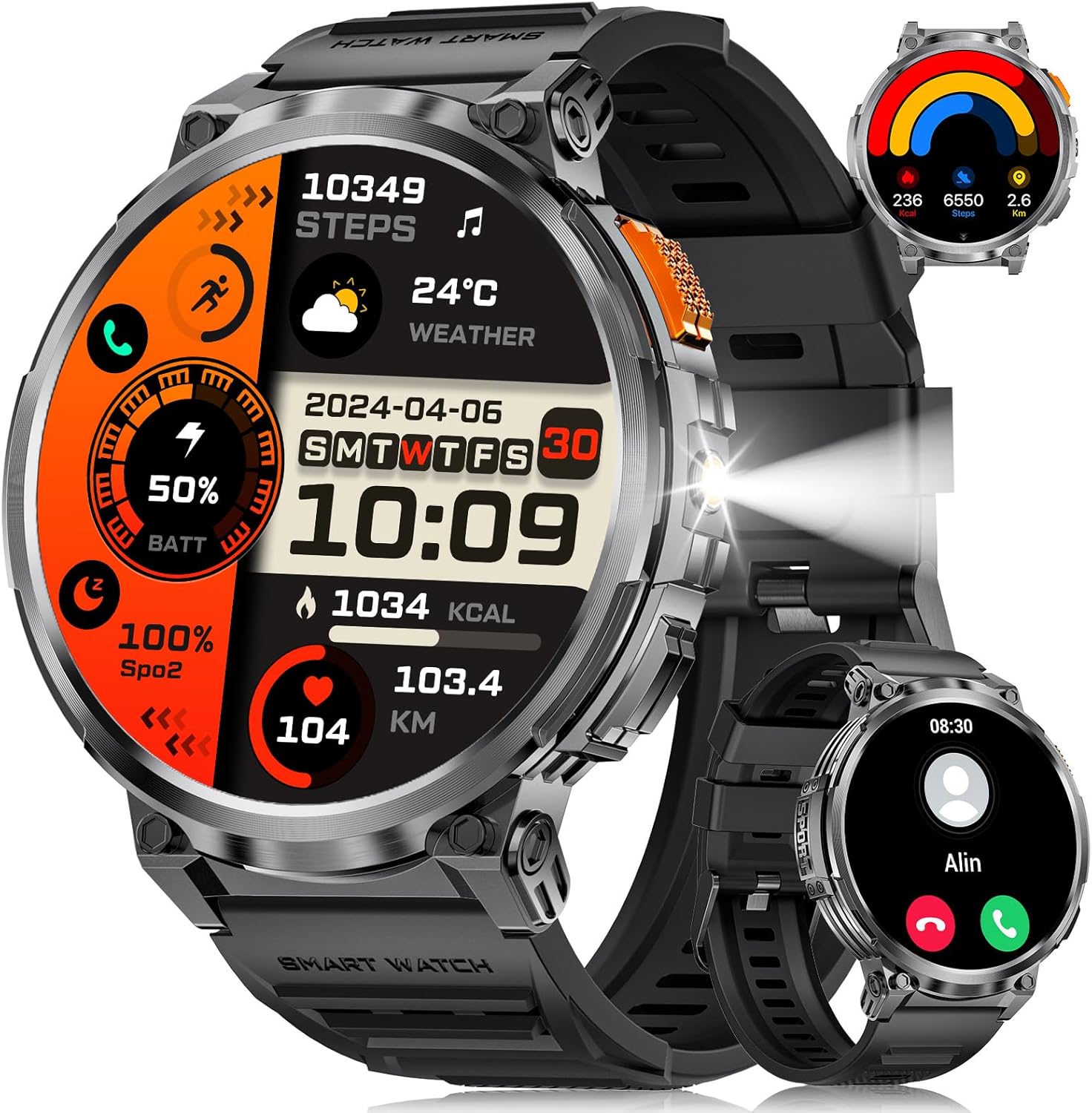
Stampa 1.1: LIGE Smart Watch FV6-B2 displaying various health and activity metrics.
2. Kontenut tal-Pakkett
Ivverifika li l-oġġetti kollha huma preżenti fil-pakkett:
- 1 x LIGE Smart Watch FV6-B2
- 1 x Watch Strap (pre-installed or separate)
- 1 x Cable tal-Iċċarġjar
- Accessories and Extension Tools (for strap adjustment, if applicable)
- 1 x Manwal tal-Utent (dan id-dokument)
3. Gwida ta' Setup
3.1 Iċċarġjar inizjali
Before first use, fully charge your smartwatch. Connect the provided charging cable to the watch and a compatible USB power source. A full charge typically takes approximately 2.5 hours. The watch features a 730mAh battery, providing extended usage time.

Stampa 3.1: Smartwatch connected to its charging cable, highlighting the 730mAh battery.
3.2 Installazzjoni u Tqabbil tal-App
To unlock the full functionality of your LIGE Smart Watch FV6-B2, download and install the companion application on your smartphone. The watch is compatible with Android 4.4 and iOS 8.0 or above. Refer to the quick start guide or packaging for the specific app name and QR code.
- Scan the QR code provided in the watch packaging or search for the app in your smartphone's app store.
- Installa l-applikazzjoni fuq l-ismartphone tiegħek.
- Iftaħ l-app u segwi l-istruzzjonijiet fuq l-iskrin biex toħloq kont jew tidħol.
- Ippermetti Bluetooth fuq l-ismartphone tiegħek.
- Within the app, search for your LIGE Smart Watch FV6-B2 and initiate the pairing process.
- Ikkonferma t-talba ta' tqabbil kemm fuq l-ismartphone tiegħek kif ukoll fuq l-ismartwatch.
For visual guidance, a connection video may be available. Check the product page or manufacturer's webgħal aktar informazzjoni.
4. Istruzzjonijiet Operattivi
4.1 Navigazzjoni tal-Interfaċċja
The LIGE Smart Watch FV6-B2 features a 1.85-inch HD display with a 360x360 resolution and a highly responsive touch interface. Navigate through menus and functions with simple swipes and taps.
- Swipe 'l fuq/'l isfel: Scroll through notifications or menu options.
- Swipe Xellug/Lemin: Aċċessa widgets veloċi jew uċuħ tal-arloġġ differenti.
- Tektek: Agħżel oġġett jew iftaħ applikazzjoni.
- Buttuna tal-ġenb: Typically used to return to the home screen, power on/off, or access the app list.

Stampa 4.1: Dettaljati view of the 1.85-inch HD display.
4.2 Sejħiet u Notifiki bil-Bluetooth
Once paired with your smartphone, the watch supports Bluetooth calling and displays notifications.
- Agħmel/Wieġeb Telefonati: Use the built-in microphone and speaker to handle calls directly from your wrist. Access the dial keypad or call records on the watch.
- Notifiki tal-messaġġi: Receive alerts for incoming messages from various applications (e.g., SMS, social media).

Stampa 4.2: Bluetooth calling and notification features on the smartwatch.
4.3 Monitoraġġ tas-Saħħa
The watch utilizes advanced biosensor technology for continuous health tracking.
- Monitoraġġ tar-Rata tal-Qalb: Measures your heart rate throughout the day.
- Monitoraġġ tal-Pressjoni tad-Demm: Jipprovdi qari tal-pressjoni tad-demm.
- Monitoraġġ tal-irqad: Isegwi x-xejriet tal-irqad tiegħek, inkluż irqad profond u ħafiftages. View detailed sleep reports in the companion app.

Stampa 4.3: Sleep monitoring interface on the smartwatch.
4.4 Modi Sportivi u Traċċar tal-Attività
The watch supports over 120 sports modes to track your physical activities.
- Built-in Modes: Access over 20 pre-installed exercise modes.
- Modi Personalizzati: Add over 100 additional sports modes via the app (e.g., running, badminton, baseball).
- Metriċi tat-Traċċar: Records training history, speed, rhythm, heart rate, and steps to help plan and improve exercise efficiency.

Stampa 4.4: Fuqview of multiple sports tracking modes.
4.5 Funzjonijiet Addizzjonali
The LIGE Smart Watch FV6-B2 includes several utility features:
- Tbassir tat-Temp
- Assistent tal-Vuċi
- Arloġġ ta' allarm
- Stopwatch
- Pedometru
- Music Control Playback
- Kontroll tar-Ritratti
- Tifkira dwar l-Ilma tax-Xorb
- Multi-language Switching
- Traċċar tas-Saħħa tan-Nisa
- Aġġustament tal-luminożità
- Modalità Tfixkilx
- Issettja Password
- Raise Hand to Turn On Screen
- Built-in Flashlight (range up to 20m)

Stampa 4.5: Multifunctional interface showing various features.
Over 200 watch desktop faces can be downloaded and switched. You can also customize the watch face with your favorite pictures.
5. Manutenzjoni
5.1 Reżistenza għall-Ilma
The LIGE Smart Watch FV6-B2 has an IP68 waterproof rating. This means it is protected against dust ingress and can withstand immersion in water up to 1.5 meters for up to 30 minutes. It is suitable for use in rainy conditions, during sweating, or while showering. However, it is not recommended for diving or high-pressure water activities.

Stampa 5.1: Smartwatch demonstrating its IP68 waterproof capability.
5.2 Tindif u Kura
- Naddaf l-arloġġ u ċ-ċinga regolarment b'ċarruta ratba u nadifa.amp drapp.
- Evita li tuża kimiċi ħarxa, prodotti tat-tindif li joborxu, jew solventi, għax dawn jistgħu jagħmlu ħsara lill-finitura u s-siġilli tal-arloġġ.
- Kun żgur li l-kuntatti tal-iċċarġjar huma nodfa u niexfa qabel ma tiċċarġja biex tevita l-korrużjoni.
- Aħżen l-arloġġ f'post frisk u niexef meta ma jkunx qed jintuża.
6 Issolvi l-problemi
6.1 Watch Will Not Turn On
- Iċċarġja l-arloġġ billi tuża l-kejbil ipprovdut għal mill-inqas 10 minuta.
- If it still does not turn on, press and hold the side button for 10 seconds to force a restart.
- If the issue persists, charge the watch fully for 2.5 hours.
- If the watch still does not power on after these steps, contact customer support.
6.2 Watch Stopped Working Suddenly
- Restart the watch by pressing and holding the side button for 10 seconds.
- Ensure the watch is sufficiently charged.
- If the problem continues, consider resetting the watch via the settings menu: Settings > System > Reset. Note that a reset will erase all data on the watch.
- Jekk il-kwistjoni tippersisti, ikkuntattja l-appoġġ tal-klijent.
6.3 Connectivity Issues (Bluetooth)
- Ensure Bluetooth is enabled on both your smartphone and the smartwatch.
- Make sure the watch is within the Bluetooth range of your smartphone (typically 10 meters or 33 feet).
- Erġa' ibda kemm l-ismartphone tiegħek kif ukoll l-ismartwatch.
- Unpair and re-pair the watch through the companion app.
- Check if the companion app is running in the background and has necessary permissions.
7. Speċifikazzjonijiet
| Karatteristika | Dettall |
|---|---|
| Numru tal-Mudell | FV6-B2 |
| Daqs tal-Wiri | 1.85 Pulzier |
| Riżoluzzjoni tal-Wiri | 360x360 pixel |
| Kapaċità tal-batterija | 730 mAh (Lithium Polymer) |
| Ħin tal-Iċċarġjar | Appross. 2.5 sigħat |
| Użu Tipiku tal-Ħajja tal-Batterija | 15+ ijiem |
| Ħajja tal-Batterija Standby | 50+ ijiem |
| Klassifikazzjoni tar-Reżistenza għall-Ilma | IP68 |
| Konnettività | Bluetooth |
| OS kompatibbli | Android 4.4 u ogħla, iOS 8.0 u ogħla |
| Sistema Operattiva | AsteroidOS |
| Kapaċità tal-Ħżin tal-Memorja | 128 MB |
| Piż tal-oġġett | 8.8 uqija |
| Dimensjonijiet tal-Pakkett | 8.07 x 3.78 x 0.87 pulzieri |
8. Garanzija u Appoġġ
8.1 Informazzjoni dwar Garanzija
Specific warranty details are not provided in the available product information. Please refer to the warranty card included in your product packaging or contact the manufacturer directly for comprehensive warranty terms and conditions.
8.2 Appoġġ għall-Klijent
Should you encounter any issues or have questions regarding your LIGE Smart Watch FV6-B2, please contact our customer support team. We aim to respond to all inquiries within 24 hours.
For support, please visit the official LIGE webis-sit jew irreferi għall-informazzjoni ta' kuntatt ipprovduta fl-imballaġġ tal-prodott tiegħek.
9. Vidjows Uffiċjali tal-Prodott
No official product videos from the seller were found in the provided data for this model. Please check the product's online listing or the manufacturer's websit għal kwalunkwe riżorsa tal-vidjow disponibbli.


