Introduzzjoni
Thank you for choosing the LEMEGA MS5 Premium Internet Radio. This device offers a comprehensive audio experience, combining Internet Radio, FM Radio, a CD player, Bluetooth 5.3 streaming, Spotify HiFi, and Podcast playback. It features a 2.4" full-color display, 50 presets, dual alarms, and can be controlled via the OKTIV App or the included remote control. This manual will guide you through the setup, operation, and maintenance of your MS5 unit.
Informazzjoni dwar is-Sigurtà
- Aqra l-istruzzjonijiet kollha bir-reqqa qabel l-użu.
- Żomm dan il-manwal għal referenza futura.
- Tesponix l-unità għax-xita, umdità, jew temperaturi estremi.
- Aċċerta ruħek li jkun hemm ventilazzjoni xierqa; timblokkax xi fetħiet tal-ventilazzjoni.
- Uża biss l-adapter tal-enerġija fornut mal-unità.
- Tippruvax tiżżarma jew timmodifika l-unità. Irreferi kull servizz lil persunal kwalifikat.
- Evita li tpoġġi l-unità ħdejn sorsi tas-sħana bħal radjaturi, reġistri tas-sħana, stufi, jew apparat ieħor (inkluż amplifiers) li jipproduċu sħana.
- Ipproteġi l-korda tad-dawl milli timxi fuqha jew maqrusa, partikolarment fil-plakek, ir-reċipjenti tal-konvenjenza, u l-punt fejn joħorġu mill-apparat.
Kontenut tal-Pakkett
Jekk jogħġbok iċċekkja li l-oġġetti kollha elenkati hawn taħt huma preżenti fil-pakkett tiegħek:
- LEMEGA MS5 Internet Radio Unit
- Adapter tal-Enerġija
- Manwal tas-Sid
- Kontroll mill-bogħod
Prodott Overview
Front Panel
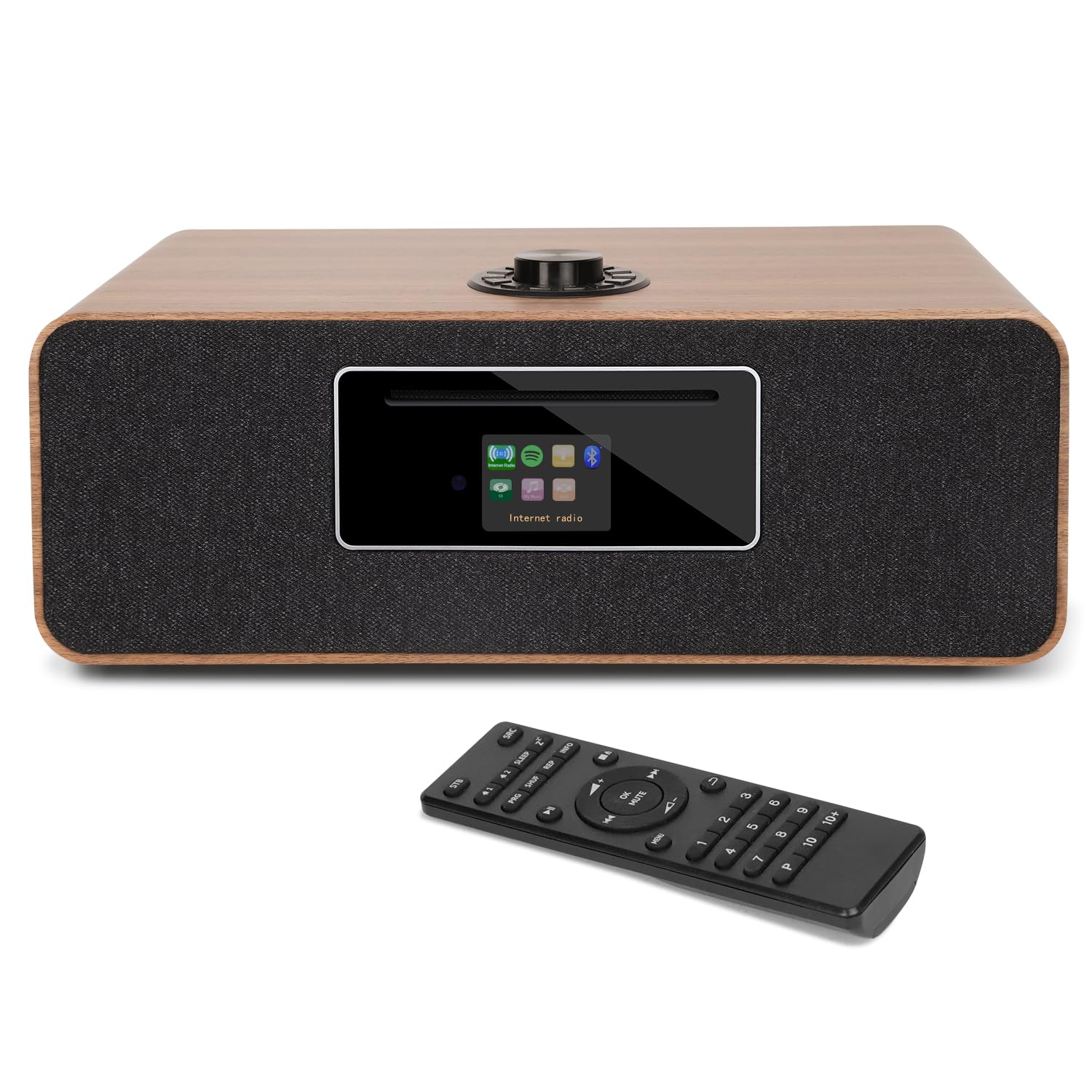
The front panel features the CD slot, the 2.4" full-color display, and primary control buttons.

Immaġni: Quddiem view of the LEMEGA MS5 unit, showcasing the CD player slot, the central display, and the speaker grilles on either side. A CD is shown partially inserted.
Panel ta' wara
The rear panel provides various connectivity options including power input, USB port, AUX input, and the FM antenna connection.

Immaġni: Wara view of the LEMEGA MS5 unit, highlighting the extendable FM antenna, DC power input, USB port, and AUX input/output jacks.
Kontrolli ta' Fuq
The top of the unit features a multi-function rotary knob for navigation and volume control.
Immaġni: Minn fuq għal isfel view of the LEMEGA MS5, focusing on the prominent rotary control knob located on the top surface.
Setup
- Spakkjar: Neħħi l-unità u l-aċċessorji kollha mill-imballaġġ bir-reqqa.
- Pjazzament: Place the MS5 on a stable, flat surface away from direct sunlight, heat sources, and moisture. Ensure adequate ventilation around the unit.
- Qabbad l-Antenna tal-FM: Extend the telescopic FM antenna located on the rear of the unit for optimal FM reception.
- Konnessjoni tal-Enerġija: Connect the supplied power adapter to the DC 12V input on the rear of the MS5, then plug the adapter into a wall outlet. The unit will power on automatically or enter standby mode.
- Inizjali Setup Wizard: Upon first power-on, the unit will guide you through an initial setup wizard. Follow the on-screen prompts to set language, time format, and connect to your Wi-Fi network.
- Use the rotary knob to navigate menus and adjust settings. Press the knob to confirm selections.
- For Wi-Fi setup, select your network from the list and enter the password using the on-screen keyboard.
Istruzzjonijiet Operattivi
Power On/Off u Standby
Agħfas il- Qawwa button on the unit or remote control to switch between On and Standby modes.
Għażla tal-Modalità
Uża l- Modalità button on the remote or navigate through the main menu on the unit to select desired audio sources: Internet Radio, FM Radio, CD, Bluetooth, USB, or AUX.
Radju fuq l-Internet
- Agħżel Radju fuq l-Internet mod.
- Browse stations by location, genre, or search by name using the rotary knob and display.
- Press the rotary knob to select a station.
- To save a preset, press and hold the Issettjati minn qabel button on the remote or the corresponding button on the unit. Follow the on-screen instructions to assign it to one of the 50 available preset slots.
Radju FM
- Agħżel Radju FM mod.
- Uża l- Intuna buttons on the remote or rotate the main knob to manually tune to a station.
- Għal skennjar awtomatiku, agħfas u żomm il-buttuna Intuna button or follow the on-screen menu option.
- Save presets as described for Internet Radio.
CD Player
- Agħżel CD mod.
- Gently insert a CD into the CD slot on the front panel. The unit will automatically load and begin playback.
- Uża l- Play/Pawsa, Waqqaf, Aqbeż 'l quddiem, u Aqbeż lura buttuni fuq l-unità jew il-kontroll remot biex timmaniġġja l-plejbek.
- The MS5 supports CD, CD-R, and CD-RW discs.
Streaming Bluetooth
- Agħżel Bluetooth modalità. L-unità tidħol fil-modalità ta' tqabbil, indikata fuq id-displej.
- Fuq l-apparat mobbli tiegħek (smartphone, tablet, laptop), attiva l-Bluetooth u fittex apparati disponibbli.
- Agħżel "LEMEGA MS5" from the list to pair. Once connected, you can stream audio from your device to the MS5.
Spotify HiFi & Podcast Player
- Spotify Connect: Ensure your MS5 is connected to the same Wi-Fi network as your Spotify-enabled device. Open the Spotify app on your device, select a song, and then choose the MS5 from the "Devices Available" list to stream directly.
- Podcast Player: Access the Podcast Player through the main menu. Browse and select podcasts. The unit supports bookmarking and following features.
Daqq USB
Daħħal flash drive USB li fih awdjo MP3 files into the USB port on the rear panel. Select USB mode to browse and play your music files.
Input AUX
Qabbad apparat awdjo estern (eż., MP3 player, smartphone) mal- KAJN IN port on the rear panel using a 3.5mm audio cable. Select AUX mode to play audio from the connected device.
OKTIV App Control
Niżżel il- OKTIV App from your device's app store. Ensure your smartphone/tablet is connected to the same Wi-Fi network as your MS5. Open the app and follow the instructions to connect and control all functions of your MS5 wirelessly.
Allarm Doppju u Timer Sleep
- Issettjar ta' Allarmi: Aċċess għall- Allarm settings through the system menu. You can set two independent alarms with options for weekday/weekend modes, alarm source (FM, Internet Radio, CD, or buzzer), and volume.
- Timer ta 'l-Irqad: Aċċess għall- Sleep Timer function through the system menu. Set a duration (e.g., 15, 30, 60 minutes) after which the unit will automatically switch to standby mode.
Manutenzjoni
- Tindif: Uża drapp artab u niexef biex tnaddaf il-barra tal-unità. Tużax prodotti tat-tindif li joborxu, xama', jew solventi.
- Kura tas-CD Player: Handle CDs by their edges to avoid fingerprints and scratches. Use a clean, lint-free cloth to wipe CDs from the center outwards.
- Ħażna: Jekk se taħżen l-unità għal perjodu estiż, skonnettjaha mis-sokit tal-enerġija u aħżenha f'post frisk u niexef.
Issolvi l-problemi
| Problema | Kawża Possibbli | Soluzzjoni |
|---|---|---|
| Ebda qawwa | L-adapter tal-enerġija mhux imqabbad jew is-sokit difettuż. | Ensure the power adapter is securely connected to the unit and a working power outlet. Try a different outlet. |
| L-ebda ħoss | Volume too low; Mute activated; Incorrect source selected; Faulty audio cable (AUX). | Increase volume. Check if the unit is muted. Ensure the correct audio source is selected. If using AUX, check the cable connection. |
| Ir-Radju tal-Internet mhux qed jikkonnettja | Incorrect Wi-Fi password; Weak Wi-Fi signal; Router issue. | Verify Wi-Fi password. Move the unit closer to the router or check router status. Re-run Wi-Fi setup. |
| Tqabbil Bluetooth falla | MS5 not in pairing mode; Device too far; Bluetooth disabled on source device. | Ensure MS5 is in Bluetooth pairing mode. Keep devices within range. Enable Bluetooth on your source device and re-scan. |
| Is-CD mhux qed idoqq | CD inserted incorrectly; Disc is dirty or scratched; Unsupported disc format. | Re-insert CD correctly. Clean the disc. Ensure it is a supported format (CD, CD-R, CD-RW). |
| Audio fading at low volume (below 13) | Potential firmware or hardware characteristic. | This behavior has been reported by some users. If consistent, try to operate at volume levels 13 or higher. If the issue persists and affects usability, contact customer support. |
Speċifikazzjonijiet
| Karatteristika | Dettall |
|---|---|
| Numru tal-Mudell | MS5 |
| Dimensjonijiet tal-Prodott | 15 x 9 x 5.51 pulzieri (38.1 x 22.86 x 14 ċm) |
| Piż tal-oġġett | 12 liri (5.44 kg) |
| Teknoloġija tal-Konnettività | Bluetooth 5.3, USB, Wi-Fi |
| Teknoloġija Tuner | Internet Radio, FM Radio |
| Karatteristika Speċjali | Built-In Clock, Dual Alarm, Sleep Timer, Spotify Connect, Podcast Player, OKTIV App Control |
| Wiri | 2.4" Full Colour Display |
| Presets | 50 (for radio stations & podcast episodes) |
| Sors tal-Enerġija | Adapter tal-enerġija |
| Formati ta' Diska appoġġjati | CD, CD-R, CD-RW |
Garanzija u Appoġġ
Għal informazzjoni dwar il-garanzija, jekk jogħġbok irreferi għall-karta tal-garanzija inkluża mal-prodott tiegħek jew żur is-sit uffiċjali ta' LEMEGA. websit.
If you encounter any issues or have questions regarding your LEMEGA MS5, please contact LEMEGA customer support for assistance.
- Appoġġ onlajn: Visit the LEMEGA websit għal FAQs u riżorsi ta' appoġġ.
- Kuntatt: Refer to the contact information provided in your product packaging or on the LEMEGA websit.


