1. Prodott Aktarview u Karatteristiċi
The DANFI AUDIO DF TE-2017 is a versatile record player designed for an enhanced audio experience. It combines vintage aesthetics with modern functionality, offering multiple playback and recording options.
- 3-Speed Belt Drive Turntable: Supports 33 1/3, 45, and 78 RPM vinyl records.
- Konnettività Bluetooth mingħajr fili: Stream music wirelessly from compatible devices.
- USB Recording & Playback: Convert vinyl to digital formats (MP3/WAV) and play music from USB drives (up to 64GB).
- Kelliema Stereo inkorporati: Dual speakers with EQ technology for clear sound.
- Input AUX: Connect external audio sources via a 3.5mm cable.
- RCA Line-Out: Qabbad ma 'barra amplifiers or powered speakers for expanded audio.
- Funzjoni ta' waqfien awtomatiku: Automatically stops the turntable at the end of a record.
- Removable Dust Cover: Protects the turntable and records from dust.

Immaġni 1.1: Fuqview of the DANFI AUDIO DF TE-2017 Record Player with key features highlighted.
2. X'hemm fil-Kaxxa
Iftaħ il-komponenti kollha bir-reqqa mill-pakkett u kun żgur li l-oġġetti li ġejjin huma inklużi:
- DANFI AUDIO DF TE-2017 Record Player
- Power Cord & Adapter (100-240V~)
- Adapter 45 RPM
- Labra ta 'sostituzzjoni
- Slipmat tat-turntable
- Manwal għall-Utent (dan id-dokument)
3. Istruzzjonijiet ta' Setup
- Iftaħ it-Turntable mill-pakkett: Remove all packaging materials and place the turntable on a stable, flat surface.
- Installa l-Slipmat: Place the felt slipmat onto the turntable platter.
- Neħħi l-Protezzjoni tal-Istilus: Carefully remove the white plastic stylus protector from the needle.
- Qabbad l-Enerġija: Plug the power adapter into the DC 5V/1A port on the back of the turntable and then into a wall outlet.
- Position Dust Cover: Ensure the clear dust cover is properly seated on its hinges. It can be left open or closed during playback.

Image 3.1: The DANFI AUDIO DF TE-2017 Record Player ready for use.
4. Istruzzjonijiet Operattivi
4.1 Daqq ta' Rekords tal-Vinil
- Qawwa Mixgħul: Rotate the 'VOLUME' knob clockwise to turn on the turntable.
- Agħżel il-Modalità Phono: Press the 'MODE' button until 'PHO' is displayed on the LED screen.
- Rekord tal-Post: Place a vinyl record on the turntable platter. For 45 RPM records, use the included adapter.
- Issettja Veloċità: Adjust the speed switch (33, 45, or 78 RPM) to match your record's speed.
- Enable/Disable Auto-Stop: The auto-stop switch is located near the tonearm. Set it to 'ON' for the turntable to stop automatically at the end of the record, or 'OFF' for continuous play.
- Pożizzjoni tad-Driegħ tat-Ton: Gently lift the tonearm using the cueing lever. Move the tonearm over the desired track on the record.
- Driegħ t'isfel: Bil-mod niżżel id-driegħ tat-tone fuq ir-rekord billi tuża l-lieva tal-cueing. Il-mużika tibda ddoqq.
- Aġġusta Volum: Use the 'VOLUME' knob to adjust the sound level.
- Waqqaf il-Daqq: At the end of the record (if auto-stop is off), or to stop manually, gently lift the tonearm using the cueing lever and return it to its rest.

Image 4.1: Proper placement of the tonearm on a vinyl record.
4.2 Modalità Bluetooth
- Qawwa Mixgħul: Rotate the 'VOLUME' knob clockwise to turn on the turntable.
- Agħżel il-Modalità Bluetooth: Press the 'MODE' button until 'BT' is displayed on the LED screen. The turntable will emit an audible tone indicating it's in pairing mode.
- Apparat Par: On your Bluetooth-enabled device (smartphone, tablet, etc.), search for 'TE-2017' in the Bluetooth settings and select it to pair.
- Play Mużika: Once paired, you can stream music from your device through the turntable's speakers. Use the play/pause and track skip buttons on the turntable or your device.
Video 4.2.1: Demonstration of the DANFI AUDIO DF record player in pink, showcasing its Bluetooth functionality and ease of use.
4.3 Reġistrazzjoni u Daqq tal-USB
- Daħħal id-Drive tal-USB: Insert a USB flash drive (up to 64GB) into the USB port on the front panel.
- Record Vinyl: While playing a vinyl record in Phono mode, press the 'M' (Mode) button until 'REC' appears on the display. The recording will begin. Press 'M' again to stop recording and save the file.
- Play USB Audio: Press the 'MODE' button until 'USB' is displayed. The turntable will automatically play audio files from the USB drive. Use the control buttons (play/pause, skip) to navigate tracks.

Image 4.3.1: Visual guide for USB recording from vinyl.
4.4 Input AUX
Connect external audio devices (e.g., MP3 players, smartphones without Bluetooth) to the 'AUX' input jack on the front panel using a 3.5mm audio cable. Press the 'MODE' button until 'AUX' is displayed to play audio from the connected device.
4.5 RCA Line-Out
For enhanced sound, connect the 'RCA OUT' ports on the back of the turntable to an external amplifier or powered speakers using RCA cables. Ensure proper left and right channel connections.
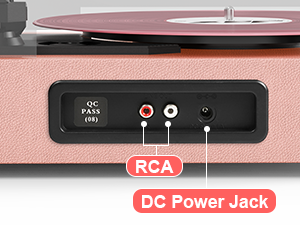
Image 4.5.1: Rear panel connections for RCA output and power.
5. Manutenzjoni
- Tindif tal-Istilus: Naddaf l-istilus bil-mod regolarment b'pinzell artab, billi tfarfar minn wara għal quddiem.
- Rekords tat-Tindif: Use a carbon fiber brush or a record cleaning solution to keep your vinyl records free of dust and debris.
- Dust Cover Care: Wipe the dust cover with a soft, dry cloth. Avoid abrasive cleaners.
- Turntable Surface: Clean the turntable's surface with a soft, slightly damp drapp.
- Sostituzzjoni tal-labra: The stylus (needle) should be replaced after approximately 300-500 hours of playback to maintain sound quality and prevent damage to your records.
6 Issolvi l-problemi
- Ebda Qawwa: Ensure the power adapter is securely connected to both the turntable and a working wall outlet. Check the 'VOLUME' knob is turned on.
- Ebda Ħsejjes: Verify the volume is turned up. If using external speakers, ensure they are powered on and correctly connected via RCA. If in Bluetooth mode, confirm successful pairing.
- Qbiż tar-Rekords: Ensure the record is clean and free of dust. Check that the turntable is on a stable, level surface. The stylus might need cleaning or replacement.
- Kwistjonijiet ta' Tqabbil tal-Bluetooth: Make sure the turntable is in 'BT' mode. Ensure your device's Bluetooth is enabled and within range. Try unpairing and re-pairing the device.
- USB Recording Failure: Check that the USB drive is formatted correctly (FAT32) and has sufficient space. Ensure the capacity is less than 64GB.
7. Speċifikazzjonijiet
| Karatteristika | Speċifikazzjoni |
|---|---|
| Dimensjonijiet tal-Prodott | 14.1 x 11.2 x 4.9 pulzieri |
| Piż tal-oġġett | 4.85 liri |
| Numru tal-Mudell | TE-2017 |
| Brand | DANFI AUDIO DF |
| Veloċità ta' Rotazzjoni Massima | 78 RPM (jappoġġja 33 1/3, 45, 78 RPM) |
| Karatteristiċi Speċjali | AUX Input, Built-In Bluetooth Receiver, Digital Recorder, Dust Cover, RCA Output |
| Materjal | Injam Inġinerija |
| Kulur | Roża ċara |
| Apparati Kompatibbli | Headphone, MP3 Player, Personal Computer, Smartphone, Tablet |
8. Garanzija u Appoġġ
For warranty information and customer support, please refer to the documentation included with your product or contact DANFI AUDIO DF directly through their official webis-sit jew il-kanali tas-servizz tal-konsumatur. Żomm l-irċevuta tax-xiri tiegħek għal talbiet ta’ garanzija.
Appoġġ onlajn: Żur il- DANFI AUDIO DF Store on Amazon għal aktar informazzjoni dwar il-prodott u riżorsi ta' appoġġ.


