1. Introduzzjoni
Grazzi tax-xiriasing the Monster S350 Bluetooth Speaker. This portable wireless speaker features a touch screen, Bluetooth 6.0 connectivity, and support for TF cards, offering a versatile audio experience. This manual provides detailed instructions for setup, operation, maintenance, and troubleshooting to ensure optimal performance and longevity of your device.
2. Informazzjoni dwar is-Sigurtà
- Tesponix l-ispiker għal temperaturi estremi, dawl tax-xemx dirett, jew umdità għolja.
- Evita li twaqqa’ jew tissuġġetta lill-kelliem għal impatti qawwija.
- Żomm il-kelliem 'il bogħod mill-ilma u likwidi oħra.
- Tippruvax tiżżarma, issewwi, jew timmodifika l-ispiker int stess. Ikkuntattja persunal tas-servizz kwalifikat jekk meħtieġ.
- Uża biss il-kejbil tal-iċċarġjar provdut jew wieħed ekwivalenti ċċertifikat.
- Armi l-batteriji skont ir-regolamenti lokali. Tarmixhomx.
3. Kontenut tal-Pakkett
Jekk jogħġbok iċċekkja l-pakkett għall-oġġetti li ġejjin:
- Monster S350 Bluetooth Speaker
- Cable tal-Iċċarġjar tal-USB
- Manwal għall-Utent
4. Prodott Aktarview
Familiarize yourself with the components of your Monster S350 speaker.

Figura 4.1: Quddiem view of the Monster S350 Bluetooth Speaker, showcasing its retro design and touch screen.

Figura 4.2: Close-up of the speaker's top controls, illustrating the long press function for power and swipe gestures for volume adjustment.
Kontrolli u Portijiet:
- Pum tal-Qawwa/Volum: Long press to turn on/off. Swipe up to increase volume, swipe down to decrease volume.
- Display touch Screen: For navigation, settings, and displaying information.
- Slott tal-Karta TF: Daħħal kard TF (microSD) għad-daqq tal-mużika lokali.
- Port tal-Iċċarġjar USB-C: Għall-iċċarġjar tal-ispiker.
5. Setup
5.1 Iċċarġjar tal-Ispeaker
- Qabbad il-kejbil tal-iċċarġjar USB mal-port USB-C tal-ispiker.
- Qabbad it-tarf l-ieħor tal-kejbil ma' adapter tal-enerġija USB (mhux inkluż) jew mal-port USB tal-kompjuter.
- L-indikatur tal-iċċarġjar fuq l-iskrin se juri l-istatus tal-iċċarġjar. Iċċarġjar sħiħ tipikament jieħu madwar 2-3 sigħat.
5.2 Tixgħel/Jitfi
- Biex Tixgħel: Long press the Power/Volume knob until the screen lights up.
- Biex Tifi: Long press the Power/Volume knob until the screen turns off.
5.3 Tqabbil tal-Bluetooth
Pair your Monster S350 with a Bluetooth-enabled device.
- Ensure the speaker is powered on and within range of your Bluetooth device (e.g., smartphone, tablet).
- Fuq it-tagħmir Bluetooth tiegħek, ippermetti l-Bluetooth u fittex tagħmir disponibbli.
- Agħżel "Monster S350" mil-lista ta' apparati misjuba.
- Ladarba jkun imqabbad, l-ispiker jindika konnessjoni b'suċċess, u tista' tibda ddoqq l-awdjo.

Figura 5.1: The speaker displaying its Bluetooth connection status alongside a smartphone's Bluetooth settings.
Daqq tal-Karta TF 5.4
Doqq il-mużika direttament minn kard TF (microSD).
- Kun żgur li l-kelliem ikun mitfi.
- Insert a TF card (up to 32GB, formatted to FAT32) into the TF card slot until it clicks into place.
- Power on the speaker. The speaker will automatically detect the TF card and switch to local music playback mode, or you can select it from the touch screen menu.

Figura 5.2: Demonstrating the insertion of a TF card into the speaker's dedicated slot for local music playback.
6. Istruzzjonijiet Operattivi
6.1 Daqq Bażiku tal-Awdjo
- Play/Pawsa: Tap the play/pause icon on the touch screen.
- Track li jmiss: Swipe right on the touch screen or tap the next track icon.
- Track preċedenti: Swipe left on the touch screen or tap the previous track icon.
- Kontroll tal-Volum: Swipe up on the Power/Volume knob to increase volume, swipe down to decrease volume. Alternatively, adjust volume via the connected Bluetooth device.
6.2 L-użu tat-Touch Screen
The full-color touchscreen display allows for intuitive navigation and access to various features.
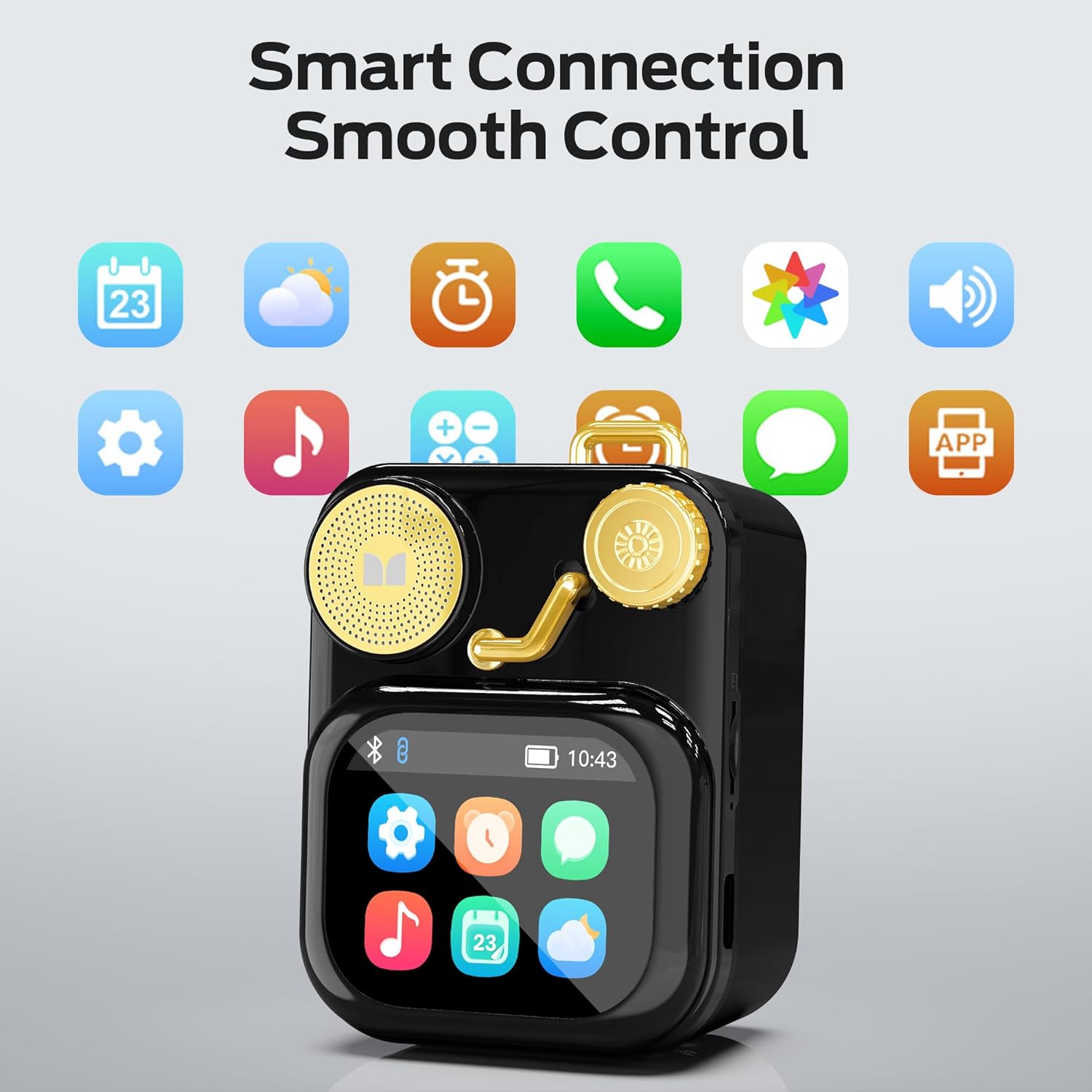
Figura 6.1: The speaker's touch screen displaying various application icons for smart features.
- Navigazzjoni: Swipe left/right or up/down to browse through menus and options.
- Għażla: Tektek ikona jew għażla biex tagħżilha.
- Settings: Access system settings, Bluetooth options, display preferences, and more through the settings icon.
6.3 Karatteristiċi Smart
When connected to a compatible smartphone via Bluetooth and the companion app (if available), the speaker can display various smart features:

Figura 6.2: Examples of smart features displayed on the speaker's screen, including notifications, weather, lyrics, and Bluetooth call information.
- Notifiki Mobbli: Receive alerts for messages and other app notifications.
- Informazzjoni dwar il-Kanzunetta: Display song titles and artist information during playback.
- Allarmi: Set and manage alarms directly from the speaker.
- Aġġornamenti tat-Temp: View informazzjoni dwar it-temp f'ħin reali.
- Storbju abjad: Access soothing white noise sounds for relaxation.
7. Manutenzjoni
7.1 Tindif
- Wipe the speaker's surface with a soft, dry, lint-free cloth.
- Tużax prodotti tat-tindif li joborxu, alkoħol, jew solventi kimiċi, għax dawn jistgħu jagħmlu ħsara lill-finitura.
- Żomm il-portijiet ħielsa mit-trab u l-fdalijiet.
7.2 Ħażna
- Aħżen l-ispiker f'post frisk u niexef 'il bogħod mix-xemx diretta u minn temperaturi estremi.
- If storing for an extended period, charge the battery to approximately 50% every three months to preserve battery life.
8 Issolvi l-problemi
If you encounter issues with your Monster S350 speaker, refer to the following solutions:
| Problema | Kawża Possibbli | Soluzzjoni |
|---|---|---|
| L-ispiker ma jixgħelx. | Il-batterija hija eżawrita. | Iċċarġja l-kelliem billi tuża l-kejbil USB ipprovdut. |
| L-ebda ħoss mill-kelliem. | Il-volum huwa baxx wisq jew immut. L-apparat mhux imqabbad. | Increase speaker volume. Ensure Bluetooth device is paired and playing audio. |
| Ma tistax tqabbad permezz tal-Bluetooth. | L-ispiker mhux fil-modalità ta' tqabbil. L-apparat huwa barra mill-firxa. Interferenza. | Ensure speaker is on and Bluetooth is enabled. Move devices closer. Turn off other Bluetooth devices. |
| Il-mużika tal-kard TF mhux qed tindaqq. | Card not inserted correctly. Unsupported file format. Corrupted card. | Erġa' daħħal il-karta TF. Kun żgur li l-mużika hija tajba. files are in a supported format (e.g., MP3). Try a different TF card. |
| Smart features not working. | Not connected to companion app. App issues. | Ensure the speaker is connected to the companion app on your smartphone. Check app permissions and updates. |
9. Speċifikazzjonijiet
Technical details of the Monster S350 Bluetooth Speaker:
- Isem tal-Mudell: S350
- Ditta: Mostru
- Materjal: Metall
- Kulur: Iswed
- Dimensjonijiet tal-Prodott: 12.5D x 10.5W x 5.4H Centimetres (approx. 4.9 x 4.1 x 2.1 inches)
- Piż tal-oġġett: 160 Gramma (madwar 0.35 libbra)
- Teknoloġija tal-Konnettività: Bluetooth 6.0
- Qawwa tal-Ħruġ Massimu tal-Ispeaker: 10 Watts
- Modalità tal-Ħruġ tal-Awdjo: Stereo
- Tip ta 'Immuntar: Mejda
- Batterija: 1 batterija tal-jone tal-litju (inkluża)
- Appoġġ għall-Karta TF: Yes (up to 32GB, FAT32 format recommended)

Figura 9.1: Diagram illustrating the internal woofer for deep bass and tweeter for crisp highs, contributing to the speaker's audio quality.
10. Garanzija u Appoġġ
For warranty information or technical support, please refer to the documentation included with your purchase or contact Monster customer service. Keep your proof of purchase for warranty claims.
Kuntatt tas-Servizz tal-Klijent: Please visit the official Monster website or refer to your product packaging for the most current support contact information.


