Introduzzjoni
This manual provides detailed instructions for the installation, operation, and maintenance of your Soundstream VRCA1-78W 7-inch Flip-Out Car Stereo. This unit features a motorized touchscreen, Wireless Apple CarPlay, Android Auto, Bluetooth 5.0, USB/SD playback, AM/FM radio, and backup camera support. Please read this manual thoroughly before use to ensure proper operation and to maximize your enjoyment of the product.
Informazzjoni dwar is-Sigurtà
Osserva l-prekawzjonijiet ta' sigurtà li ġejjin biex tevita korriment jew ħsara lill-unità:
- Tħaddimx l-unità b'mod li jtelliflek mis-sewqan. Dejjem agħti prijorità lis-sigurtà fit-triq.
- Ensure proper wiring and installation to prevent electrical shorts or fire hazards. Consult a professional if unsure.
- Żomm il-volum f'livell li jippermettilek tisma' l-ħsejjes tat-traffiku ta' barra.
- Evita li tesponi l-unità għal temperaturi estremi, dawl tax-xemx dirett għal perjodi twal, jew umdità eċċessiva.
- Tippruvax tiżżarma jew timmodifika l-unità. Dan jista' jannulla l-garanzija u jikkawża ħsara.
Kontenut tal-Pakkett
Ivverifika li l-oġġetti kollha huma preżenti fil-pakkett:
- Soundstream VRCA1-78W Car Stereo Unit
- Manwal għall-Utent
- Qfil tal-Wajers
- Ħardwer tal-Installazzjoni
- Antenna tal-GPS

Setup u Installazzjoni
The VRCA1-78W is designed for single DIN dashboard openings. Professional installation is recommended.
Konnessjonijiet tal-Wiring
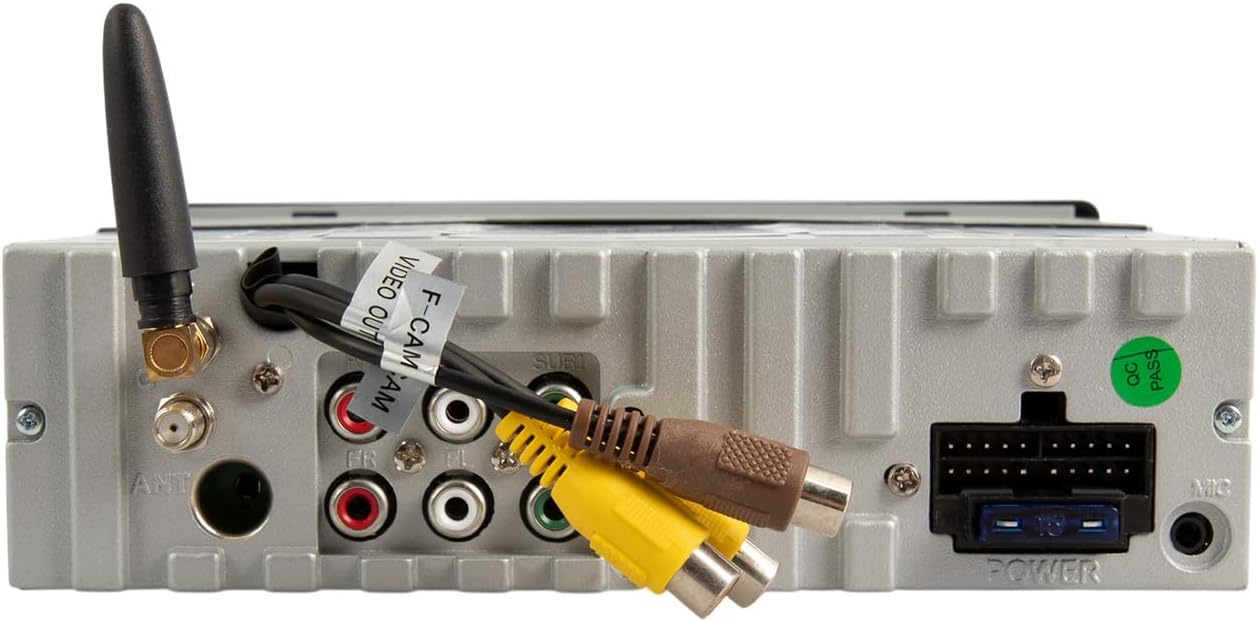
Refer to the included wiring harness diagram for specific connections. Key connections include:
- Qawwa: Qabbad mal-12V kostanti tal-vettura, it-12V tal-aċċessorji, u l-art.
- Kelliema: Connect to vehicle's speaker wires (front left/right, rear left/right).
- Antenna: Qabbad l-antenna tar-radju tal-vettura.
- Input tal-Kamera ta' Riżerva: Connect an optional backup camera for enhanced parking safety.
- Outputs RCA: Għall-konnessjoni esterna amplifiers (front, rear, subwoofer).
- USB/AUX Inputs: For external media devices.
Immuntar
Secure the unit into the single DIN opening using the provided installation hardware. Ensure the unit is firmly seated and does not obstruct any vehicle controls or vents. The motorized screen requires adequate clearance for deployment and retraction.
Istruzzjonijiet Operattivi
Kontrolli tal-Panew ta' Quddiem

- Buttuna tal-Enerġija / Modalità: Press to turn the unit on/off. Short press to cycle through audio sources (AM/FM, USB, SD, Bluetooth, AUX).
- Buttuna tal-Volum: Dawwar biex taġġusta l-volum. Agħfas biex tmutja/tneħħi l-mut.
- Buttuna MENU: Access system settings or menu options.
- Buttuna BAND: In radio mode, cycles through FM1, FM2, FM3, AM1, AM2 bands.
- AMS Button: Auto Store/Preset Scan for radio.
- OPEN/TILT Button: Controls the motorized 7-inch display. Press to open or close the screen. Hold to adjust the screen tilt angle.
- Mikrofonu (MIC): Mikrofonu inkorporat għal sejħiet mingħajr idejn.
- Port USB: Connect USB devices for media playback or smartphone connection.
- Input AUX: Jack ta' 3.5mm għal apparati awdjo esterni.
Motorized Display Operation
Agħfas il- OPEN/TILT button to extend the 7-inch touchscreen. Press it again to retract the screen. To adjust the viewing angle, press and hold the OPEN/TILT button while the screen is extended, then release when the desired angle is reached.

Wireless Apple CarPlay u Android Auto
This unit supports wireless connectivity for both Apple CarPlay and Android Auto. To connect:
- Kun żgur li l-Bluetooth u l-Wi-Fi tal-ismartphone tiegħek huma attivati.
- On the stereo, select the CarPlay or Android Auto source.
- Follow the on-screen prompts to pair your phone via Bluetooth. Once paired, the system will establish a Wi-Fi connection for CarPlay/Android Auto functionality.
- Access navigation, music, calls, and messages directly from the touchscreen or via voice commands.
Bluetooth Connectivity (Hands-Free Calling & Audio Streaming)
To pair your phone for Bluetooth audio and calls:
- Ixgħel il-Bluetooth fuq l-ismartphone tiegħek.
- On the stereo, select the Bluetooth source.
- Fittex għal available devices on your phone and select "Soundstream VRCA1-78W" (or similar name).
- Ikkonferma l-kodiċi tat-tqabbil jekk tintalab.
- Once connected, you can make/receive calls and stream audio wirelessly.
Media Playback (USB/SD/AM/FM)
- USB/SD: Insert a USB drive into the front USB port or an SD card into the designated slot. The unit will automatically detect and play compatible audio/video files.
- Radju AM/FM: Select the radio source. Use the seek buttons to find stations or the BAND button to switch between frequency bands.
Mirror Link
The Mirror Link feature allows you to mirror your smartphone's screen onto the stereo display. Refer to the on-screen instructions or the full manual for specific setup steps, as this often requires a wired connection and specific app installation on your phone.
Appoġġ għall-Kamera ta 'Backup
When a compatible backup camera is connected to the dedicated input, the display will automatically switch to the camera view when the vehicle is put into reverse. On-screen parking guidelines may be available to assist with maneuvering.
Manutenzjoni
- Tindif tal-Iskrin: Uża drapp artab u mingħajr suf biex timsaħ bil-mod it-touchscreen. Għal tbajja' persistenti, nixxef ftit.ampNaddaf id-drapp bl-ilma jew b'prodott tat-tindif li ma jagħmilx ħsara lill-iskrin. Evita kimiċi ħarxa.
- Tindif Ġenerali: Żomm l-unità ħielsa mit-trab u l-fdalijiet. Uża pinzell artab jew arja kkompressata għal żoni diffiċli biex jintlaħqu.
- Evita l-Ostruzzjonijiet: Ensure the motorized screen mechanism is free from obstructions to prevent damage during opening and closing.
Issolvi l-problemi
If you encounter issues with your VRCA1-78W, refer to the following common problems and solutions:
| Problema | Kawża Possibbli | Soluzzjoni |
|---|---|---|
| Ebda qawwa | Wiring mhux korrett, fjus minfuħ | Check power connections and vehicle fuses. Consult installation guide. |
| L-ebda ħoss | Volume muted, incorrect source, speaker wiring issues | Check volume, ensure correct audio source is selected. Verify speaker connections. |
| CarPlay/Android Auto not connecting wirelessly | Bluetooth/Wi-Fi off, phone not paired, software glitch | Ensure phone's Bluetooth and Wi-Fi are active. Re-pair phone. Restart phone and stereo. |
| Screen not opening/closing | Ostruzzjoni, problema bil-mutur, problema bil-qawwa | Check for obstructions. Ensure unit has power. If issue persists, seek professional service. |
| Screen glare in sunlight | Environmental factor, screen angle | Adjust screen tilt using the OPEN/TILT button. |
| Slow startup or occasional lag | System initialization, heavy processing | This can be normal during startup. If persistent, ensure firmware is updated (if applicable) or perform a system reset. |
If the problem persists after attempting these solutions, contact Soundstream customer support or a qualified service technician.
Speċifikazzjonijiet
- Mudell: VRCA1-78W
- Wiri: 7-inch Motorized LCD Touchscreen
- Kompatibilità: Single DIN Dashboards
- Integrazzjoni Smartphone: Wireless Apple CarPlay, Wireless Android Auto, Mirror Link
- Bluetooth: Version 5.0 (Hands-Free Calling, Audio Streaming)
- Inputs tal-Midja: USB, SD Card, AUX (3.5mm)
- Radju: Tuner AM/FM
- Appoġġ tal-Kamera: Backup Camera Input with Parking Guidelines
- Modalità tal-Ħruġ tal-Awdjo: Stereo
- Qawwa tal-Ħruġ: 200 watt (l-ogħla)
- Piż tal-oġġett: 4.3 liri
- Dimensjonijiet tal-pakkett: 10.5 x 9 x 4.5 pulzieri
Garanzija u Appoġġ
For warranty information and technical support, please refer to the warranty card included with your product or visit the official Soundstream websit. Żomm il-prova tax-xiri tiegħek għal talbiet ta' garanzija.


