1. Introduzzjoni u Fuqview
The Pard Bobcat 640 Thermal Monocular is a compact, high-performance thermal imaging optic designed for spotting and ranging in various conditions. It integrates advanced thermal sensing technology with a precise laser rangefinder to provide clear visibility and accurate distance measurements.
Il-karatteristiċi ewlenin jinkludu:
- Lenti Oġġettiva ta' 35mm: Jipprovdi qasam wiesa' ta' view and excellent light gathering capabilities.
- 2.6x Optical Magnification & 8x Digital Zoom: Joffri versatili viewing options from wide scans to detailed close-ups.
- 640x512 Thermal Sensor: Features a 12µm pixel pitch and ≤18mk NETD for high-resolution thermal imagery, detecting even subtle temperature differences.
- Integrated 1000m Laser Rangefinder (LRF): Ensures accurate distance measurement up to 1,094 yards.
- 1920x1080 OLED Display: Delivers bright, sharp, and high-contrast images for enhanced viewing.
- Disinn kompatt u ħafif: Measuring 1.77 x 2.13 x 6.14 inches, it is built for portability and quick deployment.
2. X'hemm fil-Kaxxa
Upon opening the product packaging, ensure all items are present and in good condition. The standard package contents for the Pard Bobcat 640 Thermal Monocular include:
- Pard Bobcat 640 Thermal Monocular Unit
- Batterija rikarikabbli 18650
- Cable tal-Iċċarġjar tal-USB-C
- Protective Carry Pouch
- polz Lanyard
- Drapp tat-Tindif tal-Lenti
- Manwal għall-Utent
3. Setup
3.1 Installazzjoni tal-batterija
The Pard Bobcat 640 uses a single 18650 rechargeable battery. To install or replace the battery:
- Locate the battery compartment cover, typically found on the side or bottom of the monocular.
- Iftaħ l-għatu billi tiżżerżaq jew iddawwar skont l-indikatur.
- Insert the 18650 battery with the positive (+) terminal facing the correct direction as indicated inside the compartment.
- Agħlaq sewwa l-għatu tal-kompartiment tal-batterija.
3.2 Power On/Off
To power on the device, press and hold the Power button (usually an orange or prominent button) for approximately 3 seconds until the display activates. To power off, press and hold the Power button again for 3 seconds.
3.3 Focus and Diopter Adjustment
For a clear image, adjust the focus and diopter:
- Ċirku tal-Fokus: Rotate the objective lens focus ring (at the front of the device) until the target image appears sharp.
- Aġġustament tad-diottriċi: Rotate the diopter adjustment ring (around the eyepiece) to fine-tune the clarity of the display for your individual eyesight.
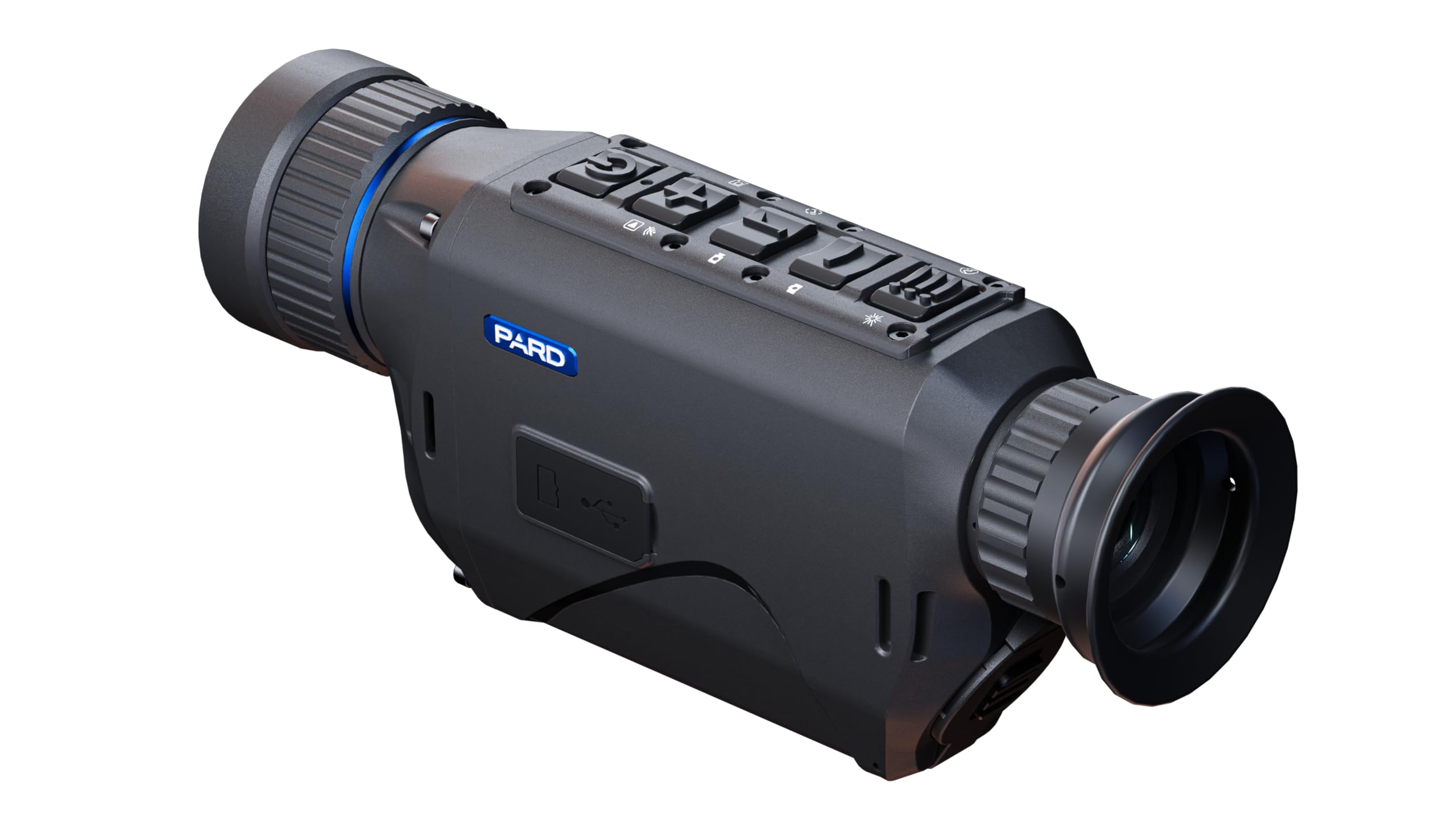
Figure 1: The Pard Bobcat 640 Thermal Monocular, showcasing its compact design and ergonomic controls.

Figura 2: Fuq view of the monocular, highlighting the power, zoom, rangefinder, and menu buttons.
4. Istruzzjonijiet Operattivi
4.1 Kontrolli Bażiċi
- Buttuna tal-Qawwa: Press and hold to turn on/off. Short press may activate standby mode or other functions depending on context.
- Buttuni taż-Żum: Use the designated buttons (often marked with '+' and '-') to adjust the digital zoom level.
- LRF Button: Short press to activate the laser rangefinder and measure distance to a target.
- Buttuna tal-menu: Press to access the main menu for settings adjustments.
- Buttuna tal-paletta: Cycle through different thermal color palettes (e.g., White Hot, Black Hot, Red Hot, Color, Green Monochrome) to optimize viewing for various scenarios.
4.2 Thermal Palettes
The Bobcat 640 offers multiple thermal palettes to enhance target detection and identification:
- Abjad sħun: Oġġetti sħan jidhru bojod, oġġetti kesħin jidhru suwed.
- Iswed sħun: Oġġetti sħan jidhru suwed, oġġetti kesħin jidhru bojod.
- Aħmar sħun: Displays heat signatures in shades of red for easy identification.
- Kulur: Uses a spectrum of colors to represent temperature differences.
- Green Monochrome: Provides a green-tinted image, often preferred for reduced eye strain during prolonged use.
4.3 Recording Photos and Videos
The monocular is capable of capturing still images and recording video footage. Refer to the on-screen menu for specific recording options and storage management.

Figura 3: Quddiem view of the monocular, showing the 35mm objective lens and integrated laser rangefinder emitters.

Figura 4: Wara view of the monocular, illustrating the eyepiece and diopter adjustment ring.
5. Manutenzjoni
Proper maintenance ensures the longevity and optimal performance of your Pard Bobcat 640.
- Tindif tal-Lenti: Use the provided lens cleaning cloth or a soft, lint-free cloth specifically designed for optics. Gently wipe the objective lens and eyepiece. Avoid using abrasive materials or harsh chemicals.
- Kura tal-batterija: Always use the recommended 18650 rechargeable batteries. Charge batteries fully before use and store them in a cool, dry place when not in use. Do not expose batteries to extreme temperatures.
- Ħażna: Store the monocular in its protective carry pouch in a dry, dust-free environment. Avoid direct sunlight and extreme temperatures.
- Tindif Ġenerali: Imsaħ il-barra tal-apparat b'artab, damp drapp. Tużax solventi jew tindif li joborxu.
6 Issolvi l-problemi
If you encounter issues with your Pard Bobcat 640, refer to the following common troubleshooting steps:
- L-Apparat Mhux Jixgħel: Ensure the battery is correctly installed and fully charged. Try using a different charged battery if available.
- Immaġni Mhux Ċara: Adjust the objective lens focus ring and the eyepiece diopter adjustment ring. Ensure lenses are clean and free from smudges or debris.
- Rangefinder Not Working: Ensure there are no obstructions between the device and the target. Check that the LRF function is enabled in the settings menu.
- Ħajja Qasira tal-Batterija: Ensure the battery is fully charged. Reduce screen brightness or disable unnecessary features to conserve power. Consider replacing old batteries.
- L-Apparat Jiffriża/Ma Jirrispondix: Power off the device by holding the power button. If unresponsive, remove and reinsert the battery to perform a hard reset.
For persistent issues, please contact Pard customer support.
7. Speċifikazzjonijiet
| Karatteristika | Speċifikazzjoni |
|---|---|
| Isem tal-Mudell | Bobcat 640 |
| Numru tal-Mudell tal-Oġġett | BO6-35/LRF |
| Dijametru Objettiv tal-Lenti | 35 Millimetru |
| Ingrandiment Ottiku | 2.6x |
| Zoom Diġitali | 8x |
| Riżoluzzjoni tas-Sensor Termali | 640x512 |
| Pixel Pitch | 12µm |
| NETD Sensitivity | ≤18mk |
| Integrated Rangefinder | 1000m (1,094 yards) |
| Tip ta 'Wiri | OLED |
| Riżoluzzjoni tal-Wiri | 1920x1080 |
| Horizontal FOV (at 100m) | 16.5 m |
| FOV djagonali | 10° |
| Dimensjonijiet tal-Prodott (P x W x H) | 1.77" x 1.77" x 6.14" |
| Piż tal-oġġett | 2 Liri |
| Sors tal-Enerġija | 18650 Batterija Rechargeable |
8. Garanzija u Appoġġ
Pard products are designed for durability and reliable performance. For specific warranty details, please refer to the official Pard website or contact your authorized dealer. Typically, thermal devices come with a manufacturer's warranty covering defects in materials and workmanship.
For customer support, technical assistance, or warranty claims, please visit the official Pard Store jew ikkuntattja lis-servizz tal-konsumatur tagħhom direttament.


