1. Introduzzjoni
Thank you for choosing the Proscenic P11 Ultra Cordless Vacuum Cleaner. This manual provides essential information for the safe and efficient use, maintenance, and troubleshooting of your new appliance. Please read it thoroughly before first use and retain it for future reference.
The Proscenic P11 Ultra is designed for versatile cleaning across various surfaces, offering powerful suction and convenient features for a cleaner home environment.
2. Istruzzjonijiet Importanti dwar is-Sigurtà
Dejjem segwi l-prekawzjonijiet bażiċi ta' sigurtà meta tuża apparati elettriċi biex tnaqqas ir-riskju ta' nar, xokk elettriku, jew korriment.
- Aqra l-istruzzjonijiet kollha qabel tuża l-apparat.
- Tużax barra jew fuq uċuħ imxarrbin.
- Tħallix li tintuża bħala ġugarell. Attenzjoni mill-qrib hija meħtieġa meta jintuża minn jew ħdejn it-tfal.
- Uża biss kif deskritt f'dan il-manwal. Uża biss l-aċċessorji rakkomandati mill-manifattur.
- Tużax b'korda jew plagg bil-ħsara. Jekk l-apparat mhux qed jaħdem kif suppost, ikun waqa’, saritlu ħsara, jitħalla barra, jew waqa’ fl-ilma, erġa’ lura f’ċentru ta’ servizz.
- Tiġbedx jew iġorrux bil-korda, uża korda bħala manku, agħlaq bieb fuq korda, jew iġbed korda madwar truf jew kantunieri li jaqtgħu. Tmexxix l-apparat fuq il-korda. Żomm il-korda 'l bogħod minn uċuħ imsaħħna.
- Tneħħix il-plagg billi tiġbed il-korda. Biex tneħħi l-plagg, aqbad il-plagg, mhux il-korda.
- M'għandekx timmaniġġja l-plagg jew l-apparat b'idejhom imxarrbin.
- Tpoġġi l-ebda oġġett fil-fetħiet. Tużax b'xi ftuħ imblukkat; żomm ħieles minn trab, lint, xagħar, u kull ħaġa li tista 'tnaqqas il-fluss ta' l-arja.
- Żomm ix-xagħar, il-ħwejjeġ maħlula, is-swaba’, u l-partijiet kollha tal-ġisem 'il bogħod mill-fetħiet u l-partijiet li jiċċaqilqu.
- Tiġborx xi ħaġa li tkun qed taħraq jew tpejjep, bħal sigaretti, lofarini, jew irmied jaħraq.
- Uża attenzjoni żejda meta tnaddaf it-taraġ.
- Tużax biex tiġbor likwidi li jaqbdu jew kombustibbli, bħall-gażolina, jew tuża f'żoni fejn jistgħu jkunu preżenti.
- Tiġborx materjal tossiku (eż., bliċ bil-kloru, prodott tat-tindif bl-ammonja, prodott tat-tindif tad-drejns).
- Tużax fi spazju magħluq fejn ikun hemm fwar minn żebgħa bbażata fuq iż-żejt, irqaq taż-żebgħa, xi sustanzi li ma jħallux il-kamla jinġibed, trab fjammabbli, jew fwar ieħor splussiv jew tossiku.
- Do not vacuum hard or sharp objects such as glass, nails, screws, or coins.
- Dejjem itfi dan l-apparat qabel ma tqabbad jew skonnettja ż-żennuna motorizzata.
- Aħżen l-apparat ġewwa. Poġġih fil-post wara l-użu biex tevita inċidenti.
- Uża biss iċ-ċarġer fornut mill-manifattur biex terġa 'tiċċarġja.
- Taħraqx l-apparat anki jekk ikun bil-ħsara serjament. Il-batteriji jistgħu jisplodu f'nar.
- The battery should be fully charged and stored separately if the device is not used for a long time.
3. Kontenut tal-Pakkett
Carefully unpack your Proscenic P11 Ultra and check that all items are present and in good condition. If any items are missing or damaged, please contact customer support.
- Unità Prinċipali tal-Vakwu
- Adjustable Telescopic Rod
- Motorized Floor Brush (Anti-Tangle with Green Light)
- Batterija li tista 'titneħħa
- Accessory Kit (includes Crevice Tool, Dusting Brush)
- Adapter (Ċarġer)
- Charging Dock / Wall Mount
- Manwal għall-Utent (dan id-dokument)
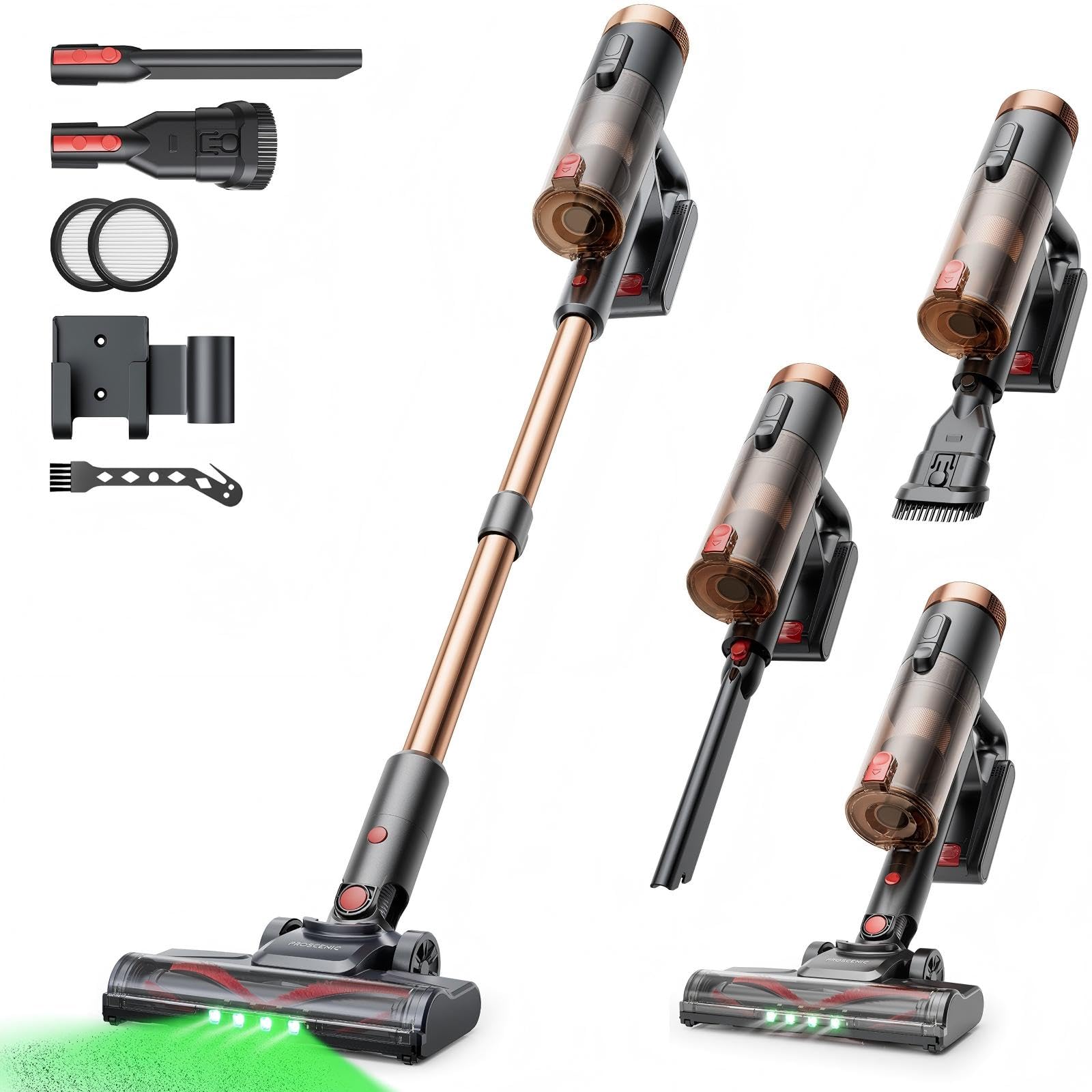
Image 1: Proscenic P11 Ultra main unit and included accessories. This image displays the vacuum cleaner's primary components, including the handheld unit, extension wand, floor brush, and various attachments.
4. Prodott Aktarview
Familiarize yourself with the key components and features of your Proscenic P11 Ultra.
Karatteristiċi ewlenin:
- Disinn Freestanding: Allows the vacuum to stand upright independently for convenient storage and breaks during cleaning.
- 180° Rotating Floor Brush: Enhances maneuverability, allowing easy access to tight corners and under furniture.
- Adjustable Telescopic Rod: Customize the height for comfortable use by various users.
- Anti-Tangle Brush with Green Detection Light: Prevents hair tangles and illuminates hidden dust particles for thorough cleaning.
- 50 kPa Super Strong Suction Power: Provides powerful cleaning performance for stubborn dirt and debris.
- Intelligent Touchscreen: Displays real-time information on battery life, maintenance status, and suction modes.
- Two Suction Power Modes: Offers versatile cleaning options for different floor types and cleaning needs.
- Batterija li tista 'titneħħa: Allows for extended cleaning time with an optional spare battery and convenient charging.
Image 2: Close-up of the Proscenic P11 Ultra's intelligent touchscreen. The screen provides visual feedback on the vacuum's status.
5. Twaqqif u Assemblaġġ
Follow these steps to assemble your Proscenic P11 Ultra and prepare it for first use.
5.1 Assembling the Main Unit
- Insert the adjustable telescopic rod into the main handheld vacuum unit until it clicks securely into place.
- Attach the motorized floor brush to the bottom end of the telescopic rod, ensuring it locks firmly.
- Insert the removable battery into the designated slot on the main unit until it clicks.
Image 3: Illustration of assembling the main vacuum unit, showing the connection points for the telescopic rod and floor brush.
5.2 Iċċarġjar tal-batterija
Before first use, fully charge the battery. The battery can be charged while attached to the main unit or separately.
- Connect the adapter to the charging port on the battery or the charging dock.
- Ipplaggja l-adapter fi żbokk tad-dawl.
- The touchscreen display will indicate charging status. A full charge typically takes approximately 4-5 hours.
Image 4: The vacuum cleaner connected to its charger, illustrating the charging process. The battery can be charged while installed or removed.
5.3 Aċċessorji twaħħil
To use the crevice tool or dusting brush, detach the telescopic rod and floor brush from the main unit. Insert the desired accessory directly into the main unit's nozzle until it clicks.
6. Operazzjoni
Learn how to effectively use your Proscenic P11 Ultra for various cleaning tasks.
6.1 Modi ta' Tixgħel/Titfi u Ġbid
- Press the power button on the main unit to turn the vacuum cleaner on. It will start in the default suction mode.
- Use the mode selection button on the touchscreen to switch between the two available suction power modes: Standard and Max.
- Agħfas il-buttuna tal-qawwa mill-ġdid biex titfi l-vacuum cleaner.
6.2 Tindif tal-Uċuħ
- Hard Floors & Carpets: Use the motorized floor brush for general cleaning. The green detection light will help identify fine dust.
- Tight Spaces & Corners: Utilize the crevice tool for narrow gaps, edges, and hard-to-reach areas.
- Upholstery & Delicate Surfaces: Attach the dusting brush for cleaning sofas, curtains, and other sensitive items.
- Xagħar tal-Annimali Domestiċi: The anti-tangle brush is specifically designed to effectively pick up pet hair without tangling.
Image 5: The Proscenic P11 Ultra in use, demonstrating its maneuverability on a hard floor surface. The green light on the brush head is visible.
6.3 Freestanding Function
The P11 Ultra features a freestanding design. When you need to pause cleaning or store the vacuum temporarily, simply ensure it is balanced and stands upright on its own. This allows for convenient breaks without needing to lean the vacuum against a wall or lay it down.
7. Manutenzjoni
Manutenzjoni regolari tiżgura prestazzjoni ottimali u testendi l-ħajja tal-vacuum cleaner tiegħek.
7.1 Tbattil tal-landa taż-żibel
Empty the dustbin after each use or when the MAX fill line is reached.
- Kun żgur li l-vacuum cleaner ikun mitfi.
- Locate the dustbin release button, usually near the handle.
- Press the button to open the dustbin flap and empty contents into a waste bin.
- Agħlaq il-flap tal-kontenitur tat-trab sew sakemm tikklikkja.
Image 6: A user demonstrating how to empty the transparent dustbin of the Proscenic P11 Ultra into a trash receptacle.
7.2 Tindif tal-Filtru HEPA
Clean the HEPA filter regularly (e.g., monthly, depending on usage) to maintain suction power.
- Remove the dustbin from the main unit.
- Twist and pull out the HEPA filter assembly.
- Tektek il-filtru bil-mod fuq bin tal-iskart biex tneħħi t-trab maħlul.
- If necessary, rinse the filter under cold running water. Ensure it is completely dry (for at least 24 hours) before reinserting. Do not use detergents.
- Erġa’ arma l-filtru u l-kontenitur tat-trab.
7.3 Tindif tar-Romblu tal-Pinzell
Iċċekkja r-romblu tal-pinzell perjodikament għal xagħar imħabbel jew debris.
- Turn off the vacuum and detach the motorized floor brush.
- Locate the brush roll release mechanism (refer to the floor brush diagram).
- Remove the brush roll. Use scissors or a cleaning tool to cut and remove any tangled hair or fibers.
- Erġa' daħħal ir-romblu tal-pinzell u waħħal il-mekkaniżmu tar-rilaxx.
8 Issolvi l-problemi
If you encounter issues with your Proscenic P11 Ultra, refer to the following common problems and solutions.
| Problema | Kawża Possibbli | Soluzzjoni |
|---|---|---|
| Il-vakwu ma jixgħelx | Il-batterija mhix iċċarġjata jew mhux installata sew. | Kun żgur li l-batterija tkun iċċarġjata kompletament u mdaħħla sew. |
| Qawwa baxxa ta 'ġbid | Dustbin is full; Filter is clogged; Brush roll is blocked. | Empty dustbin. Clean or replace HEPA filter. Remove blockages from brush roll. |
| Ir-romblu tal-pinzell mhux qed idur | Brush roll is tangled with hair/debris; Floor brush is not properly attached. | Clean brush roll. Reattach floor brush securely. |
| Ħajja qasira tal-batterija | Battery not fully charged; Using Max suction mode frequently; Battery degradation. | Ensure full charge. Use Standard mode for longer runtime. Consider replacing battery if significantly degraded. |
| Ħoss mhux tas-soltu | Blockage in nozzle or hose; Damaged brush roll. | Check for and remove any blockages. Inspect brush roll for damage. |
If the problem persists after attempting these solutions, please contact Proscenic customer support.
9. Speċifikazzjonijiet
Technical specifications for the Proscenic P11 Ultra Cordless Vacuum Cleaner.
- Mudell: P11 Ultra
- Sors tal-Enerġija: Mħaddma bil-batterija
- Voltage: 22.5 Volts
- Qawwa tal-ġbid: Sa 50 kPa
- Piż tal-oġġett: 2.68 Kilogrammi
- Kapaċità tat-Trin: Approximately 1.0 Liter (1000 Microliters as per data, interpreted as 1.0L)
- Tip ta' filtru: Filtru HEPA
- Fattur tal-Formola: Upright (Stick Vacuum)
- Bla fili: Iva
- Uċuħ Rakkomandati: Carpet, Solid Wood, Upholstery
- Karatteristiċi Speċjali: Freestanding Design, Touchscreen, Green Detection Light, Anti-Tangle Brush, Adjustable Telescopic Rod, Removable Battery
10. Garanzija u Appoġġ għall-Klijent
Proscenic provides a garanzija ta 'sena for the P11 Ultra Cordless Vacuum Cleaner, covering manufacturing defects from the date of purchase.
For any questions, technical assistance, or warranty claims, please contact our customer support team. We offer 7x24 hours customer support biex jgħinuk.
Email: service-de@proscenic.com
Please have your model number (P11 Ultra) and purchase information ready when contacting support.


