1. Introduzzjoni
This manual provides essential information for setting up, operating, and maintaining your Machenike Mini Desktop. Please read this manual thoroughly before using the device to ensure proper functionality and longevity.
The Machenike Mini Desktop, model GTR HP8745H00, is a compact and powerful computing solution featuring an AMD Ryzen 7 8745HS processor, AMD Radeon Graphics, 32GB DDR5 RAM, and a 1TB SSD, running on Windows 11 Home.
2. Kontenut tal-Pakkett
Ivverifika li l-oġġetti kollha huma preżenti fil-pakkett:
- Machenike Mini Desktop (GTR HP8745H00)
- Adapter tal-Enerġija
- Manwal għall-Utent (dan id-dokument)
- (Additional accessories may vary by region or bundle)
3. Prodott Aktarview
The Machenike Mini Desktop is designed for efficiency and performance in a small form factor. Below is an illustration of the device and its various ports.

Immaġni: Quddiem view of the Machenike Mini Desktop, showcasing id-disinn kompatt tiegħu u l-portijiet li jħarsu 'l quddiem.
3.1. Tqassim tal-Port
Familiarize yourself with the available ports for connecting peripherals and displays.
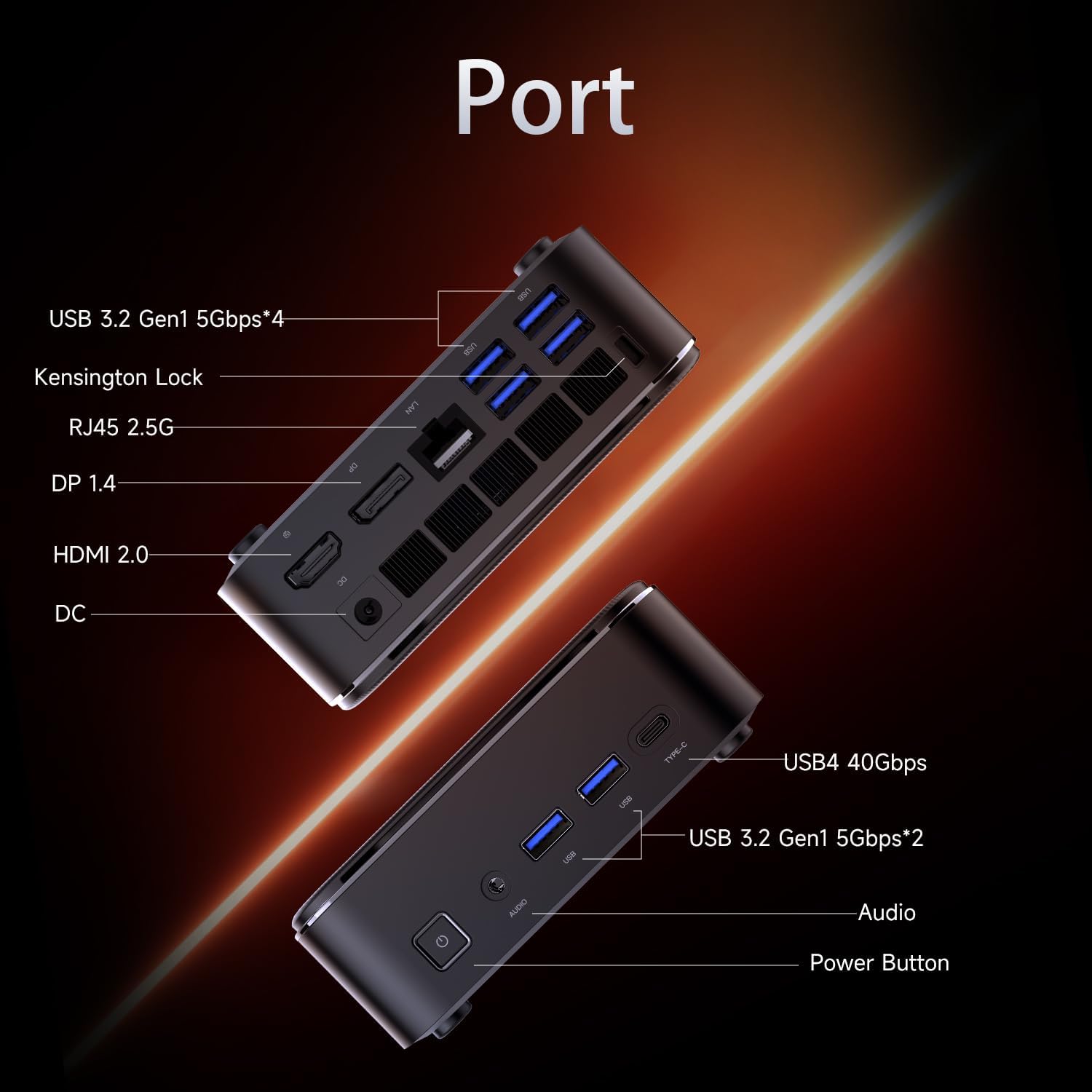
Image: Diagram illustrating the various ports on the Machenike Mini Desktop, including USB, Type-C, HDMI, DisplayPort, RJ45, and audio connections.
- Portijiet ta' quddiem: Power Button, 3.5mm Audio Jack, 2 x USB 3.2 Gen1 (5Gbps), 1 x Type-C (USB4 40Gbps)
- Portijiet ta' wara: 2 x USB 3.2 Gen1 (5Gbps), 1 x USB 3.2 Gen2 (10Gbps), 1 x Type-C, 1 x HDMI 2.1, 1 x RJ45, 1 x Display Port, DC Power Input, Kensington Lock Slot, Restart Button
4. Setup Inizjali
Follow these steps to set up your Machenike Mini Desktop:
- Qabbad id-Displej: Connect your monitor or display to the Mini Desktop using an HDMI or DisplayPort cable. The device supports 4K resolution.
- Ikkonnettja l-Periferali: Ipplaggja t-tastiera, il-maws, u kwalunkwe apparat USB ieħor tiegħek fil-portijiet USB disponibbli.
- Qabbad l-Enerġija: Connect the power adapter to the DC power input port on the Mini Desktop, then plug the adapter into a power outlet.
- Qawwa Mixgħul: Press the power button located on the front of the device. The system will boot up.
- Setup tal-Windows: Segwi l-istruzzjonijiet fuq l-iskrin biex tlesti s-setup inizjali tal-Windows 11 Home, inkluż il-lingwa, ir-reġjun, il-konnessjoni tan-netwerk, u l-ħolqien tal-kont tal-utent.
5. Istruzzjonijiet Operattivi
5.1. Power On/Off
- Qawwa Mixgħul: Agħfas il-buttuna tal-qawwa fuq in-naħa ta 'quddiem tal-apparat.
- Itfi: Ikklikkja l-buttuna Start fil-Windows, imbagħad agħżel Power > Shut down.
- Ibda mill-ġdid: Ikklikkja l-buttuna Start fil-Windows, imbagħad agħżel Power > Restart.
5.2. Konnessjoni tan-Netwerk
- Wi-Fi: The device supports Wi-Fi 6. During Windows setup or via Windows Settings, select your Wi-Fi network and enter the password.
- Bil-fili (Ethernet): Connect an Ethernet cable from your router or modem to the RJ45 port on the back of the Mini Desktop.
5.3. Konnessjoni ta 'Tagħmir Estern
- Apparat USB: Connect USB flash drives, external hard drives, printers, or other USB peripherals to any available USB 3.2 Gen1 or Gen2 ports.
- Type-C Devices: Use the Type-C ports for compatible devices, including high-speed data transfer (up to 40Gbps on the front Type-C port) or display output.
- Awdjo: Connect headphones or speakers to the 3.5mm audio jack on the front.
- Bluetooth: The device supports Bluetooth for wireless peripherals like keyboards, mice, and speakers. Pair devices through Windows Settings > Bluetooth & devices.
6. Manutenzjoni
Regular maintenance helps ensure optimal performance and extends the lifespan of your Mini Desktop.
- Tindif: Use a soft, dry cloth to clean the exterior. For dust accumulation in vents, use compressed air. Ensure the device is powered off and unplugged before cleaning.
- Aġġornamenti tas-Software: Iċċekkja u installa regolarment aġġornamenti tal-Windows u aġġornamenti tad-drajvers biex tiżgura l-istabbiltà u s-sigurtà tas-sistema.
- Ventilazzjoni: Ensure the Mini Desktop is placed in a well-ventilated area. Avoid blocking the air vents to prevent overheating.
- Backup tad-Data: Agħmel backup tad-dejta importanti perjodikament fuq drajv estern jew ħażna fil-cloud.
7 Issolvi l-problemi
Din it-taqsima tindirizza kwistjonijiet komuni li tista’ tiltaqa’ magħhom.
- Ebda Qawwa:
- Ensure the power adapter is securely connected to both the Mini Desktop and a working power outlet.
- Ittestja l-iżbokk tad-dawl b'apparat ieħor.
- Ebda Display:
- Verify that the HDMI or DisplayPort cable is securely connected to both the Mini Desktop and the monitor.
- Kun żgur li l-monitor ikun mixgħul u ssettjat għas-sors tad-dħul korrett.
- Ipprova kejbil jew monitor differenti jekk disponibbli.
- Ebda Konnessjoni tal-Internet:
- For Wi-Fi, check if the Wi-Fi adapter is enabled in Windows Settings and if you are connected to the correct network with the right password.
- For wired connection, ensure the Ethernet cable is properly connected and your router/modem is working.
- Kwistjonijiet ta' Konnettività Bluetooth:
- Ensure Bluetooth is enabled in Windows Settings.
- Remove and re-pair the problematic Bluetooth device.
- Update Bluetooth drivers through Device Manager.
- Ensure the device is within range and fully charged.
- Tnaqqis tas-Sistema:
- Check Task Manager for resource-intensive applications.
- Kun żgur li hemm biżżejjed spazju ħieles fuq l-SSD.
- Run a disk cleanup and defragmentation (for HDD, though SSDs don't need defragging).
- Perform a malware scan.
8. Speċifikazzjonijiet
Detailed technical specifications for the Machenike Mini Desktop (GTR HP8745H00):
| Karatteristika | Speċifikazzjoni |
|---|---|
| Mudell | GTR HP8745H00 |
| Proċessur | AMD Ryzen 7 8745HS (8 Cores, 16 Threads, 16MB L3 Cache, up to 5.1 GHz) |
| Grafika | Grafika AMD Radeon (Integrata) |
| RAM | 32GB DDR5 (4800 MHz) |
| Ħażna | SSD PCIe M.2 ta' 1TB |
| Sistema Operattiva | Windows 11 Home |
| Konnettività bla fili | Wi-Fi 6 (802.11ax), Bluetooth |
| Portijiet ta' quddiem | 1 x Power Button, 1 x 3.5mm Audio, 2 x USB 3.2 Gen1 (5Gbps), 1 x Type-C (USB4 40Gbps) |
| Portijiet ta' wara | 2 x USB 3.2 Gen1 (5Gbps), 1 x USB 3.2 Gen2 (10Gbps), 1 x Type-C, 1 x HDMI 2.1, 1 x RJ45, 1 x Display Port, DC Power Input, Kensington Lock, Restart Button |
| Riżoluzzjoni Massima tal-Iskrin | 3840 x 2160 (4K) |
| Dimensjonijiet (LxWxH) | 5.05 x 1.96 x 5.05 pulzieri |
| Piż | 3.4 liri |
| Kulur | Iswed |
9. Garanzija u Appoġġ
Machenike products are covered by a limited warranty. For specific warranty terms and conditions, please refer to the warranty card included with your product or visit the official Machenike websit.
For technical support, troubleshooting assistance, or to inquire about service, please contact Machenike customer support or visit the official brand store:


