1. Introduzzjoni
This manual provides detailed instructions for the ATK A87 Pro Wireless Mechanical Keyboard. Designed for versatility and performance, this 87-key Tenkeyless (TKL) keyboard features a gasket-mounted structure, hot-swappable switches, and tri-mode connectivity. Please read this manual thoroughly to ensure proper setup and operation of your device.

Image 1: ATK A87 Pro Wireless Mechanical Keyboard, showcasing its 87-key layout and RGB lighting.
2. Prodott Aktarview
The ATK A87 Pro is an 87-key TKL mechanical keyboard engineered for both gaming and productivity. Its compact ANSI layout optimizes desk space while retaining essential keys. Key features include:
- Gasket-Mounted Design: Features a multi-layer damping system for a soft, stable key feel and reduced acoustic resonance.
- Sokits li jistgħu jinbidlu bis-sħana: Allows for easy switch replacement and keycap customization. Equipped with south-facing LEDs for compatibility with various keycap profiles.
- Full N-Key Rollover (NKRO): Ensures every keypress is registered accurately, even during rapid typing or complex gaming sequences.
- Konnettività Tri-Modalità: Supports 2.4G wireless, Bluetooth, and USB-C wired connections. Offers low-latency 1ms performance in 2.4G wireless mode.
- Per-Key 16.8M RGB Lighting: Customizable RGB lighting with multiple preset effects for personalization.
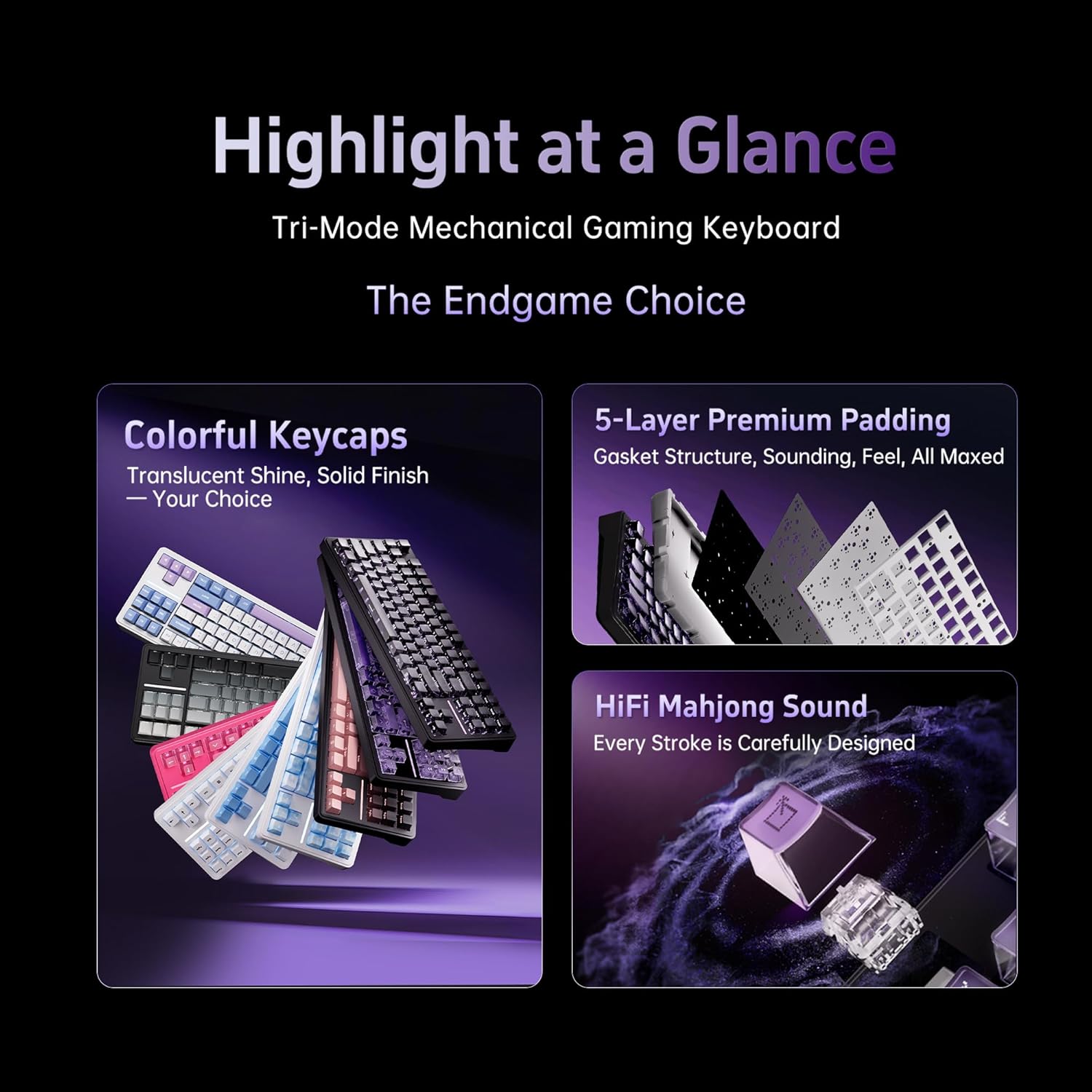
Image 2: Visual summary of the ATK A87 Pro's key features, including tri-mode connectivity, 5-layer padding, and HiFi sound.

Immaġni 3: Dettaljata view of the keyboard's five-layer padding for enhanced stability and acoustic performance.

Image 4: Illustration of different premium switch types, highlighting their characteristics and performance.

Immaġni 5: Eż.amples of keycap legend styles and transparent keycaps for enhanced RGB lighting.
3. Setup
3.1 Kontenut tal-Pakkett
Kun żgur li l-oġġetti kollha huma preżenti fil-pakkett:
- Tastiera Mekkanika ATK A87 Pro
- USB-C Cable
- 2.4G Wireless Receiver (stored in keyboard)
- Keycap Puller
- Iswiċċ Puller
- Manwal għall-Utent
Video 1: Unboxing and initial setup of the ATK A87 Pro keyboard, demonstrating package contents and basic features.
3.2 Modi ta' Konnettività
The ATK A87 Pro supports three connection methods:
- Modalità Wireless 2.4G:
- Locate the 2.4G wireless receiver stored in the dedicated compartment on the back of the keyboard.
- Ipplaggja r-riċevitur f'port USB disponibbli fuq il-kompjuter tiegħek.
- Switch the keyboard's mode selector to 2.4G. The keyboard will automatically connect.
- Modalità Bluetooth:
- Switch the keyboard's mode selector to Bluetooth (BT).
- Fuq il-kompjuter jew l-apparat tiegħek, attiva l-Bluetooth u fittex apparati ġodda.
- Select "ATK A87 Pro" from the list of available devices to pair. The keyboard can store up to 3 Bluetooth profiles.
- Modalità bil-fili USB-C:
- Qabbad il-kejbil USB-C provdut mal-port USB-C tat-tastiera u t-tarf l-ieħor mal-kompjuter tiegħek.
- It-tastiera taqleb awtomatikament għall-modalità bil-fili u tibda tiċċarġja.
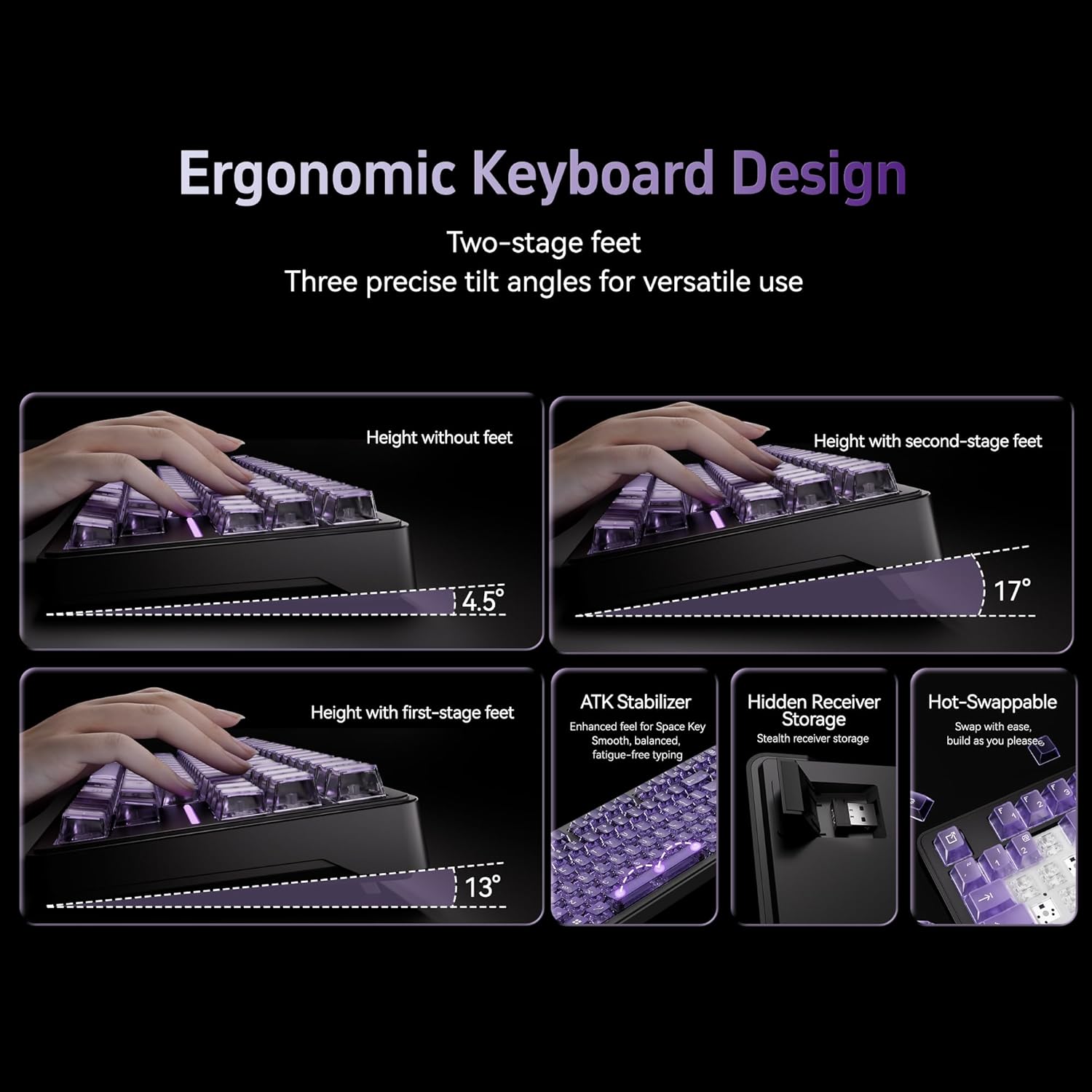
Image 6: Features such as adjustable ergonomic feet, the hidden compartment for the 2.4G receiver, and the hot-swappable switch design.

Immaġni 7: Fuqview of the keyboard's performance features, including low latency, multiple connection options, and long battery life.
3.3 Iċċarġjar
Connect the keyboard to your computer using the USB-C cable. The keyboard will charge automatically. The battery indicator (usually an LED near the USB port or on specific keys) will show charging status.
4. Istruzzjonijiet Operattivi
4.1 Kombinazzjonijiet ta' Tasti tal-Funzjoni (FN)
The FN key, located on the bottom row, can be combined with other keys to access various functions:
- FN + F1-F12: Multimedia controls (e.g., volume, play/pause, track skip). Specific functions may vary.
- FN + Backlight Key: Cycle through RGB lighting effects.
- FN + Ċwievet tal-Vleġġa: Adjust RGB brightness and speed.
- FN + Q/W/E: Switch between Bluetooth device profiles (BT1, BT2, BT3).
- FN + R: Aqleb għall-modalità mingħajr fili 2.4G.
- FN + T: Aqleb għall-modalità bil-fili.
- FN + Win: Ċavetta tal-illokkjar/ftuħ tal-Windows.
4.2 Kontroll tad-Dawl RGB
The ATK A87 Pro features per-key 16.8M RGB lighting. Use the FN key combinations mentioned above to customize your lighting experience. Refer to the specific key legends for detailed lighting controls.

Image 8: The keyboard displaying its ARGB music rhythm lighting feature, synchronized with audio.
4.3 Swiċċijiet li Jissostitwixxu bis-Sħana
The hot-swappable design allows you to change mechanical switches without soldering. Use the provided switch puller to carefully remove existing switches and insert new ones. Ensure the pins of the new switch align correctly with the sockets to avoid damage.
5. Manutenzjoni
5.1 Tindif
Biex tnaddaf it-tastiera tiegħek:
- Skonnettja t-tastiera mis-sorsi kollha tal-enerġija.
- Use a keycap puller to remove keycaps for thorough cleaning.
- Wipe the keycaps and keyboard surface with a soft, damp cloth. For stubborn dirt, use a mild cleaning solution.
- Uża arja kkompressata biex tneħħi t-trab u l-fdalijiet minn bejn is-swiċċijiet.
- Ensure all components are completely dry before reassembling and reconnecting the keyboard.
5.2 Sostituzzjoni tas-Swiċċ u l-Għatu taċ-Ċwievet
When replacing switches or keycaps, use the provided tools. Be gentle to avoid bending switch pins or damaging keycap stems. Ensure new switches are fully seated and keycaps are pressed down evenly.
6 Issolvi l-problemi
If you encounter issues with your ATK A87 Pro keyboard, refer to the following common solutions:
- It-tastiera ma tirrispondix: Ensure the keyboard is charged and properly connected (wired, 2.4G receiver, or Bluetooth paired). Try switching between modes.
- Problemi bil-konnessjoni mingħajr fili 2.4G: Ensure the receiver is securely plugged in and the keyboard is in 2.4G mode. Try plugging the receiver into a different USB port.
- Problemi bil-konnessjoni Bluetooth: Ensure Bluetooth is enabled on your device and the keyboard is in pairing mode (FN + Q/W/E). Remove and re-pair the device if necessary.
- Id-dawl RGB mhux qed jaħdem: Check FN key combinations for lighting control. Ensure the keyboard is not in a low-power state.
- Iċ-ċwievet mhux qed jirreġistraw: Check if the switch is properly seated. If hot-swapping, ensure switch pins are not bent.
- Intermittent disconnections: Ensure the keyboard is within range of the receiver/Bluetooth device. Avoid sources of interference.
For further assistance, please contact ATK customer support.
7. Speċifikazzjonijiet
Detailed technical specifications for the ATK A87 Pro keyboard:
| Karatteristika | Dettall |
|---|---|
| Isem tal-Mudell | A87 Pro |
| Tqassim | 80% TKL with 87 keys |
| Struttura | Muntatura tal-gasket |
| Kuttunar | Poron Foam / IXPE Foam / PET Film / EPDM Foam / Silicone Dampening Pad |
| Konnettività | 2.4G Wireless / Bluetooth / USB-C Wired |
| Dawl | 16.8M ARGB (South Facing), Music Rhythm Support |
| Batterija | 12000 mAh |
| Jiskambjaw bis-sħana | Iva |
| Qlib N-Key (NKRO) | Full NKRO |
| Latency | 1ms (2.4G Wireless) |
| Appoġġ tas-Sistema | Windows / macOS |
| Manifattur | ATK |
| Piż tal-oġġett | 3 liri |
| Dimensjonijiet tal-Pakkett | 15 x 7 x 2 pulzieri |
Vidjo 2: Wirja ta' vidjo promozzjonaliasing the ATK A87 Gaming Keyboard's features and design.
Video 3: Another promotional video highlighting the ATK A87 Pro Gaming Keyboard's various functionalities and aesthetic appeal.
8. Garanzija u Appoġġ
ATK products are covered by a limited warranty. For specific warranty terms and conditions, please refer to the warranty card included in your package or visit the official ATK website. For technical support, troubleshooting assistance, or any product-related inquiries, please contact ATK customer service through their official channels or visit the ATK Store fuq Amazon.


