1. Introduzzjoni
This manual provides detailed instructions for the SUNKTA Military Smart Watch EF16. Please read this manual thoroughly before using the device to ensure proper operation and to maximize its features. This smartwatch is designed for durability and functionality, offering a range of features including health monitoring, fitness tracking, and communication capabilities.

Image 1.1: SUNKTA Military Smart Watch EF16, showcasing its display and battery capacity.
2. Kontenut tal-Pakkett
Ivverifika li l-oġġetti kollha huma preżenti fil-pakkett tal-prodott tiegħek:
- 1 x SUNKTA Military Smart Watch EF16
- 1 x Stainless Steel Strap
- 1 x Ċinga tas-silikonju
- 1 x Cable tal-Iċċarġjar manjetiku
- 1 x Strap Replacement Tool
- 1 x Manwal tal-Utent (dan id-dokument)

Image 2.1: Illustration of the smartwatch and its included accessories.
3. Setup
3.1 Iċċarġjar tal-Arloġġ Intelliġenti
Before first use, fully charge your smartwatch. Connect the magnetic charging cable to the charging contacts on the back of the watch and plug the USB end into a power adapter (not included) or a computer's USB port. A full charge typically takes approximately 2 hours.

Image 3.1: The smartwatch connected to its magnetic charging cable, indicating its 600mAh battery capacity.
3.2 Installazzjoni tal-App
To unlock the full functionality of your smartwatch, download the companion application, FitCloudPro, from your smartphone's app store. The app is compatible with both iOS (11.0 or later) and Android (5.0 or later) devices.
- Open the App Store (iOS) or Google Play Store (Android) on your smartphone.
- Fittex għal "FitCloudPro".
- Niżżel u installa l-applikazzjoni.

Image 3.2: Screenshot showing the FitCloudPro application available for download.
3.3 Tqabbil tal-Apparat
After installing the FitCloudPro app, follow these steps to pair your smartwatch with your smartphone:
- Kun żgur li l-Bluetooth huwa attivat fuq l-ismartphone tiegħek.
- Iftaħ l-app FitCloudPro.
- Navigate to the "Device" section and select "Add A New Device".
- The app will scan for available devices. Select "EF16" from the list.
- Confirm the connection status within the app. Once paired, the watch will synchronize data with your phone.

Image 3.3: Step-by-step guide for connecting the smartwatch via the FitCloudPro app.
4. Istruzzjonijiet Operattivi
4.1 Wiri u Navigazzjoni
The smartwatch features a 1.6-inch AMOLED full-color touchscreen with a 480x480 pixel resolution, offering clear visuals and wide viewing angles. It supports an always-on time display.
- Touch Screen: Swipe left/right, up/down, and tap to navigate menus and select functions.
- Uċuħ tal-Għassa: Customize your watch face through the FitCloudPro app or choose from various pre-installed options. You can upload personal photos for a custom display.
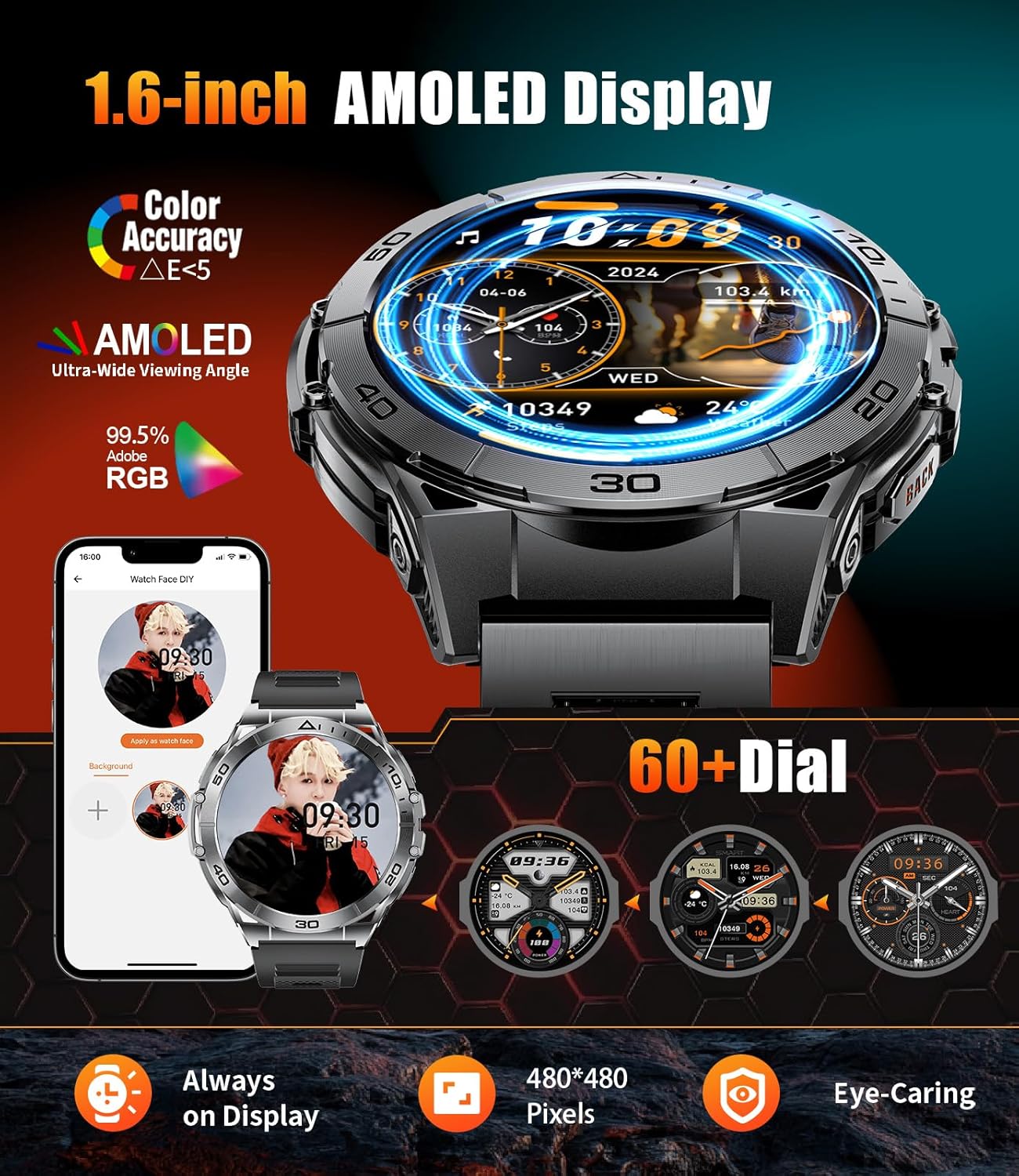
Image 4.1: The 1.6-inch AMOLED display and options for customizing watch faces.
4.2 Sejħiet u Notifiki ta' Messaġġi bil-Bluetooth
The smartwatch allows you to manage calls and receive notifications directly on your wrist.
- Tagħmel/Rċeviment Sejħiet: Utilize the built-in high-fidelity speaker and microphone to answer or dial calls. You can also view call logs and add contacts via the app.
- Notifiki: Receive alerts for messages from various applications such as Facebook, Messenger, Instagram, Gmail, WhatsApp, and Twitter.
- Assistent tal-Vuċi: Use voice commands for hands-free operation.

Image 4.2: The smartwatch showing incoming call and message notifications from various social media platforms.
4.3 Linterna LED
The smartwatch includes a built-in LED flashlight with three modes for various situations.
- Attivazzjoni: Quickly activate the flashlight by pressing the left button on the watch.
- Modi: Cycle through Bright Light, Flashlight (strobe), and SOS modes.
- Użu: Ideal for outdoor activities, power outages, jew emerġenzi.

Image 4.3: The smartwatch's LED flashlight function, useful for illuminating dark environments.
4.4 Modalità Sportiva
The smartwatch supports 116 sport modes to track your physical activities.
- Traċċar: Monitors total exercise time, calories burned, workout heart rate, steps, and distance.
- Modi: Includes activities such as running, cycling, gym workouts, rock climbing, and more.

Image 4.4: The smartwatch interface showing various sports modes and real-time activity data.
4.5 Monitoraġġ tas-Saħħa
Equipped with advanced sensors, the smartwatch provides continuous health monitoring.
- Rata tal-qalb: Monitoraġġ tar-rata tal-qalb f'ħin reali.
- Ossiġenu tad-Demm: SpO2 level tracking.
- Traċċar tal-irqad: Comprehensive analysis of sleep quality, including deep sleep, light sleep, and REM stages.
- Livelli ta' Stress: Monitors stress in real-time.
- Health Reports: Detailed reports available in the FitCloudPro app to help manage health habits.
4.6 Funzjonijiet Oħra
The smartwatch integrates various daily utility functions:
- Pedometru
- Arloġġ ta' allarm
- Stopwatch
- Timer
- Kalkulatur
- Tbassir tat-Temp
- Kontroll tal-Daqq tal-Mużika
- Eżerċizzji tan-nifs
- Kalendarju
- Activity Reminders (e.g., sedentary, drink water)

Immaġni 4.5: Fuqview of the smartwatch's multi-functional capabilities.
5. Manutenzjoni
The SUNKTA Military Smart Watch EF16 is built to withstand various conditions.
- Reżistenza għall-Ilma: With an IP68 waterproof rating, the watch can be worn during hand washing, in rainy weather, and during sweating. It is resistant to splashes and brief immersion but not recommended for prolonged underwater activities or hot water exposure.
- Durabilità: Manufactured to military standards with a stainless steel metal case, it is designed to resist scratches, impacts, and abrasions. It has passed tests for extreme temperatures, low pressure, dust, and salt fog.
- Tindif: Regularly clean the watch and straps with a soft, dry cloth. Avoid using harsh chemicals.

Image 5.1: Visual representation of the smartwatch's military-grade durability and resistance to various environmental factors.
6 Issolvi l-problemi
If you encounter issues with your SUNKTA Military Smart Watch EF16, refer to the following common solutions:
- L-arloġġ ma jixgħelx: Kun żgur li l-arloġġ ikun iċċarġjat kompletament. Qabbad mal-kejbil tal-iċċarġjar manjetiku u ma' sors ta' enerġija għal mill-inqas 10 minuti.
- Ma tistax tqabbad mat-telefon:
- Kun żgur li l-Bluetooth huwa attivat fuq it-telefon tiegħek.
- Kun żgur li l-arloġġ jinsab fil-medda tal-Bluetooth (tipikament 10 metri).
- Erġa' ibda kemm it-telefon tiegħek kif ukoll l-ismartwatch.
- Check if the FitCloudPro app is updated to the latest version.
- Jekk diġà kien imqabbad, ipprova neħħi l-akkoppjar tal-apparat mis-settings tal-Bluetooth tat-telefon tiegħek u mbagħad erġa' waħħalh permezz tal-app.
- Dejta dwar is-saħħa mhux preċiża: Ensure the watch is worn snugly on your wrist, not too tight or too loose. Clean the sensors on the back of the watch. Note that the data is for reference and not for medical diagnosis.
- Notifiki li ma jidhrux:
- Verify that notification permissions are granted to the FitCloudPro app in your phone's settings.
- Ensure the app is running in the background.
- Check notification settings within the FitCloudPro app for specific applications.
- Ħajja qasira tal-batterija:
- Naqqas il-luminożità tal-iskrin.
- Iddiżattiva karatteristiċi mhux meħtieġa bħall-monitoraġġ kontinwu tar-rata tal-qalb jekk mhux meħtieġa.
- Limita n-numru ta' notifiki attivi.
- Kun żgur li l-arloġġ ikun iċċarġjat kompletament kull darba.
If the issue persists, please contact customer support as detailed in the Warranty and Support section.
7. Speċifikazzjonijiet
| Karatteristika | Speċifikazzjoni |
|---|---|
| Mudell | EF16 |
| Daqs tal-Wiri | 1.6 Pulzieri AMOLED |
| Kapaċità tal-batterija | 600 mAh Polimer tal-litju |
| Ħin tal-Iċċarġjar | Appross. 2 sigħat |
| Ħin tax-Xogħol | 7-10 Jiem (użu tipiku) |
| Ħin ta' Standby | Sa 30 Jum |
| Klassifikazzjoni li ma jgħaddix ilma minnha | IP68 (5ATM) |
| Sistema Operattiva | Kompatibbli ma' Android/iOS |
| Konnettività | Bluetooth |
| Kapaċità tal-Ħżin tal-Memorja | 256 MB |
| Piż tal-oġġett | 3.53 uqija |
8. Garanzija u Appoġġ
SUNKTA is committed to product quality and customer satisfaction.
- Garanzija: The SUNKTA Military Smart Watch EF16 comes with a 2-year warranty from the date of purchase. This warranty covers manufacturing defects and malfunctions under normal use.
- Servizz tal-Klijent: For any questions, technical support, or warranty claims, please contact SUNKTA customer service. Online customer service is available 24 hours.
- Metodu ta' Kuntatt: You can reach customer support via the Amazon platform where the product was purchased.

Image 8.1: Information regarding SUNKTA's 2-year warranty and 24-hour online customer service.


