1. Introduzzjoni
This manual provides detailed instructions for the setup, operation, and maintenance of your TECKNET TK-MS046 Dual-Mode Wireless Mouse. Please read this manual thoroughly before using the product to ensure proper functionality and to maximize your user experience.

Image 1.1: The TECKNET TK-MS046 Dual-Mode Wireless Mouse, a compact and ergonomic device.
2. Prodott Aktarview
The TECKNET TK-MS046 is a versatile dual-mode wireless mouse designed for comfort and efficiency. It supports both 2.4GHz wireless and Bluetooth 5.2/3.0 connectivity, offering flexible options for various devices. Key features include:
- Konnettività b'Modalità Doppja: Seamlessly switch between 2.4GHz wireless (via USB-A receiver) and Bluetooth 5.2/3.0.
- DPI aġġustabbli: Two sensitivity levels (800/1600 DPI) for precise cursor control.
- Ikklikkja Siekta: Designed for quiet operation, ideal for shared environments.
- Disinn Ambidestru: Symmetrical shape suitable for both left and right-handed users.
- Ħajja twila tal-batterija: Up to 18 months of battery life with a single AA battery (not included).
- Modalità Auto-Sleep: Conserves power by entering sleep mode after 10 minutes of inactivity.

Image 2.1: Component diagram of the TECKNET TK-MS046 mouse, highlighting the Left Button, Right Button, Anti-Slip Scroller, DPI Switch Button, BT Indicator, AA Battery Compartment, Power Switch, Mode Switch Button, and USB Receiver.
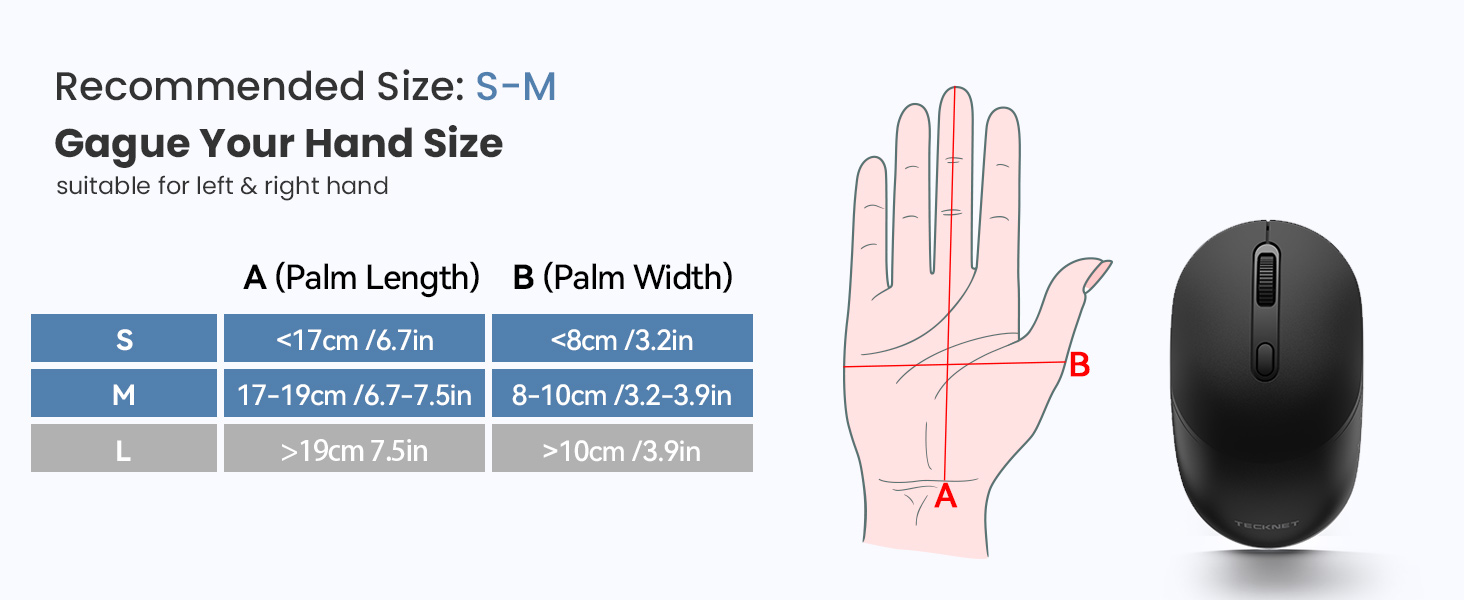
Image 2.2: Recommended hand size guide for optimal comfort with the TECKNET TK-MS046 mouse, suitable for small to medium hands.
3. Istruzzjonijiet ta' Setup
3.1. Installazzjoni tal-batterija
- Sib il-kompartiment tal-batterija fuq in-naħa ta' taħt tal-maws.
- Iftaħ l-għatu tal-kompartiment tal-batterija.
- Insert one AA battery (not included) into the compartment, ensuring correct polarity (+/-).
- Agħlaq l-għatu tal-kompartiment tal-batterija.

Image 3.1: The mouse with its battery compartment open, showing where to insert the AA battery, and the ON/OFF switch.
3.2. Modi ta' Konnettività
The TECKNET TK-MS046 mouse offers two connection modes: 2.4G Wireless and Bluetooth. You can switch between modes using the Mode Switch Button on the underside of the mouse.

Image 3.2: Visual guide for setting up both Bluetooth and 2.4G wireless connections.
3.2.1. Modalità Wireless 2.4G
- Ensure an AA battery is installed (refer to Section 3.1).
- Locate the USB-A receiver, which is stored inside the mouse's battery compartment.
- Plug the USB-A receiver into an available USB port on your computer.
- Toggle the Mode Switch Button on the mouse's underside to select the 2.4G mode. The LED indicator will flash red.
- The mouse should connect automatically. No additional drivers are typically required.
3.2.2. Bluetooth Mode (BT 5.2/3.0)
- Ensure an AA battery is installed (refer to Section 3.1).
- Toggle the Mode Switch Button on the mouse's underside to select the Bluetooth mode. The LED indicator will flash green.
- Press and hold the Bluetooth pairing button (usually located near the mode switch) for 3-5 seconds until the LED indicator flashes rapidly. This indicates pairing mode.
- Fuq il-kompjuter jew l-apparat tiegħek, iftaħ is-settings tal-Bluetooth.
- Fittex għal new devices and select "BT 3.0 Mouse" or "BT 5.2 Mouse" from the list to connect.
- Once connected, the LED indicator will stop flashing.
4. Istruzzjonijiet Operattivi
4.1. Aġġustament tad-DPI
The mouse features two adjustable DPI settings (800 and 1600) to suit different tasks and preferences. To change the DPI:
- Press the DPI Switch Button, located behind the scroll wheel, to cycle between the available DPI settings.
- The cursor speed will change instantly, allowing you to select the sensitivity that best fits your current activity.
4.2. Auto-Sleep Mode
To conserve battery life, the mouse will automatically enter sleep mode after approximately 10 minutes of inactivity. To wake the mouse:
- Click any button (left or right click) 2-3 times, or move the mouse.
- The mouse will reactivate and reconnect to your device.
5. Manutenzjoni
To ensure the longevity and optimal performance of your TECKNET TK-MS046 mouse, follow these maintenance guidelines:
- Tindif: Uża drapp artab u niexef biex tnaddaf il-maws. Evita li tuża kimiċi ħarxa jew materjali li joborxu.
- Ħażna: When not in use for extended periods, turn off the mouse using the power switch on the underside to further conserve battery life.
- Sostituzzjoni tal-batterija: Replace the AA battery when the mouse performance degrades or the low battery indicator (if present) activates.
6 Issolvi l-problemi
If you encounter issues with your TECKNET TK-MS046 mouse, refer to the following common solutions:
| Problema | Soluzzjoni Possibbli |
|---|---|
| Il-maws mhux qed jikkonnettja (2.4G) |
|
| Il-maws mhux qed jikkonnettja (Bluetooth) |
|
| Cursor is erratic or jumps |
|
| Mouse does not wake from sleep mode |
|
| L-issettjar tad-DPI mhux qed jinbidel |
|
7. Speċifikazzjonijiet
| Karatteristika | Dettall |
|---|---|
| Numru tal-Mudell | TK-MS046 |
| Teknoloġija tal-Konnettività | 2.4G Wireless, Bluetooth 5.2/3.0 |
| Sejbien tal-Moviment | Ottiċi |
| Settings DPI | 800 / 1600 |
| Tip ta 'batterija | 1 x Batterija AA (mhux inklużi) |
| Dimensjonijiet tal-Prodott | 4.6 x 2.6 x 0.1 pulzieri |
| Piż tal-oġġett | 2.12 uqija |
| Kompatibilità | Windows, macOS, ChromeOS |
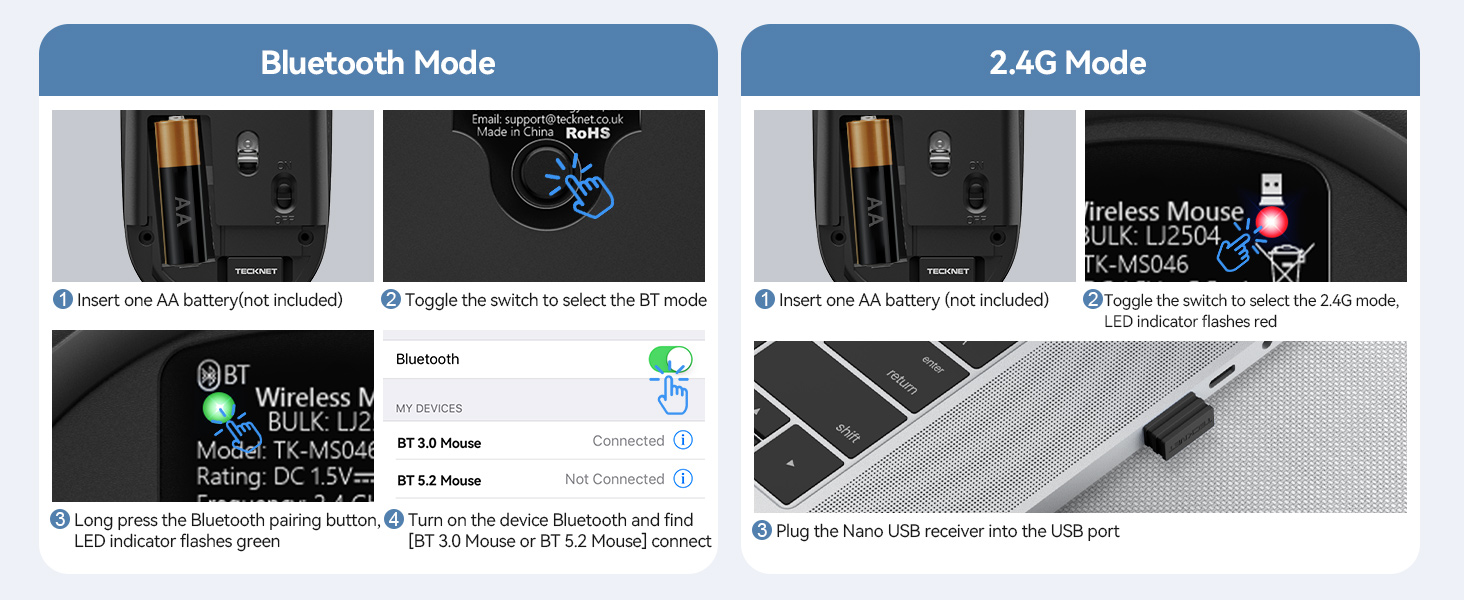
Image 7.1: The TECKNET TK-MS046 mouse demonstrating universal system compatibility across various operating systems.
8. Garanzija u Appoġġ
For any questions, technical assistance, or warranty inquiries regarding your TECKNET TK-MS046 Dual-Mode Wireless Mouse, please do not hesitate to contact TECKNET customer support. Refer to the product packaging or the official TECKNET webis-sit għall-aktar informazzjoni ta' kuntatt aġġornata.


