1. Introduzzjoni
This manual provides detailed instructions for the EasySMX S10 Wireless Controller. It covers setup, operation, features, and troubleshooting to ensure optimal performance across compatible platforms including Nintendo Switch 2, PC, Android, and iOS devices.

Image 1.1: The EasySMX S10 Wireless Controller in black, showcasinid-disinn ergonomiku u t-tqassim tal-buttuni tiegħu.
2. Prodott Aktarview
Karatteristiċi ewlenin:
- One-Tap Wake Up for Nintendo Switch consoles.
- TMR (Tunnel Magnetoresistance) Anti-Drift Joysticks for precision and durability.
- Full Mechanical Buttons with 0.3mm actuation and 5 million+ click lifespan.
- HD Rumble powered by ALPS Linear motors for immersive haptic feedback.
- 1200mAh rechargeable battery offering extended playtime.
- Interchangeable D-pad and magnetic swappable faceplates for customization.
- Customizable RGB Lighting with multiple modes.
- Two programmable back buttons.
- 6-Axis Gyroscope for motion sensing.
- NFC Function for compatible applications.
Kompatibilità:
The EasySMX S10 controller is compatible with:
- Nintendo Switch / Switch Lite / Switch OLED / Switch 2
- PC (Windows)
- iOS (iOS 13.0 and above)
- Android (Android 8.0 u ogħla)
- Steam OS
- In-car Gaming Mode
- Android TV/Box
3. Setup u Konnessjoni
3.1 Connecting to Nintendo Switch / Switch 2:
- Ensure the mode toggle switch on the back of the controller is set to "S" mode.
- Press and hold the HOME button on the controller for 3 seconds until the LED indicators flash rapidly.
- On your Nintendo Switch console, navigate to Kontrolluri > Ibdel il-Maqbad/Ordni.
- Once successfully paired, the LED indicators on the controller will become solid, and the controller will vibrate briefly.
- (First-time setup only) Within 20 seconds of initial pairing, remove and reattach one of your Joy-Con controllers to the Switch console. This step activates the wake-up function for the EasySMX S10 controller.
- For subsequent connections, a short press of the HOME button will automatically reconnect the controller to your Switch.

Image 3.1: Visual representation of the One-Tap Wake-Up feature, showing the controller waking up a Nintendo Switch console.
3.2 Connecting to PC (Windows):
- Set the mode toggle switch on the back of the controller to "X" mode for XInput compatibility.
- Connect the controller to your PC using the provided USB-C cable, or pair via Bluetooth through your PC's Bluetooth settings.
- Il-PC għandu jiskopri u jinstalla awtomatikament id-drajvers meħtieġa.
3.3 Connecting to Android/iOS Devices:
- Set the mode toggle switch on the back of the controller to "X" mode for Android or "S" mode for iOS.
- Ippermetti Bluetooth fuq it-tagħmir mobbli tiegħek.
- Fittex għal "EasySMX S10" or a similar device name in the Bluetooth device list and select it to pair.
4. Istruzzjonijiet Operattivi
4.1 TMR Anti-Drift Joysticks:
The controller features TMR (Tunnel Magnetoresistance) joysticks, designed for enhanced durability and precision, minimizing stick drift over time. These joysticks provide ultra-smooth analog input for competitive gameplay.
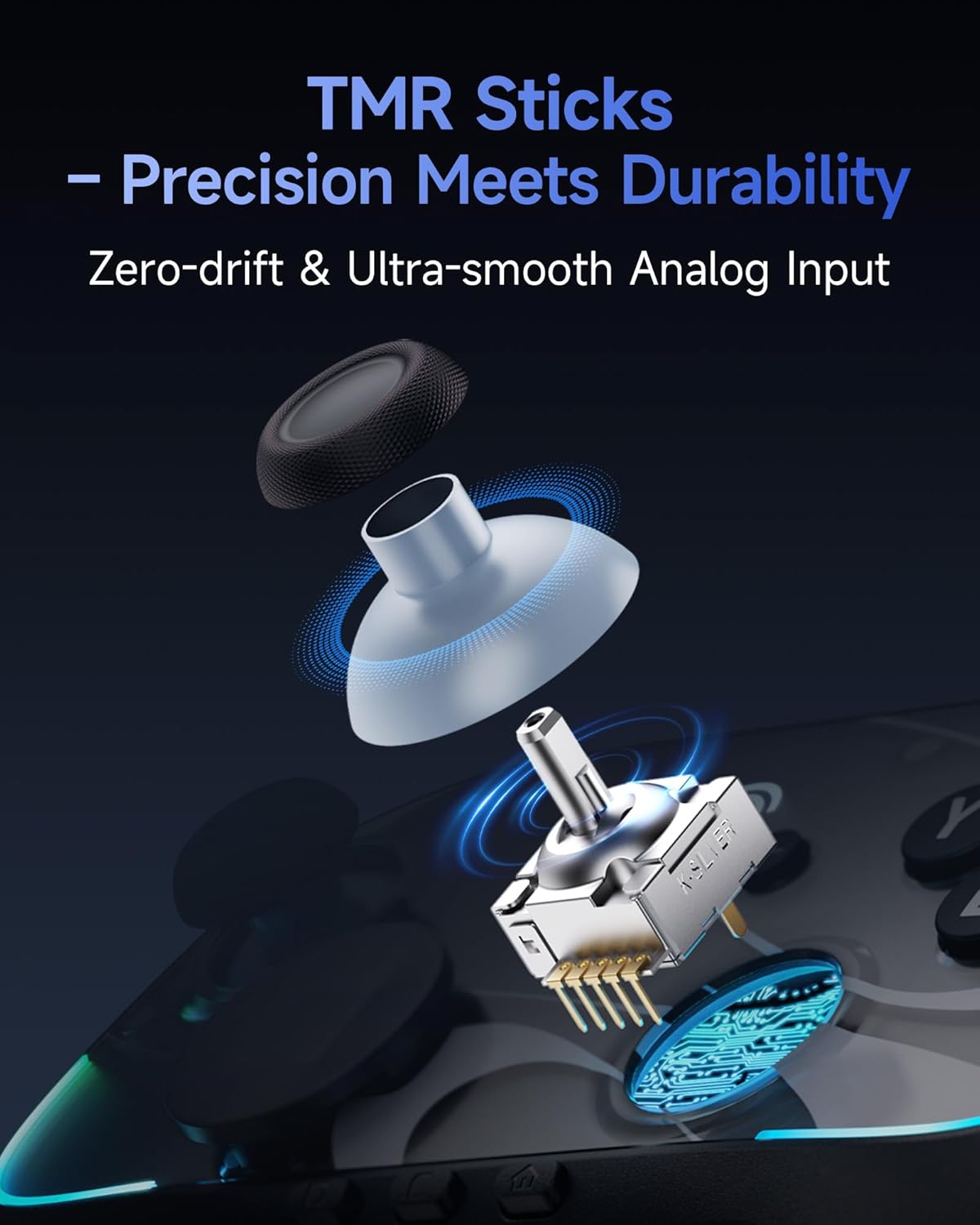
Immaġni 4.1: Sploda view illustrating the internal components of the TMR joystick, highlighting its precision and durability features.
4.2 Full Mechanical Buttons:
Experience responsive and tactile feedback with full mechanical micro-switch buttons. These buttons offer a rapid 0.3mm actuation distance and a lifespan exceeding 5 million clicks, similar to premium gaming keyboards.
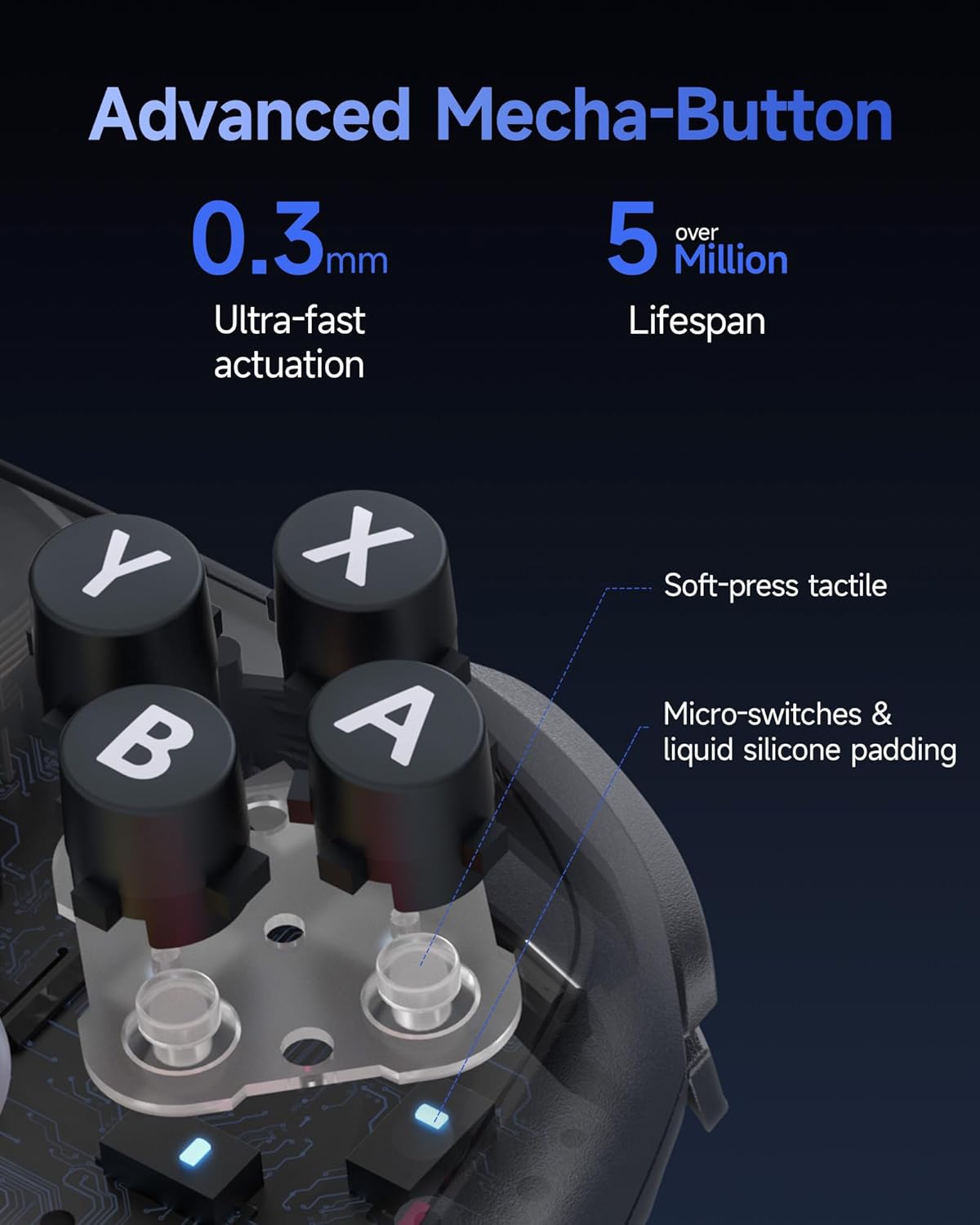
Immaġni 4.2: Sezzjoni maqtugħa view of the controller's face buttons, showing the micro-switches and liquid silicone padding for tactile feedback.
4.3 HD Rumble:
Equipped with genuine ALPS Linear HD Rumble motors, the controller delivers multi-layered haptic feedback, enhancing immersion in games.

Image 4.3: An illustration highlighting the placement of the HD Rumble motors within the controller's grips, indicating the vibration patterns.
4.4 Clicky Micro-switch Triggers:
The triggers feature micro-switches for a distinct clicky feel and a fast 0.3mm actuation, providing quick response times.

Immaġni 4.4: Close-up view of the controller's trigger button, revealing the internal micro-switch mechanism for rapid actuation.
4.5 6-Axis Gyroscope:
The integrated 6-axis gyroscope provides precise motion sensing capabilities, allowing for intuitive aiming and tilting controls in compatible games.
4.6 NFC Function:
The controller includes an NFC sensor, enabling interaction with compatible NFC-enabled accessories, such as Amiibo figures, to unlock in-game content.

Image 4.5: An illustration demonstrating the NFC sensor's capability to scan and interact with an Amiibo figure, unlocking in-game features.
4.7 Programmable Back Buttons:
The controller features two programmable back buttons. Refer to the quick start guide included with your controller for specific instructions on how to map functions to these buttons.
4.8 Customizable RGB Lighting:
The controller features customizable RGB lighting with 5 modes and various color combinations. Consult the quick start guide for instructions on how to adjust the lighting effects.
5. Personalizzazzjoni
5.1 Swappable D-Pad and Faceplates:
The EasySMX S10 controller allows for personalization with interchangeable D-pads (disc and cross-style) and magnetic removable faceplates. These can be swapped in seconds to match your preference or style.

Image 5.1: A visual guide demonstrating how to swap the magnetic faceplates and D-pads on the controller for personalized aesthetics.
6. Batterija u Iċċarġjar
The controller is equipped with a 1200mAh rechargeable battery. A full charge takes approximately 3 hours and provides up to 17 hours of playtime (with lights and vibration enabled). Playtime may vary based on usage and feature settings.
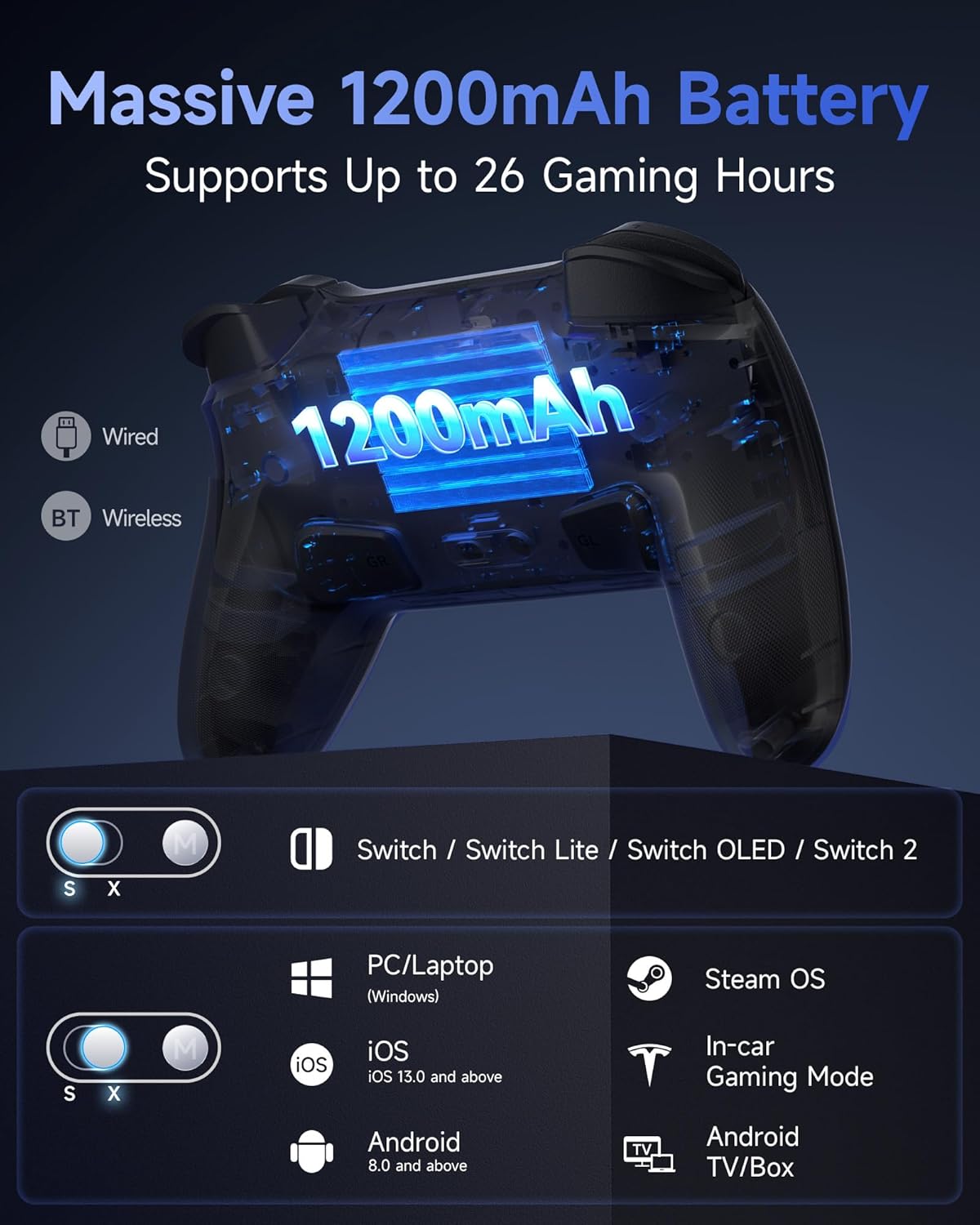
Immaġni 6.1: X-ray view of the controller highlighting the internal 1200mAh battery and listing compatible platforms.
Istruzzjonijiet għall-iċċarġjar:
- Connect the controller to a USB power source (e.g., console, PC, USB wall adapter) using the provided USB-C cable.
- The LED indicators will show charging status and turn off or change color when fully charged.
7 Issolvi l-problemi
7.1 Controller Not Connecting:
- Kun żgur li l-kontrollur huwa ċċarġjat biżżejjed.
- Verify the mode toggle switch on the back is set correctly for your device (S for Switch/iOS, X for PC/Android).
- For Switch, ensure you have followed the "Change Grip/Order" steps.
- Try resetting the controller by inserting a thin object into the reset hole (usually on the back).
- If connecting to PC, try a different USB port or re-pair via Bluetooth.
7.2 Wake-Up Function Not Working (Switch):
- Confirm the initial setup step of removing and reattaching a Joy-Con within 20 seconds of first pairing was completed. This step is crucial for activating the wake-up feature.
- Ensure the controller is paired and recognized by the Switch console.
7.3 Rumble Issues:
- Iċċekkja s-settings fil-logħba biex tiżgura li r-rumble huwa attivat.
- Some games may have specific rumble profiles.
- If rumble feels too strong or weak, consult the quick start guide for instructions on adjusting rumble intensity (typically a combination of the M button and joystick direction).
7.4 Aġġornamenti tal-Firmware:
Periodically check the EasySMX official website for any available firmware updates for your S10 controller. Firmware updates can improve performance, add features, or resolve known issues. Instructions for updating firmware are typically provided on the websit.
8. Speċifikazzjonijiet
| Karatteristika | Dettall |
|---|---|
| Numru tal-Mudell | T37 |
| Konnettività | Mingħajr fili (Bluetooth), Bil-fili (USB-C) |
| Kapaċità tal-batterija | 1200mAh |
| Ħin tal-Iċċarġjar | Appross. 3 sigħat |
| Ħin tal-logħob | Up to 17 hours (with lights/vibration) |
| Tip ta' Joystick | TMR Anti-Drift |
| Tip ta' Buttuna | Full Mechanical Micro-switch |
| Tip ta' Trigger | Clicky Micro-switch |
| Sensor tal-Moviment | Ġiroskopju 6-Assi |
| Karatteristiċi Speċjali | One-Tap Wake Up, HD Rumble, NFC, Programmable Back Buttons, Customizable RGB Lighting, Swappable D-Pad & Faceplates |
| Dimensjonijiet tal-Prodott | 2.56 x 3.54 x 4.33 pulzieri |
| Piż tal-oġġett | 0.012 uqija |
| Manifattur | EasySMX |
| Data ta' Rilaxx | 17 ta’ Settembru, 2025 |
9. Manutenzjoni
- Żomm il-kontrollur nadif billi timsaħ b'ċarruta ratba u niexfa. Evita li tuża kimiċi ħarxa jew materjali li joborxu.
- Aħżen il-kontrollur f'post frisk u niexef 'il bogħod mix-xemx diretta u minn temperaturi estremi.
- Evita li twaqqa’ l-kontrollur jew li tissottomettih għal impatti qawwija.
- Ensure the USB-C port is free of dust and debris when charging.
10. Garanzija u Appoġġ
EasySMX products are designed for reliability and performance. For warranty information, technical support, or further assistance, please refer to the warranty card included with your product or visit the official EasySMX website. Contact information for customer service is typically available on the websit.


