1. Introduzzjoni
This manual provides essential information for setting up, operating, and maintaining your ACEMAGIC TX15 Laptop, Model N150. Please read this guide thoroughly to ensure optimal performance and longevity of your device.

Figure 1: ACEMAGIC TX15 Laptop featuring Windows 11, 16GB RAM, and 512GB storage.
2. Kontenut tal-Pakkett
Ivverifika li l-oġġetti kollha huma preżenti fl-imballaġġ tal-prodott tiegħek:
- ACEMAGIC TX15 Laptop (Model N150)
- Adapter tal-Enerġija
- Manwal għall-Utent (dan id-dokument)
3. Prodott Aktarview
3.1 Karatteristiċi ewlenin
- Proċessur: Intel N150 Processor (up to 3.6GHz)
- Memorja: 16GB DDR4 RAM
- Ħażna: 512GB NVMe SSD (expandable up to 2TB)
- Wiri: 15.6-inch Full HD (1920x1080) IPS Display
- Sistema Operattiva: Windows 11 Pro
- Konnettività: Wi-Fi 5, Bluetooth 5.2
- Portijiet: USB 3.2, HDMI, USB-C (Data), 3.5mm Headphone Jack, TF Card Socket, DC Jack, Security Lock
- Kamera: 720p HD Front Webcam
- Disinn: Metal Shell, Lightweight and Portable (approximately 1.65kg / 3.64 lbs)

Figure 2: The laptop is equipped with an Intel N150 processor, designed for efficient performance.

Figure 3: The laptop's 16GB RAM and 512GB SSD facilitate smooth multitasking and fast data access.
3.2 Portijiet u Konnetturi
The ACEMAGIC TX15 Laptop offers a variety of ports for connectivity and expansion:
- In-naħa tax-xellug: Security lock slot, DC power input, USB-C (Data), HDMI, USB 3.2 port.
- In-naħa tal-lemin: TF Card Socket, two USB 3.2 ports, 3.5mm Headphone Jack.

Figure 4: Left side ports including Security lock, DC jack, Type-C (Data), HDMI, and USB 3.2.

Figure 5: Right side ports including TF Card Socket, two USB 3.2 ports, and 3.5mm Headphone Jack.
4. Setup
4.1 Qawwa Inizjali
- Connect the power adapter to the DC jack on the left side of the laptop and plug it into a power outlet.
- Iftaħ l-għatu tal-laptop.
- Agħfas il-buttuna tal-qawwa, li tipikament tinsab fin-naħa ta' fuq tal-lemin tat-tastiera, biex tixgħel l-apparat.
- Follow the on-screen instructions to complete the Windows 11 setup process.
4.2 Konnessjoni mal-Wi-Fi
- Once Windows 11 setup is complete, click on the Wi-Fi icon in the taskbar.
- Agħżel in-netwerk Wi-Fi mixtieq tiegħek mil-lista.
- Enter the network password if prompted and click 'Connect'.
5. Istruzzjonijiet Operattivi
5.1 Tastiera u Touchpad
The laptop features a full-size keyboard and a responsive touchpad for navigation. Ensure the touchpad is not locked (Fn+F11 on some models) if you experience issues.

Figure 6: The full-size keyboard and large touchpad provide comfortable input.
5.2 Wirja u Viżwali
The 15.6-inch Full HD IPS display offers clear and vibrant visuals. You can adjust brightness and display settings through Windows settings.

Figure 7: The 1920x1080 Full HD IPS display provides a clear and comfortable viewing esperjenza.
5.3 Audio and Webcam
The laptop includes integrated speakers for audio output and a 720p HD front webcam għal sejħiet bil-vidjo.

Figure 8: The laptop offers engaging visuals and stereo sound, supported by Wi-Fi 5, Bluetooth 5.2, and a 720p HD camera.
5.4 Ħajja tal-batterija
The laptop is designed for extended use with its large battery capacity, making it suitable for mobile work and entertainment.

Figure 9: The laptop's large battery capacity supports extended use, ideal for travel.
6. Manutenzjoni
6.1 Tindif
- Uża drapp artab u mingħajr suf biex tnaddaf l-iskrin u l-barra.
- Evita li tuża kimiċi ħarxa jew materjali li joborxu.
- Għal marki iebsa, ħassar bil-modampNaddaf id-drapp bl-ilma jew b'prodott tat-tindif li ma jagħmilx ħsara lill-iskrin.
6.2 Ħażna
Store the laptop in a cool, dry place away from direct sunlight and extreme temperatures. When not in use for extended periods, ensure the battery is charged to approximately 50% to prolong its lifespan.
6.3 Aġġornamenti tas-Software
Regularly update your Windows operating system and drivers to ensure optimal performance and security. These updates often include bug fixes and performance enhancements.
7 Issolvi l-problemi
7.1 Kwistjonijiet tal-Enerġija
- Il-laptop mhux qed jixgħel: Ensure the power adapter is securely connected to both the laptop and a working power outlet. Check if the power adapter's indicator light is on.
- Il-batterija mhix qed tiċċarġja: Verify the power adapter connection. Try a different power outlet. If the issue persists, contact support.
7.2 Problemi tal-Wiri
- Ebda wiri: Qabbad monitor estern mal-port HDMI biex tivverifika jekk il-problema hijiex fid-displej intern tal-laptop.
- Skrin mudlam: Adjust the brightness settings using the function keys (e.g., Fn + F5/F6) or through Windows display settings.
7.3 Kwistjonijiet ta' Konnettività
- Il-Wi-Fi mhux qed jikkonnettja: Restart your router and the laptop. Ensure Wi-Fi is enabled in Windows settings.
- Apparat Bluetooth mhux qed jitqabbad: Kun żgur li l-apparat Bluetooth jinsab fil-modalità ta' tqabbil u fil-medda. Iċċekkja s-settings tal-Bluetooth fuq il-laptop.
8. Speċifikazzjonijiet
| Karatteristika | Dettall |
|---|---|
| Daqs tal-wiri tal-iskrin wieqaf | 15.6 Pulzier |
| Riżoluzzjoni tal-Iskrin | 1920 x 1080 pixel |
| Riżoluzzjoni Massima tal-Iskrin | 1920x1080 |
| Tip bla fili | 802.11ac (Wi-Fi 5) |
| Brand | ACEMAGIC |
| Numru tal-mudell tal-oġġett | N150 |
| Piż tal-oġġett | 5.1 libbra (2.32 Kilogrammi) |
| Dimensjonijiet tal-Prodott | 14.52 x 9.19 x 0.74 pulzieri |
| Tip ta' Memorja tal-Kompjuter | DDR4 SDRAM |
| Daqs tal-Memorja Flash | 16 GB |
| Teknoloġija tal-Konnettività | Bluetooth, HDMI, USB, Wi-Fi |
| Għandu webcam capability? | Yes (720p HD) |
| Input tal-Interface tal-Bniedem | Touch Pad |
| Komunikazzjoni mingħajr fili Standard | 802.11ac |
| Tip ta 'Wiri | LCD |
9. Garanzija u Appoġġ
9.1 Garanzija tal-Prodott
ACEMAGIC provides a one-year effective warranty period for this product, including free return or exchange services. Offline maintenance services are available for products beyond this period.
9.2 Appoġġ għall-Klijent
For any product-related inquiries or support, please use the following contact methods:
- Email: servizz@acemagic.com
- Telefon (US): +1 833 988 3568 (it-Tnejn sal-Ġimgħa, 9am-5pm EST)
- Appoġġ tal-Amazon: Log in to your Amazon account, navigate to 'Your orders', and select 'Ask Product Question'.
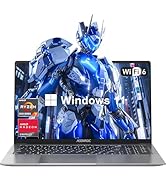
Figure 10: ACEMAGIC customer support details for assistance.
10. Vidjo tal-Prodott Aktar minnview
Watch this video for a brief overview of the ACEMAGIC TX15 Laptop's features and design.
Vidjo 1: Overview of the ACEMAGIC TX15 Laptop, highlighting its N150 processor, 16GB RAM, and 512GB NVMe storage.


