Introduzzjoni
This manual provides detailed instructions for the LIGE Smart Watch for Women, model FV12-D1-US. It covers setup, operation, maintenance, and troubleshooting to ensure optimal use of your device. This smartwatch features a 1.43-inch AMOLED HD display, Bluetooth calling capabilities, over 100 sports modes, comprehensive health monitoring, and IP68 water resistance.

Image: The LIGE Smart Watch FV12-D1-US displayed with both its metal mesh strap and silicone strap, showcasing its elegant design and customizable options.
X'hemm fil-Kaxxa
Upon opening your LIGE Smart Watch package, you should find the following items:
- LIGE Smart Watch (FV12-D1-US)
- Ċinga tal-metall
- Ċinga tas-silikonju
- Strap accessories
- Kejbil għall-iċċarġjar manjetiku
- Manwal ta' Istruzzjonijiet għall-Utent

Image: A visual representation of the package contents, including the smartwatch, two different straps, a charging cable, and the instruction manual.
Gwida ta' Setup
Follow these steps to set up your LIGE Smart Watch and connect it to your smartphone:
- Iċċarġja l-Arloġġ Intelliġenti: Before first use, fully charge the smartwatch using the provided magnetic charging cable.
- Ixgħel il-Bluetooth: Kun żgur li l-Bluetooth huwa attivat fuq l-ismartphone tiegħek.
- Niżżel l-App: Scan the QR code provided in the manual or on the watch screen, or search for the "FitCloudPro" app in your phone's app store (App Store for iOS, Google Play Store for Android). You can also visit http://fitcloud.hetangsmart.com/qrcode/_cn/ għall-link tat-tniżżil.
- Install and Open App: Install the "FitCloudPro" app and open it.
- Żid Apparat: In the app, navigate to the device section and select "Add Device" or similar. The app will search for available devices. Select "FV12" from the list.
- Pairing Confirmation: A Bluetooth pairing request will appear on your phone. Confirm the pairing.
- Enable Call Function: On the watch, you may need to turn on the call function. In the app, ensure "Connected to Call audio" is enabled for full calling features.
- Imla Setup: Once connected, the watch will synchronize data with the app, and you can begin customizing settings and using its features.
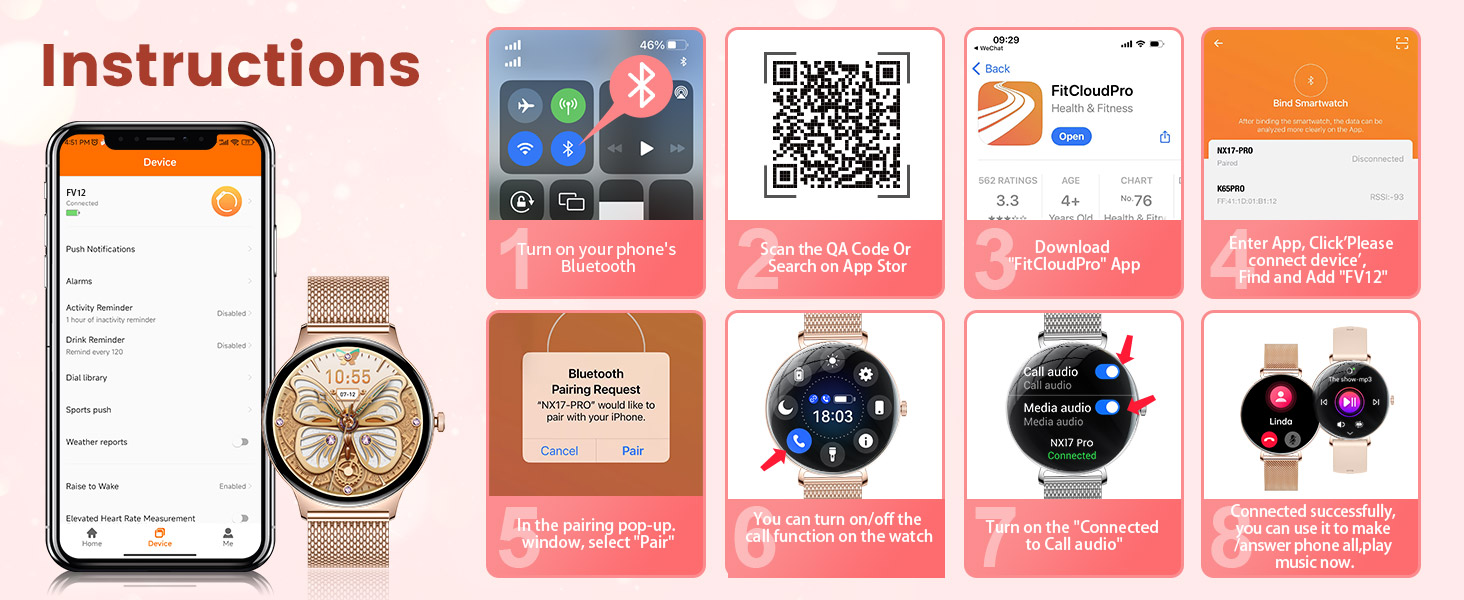
Image: A visual guide demonstrating the process of pairing the smartwatch with a smartphone, including app download, Bluetooth connection, and call function activation.
Istruzzjonijiet Operattivi
Navigazzjoni Bażika
- Swipe 'l fuq/'l isfel: Aċċessa s-settings jew in-notifiki malajr.
- Swipe Xellug/Lemin: Navigate through widgets and main functions.
- Agħfas il-Buttuna tal-Ġenb: Wake up the screen, return to the home screen, or access the app menu.
- Tektek l-Iskrin: Agħżel oġġetti jew ikkonferma azzjonijiet.
Bluetooth Calling and Notifications
Once connected via Bluetooth, your smartwatch can handle calls and display notifications.
- Wieġeb/Agħmel Sejħiet: Use the watch to answer incoming calls or dial numbers directly from your wrist. Access your contact list or call records.
- Notifiki tal-messaġġi: Receive real-time alerts for texts, emails, and social media apps (e.g., WhatsApp, Facebook, Instagram, YouTube, Twitter, Snapchat, LinkedIn). Customize which app notifications you wish to receive through the FitCloudPro app.

Image: The smartwatch screen showing an incoming call and various social media app icons, illustrating its communication features.
Uċuħ ta 'l-arloġġi customizable
Personalize your watch by choosing from a variety of pre-installed watch faces or uploading your own photos through the FitCloudPro app. This allows you to match your watch's appearance to your style or mood.
Karatteristiċi Smart Addizzjonali
- Kontroll tal-Mużika: Ikkontrolla d-daqq tal-mużika fuq l-ismartphone tiegħek direttament mill-arloġġ.
- Kamera mill-bogħod: Use your watch as a remote shutter button for your phone's camera.
- Allarmi: Set alarms to wake you up or remind you of important tasks.
- Tbassir tat-Temp: Ikseb aġġornamenti tat-temp f'ħin reali fuq il-polz tiegħek.
- Reminder Functions: Includes sedentary reminders and drink water reminders to promote healthy habits.
- Assistent tal-Vuċi: Access your phone's voice assistant directly from the watch.

Image: A collage of images demonstrating the smartwatch's diverse functionalities, including controlling music, setting alarms, checking weather, using a voice assistant, and receiving health reminders.
Monitoraġġ tas-Saħħa
The LIGE Smart Watch provides comprehensive health monitoring features to help you track your well-being. Note: Data is for reference only and should not be used as professional diagnostic information.
- Monitoraġġ tar-Rata tal-Qalb: Continuously records heart rate changes throughout the day.
- Monitoraġġ tal-Ossiġenu tad-Demm (SpO2): Ikejjel il-livelli tal-ossiġnu fid-demm.
- Traċċar tal-irqad: Analyzes sleep quality, including light and deep sleep stages, to help improve sleep habits.
- Monitoraġġ tal-istress: Helps you monitor stress levels and reminds you to relax when needed.
- Traċċar tas-Saħħa tan-Nisa: Supports tracking of menstrual cycles, predictions, gestation, and ovulation.

Image: The smartwatch interface showing real-time data for sleep duration, heart rate, blood oxygen saturation, and stress levels, alongside images of users engaged in related activities.

Image: A visual representation of the female cycle tracking feature on the smartwatch, showing period, prediction, and ovulation dates on a calendar interface.
Modi Sportivi u Traċċar tal-Attività
The LIGE Smart Watch offers over 100 sports modes to cater to various physical activities. It accurately records your workout data, helping you achieve your fitness goals.
- 100+ Modalità Sportiva: Includes activities like running, walking, cycling, swimming, yoga, rock climbing, and more.
- Data tal-Attività: Tracks steps, distance, calories burned, and active time.
- Sinkronizzazzjoni tal-App: Sync data with the FitCloudPro app to review your progress and set new fitness plans.

Image: A user exercising with dumbbells, while the smartwatch screen shows activity metrics like duration, calories, and steps, highlighting the extensive sports mode functionality.
Ħajja tal-batterija u Iċċarġjar
The smartwatch is equipped with a 260mAh battery, designed for extended use. A single charge can provide several days of operation, with an intelligent power management system optimizing energy consumption.
- Użu ta 'Kuljum: Approximately 4-7 days.
- Ħin ta' Standby: Sa 15 ijiem.
- Iċċarġjar: Use the provided magnetic charging cable. Align the magnetic pins with the charging contacts on the back of the watch.

Image: The smartwatch being charged via its magnetic cable, with an infographic detailing its battery life for daily use and standby time.
Reżistenza għall-Ilma (IP68)
The LIGE Smart Watch has an IP68 waterproof rating, making it suitable for various daily scenarios. This means it is resistant to dust and can withstand immersion in water up to 1.5 meters for 30 minutes.
- Adattat għal: Hand washing, rain, shallow swimming.
- Mhux adattat għal: Hot showers, saunas, diving, or high-pressure water activities. Avoid contact with hot water or steam.

Image: The smartwatch partially submerged in water, with water droplets on its surface, visually confirming its IP68 waterproof capability.
Manutenzjoni
To ensure the longevity and optimal performance of your LIGE Smart Watch, follow these maintenance guidelines:
- Tindif: Regularly wipe the watch screen and straps with a soft, dry cloth. If necessary, use a slightly damp cloth for the straps, then dry thoroughly.
- Evita kimiċi: Do not use harsh chemicals, cleaning solvents, or strong detergents, as these can damage the watch's finish and seals.
- Iċċarġjar: Always use the original charging cable. Ensure the charging contacts are clean and dry before charging.
- Ħażna: Aħżen l-arloġġ f'post frisk u niexef meta ma tkunx qed tużah. Evita temperaturi estremi.
- Espożizzjoni għall-Ilma: While IP68 rated, it is recommended to dry the watch thoroughly after exposure to water to prevent skin irritation or damage to internal components over time.
Issolvi l-problemi
If you encounter issues with your LIGE Smart Watch, refer to the following common solutions:
- L-arloġġ ma jixgħelx: Kun żgur li l-arloġġ ikun iċċarġjat kompletament. Qabbad mal-ċarġer għal mill-inqas 30 minuti.
- Cannot connect to phone/Bluetooth issues:
- Kun żgur li l-Bluetooth huwa attivat fuq it-telefon u l-arloġġ tiegħek.
- Kun żgur li l-arloġġ jinsab fil-firxa tal-Bluetooth tat-telefon tiegħek.
- Erġa' ibda kemm it-telefon kif ukoll l-arloġġ tiegħek.
- Forget the device in your phone's Bluetooth settings and re-pair through the FitCloudPro app.
- Ensure the FitCloudPro app has necessary permissions (location, Bluetooth, notifications).
- Notifiki li ma jidhrux:
- Check app notification settings in the FitCloudPro app.
- Ensure your phone's notification settings allow the FitCloudPro app to send notifications.
- Ivverifika li l-arloġġ huwa konness sew mal-app.
- Dejta dwar is-saħħa mhux preċiża:
- Kun żgur li l-arloġġ jintlibes sew fuq il-polz tiegħek, la maħlul wisq u lanqas issikkat wisq.
- Naddaf is-sensor fuq wara tal-arloġġ.
- Remember that data is for reference and not medical diagnosis.
- L-iskrin ma jirrispondix: Ipprova erġa' ibda l-arloġġ billi tagħfas u żżomm il-buttuna tal-ġenb. Jekk ma jirrispondix, ħalli l-batterija tinxef kompletament u mbagħad erġa' ibgħatha mill-ġdid.
Speċifikazzjonijiet
| Karatteristika | Speċifikazzjoni |
|---|---|
| Numru tal-Mudell | FV12-D1-US |
| Wiri | 1.43 Inches AMOLED, 466 x 466 pixels |
| Ħxuna tal-Każ | 7.9 mm |
| Piż tal-oġġett | 3.17 uqija |
| Kapaċità tal-batterija | 260 Milliamp Sigħat (Polimeru tal-Litju) |
| Konnettività | Bluetooth |
| Sistema Operattiva | AsteroidOS |
| Reżistenza għall-Ilma | IP68 |
| Kompatibilità | Android 5.0+ and iOS 8.0+ (iOS 13+ for one-touch call function) |
| Karatteristiċi Speċjali | Fitness Tracker, Phone Call, Sleep Monitor, IP68 Waterproof, Calorie Tracker, Alarm Clock, Stopwatch, Timer, Pedometer, Camera Control, Music Playback/Control, Sedentary Reminder, Weather, Notifications, All-day activity tracker, Distance, Breathing Training, 100 Sports Modes, Voice Assistant |
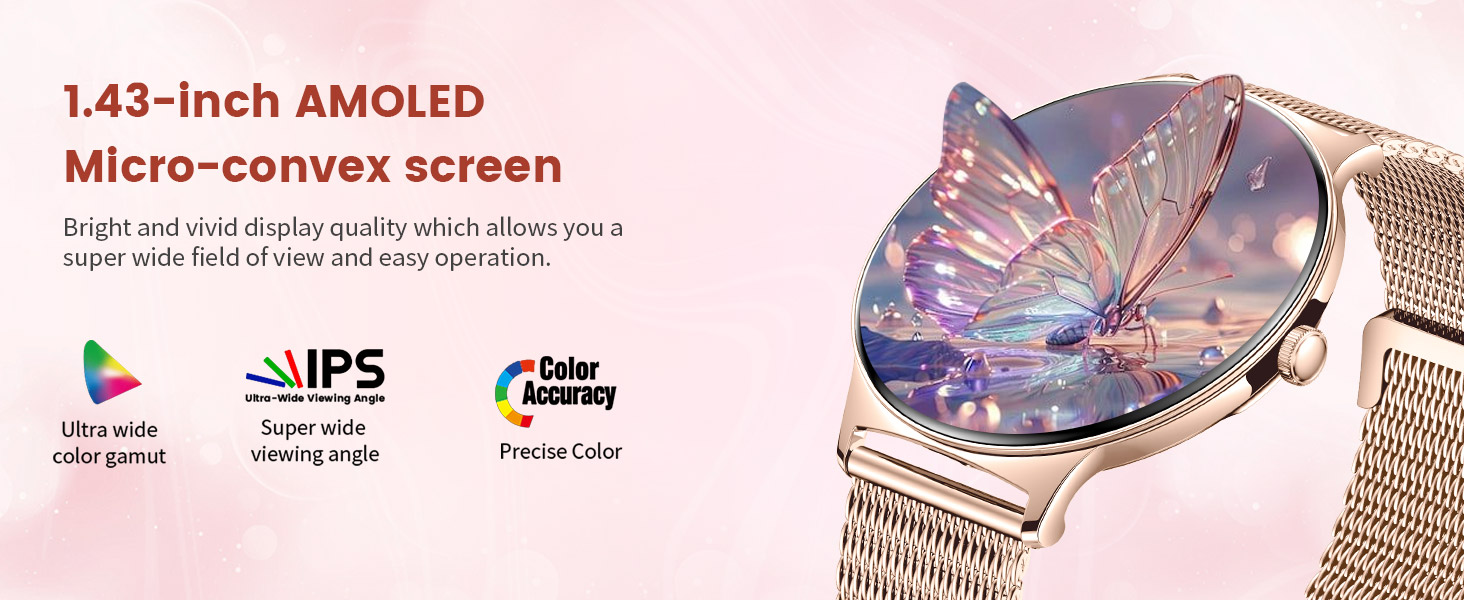
Immaġni: Close-up view of the smartwatch's 1.43-inch AMOLED micro-convex screen, highlighting its vibrant colors, wide viewing angle, and precise color accuracy.
Garanzija u Appoġġ
LIGE is committed to providing excellent customer service and product quality.
- Garanzija: The LIGE Smart Watch comes with a 2-year guarantee.
- Returns Service: Enjoy a 6-month returns service.
- Servizz tal-Klijent: 24-hour online service is available for any questions or issues you may have.
If you experience any damage issues, usage problems, are not 100% satisfied, or have concerns about quality assurance, please contact the LIGE Customer Service Team directly. They aim to provide a satisfactory reply within 24 hours.

Image: An infographic detailing LIGE's customer support offerings, including 24-hour online service, 6-month returns service, and a 2-year guarantee.


