1. Introduzzjoni
This manual provides essential information for setting up, operating, and maintaining your NIMO 17.3" IPS FHD Gaming Laptop. Designed for both productivity and entertainment, this laptop features an AMD Ryzen 7 8745HS processor, 64GB DDR5 RAM, and a 2TB PCIe 4.0 SSD, ensuring a responsive and powerful user experience.
Image 1.1: NIMO 17.3" FHD Gaming Laptop overview, billi tenfasizza l-karatteristiċi ewlenin.
2. X'hemm fil-Kaxxa
Jekk jogħġbok ivverifika li l-oġġetti kollha huma preżenti meta tiftaħ il-kaxxa:
- 1 x Laptop NIMO N177
- 1 x Ċarġer Veloċi tat-Tip Ċ 100W PD
- 1 x Manwal għall-Utent
- Windows 11 Home (Installat minn qabel)
3. Setup Inizjali
3.1 Ixgħel u Iċċarġja
- Connect the provided 100W Type-C PD Fast Charger to the laptop's USB-C port and a power outlet.
- Iftaħ l-għatu tal-laptop. Il-laptop jista’ jixgħel awtomatikament, jew jista’ jkollok bżonn tagħfas il-buttuna tal-qawwa.
- Allow the battery to charge fully before initial use. A 15-minute charge can provide approximately 2 hours of use.

Image 3.1: Illustration of the laptop charging process and battery life.
3.2 Windows 11 Configuration
Follow the on-screen prompts to complete the Windows 11 setup process. This includes selecting your region, connecting to a Wi-Fi network, and creating a user account.
3.3 Konfigurazzjoni tal-Qarrej tal-Marki tas-Swaba'
For enhanced security and quick login, set up the integrated fingerprint reader:
- Innaviga lejn Settings tal-Windows > Kontijiet > Għażliet ta' Sign-in.
- Select 'Fingerprint recognition (Windows Hello)' and follow the instructions to register your fingerprint.

Image 3.2: The backlit keyboard and fingerprint sensor for secure login.
4. It-Tħaddim tal-Laptop Tiegħek
4.1 Prestazzjoni u Multitasking
Your NIMO laptop is equipped with an AMD Ryzen 7 8745HS processor (8-core/16-thread, up to 4.9GHz) and 64GB DDR5 RAM, providing robust performance for demanding applications, gaming, and seamless multitasking. The 2TB PCIe 4.0 SSD ensures fast boot times and rapid data access.

Image 4.1: Details of the AMD Ryzen 7 8745HS processor.

Image 4.2: Laptop demonstrating seamless multitasking with ample storage and RAM.
4.2 Wiri
The 17.3" FHD (1920x1080) IPS anti-glare display offers immersive visuals with vibrant colors and wide viewing angles. The ultra-thin bezel design provides an 85% screen-to-body ratio for an expansive viewing esperjenza.

Image 4.3: The 17.3" FHD IPS display for visual clarity.
4.3 Tastiera u Touchpad
The full-size keyboard includes a numeric keypad and features backlighting for comfortable typing in various lighting conditions. The precision gesture touchpad allows for intuitive navigation and supports multi-touch gestures.
4.4 Webcam
Il-2MP integrat webIl-kamera hija adattata għal sejħiet bil-vidjo u laqgħat online. Għall-privatezza, il-laptop jinkludi swiċċ fiżiku tal-privatezza biex jiddiżattiva webcam meta ma tkunx qed tintuża.

Image 4.4: Privacy-focused camera convenience with a built-in switch.
5. Konnettività
5.1 Portijiet u Interfejsijiet
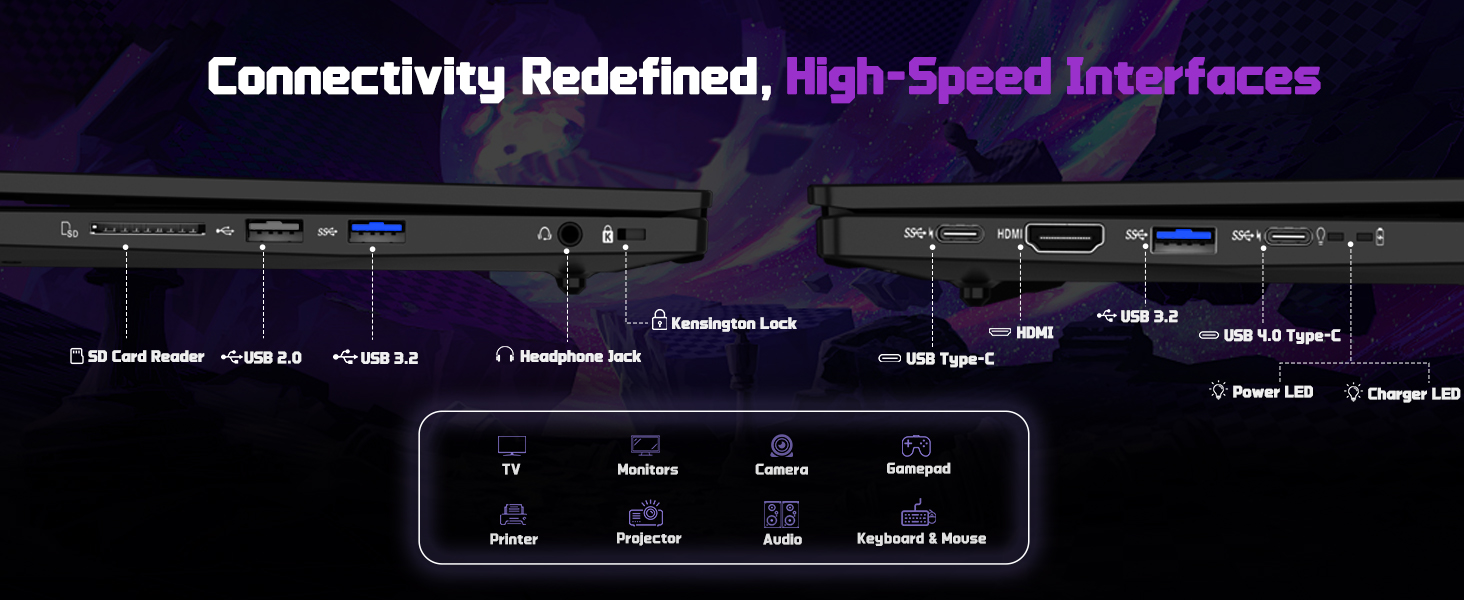
The NIMO N177 laptop offers a variety of ports for connecting peripherals and external displays:
- 1 x USB 2.0 Port
- 3 x Portijiet USB 3.0
- 1 x USB 4.0 Type-C Port (supports 100W PD charging, data transfer, and display output)
- 1 x Port HDMI
- 1 x Headphone Jack
- 1 x SD Card Reader
- 1 x Kensington Lock Slot

Image 5.1: Detailed diagram of the laptop's high-speed interfaces.
5.2 Konnettività bla fili
The laptop supports 802.11a/b/g/n/ac Wi-Fi for reliable wireless internet access and Bluetooth for connecting wireless accessories.
6. Manutenzjoni
6.1 Tindif
- Uża drapp artab u mingħajr suf biex tnaddaf l-iskrin u l-uċuħ ta’ barra.
- Evita li tuża kimiċi ħarxa jew materjali li joborxu.
- For the screen, use a specialized screen cleaner and a microfiber cloth.
6.2 Aġġornamenti tas-Software
Regularly check for and install Windows updates and driver updates to ensure optimal performance and security. You can find driver updates on the NIMO official websit.
6.3 Ħażna u Immaniġġjar
Store the laptop in a cool, dry place. Avoid exposing it to extreme temperatures, direct sunlight, or excessive moisture. Handle the laptop with care to prevent physical damage.
7 Issolvi l-problemi
If you encounter issues with your NIMO laptop, try the following common troubleshooting steps:
- Ebda Qawwa: Ensure the charger is securely connected to both the laptop and a working power outlet. Check if the power adapter's LED indicator is on.
- Kwistjonijiet tal-Wiri: If the screen is blank, try connecting an external monitor to verify if the laptop is functioning. Adjust display settings in Windows.
- Prestazzjoni bil-mod: Agħlaq l-applikazzjonijiet mhux meħtieġa, iċċekkja għal proċessi fl-isfond, u żgura li hemm biżżejjed spazju għall-ħażna ħieles.
- Problemi ta' Konnettività: For Wi-Fi issues, restart your router and the laptop. For peripheral issues, ensure drivers are updated and connections are secure.
- Sistema Ma Tirrispondix: Press and hold the power button for 10-15 seconds to force a shutdown, then restart the laptop.
For persistent issues, refer to the support section or contact NIMO customer service.
8. Speċifikazzjonijiet
| Karatteristika | Speċifikazzjoni |
|---|---|
| Brand | NIMO |
| Isem tal-Mudell | NIMO N177L |
| Daqs tal-Iskrin | 17.3 Pulzier |
| Riżoluzzjoni tal-Iskrin | 1920 x 1080 Pixel (FHD IPS) |
| Proċessur | AMD Ryzen 7 8745HS (8 Qlub, sa 4.9 GHz) |
| RAM | 64 GB DDR5 (4800 MHz) |
| Hard Drive | SSD ta' 2 TB (PCIe 4.0) |
| Koproċessur tal-Grafika | AMD Radeon 780M (Integrata) |
| Sistema Operattiva | Windows 11 Home |
| Tip bla fili | 802.11a/b/g/n/ac |
| Portijiet USB | 1 x USB 2.0, 3 x USB 3.0, 1 x USB 4.0 Tip-C |
| Karatteristiċi Speċjali | Tastiera b'dawl minn wara, Qarrej tal-marki tas-swaba', Awdjo HD, Tastiera Numerika |
| Ħajja Medja tal-Batterija | 15.5-il Siegħa (75Wh) |
| Piż tal-oġġett | 3.84 liri |
| Dimensjonijiet tal-Prodott | 15.66 x 9.99 x 0.74 pulzieri |
| Kulur | Iswed |
9. Garanzija u Appoġġ
9.1 Informazzjoni dwar Garanzija
Your NIMO laptop is backed by a garanzija ta 'sena. This warranty covers manufacturing defects and ensures your satisfaction. The product also includes partial U.S. assembly.
9.2 Politika ta' Ritorn
NIMO offers hassle-free Prospetti ta' 90 jum from the date of purchase. Please refer to your purchase documentation for detailed return instructions.
9.3 Appoġġ għall-Klijent
Our dedicated support team is available to assist you with any questions or issues. You can contact us via:
- Email: service@nimopc.com
- L-uffiċjal tagħna website or product page (for contact details).
We aim to provide quick solutions and a worry-free experience.
Immaġni 9.1: Fuqview of NIMO's customer commitment and support.


