Introduzzjoni
Thank you for choosing the Fachixy FC-200 Wireless Gaming Headset. This manual provides detailed instructions for setup, operation, maintenance, and troubleshooting to ensure optimal performance and longevity of your device. Please read this manual thoroughly before using the headset.
Kontenut tal-Pakkett
Ivverifika li l-oġġetti kollha huma preżenti fil-pakkett tiegħek:
- 1 x Fachixy FC-200 Wireless Gaming Headset
- 1 x USB Iċċarġjar Cable
- 1 x 2.4G USB Dongle
- 1 x Manwal tal-Utent (dan id-dokument)
Prodott Overview
The Fachixy FC-200 is a versatile wireless gaming headset designed for various platforms, offering both 2.4GHz wireless and Bluetooth 5.4 connectivity. It features 50mm high-density dual neodymium audio drivers for stereo surround sound, a foldable and ergonomic design for comfort, and a long-lasting battery.
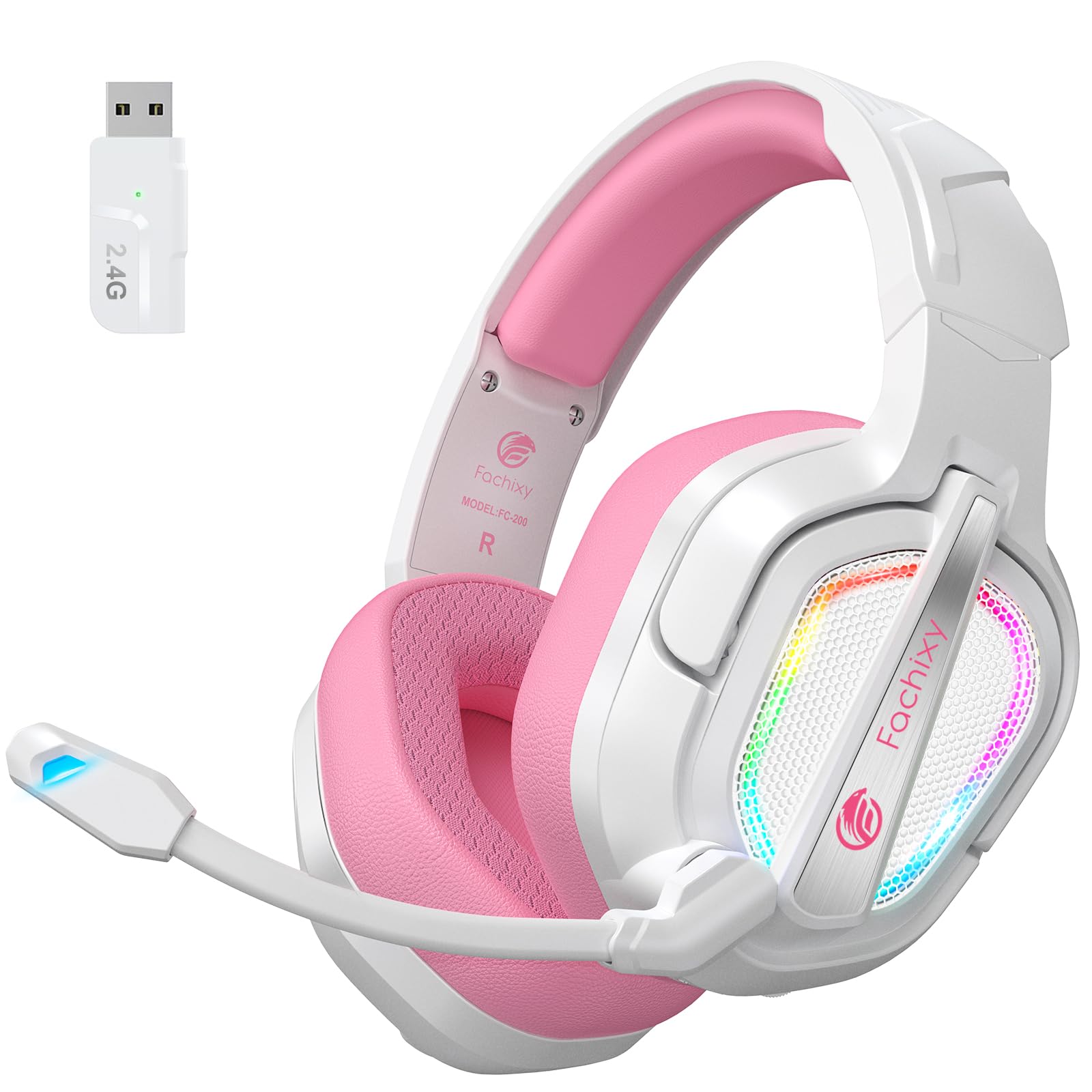
Image: The Fachixy FC-200 Wireless Gaming Headset, showcasinid-disinn u l-kulur tiegħu.
Setup
Iċċarġjar tal-Headset
Before first use, fully charge the headset. A full charge takes approximately 2.5 hours and provides up to 50 hours of battery life (with RGB lighting off).
- Connect the supplied USB Charging Cable to the headset's charging port.
- Connect the other end of the USB Charging Cable to a USB power source (e.g., computer, USB wall adapter).
- The charging indicator light will show charging status (refer to LED indicator section for details).

Image: Close-up of the headset's charging port and an illustration of its 50-hour battery life.
Connecting via 2.4GHz Wireless (for PC, PS4, PS5, Laptop, Mac)
The 2.4GHz wireless connection offers ultra-low latency for a seamless gaming experience.
- Insert the 2.4G USB Dongle into an available USB port on your device (PC, PS4, PS5, Laptop, Mac).
- Ixgħel il-headset billi tagħfas u żżomm il-buttuna tal-Power.
- The headset will automatically connect to the dongle. A voice prompt or LED indicator will confirm the connection.

Image: The 2.4GHz USB dongle for wireless connectivity, shown next to the headset.
Note: 2.4G mode is not compatible with Xbox devices.
Connecting via Bluetooth 5.4 (for Switch, Mobile Devices, PC, Mac, Tablets)
Bluetooth mode allows for versatile connectivity with various mobile and portable devices.
- Żgura li l-headset tkun mixgħula.
- Long press the Mic button for 2 seconds to switch to Bluetooth mode. The LED indicator will flash to indicate pairing mode.
- On your device (Switch, smartphone, tablet, PC, Mac), go to Bluetooth settings and search for "FC-200".
- Select "FC-200" to pair. A voice prompt or LED indicator will confirm successful pairing.
Note 1: Bluetooth mode is not compatible with PS4 or PS5 consoles.
Note 2: The microphone is not supported when connected to Nintendo Switch via Bluetooth.
Note 3: Both 2.4G and Bluetooth modes are NOT compatible with Xbox all Series.
Istruzzjonijiet Operattivi
Kontrolli Fuqview

Image: Close-up of the headset's control buttons and their functions.
| Buttuna/Kontroll | Funzjoni |
|---|---|
| Buttuna tal-Qawwa | Agħfas u żomm għal 3 sekondi biex tixgħel/itfi. |
| Buttuna Mic | Long press for 2 seconds to switch between Bluetooth and 2.4G modes. Short press to mute/unmute microphone. |
| Buttuna Dawl RGB | Press for 3 seconds to turn RGB lighting on/off. |
| Volum tar-Rota | Scroll up/down to adjust volume. |
| Buttuna Play/Pause | Press for 3 seconds to play/pause audio. Also used to answer/end calls. |
Użu tal-mikrofonu
The headset features a flexible microphone for clear communication. To use the microphone, ensure it is not muted (refer to Mic Button function above). The microphone can be adjusted for optimal positioning.

Image: A user wearing the Fachixy FC-200 headset, demonstrating the microphone's position.
Esperjenza Awdjo
The 50mm neodymium drivers provide stereo surround sound. For an optimal experience, ensure your device's audio settings are configured correctly for headset output.

Immaġni: Interna view of the headset's 50mm audio drivers, emphasizing sound quality.
Manutenzjoni
Manutenzjoni xierqa tiżgura l-lonġevità u l-prestazzjoni tal-headset tiegħek.
- Tindif: Uża drapp artab u niexef biex tnaddaf il-headset. Tużax prodotti tat-tindif jew solventi li joborxu.
- Ħażna: Aħżen il-headset f'post frisk u niexef 'il bogħod mix-xemx diretta u minn temperaturi estremi. Id-disinn li jintrewa jippermetti ħażna kompatta.
- Kura tal-batterija: Biex ittawwal il-ħajja tal-batterija, evita li tiċċarġja l-headset kompletament ta' spiss. Iċċarġjah regolarment, anke jekk ma jkunx qed jintuża għal perjodi twal.
- Reżistenza għall-Ilma: The headset is not water-resistant. Avoid exposure to liquids.

Image: The Fachixy FC-200 headset in its folded configuration, highlighting its portability and ease of storage.
Issolvi l-problemi
| Problema | Kawża Possibbli | Soluzzjoni |
|---|---|---|
| Ebda Ħoss | Headset not powered on, not connected, or volume too low. | Ensure headset is on and connected. Check device volume and headset volume wheel. |
| Mikrofonu Mhux Taħdim | Microphone muted, incorrect device settings, or not supported on current connection (e.g., Switch Bluetooth). | Unmute microphone. Check device audio input settings. Confirm microphone compatibility for your connection mode. |
| Connection Issues (2.4GHz) | Dongle not properly inserted, interference, or out of range. | Re-insert dongle. Move closer to the dongle. Avoid strong interference sources. |
| Problemi ta' Konnessjoni (Bluetooth) | Headset not in pairing mode, device Bluetooth off, or previously paired device interfering. | Ensure headset is in Bluetooth pairing mode. Turn device Bluetooth off/on. Forget previous pairings and re-pair. |
| Ħajja Qasira tal-Batterija | RGB lighting on, frequent full discharge, or aging battery. | Turn off RGB lighting. Charge regularly. If battery life significantly degrades, contact support. |
Speċifikazzjonijiet
| Karatteristika | Dettall |
|---|---|
| Isem tal-Mudell | FC-200 |
| Teknoloġija tal-Konnettività | Mingħajr fili (2.4GHz, Bluetooth 5.4) |
| Komunikazzjoni bla fili | 2.4GHz bla fili, Bluetooth 5.4 |
| Tip ta' Sewwieq Awdjo | Sewwieq Dinamiku (Neodimju ta' 50mm) |
| Ħajja tal-batterija | Up to 50 Hours (RGB off) |
| Ħin tal-Iċċarġjar | Appross. 2.5 Sigħat |
| Kontroll tal-Ħoss | Passive Noise Cancellation / Isolation |
| Forma tal-widna | Fuq il-widnejn |
| Materjal | Acrylonitrile Butadiene Styrene (ABS), Leather, Polycarbonate (PC) |
| Karatteristiċi Speċjali | Foldable, Lightweight, Microphone Included, Volume Control, RGB Lighting |
| Piż tal-oġġett | 13.7 uqija |
| Apparati Kompatibbli | PC, PS4, PS5, Laptop, Mac, Nintendo Switch (audio only via BT), Mobile Devices |
| Apparati inkompatibbli | Xbox All Series |

Image: A detailed compatibility table showing which features (audio, mic) are supported on different gaming devices for both 2.4GHz and Bluetooth modes.
Garanzija u Appoġġ
For warranty information and technical support, please refer to the contact details provided on the product packaging or visit the official Fachixy websit. Żomm l-irċevuta tax-xiri tiegħek għal pretensjonijiet ta' garanzija.
Vidjows Uffiċjali tal-Prodott
Video: An official product video from Fachixy showcasing the low-latency wireless gaming headset, highlighting its features and design. This video is provided by the seller, Orange Re Technology Co., Limited.


