Introduzzjoni
This manual provides detailed instructions for the setup, operation, and maintenance of your Lemega PlayHD Multi-Region DVD Player. Please read this manual thoroughly before using the device to ensure proper functionality and to maximize your viewing experience. The PlayHD is designed to play DVDs from any region (0-8) and features 1080p HDMI upscaling for enhanced picture quality, along with USB media playback capabilities.
X'hemm fil-Kaxxa
Iftaħ l-oġġetti kollha bir-reqqa u kun żgur li rċevejt il-komponenti li ġejjin:
- Lemega PlayHD DVD Player
- Kontroll mill-bogħod
- Adapter tal-Enerġija
- Cable HDMI
- Cable AV RCA
- Gwida Quick Start

Image: All included accessories and the Lemega PlayHD DVD Player, ready for use.
Prodott Overview
Front Panel
The front panel features the disc tray, power button, basic playback controls, and a USB port.
- Trej tad-Diska: Daħħal DVDs jew CDs hawn.
- Buttuna tal-Qawwa: Jixgħel jew jitfi l-plejer.
- Buttuna Miftuħa/Agħlaq: Ejects or closes the disc tray.
- Buttuna Play/Pause: Jibda jew iwaqqaf il-plejbek.
- Buttuna Waqqaf: Jieqaf daqq.
- Port USB: Qabbad apparati tal-ħażna USB għad-daqq tal-midja.
- Wiri: Shows current status, track number, or time.
Panel ta' wara
The rear panel provides various connection ports for audio and video output.
- Ħruġ HDMI: Connects to a TV or display for high-definition video and audio.
- RCA (AV) Output: Connects to older TVs or audio systems using composite video and stereo audio.
- Output koassjali: Digital audio output for compatible audio receivers.
- Input ta' Enerġija: Qabbad l-adapter tal-enerġija pprovdut.
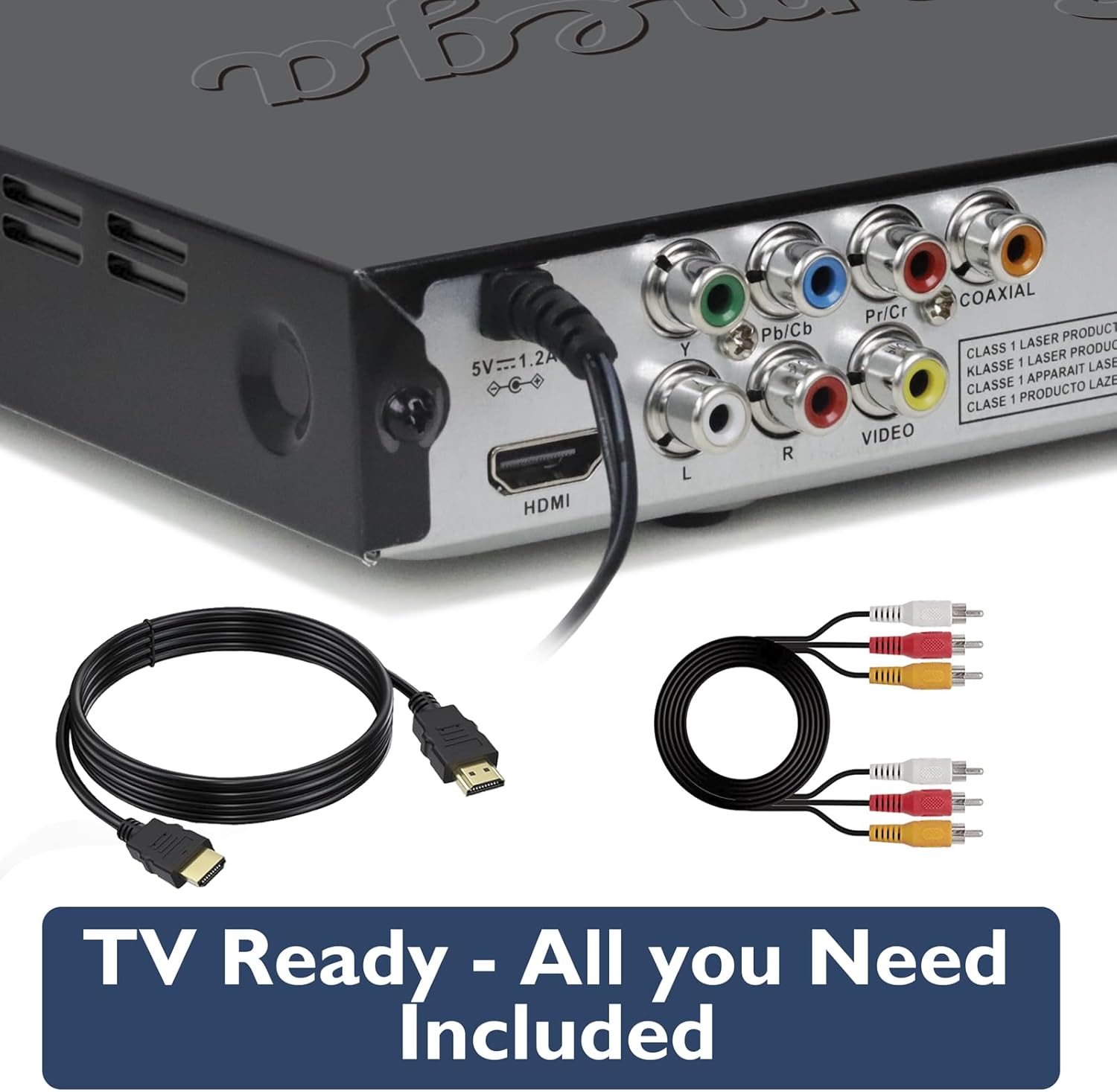
Image: The rear panel of the DVD player, highlighting the various connectivity options including HDMI and RCA ports.
Setup
Follow these steps to connect your Lemega PlayHD DVD Player to your television.
- Choose Your Connection Method:
- HDMI (Recommended for HD): Connect one end of the HDMI cable to the HDMI OUT port on the DVD player and the other end to an HDMI input port on your TV. Note the HDMI input number on your TV (e.g., HDMI 1, HDMI 2).
- RCA (Standard Definition): Connect the yellow plug of the RCA AV cable to the VIDEO OUT port on the DVD player, and the red and white plugs to the AUDIO R and AUDIO L ports respectively. Connect the other ends of these cables to the corresponding input ports on your TV.
- Qabbad l-Enerġija: Plug the power adapter into the DC IN port on the DVD player, then plug the adapter into a wall outlet.
- Qawwa Mixgħul: Press the Power button on the DVD player or the remote control to turn on the unit.
- Agħżel l-Input tat-TV: Turn on your TV and use its remote control to select the correct input source (e.g., HDMI 1, AV) that corresponds to the connection you made in step 1.

Image: The DVD player and remote control positioned in front of a television displaying the setup menu, indicating ease of installation.
Istruzzjonijiet Operattivi
Basic DVD Playback
- Ensure the player is connected to your TV and powered on.
- Press the OPEN/CLOSE button on the player or remote to open the disc tray.
- Poġġi diska DVD jew CD bil-mod fit-trej bin-naħa tat-tikketta tħares 'il fuq.
- Press the OPEN/CLOSE button again to close the tray. The player will automatically detect the disc and begin playback or display the disc menu.
- Use the navigation buttons (Up, Down, Left, Right, OK) on the remote control to navigate disc menus.
- Use the PLAY/PAUSE, STOP, FAST FORWARD, REWIND, NEXT, and PREVIOUS buttons on the remote for playback control.
Multi-Region Playback
The Lemega PlayHD DVD Player is designed to automatically detect and play DVDs from any region (Region 0-8) without manual switching. Simply insert your DVD, and the player will adjust accordingly.

Image: The DVD player ready to play a disc, illustrating its multi-region compatibility with various DVD cases.
1080p HDMI Upscaling
When connected via HDMI, the PlayHD player automatically upscales standard definition DVD content to 1080p resolution, providing a clearer and more detailed picture on compatible high-definition televisions.

Image: A visual comparison demonstrating the enhanced clarity and detail provided by 1080p HD upscaling.
Advanced Playback Controls
The remote control offers additional playback functions:
- ZOOM: Magnify a portion of the screen during playback.
- Bil-mod: Play video in slow motion.
- ANGOLU: Change camera angles on compatible DVDs.
- SOTTOTITOLU: Select subtitle tracks.
- AWDJO: Select audio tracks or languages.

Image: The remote control in use, demonstrating advanced playback options such as slow motion and zoom.
Daqq USB
The PlayHD supports media playback from USB storage devices.
- Insert a USB flash drive into the USB port on the front panel of the DVD player.
- The player should automatically detect the USB device and display a media browser. If not, press the 'USB' button on the remote control or navigate to the USB input option.
- Use the navigation buttons on the remote to browse through your video, music (MP3), or photo (JPEG) files.
- Press the OK button to select and play a file.
Manutenzjoni
Proper care will extend the life of your DVD player.
- Tindif tal-Unità: Imsaħ il-parti ta’ barra tal-plejer b’ċarruta ratba u niexfa. Tużax prodotti tat-tindif likwidi jew materjali li joborxu.
- Kura tad-Diska: Handle discs by their edges. Keep discs clean and free of scratches. Store them in their cases when not in use.
- Ventilazzjoni: Ensure the player has adequate ventilation. Do not block the ventilation slots.
- Ħażna: When not in use for extended periods, disconnect the power adapter and store the player in a cool, dry place.
Issolvi l-problemi
Jekk tiltaqa' ma' problemi bid-DVD player tiegħek, irreferi għall-problemi u s-soluzzjonijiet komuni li ġejjin.
| Problema | Kawża Possibbli | Soluzzjoni |
|---|---|---|
| Ebda qawwa | Power adapter not connected; power outlet not working. | Ensure power adapter is securely connected to the player and a working power outlet. |
| L-ebda stampa fuq it-TV | Incorrect TV input selected; loose HDMI/RCA cable connection. | Select the correct TV input source. Check HDMI or RCA cable connections. |
| L-ebda ħoss | TV volume muted; audio cables loose; incorrect audio settings. | Increase TV volume. Check audio cable connections. Verify audio settings on the player and TV. |
| Diska mhux qed tindaqq | Disc is dirty or scratched; disc inserted incorrectly; unsupported disc format. | Clean the disc. Insert disc with label side up. Ensure the disc is a supported format (DVD, CD). |
| Il-kontroll mill-bogħod ma jaħdimx | Il-batteriji huma mejta jew imdaħħla ħażin; ostruzzjoni bejn ir-remote u l-plejer. | Replace batteries. Ensure correct battery polarity. Remove any obstructions and point remote directly at the player's sensor. |
Speċifikazzjonijiet
- Numru tal-Mudell: PlayHD
- Ditta: LEMEGA
- Tip tal-Midja: CD, DVD
- Output tal-vidjo: HDMI (1080p Upscaling), RCA Composite Video
- Output Awdjo: HDMI, RCA Stereo Audio, Coaxial Digital Audio
- Daqq USB: Supports video, MP3, JPEG files
- Kompatibilità tar-Reġjun: Multi-region (0-8)
- Manifattur: HuiZhou LEMEDIA Technology Co., Ltd
Garanzija u Appoġġ
The Lemega PlayHD DVD Player comes with a Garanzija ta' 1 snin mill-manifattur. For warranty claims or technical support not covered in this manual, please contact LEMEGA customer service. Keep your purchase receipt as proof of purchase for warranty purposes.
For further assistance, please refer to the contact information provided in your Quick Start Guide or visit the official LEMEGA websit.


