Introduzzjoni
Thank you for choosing the Bigben Karaoke Microphone. This all-in-one portable karaoke system combines a stereo microphone with a powerful 15W Bluetooth speaker and dynamic light effects, designed to enhance your singing and music listening experience. This manual provides essential information for safe and optimal use of your device.
Informazzjoni dwar is-Sigurtà
- Aqra l-istruzzjonijiet kollha qabel tuża l-apparat.
- Żomm l-apparat 'il bogħod mill-ilma u l-umdità.
- Tesponix għal temperaturi estremi jew dawl tax-xemx dirett.
- Tippruvax tiżżarma jew issewwi l-apparat int stess. Irreferi għal persunal tas-servizz kwalifikat.
- Uża biss l-aċċessorji tal-iċċarġjar speċifikati.
- Żomm fejn ma jintlaħaqx mit-tfal.
Kontenut tal-Pakkett
Jekk jogħġbok iċċekkja li l-oġġetti kollha huma preżenti fil-pakkett:
- Bigben Karaoke Microphone (Model PARTYBTMIC2WH)
- Kejbil tal-Iċċarġjar (USB)
- Manwal għall-Utent (dan id-dokument)
- Front Glass (as an included component, likely pre-installed or a protective cover)

Stampa 1: The Bigben Karaoke Microphone shown in its retail packaging. The packaging highlights features such as Bluetooth connectivity, 4 vocal effects, and wireless speaker functionality.
Prodott Overview
The Bigben Karaoke Microphone features an integrated speaker and various controls for an interactive experience.
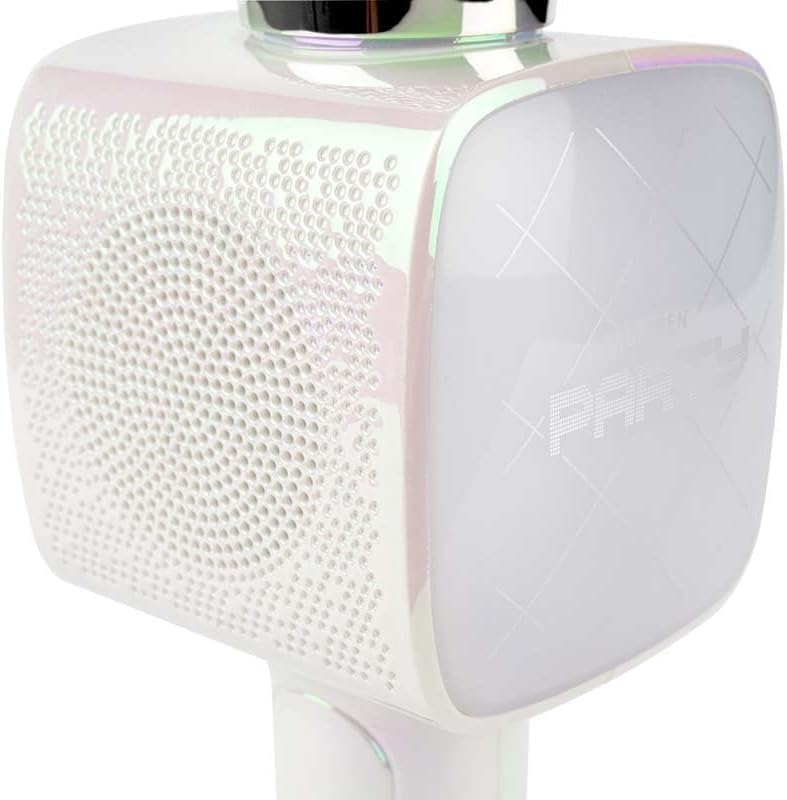
Stampa 2: A close-up view of the Bigben Karaoke Microphone, focusing on the speaker grille and the light-up panel. The panel displays "PARTY" and shows dynamic light effects.
Karatteristiċi ewlenin:
- Bluetooth 5.0: For stable wireless connection to your devices.
- Kelliem Integrat: 15W output for clear and powerful sound.
- Effetti tad-Dawl: Dynamic lighting to enhance the karaoke experience.
- Effetti tal-Ħsejjes: 4 different vocal effects and an echo effect.
- Input Multipli: USB, Micro SD, and 3.5mm headphone jack.
Setup
1. Iċċarġjar tal-Mikrofonu
- Connect the provided USB charging cable to the microphone's charging port.
- Qabbad it-tarf l-ieħor tal-kejbil USB ma' adapter tal-enerġija USB kompatibbli (mhux inkluż) jew mal-port USB tal-kompjuter.
- Id-dawl indikatur tal-iċċarġjar jixgħel. Ladarba jkun iċċarġjat kompletament, id-dawl jista’ jibdel il-kulur jew jintefa.
2. Tixgħil / Mitfi
- To power on, press and hold the Power button for a few seconds until the indicator light illuminates and you hear an audible prompt.
- Biex titfi, agħfas u żomm il-buttuna tal-Qawwa mill-ġdid sakemm id-dawl indikatur jintefa.
3. Tqabbil tal-Bluetooth
- Ensure the microphone is powered on and in Bluetooth pairing mode (usually indicated by a flashing light).
- Fuq l-ismartphone, it-tablet, jew apparat ieħor li jaħdem bil-Bluetooth tiegħek, mur fis-settings tal-Bluetooth.
- Fittex għal available devices and select "Bigben Karaoke Mic" (or similar name) from the list.
- Once paired, you will hear a confirmation sound, and the indicator light will stop flashing.
Istruzzjonijiet Operattivi
1. Daqq tal-Mużika
- Permezz tal-Bluetooth: After successful pairing, play music from your connected device. The sound will output through the microphone's speaker.
- Via USB/Micro SD: Insert a USB drive or Micro SD card (with music files) into the respective port. The microphone will automatically detect and play music.
- Via 3.5mm Audio Cable: Connect an external audio source using a 3.5mm audio cable (not included) to the headphone input.
2. Bl-użu tal-Mikrofonu
- Speak or sing directly into the microphone grille.
- Adjust the microphone volume using the dedicated controls on the device.
3. Effetti tal-Ħoss
- Effetti Vokali: The microphone offers 4 different vocal effects. Press the "Effect" button (or similar labeled button) to cycle through these effects.
- Effett Eku: Activate or adjust the echo effect using its dedicated control.
4. Effetti tad-Dawl
The microphone features dynamic light effects. These lights typically activate automatically when the device is on and can often be toggled or changed using a dedicated light button, if available.
Manutenzjoni
- Tindif: Imsaħ il-mikrofonu b'ċarruta ratba u niexfa. Tużax prodotti tat-tindif jew solventi li joborxu.
- Ħażna: Aħżen l-apparat f'post frisk u niexef 'il bogħod mix-xemx diretta meta ma tkunx qed tuża.
- Kura tal-batterija: For optimal battery life, charge the device regularly, even if not used frequently.
Issolvi l-problemi
| Problema | Kawża Possibbli | Soluzzjoni |
|---|---|---|
| Ebda qawwa | Il-batterija hija eżawrita. | Iċċarġja l-mikrofonu kompletament. |
| L-ebda ħoss mill-kelliem | Volume is too low; device not connected; incorrect input mode. | Increase volume; ensure Bluetooth is paired or cable is connected; check USB/Micro SD insertion. |
| Mikrofonu mhux qed jaħdem | Microphone volume is too low; microphone function is off. | Increase microphone volume; ensure microphone is active. |
| Konnessjoni Bluetooth instabbli | Device is too far from the microphone; interference. | Move devices closer; avoid obstacles; disconnect and re-pair. |
Speċifikazzjonijiet
| Karatteristika | Dettall |
|---|---|
| Brand | Bigben |
| Numru tal-Mudell | PARTYBTMIC2WH |
| Konnettività | Bluetooth 5.0, USB, Micro SD, 3.5mm Headphone Jack |
| Output Speaker | 15W |
| Effetti tal-Ħsejjes | 4 Vocal Effects, Echo Effect |
| Dimensjonijiet tal-Prodott (LxWxH) | 20 x 15 x 10 ċm |
| Piż tal-oġġett | 300 gramma |
| Kulur | Abjad |
| Numru ta 'Kanali | 2 |
| Batteriji Meħtieġa | Yes (type unknown, likely integrated rechargeable) |
Garanzija u Appoġġ
For warranty information and customer support, please refer to the documentation provided with your purchase or visit the official Bigben websit. Żomm il-prova tax-xiri tiegħek għal talbiet ta' garanzija.
For technical assistance or further inquiries, please contact Bigben customer service through their official channels.


