Introduzzjoni
This manual provides essential information for setting up, operating, maintaining, and troubleshooting your NIMO 17.3 Gaming Laptop. Designed for high performance with an AMD Ryzen 9 8945HS processor and Radeon 780M graphics, this laptop offers a powerful computing experience for gaming, creative work, and everyday tasks. Please read this manual thoroughly to ensure optimal use and longevity of your device.
1. Setup Inizjali
1.1 Unpacking and First Power On
Carefully remove your NIMO laptop and all accessories from the packaging. Place the laptop on a stable, flat surface. Before first use, it is recommended to fully charge the battery.

The NIMO 17.3 Gaming Laptop, ready for initial setup.
1.2 Iċċarġjar tal-batterija
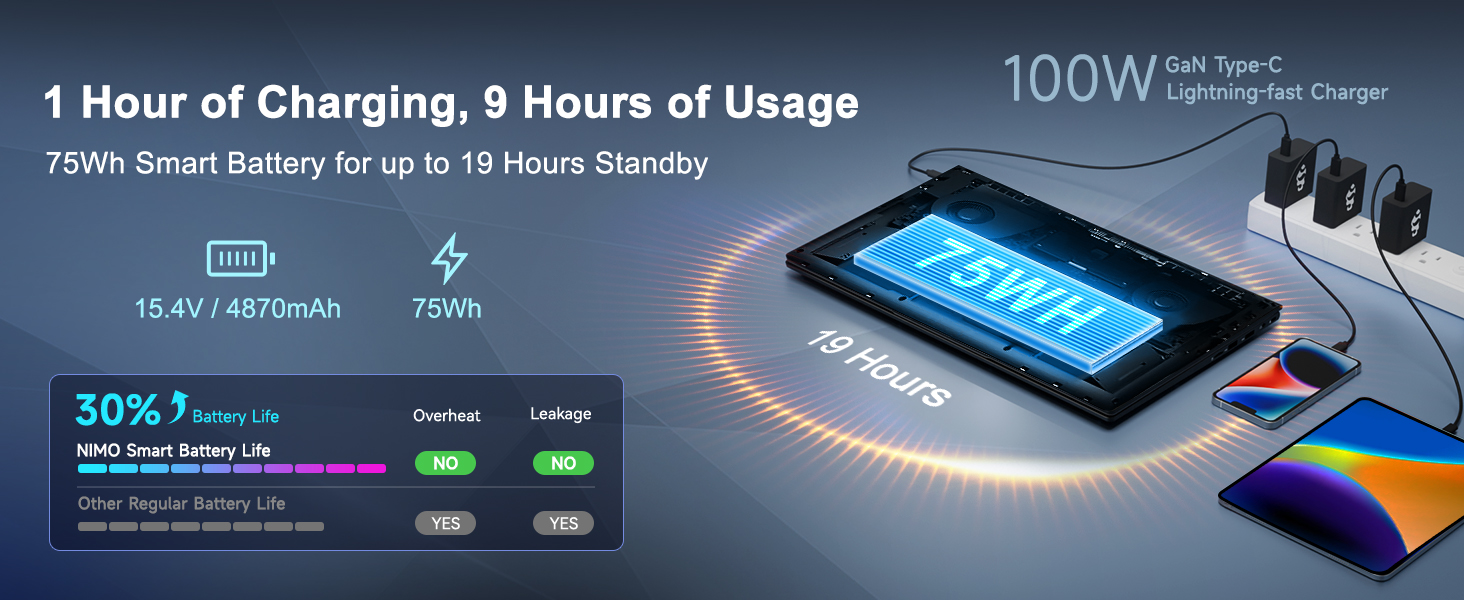
Connect the provided 100W PD Type-C fast charger to the USB-C port on your laptop and then to a power outlet. The charging indicator light will illuminate. Allow the laptop to charge fully before its first use for optimal battery calibration.

The 100W GaN Type-C charger connected to the laptop, illustrating fast charging capability.
1.3 Konfigurazzjoni tas-Sistema Operattiva
Upon first power-on, you will be guided through the Windows 11 setup process. Follow the on-screen instructions to configure language, region, network settings, and user accounts.
1.4 Konfigurazzjoni tal-Qarrej tal-Marki tas-Swaba'
For enhanced security and quick login, set up the integrated fingerprint reader during the Windows 11 setup or later via Windows Settings > Accounts > Sign-in options. Follow the prompts to register your fingerprints.

Close-up of the backlit keyboard and integrated fingerprint reader for secure access.
1.5 Konnessjoni tal-Periferali
Your NIMO laptop features a comprehensive multi-port design for various peripherals:
- USB-C 4.0: For ultra-fast data transfer, external displays, and eGPU support.
- USB 3.2: High-speed data transfer for compatible devices.
- USB 2.0: Għal apparati USB standard.
- HDMI: Qabbad ma' monitors jew televiżjonijiet esterni.
- Slot tal-Kard SD: Għal karti tal-memorja.
- Jack tal-Headphone Combo: Għall-ħruġ tal-awdjo u d-dħul tal-mikrofonu.
- Slot Kensington Lock: Għas-sigurtà fiżika.
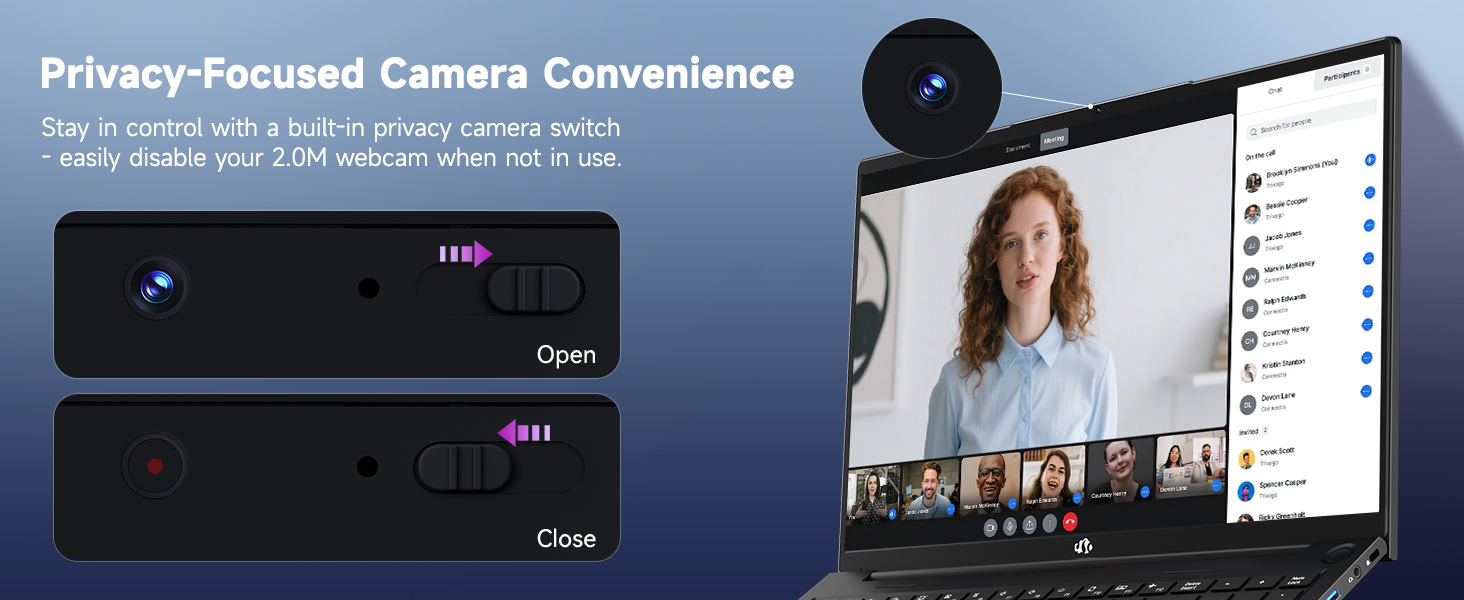
Diagram illustrating the comprehensive multi-port design of the NIMO laptop, including USB-C 4.0, HDMI, USB 3.2, USB 2.0, SD Card slot, Headphone Combo, and Kensington Lock.
2. Istruzzjonijiet Operattivi
2.1 Power On/Off and Sleep Modes
- Qawwa Mixgħul: Agħfas il-buttuna tal-qawwa li tinsab fuq it-tastiera.
- Itfi: Ikklikkja l-buttuna Start, imbagħad Power > Shut down.
- Modalità Sleep: Ikklikkja l-buttuna Start, imbagħad Power > Sleep, jew agħlaq l-għatu tal-laptop.
2.2 L-Użu tat-Tastiera u t-Touchpad
The NIMO laptop features a full-size keyboard with a numeric keypad and adjustable backlighting. Press Fn + F10 (or similar function key depending on model) to cycle through backlight brightness levels. The large touchpad supports multi-touch gestures for navigation.
2.3 Karatteristiċi tal-Wiri
Experience clear visuals on the 17.3-inch Full HD (1920x1080) IPS display. This screen provides vibrant colors and wide viewing angles, suitable for various applications from productivity to entertainment.

The NIMO laptop displaying a vibrant image, highlighting its 17.3-inch Full HD IPS screen.
2.4 WebSwiċċ tal-Privatezza tal-kamera
For privacy, your laptop includes a physical webcam privacy switch. Slide the switch to the left to cover the camera lens and disable the webcam, or to the right to uncover and enable it.
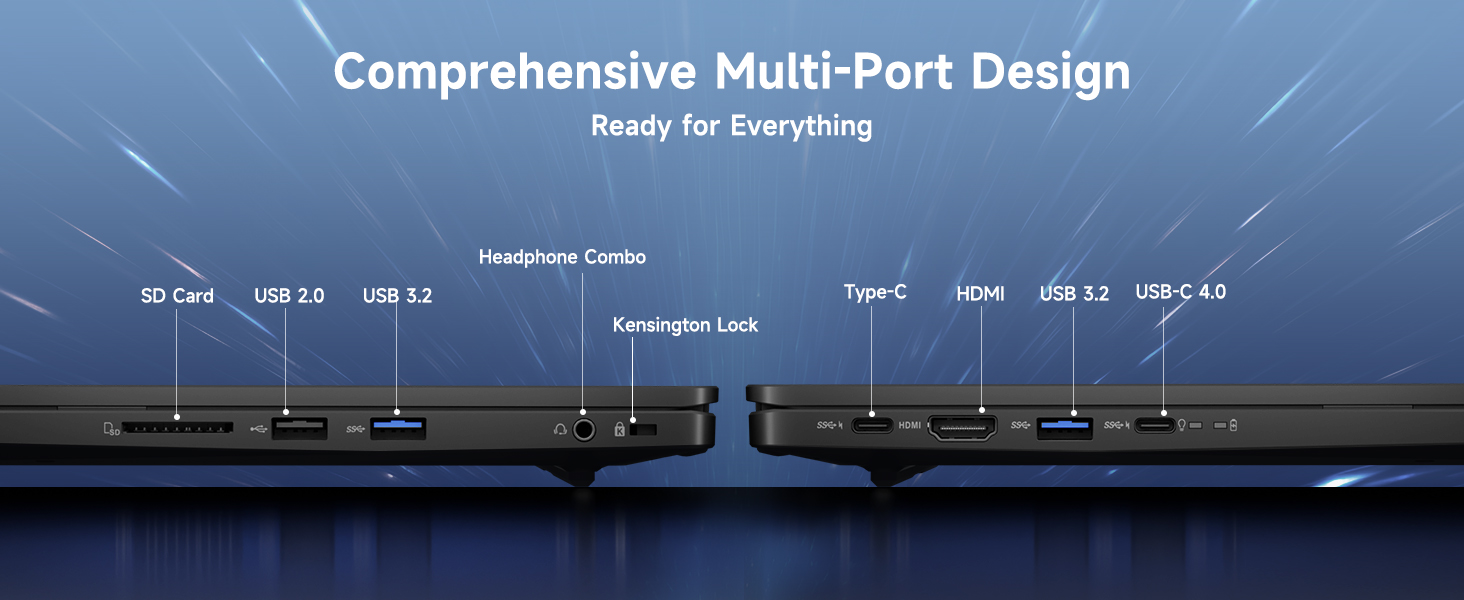
Illustration of the webcam privacy switch in both open and closed positions, demonstrating how to control camera access.
2.5 Prestazzjoni 'l fuqview
The NIMO laptop is powered by an AMD Ryzen 9 8945HS processor, offering 8 cores and 16 threads with a max boost clock of 5.2GHz. Integrated AMD Radeon 780M graphics provide capable performance for gaming and demanding creative applications.

Dijagramma li turiasing the AMD Ryzen 9 8945HS processor with its 8 cores/16 threads and integrated Ryzen AI NPU.

Visual representation of the AMD Radeon 780M graphics, emphasizing its capabilities for gaming and creative work.
3. Kura u Manutenzjoni
3.1 Tindif tal-Laptop
- Skrin: Uża ċarruta ratba u mingħajr ħelu dampLaħlaħ bl-ilma jew b'tindif tal-iskrin. Tisprejjax likwidu direttament fuq l-iskrin.
- Tastiera u Chassis: Uża drapp artab u niexef. Għal ħmieġ iebes, neħħi ftit drapp.amp jista' jintuża drapp. Evita kimiċi ħarxa.
- Portijiet: Uża arja kkompressata biex tneħħi t-trab bil-mod mill-portijiet.
3.2 Ġestjoni tal-batterija
The laptop is equipped with a 75Wh battery. To prolong battery life:
- Evita li tiċċarġja l-batterija kompletament ta' spiss.
- Aħżen il-laptop f'post frisk u niexef jekk ma tużahx għal perjodi twal.
- Utilize power-saving settings in Windows 11.

Graphic illustrating smart battery optimization features, including extended battery life, smart power control, safe fast charging, and battery health protection.
3.3 Dissipazzjoni tas-Sħana
The NIMO laptop features an efficient cooling system with dual fans and double copper pipes to manage heat. Ensure that the ventilation openings are not blocked during use to maintain optimal performance and prevent overheating.
Intern view of the laptop's efficient heat dissipation system, featuring dual fans and double copper pipes.
3.4 Aġġornamenti tas-Software
Regularly update your Windows 11 operating system and device drivers to ensure system stability, security, and optimal performance. You can check for updates via Windows Settings > Windows Update.
4 Issolvi l-problemi
Din it-taqsima tindirizza kwistjonijiet komuni li tista' tiltaqa' magħhom bil-laptop NIMO tiegħek.
4.1 Kwistjonijiet tal-Enerġija
- Il-laptop mhux qed jixgħel: Ensure the charger is securely connected and the power outlet is functional. Try holding the power button for 15-20 seconds to perform a hard reset.
- Il-batterija mhix qed tiċċarġja: Verify the charger is correctly plugged into both the laptop and the wall. Check for any damage to the charger cable or port.
4.2 Problemi tal-Wiri
- L-ebda wiri fuq l-iskrin: Connect an external monitor via HDMI to check if the issue is with the laptop's internal display. If the external monitor works, the internal display or its connection may be faulty.
- Skrin li jteptep: Update your graphics drivers. Adjust display refresh rate in Windows settings.
4.3 Problemi ta' Konnettività
- Il-Wi-Fi mhux qed jikkonnettja: Kun żgur li l-Wi-Fi huwa attivat fis-settings tal-Windows. Erġa' ibda r-router u l-laptop tiegħek. Aġġorna d-drivers tal-wireless.
- Apparat Bluetooth mhux qed jitqabbad: Ensure Bluetooth is enabled on both devices. Remove and re-add the device in Windows Bluetooth settings.
4.4 Degradazzjoni tal-Prestazzjoni
- Prestazzjoni bil-mod: Agħlaq l-applikazzjonijiet mhux meħtieġa. Iċċekkja t-Task Manager għal użu għoli tas-CPU/RAM. Kun żgur li hemm biżżejjed spazju ħieles fuq l-SSD. Mexxi skennjar tal-virus.
- Is-sħana żejda: Ensure ventilation vents are clear. Use the laptop on a hard, flat surface. Consider reducing demanding workloads.
5. Speċifikazzjonijiet Tekniċi
| Karatteristika | Speċifikazzjoni |
|---|---|
| Brand | NIMO |
| Isem tal-Mudell | NIMO N175L |
| Daqs tal-Iskrin | 17.3 Pulzier |
| Riżoluzzjoni tal-Iskrin | 1920 x 1080 pixels (Full HD) |
| Proċessur | AMD Ryzen 9 8945HS (Up to 5.2 GHz) |
| RAM | 32 GB DDR5 |
| Hard Drive | SSD ta' 1024 GB (Stat Solidu) |
| Koproċessur tal-Grafika | AMD Radeon 780M (Integrata) |
| Sistema Operattiva | Windows 11 |
| Tip bla fili | 802.11a/b/g/n/ac |
| Portijiet USB | 1x USB 2.0, 3x USB 3.0, 1x USB-C 4.0 |
| Ħajja Medja tal-Batterija | 12.8 Sigħat |
| Piż tal-oġġett | 3.84 liri |
| Dimensjonijiet tal-Prodott | 15.66 x 9.99 x 0.74 pulzieri |
| Kulur | Iswed |
| Karatteristiċi Speċjali | Tastiera b'dawl minn wara, Qarrej tal-marki tas-swaba', Awdjo HD, Tastiera Numerika |
6. Garanzija u Appoġġ għall-Klijent
6.1 Informazzjoni dwar Garanzija
Il-laptop NIMO tiegħek jiġi b' garanzija ta 'sena for support and service. Additionally, NIMO offers a Politika ta 'ritorn ta' 90 jum from the date of purchase for any reason.
Image depicting a technician working on a laptop, symbolizing the 2-year support provided for NIMO products.
Image of a customer receiving a package, representing the 90-day return policy for NIMO products.
6.2 Ikkuntattja l-Appoġġ
For any product-related questions, technical assistance, or warranty claims, please contact NIMO customer support:
- Email: service@nimopc.com
- Professional customer assistance is available to help resolve your issues.
Image of customer service representatives, indicating professional customer assistance is available.


